
You encounter an interesting function in an application, a file format with no documentation, or an old program you need to understand. The problem isn't asking the AI to “guess how it works”: it's giving it ways to examine the target and demanding evidence. The REA — Reverse Engineer Anything connects programming agents to reverse engineering tools via MCP and offers the same workflows through a CLI.
This article complements “Reverse Engineering with AI: is Adobe dead?”, by Fábio Akita, published in 13 October of 2026. His discussion separates the excitement around AI-assisted reconstructions from the work needed to understand and reproduce software. Here, the focus is operational: which tools REA integrates, what questions they help answer, and how to get started with a controlled target on Linux.
3b79af28e80785afce9f5998d8f03289402a1847, and the corresponding npm package. The main branch documentation may show later capabilities. Local tests used a small application created for this article; we did not run third-party targets nor install Ghidra, Hopper, or IDA.REA is not a button to clone any software
REA is an integration, investigation, and evidence layer. The agent formulates a question, calls a tool, receives observations, and decides what the next step will be. Decompilation is still the work of an engine like Ghidra, Hopper, or IDA; JavaScript analysis uses other paths; observing a running process is a different operation from reading a file.
The very name “Reverse Engineer Anything” needs to be read as a broad proposal, not a guarantee. The tool doesn't automatically recover the names, comments, intentions, and tests that the compiler discarded. It also doesn't deliver the backend of a SaaS just because you opened its interface in the browser.
This doesn't diminish its usefulness. Automating inventories, finding references, relating modules, and maintaining the origin of results can save a lot of repetitive work. But readable pseudocode, code that compiles, and equivalent behavior are three different things.
How it works: agent, tools, and evidence
The project is written in TypeScript, distributed as rea-agents and offers the command rea. REA is published under MIT license; this does not alter the licenses of Hopper, IDA, or other third-party providers themselves. CLI and MCP use shared flows. Depending on the task, REA works with its own parser, an external tool installation, or a connection to a runtime you have selected.
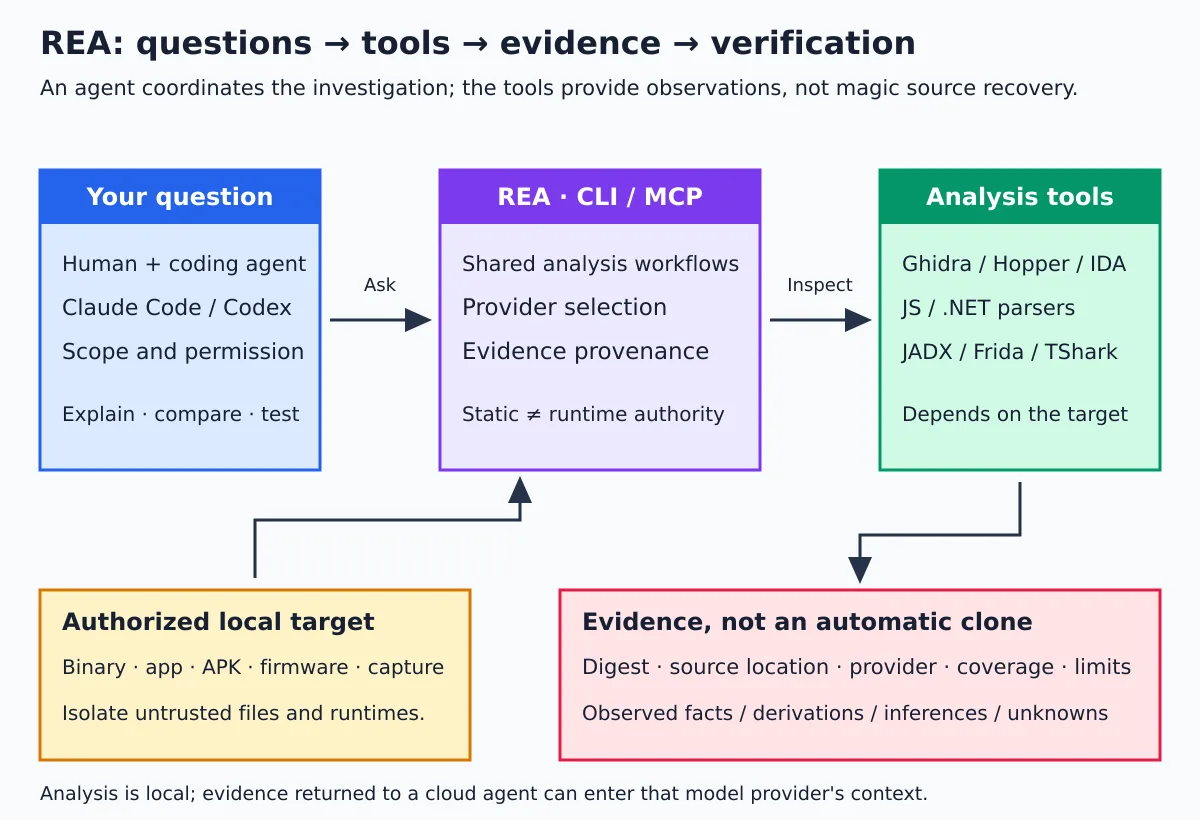
The results use an Evidence, contract with fields to identify the target, operation, provider, parameters, source, and limitations. Depending on the flow, there are also hashes, locations within the artifact, and coverage information. This helps distinguish:
- Observation: a string, instruction, import, or statement found in the file.
- Derivation: a relation obtained from observed facts and explicit rules.
- Inference: a hypothesis about purpose or behavior.
- Unknown: something the analysis could not establish.
An address similar to an API in a bundle does not prove that endpoint was called. Two functions with similar text do not prove behavioral equivalence. This discipline is more important than the number of tools exposed to the agent. The contracts are in the MCP documentation.
The tools, organized by question
No need to install everything. Choose the target and the question first; then see the required tool. Some capabilities are already in the package, others depend on programs you provide. Supported platforms and versions vary by adapter.
| Type of analysis | Tool or mechanism | What it helps discover | Important limitation |
|---|---|---|---|
| Native binary | Ghidra, Hopper, or IDA. | Assembly, pseudocode, functions, strings, calls, and references. | Format and architecture depend on the provider; output is not the original source. |
| Auxiliary native inspection | GNU objdump and Rizin provided by the user. | Headers, sections, symbols, relocations, and instructions. | Not every command equals decompilation; capabilities depend on the installation. |
| Static JavaScript/Electron | REA analyzers; Wakaru optional for source recovery. | Modules, imports, exports, route candidates, and relations between main, preload, and renderer. | Dynamic expressions and obfuscation may leave relations unknown. |
| Browser and web applications | CDP in a compatible browser; scenario flows with Playwright. | Page structure, scripts, resources, network observations, and differences between runs. | Passive observation and browser-driving scenario have distinct authorities. |
| Android | JADX and JDK; adb and Apktool for specific tasks; JEB for its own integration. | Manifest, classes, methods, resources, and authorized device information. | A decompiled APK is not a ready-to-recompile Android project. |
| .NET | Static inspection of PE/CLI and CIL metadata. | Identity, types, members, instructions, and declared native dependencies. | NativeAOT and other forms of distribution require different handling. |
| Runtime and instrumentation | Frida, GDB, and capture integrations depending on the host. | Events, calls, output, and behavior of a selected process. | Can execute code, change state, or affect the target; requires additional authorization. |
| Firmware | Binwalk and Unblob on Linux. | Regions, extracted contents, and artifacts for later analysis. | Extracting files does not mean understanding all the logic or being able to update the device. |
| Recorded traffic | HAR/SAZ; TShark/capinfos; mitmdump on specific flow. | Requests, responses, endpoints, protocols, and selected fields. | Captures may contain credentials and personal data; encryption limits visible content. |
| Recorded logic signals | sigrok-cli and process limits on Linux. | Decoder annotations and sample tracks. | Depends on the recorded signal and the appropriate decoder. |
| Go/Rust metadata | Built-in static inspection for supported formats. | Go build info and Rust dependencies when cargo-auditable metadata is present. | Missing metadata does not prove the absence of dependencies. |
| WASM, EVM, and SQLite | Specific flows; external WABT for WASM, SQLite has its own requirements. | Sections and imports/exports, bytecode structure, or schema and table samples. | These are different analyses; one does not replace the other's runtime tests. |
The starting points are the guides for native binaries, JavaScript, Android, .NET and auxiliary tools.
Ghidra, Hopper, and IDA: what is the role of each?
For an in-depth native investigation, you need a compatible provider installed and configured. REA does not replace these engines: it provides organized access to their operations and preserves the provenance of results.
- Ghidra: an open path to native analysis. The REA imports the target into a temporary analysis project; it is not simply a robot clicking on your GUI.
- Hopper: integration with a commercial tool; the setup may offer installation, subject to approval. Demo and license have their own conditions.
- IDA: uses an installation and compatible components you already have; it does not provide an IDA or Hex-Rays license.
REA does not download or update Ghidra or Java for you. Configure the paths according to the provider's guide and verify that version's compatibility. For targeted diagnostics:
rea providers --json
rea capabilities --json
rea doctor --provider ghidra --json
Explicitly choosing a provider avoids ambiguity when more than one is available. Do not use an invented function address: find the address or name in the target's inventory before requesting an operation.
# Somente em um binário próprio ou cuja análise foi autorizada:
rea analyze /caminho/absoluto/programa --provider ghidra --json
rea function /caminho/absoluto/programa main --provider ghidra --json
These examples are conditional: a binary without a symbol main requires another identifier, and the analysis needs a configured Ghidra. We do not run this native flow in this article's lab.
Quick installation and setup without surprises
In 6.5.0, the package declares these Node.js ranges: 22.x starting from 22.19, 24.x starting from 24.11 or 26 and later, as well as npm. Do not simplify this to “any Node newer than 22”: other intermediate lines do not appear in the compatibility declaration.
There are specific requirements: the SQLite inspection in the version analyzed asks for Node 24.x starting from 24.15 or 26+. The Node 24.13.1 used in our JavaScript test meets the general requirement, but not this SQLite workflow.
On Linux, some workflows need a ps compatible with procps to check process identity and ownership. In a minimal distribution, check before starting:
node --version
npm --version
command -v ps

# CLI sem instalação global, fixando a versão examinada
npx --yes rea-agents@6.5.0 --version
npx --yes rea-agents@6.5.0 --help

# Planejamento somente leitura: não altera o Codex nem instala a skill
npx --yes rea-agents@6.5.0 setup \
  --client codex --skill=false --dry-run --json
npx --yes approves the package download/execution by npm; it is not the same authorization as applying REA configuration changes. Read the plan, back up the configurations, and then run the interactive setup to choose the clients and approve exactly what will be changed:
npx rea-agents@6.5.0 setupThe setup can register MCP and install investigation instructions compatible with that version. Restart the clients afterwards. Installing only a skill is not the same as configuring the server and analysis engines. For frequent use, the project also documents the global installation of rea-agents; prefer a user prefix or a Node manager instead of installing with sudo npm.
The official source is morluto/rea, the site rea.tools and the official metadata for the npm package rea-agents. A similar name on GitHub does not prove the download is official.
First exercise: a small JavaScript application of your own
You don't need to start with a big commercial binary. A controlled project lets you compare the analysis against something you know. The commands below create a simple example and analyze its files as text, without needing Ghidra.
mkdir -p rea-lab-app/lib
cd rea-lab-app

cat > package.json <<'JSON'
{"name":"rea-lab-app","version":"1.0.0","main":"main.cjs"}
JSON

cat > lib/labels.cjs <<'JS'
exports.normalizeLabel = (value) => String(value).trim().toLowerCase();
JS

cat > main.cjs <<'JS'
const { normalizeLabel } = require('./lib/labels.cjs');
module.exports = { normalizeLabel };
JS

npx --yes rea-agents@6.5.0 analyze-javascript-application \
  "$PWD" --json > ../rea-lab-evidence.json
The result isn't just a plain-language explanation. There's an evidence structure and relationships between artifacts and modules. To inspect it, use a JSON viewer or produce a summary view from the saved file. The following example uses jq, which needs to be installed:
cd ..
jq -c '{source: {kind: "inline", evidence: .}, view: {kind: "summary"}}' \
  rea-lab-evidence.json > rea-lab-summary-request.json

npx --yes rea-agents@6.5.0 inspect-analysis-view \
  rea-lab-summary-request.json --json > rea-lab-summary.json
In the lab, we use a controlled variation of this application and add a marker that would be written if the entrypoint were executed. The analysis finished successfully and the marker was not created. This is consistent with the static-analysis path declared by the project; it doesn't demonstrate universal safety for any file or parser.
What we tested and what was left out
| Verification | Observed result |
|---|---|
| npm package and tag | Version 6.5.0 confirmed; tests with Node 24.13.1. |
| CLI | --version and --help worked. |
| Read-only setup | Plan for Codex returned planned, with no actions applied, in an isolated HOME. |
| JavaScript static analysis | Returned Evidence with target, digest, relationships and limitations, without running the test entrypoint. |
| Summary view | inspect-analysis-view processed the saved evidence. |
| Output volume for this example | 124.682 bytes of Evidence and 10.032 bytes in the summarized vision response. |
| Third-party providers and runtime | Not tested: Ghidra, Hopper, IDA, JADX, Frida, devices, and browser scenarios. |
We installed the package in a lab directory, with no global install and install scripts disabled. That was enough for the static flows examined, but does not validate optional native integrations. We did not apply the setup to real user agents.
The sizes above are JSON bytes, not tokens, nor an API cost estimate. They are also not a scale benchmark: the target was small. The practical lesson is that preserving the full evidence on disk and consulting a projection can be better than dumping everything into the model context.
Use cases: where REA really helps
1. Documenting a legacy system
Imagine an internal utility whose source was lost, but whose use and analysis were authorized. You can extract strings, parameters, recognized formats, and candidate functions, then confront the hypotheses with controlled inputs and outputs. The initial goal is a testable specification, not rewriting everything in the first prompt.
2. Understanding a JavaScript or Electron flow
An export function can cross renderer, preload, IPC, and main process. The static graph helps map these boundaries; authorized runtime observation can show which paths actually occurred. Imports found and reachable code do not, on their own, mean proven execution.
3. Interoperability and migration
An integration may need to understand an observed format or contract to build its own implementation. Work with allowed samples, record test cases, failures, and ambiguities, and validate the results. Do not assume that being able to decompile a file grants rights to copy its implementation or redistribute it.
4. Preservation of old software and games
Stable targets, small algorithms, and reproducible inputs are good candidates for investigation. Assembly and behavior comparisons can help recover a specific computation. This is not the same as automatically reconstructing assets, tools, servers, or an entire game.
5. Comparing versions and investigating regressions
The REA has comparison flows for different kinds of artifact. They can locate changes in structure, text, or runtime observations. A pseudocode difference does not by itself demonstrate functional regression; design tests around the concrete hypothesis.
6. Authorized application auditing
Permission, library, resource, and candidate endpoint inventories help formulate security and privacy questions. Combine static analysis and authorized observation, without turning “I didn't find it” into “it doesn't exist.” Do not use this activity to collect data from third-party accounts or devices without permission.
7. Firmware, protocols, and equipment
Firmware and recorded captures can reveal components, layouts, and messages. On your own hardware or in an authorized lab, this helps documentation and interoperability. Extraction, emulation, execution, and dumping of firmware are distinct activities, with different risks and permissions.
Static analysis, passive observation, and execution are not synonyms
This is one of the most important distinctions in the REA. On the static path of JavaScript and .NET, files are read without running the application. A process capture, a Frida session, or a Playwright scenario may execute or interact with the target, with the user's privileges.
The CDP observation adapter connects to a selected browser to collect passive evidence; the scenario providers that drive a browser are another surface. Don't treat every browser-related feature as equivalent to a simple screenshot.
Frida isn't just a viewer either: instrumentation scripts run inside the selected process. GDB can change state and execute commands. Before using dynamic features, establish the target, the purpose, the allowed effects, and the expected cleanup. The Frida guide documents its limits and lifecycle.
“Local” doesn't mean sandbox or absolute secrecy
- A parser is code. Opening an unknown file delivers bytes to a parser or tool; static analysis does not automatically make an artifact safe.
- The REA is not a sandbox. Use a VM or appropriate isolated environment for untrusted targets. Do not mount your entire home folder inside the lab.
- Authority is specific. Permission to read a file does not imply permission to execute it, intercept traffic, or modify a device.
- Model provider: local results delivered to a cloud agent may enter the context sent to the provider.
- Evidence is sensitive. Screenshots, strings, internal names, paths, code, and payloads may contain private data. Review before sharing.
- Content is not instruction. A binary, document, or tool response may contain malicious text; do not let memory or analysis results authorize new commands.
The security model describes the transport protections and also what they do not do. The disclaimer delimits the purpose of the project and the responsibilities of use. This article is not legal guidance: authorization, contracts, privacy, and rights over the results need to be assessed in the concrete context.
How to request a useful investigation from the agent
A vague request like “clone that program” invites untested inferences and scope expansions. A better request states the question, the authorized material, and the expected outcome:
Analise somente esta cópia local do aplicativo de laboratório.
Objetivo: entender o fluxo de normalização de nomes antes da exportação.
Comece por análise estática; não execute o alvo nem abra conexões de rede.
Para cada conclusão, indique o arquivo ou função de origem e a evidência.
Separe observações, inferências e o que continua desconhecido.
Não proponha equivalência funcional sem testes para as entradas escolhidas.
Se uma etapa dinâmica for necessária, apresente o motivo e peça aprovação.
For a new implementation, first ask for a behavior specification with inputs, outputs, errors, and edge cases. Then, make the candidate code pass independent tests. A truly separate clean-room process requires access controls and effective segregation; it is not guaranteed by writing “clean-room” in the prompt or swapping the agent's name.
Tokens, maturity, and maintenance
MCP catalogs and extensive reports can take up a lot of context. Start with a small question, save Evidence to disk, and use summaries or pages when the flow supports it. Some native inventories return full collections; do not assume a pagination parameter exists on every operation.
The analyzed version documents options such as REA_MCP_INPUT_SCHEMA_PROFILE=compact for compatibility with clients that limit schemas. This changes how the contract is presented, not a universal guarantee of fewer tokens or small responses. Check the schema profiles before changing the configuration.
The project has tool-specific tests and checks, but declared support and mocked tests are no substitute for execution with the real provider. The testing guide makes this distinction explicit. We do not use stars or commit count as a certificate of maturity.
REA evolves fast. Pinning a version helps reproduce an investigation; to upgrade, check the notes, requirements, and contract changes, update the CLI, and also review the setup and agent instructions. Do not silently mix documentation from main, old npm package and a skill from another release.
So, did Adobe die?
Not this. REA does not demonstrate that. Understanding an algorithm or an app's flow does not automatically reproduce the entire product, its integrations, data, infrastructure, formats, and quality criteria. The distinction discussed by Akita is a good antidote to turning an interesting demonstration into a universal promise.
The real gain lies in investigating better: smaller questions, proper tools, traceable evidence, and tests that confront the hypothesis. For those who use agents in the Linux terminal, REA adds a specialized workbench — different from tools that store session memory or map the repository's own structure.
Start with something of your own and small. The JavaScript exercise already lets you learn the evidence contract without installing a decompiler. Then choose a provider and an authorized case. REA is a powerful toolbox; what makes the result reliable remains scope, method, and verification.