
You solved a problem in Claude Code, continued the project in Codex, and weeks later Cursor tries to investigate everything again. The solution might still be on disk—buried in the session histories. O Deja Vu, whose command is deja, turns those logs into searchable memory, accessible from the terminal and by the agents themselves. The project is written in Go and distributed under the MIT license.
This is a companion to our comparison of Claude-Mem alternatives in Go, Rust, and C. Here we go beyond the README: architecture, quick installation, selective integration, privacy, limitations, and a maturity assessment based on the code and local testing.
0fb72c044f9c75444d270275424de29dca62e536. We do not confuse features from the main branch or nightly builds with what is in this release. The tests used synthetic histories and isolated directories, not real user conversations.What Deja Vu does differently
Many memory tools start out empty. You install hooks, let the agent work and wait for observations to accumulate or ask it to record decisions. Deja Vu can start from the past: it reads the histories that agents already keep locally and brings them together in an index.
- Retroactive search: a session prior to the installation may appear in the first query, as long as the history still exists and is supported.
- Continuity between agents: a decision recorded in Claude can be retrieved in a Codex session, without manually importing each conversation.
- Work context: beyond the conversation, it can retrieve mentioned files, commands, results and snippets replaced by editing tools, depending on the agent's format.
- Utility without integration: the CLI and terminal interface already work without registering an MCP server.
- Basic search without a model: the default path requires no API key, LLM download, or embeddings service.
This does not mean recovering a session that was never saved, nor fully reconstructing any deleted conversation. Quality depends on what each agent has recorded and what the parser is able to interpret. To learn the formats effectively read, see the source table of the analyzed version.
How it works: history, index, and recovery
The flow is simple to understand: discover the agents' files or databases, interpret sessions, sanitize the texts, build the index, and deliver relevant excerpts. Claude Code uses JSONL; Codex has rollouts; other tools store sessions in JSON, Markdown, or SQLite. There is no universal format, which is why parsers are a central part of the project.
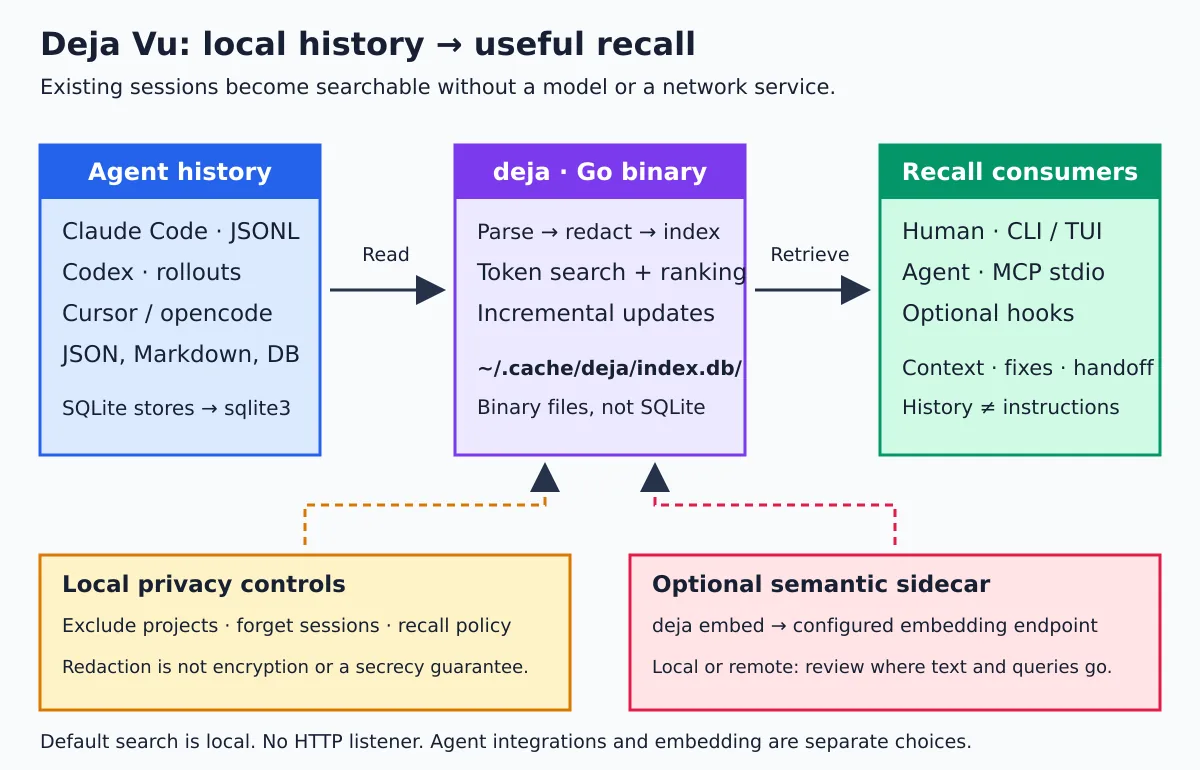
An easy detail to get wrong: ~/.cache/deja/index.db is the name of a directory, not of a SQLite database. In 0.22.1, it contains binary records, lists of term occurrences, and metadata. Do not try to open it with sqlite3. The format and lexical ranking are explained in architecture documentation.
The lexical query uses terms and BM25 ranking; phrases and filters refine retrieval. There are also approximation mechanisms when the exact query is not enough. This is different from claiming that every search is semantic: the embeddings layer is optional and requires its own configuration.
The MCP server runs on stdio: the client starts deja mcp and communicates through standard input and output. You don't need to open an HTTP port or maintain a central daemon just to use this path.
Quick installation on Linux
The releases provide binaries for Linux amd64 and arm64. To start using the official installer, without compiling Go, download the script, read it, and only then execute it. The example pins the revision of the script analyzed; the script itself checks the latest stable release, so does not pin the binary version.
mkdir -p "$HOME/.cache/deja-installer"
curl -fsSL \
  https://raw.githubusercontent.com/vshulcz/deja-vu/v0.22.1/install.sh \
  -o "$HOME/.cache/deja-installer/install.sh"

less "$HOME/.cache/deja-installer/install.sh"
sh "$HOME/.cache/deja-installer/install.sh"

export PATH="$HOME/.local/bin:$PATH"
deja version
deja index
deja search "connection pool"
deja doctor
By default, the destination is ~/.local/bin. Do not use sudo to install in the home directory. If the command does not appear in a new terminal, add ~/.local/bin in PATH from your shell; the installer also provides the full path that can be used immediately.
The shortcut advertised by the project is to download the script from the main branch and pipe it directly to sh, followed by deja install --auto. It's fast, but it's two separate decisions: running newly downloaded code and authorizing changes to the agents' settings. The procedure above lets you inspect the first and postpone the second. See the official installation guide.
Need to install sqlite3?
For SQLite history stores, yes: Deja Vu calls the local executable sqlite3 to read the source database. This shows up, for example, in integrations with Cursor IDE and opencode. The Go binary does not embed an SQLite library via CGO.
# Debian / Ubuntu: necessário para fontes que usam SQLite
sudo apt update
sudo apt install sqlite3

deja sources
deja doctor
Having a single main binary doesn't mean that every format of every agent works without auxiliary utilities. Use the diagnostic to discover missing dependencies for your combination of sources, especially compressed formats.
Alternative with Go and fixed version
The go.mod from the release declares Go 1.25. Anyone who already has a compatible toolchain can compile the tag explicitly:
go install github.com/vshulcz/deja-vu/cmd/deja@v0.22.1

# Sem GOBIN personalizado, o executável fica no bin do GOPATH.
export PATH="$(go env GOPATH)/bin:$PATH"
deja version
A build via go install can show dev in deja version: the official distribution injects the release number into the build. This doesn't change the tag requested in the install command.
The project also documents Homebrew, npm, and Windows packages. For Linux, the release binary avoids installing a whole language just to use the tool. In controlled environments, prefer a fixed release and validate its signature, not only the checksum.
Integration with Claude Code and Codex without installing everything
Before changing settings, back up the files of the agents that will be affected. The Deja Vu installer also creates configuration snapshots, but that does not replace your own backup.
backup="$HOME/deja-config-backup-$(date +%Y%m%d-%H%M%S)"
mkdir -m 700 "$backup"

# Caminhos padrão; ajuste se você usa perfis ou diretórios personalizados.
for file in \
  "$HOME/.claude.json" \
  "$HOME/.claude/settings.json" \
  "$HOME/.claude/CLAUDE.md" \
  "$HOME/.codex/config.toml" \
  "$HOME/.codex/AGENTS.md"
do
  if [ -f "$file" ]; then
    cp --parents -- "$file" "$backup/"
  fi
done

# Registra MCP e orientação para os dois agentes, sem o modo automático.
deja install claude-code codex
deja doctor
Restart the agent sessions to load the configuration. The distinction between the options matters:
| Command | Main effect |
|---|---|
deja install claude-code codex |
Integrates only those clients, with MCP and guidance, without enabling their auto modes. |
deja install claude-auto codex-auto |
Enables the automatic integrations planned for those two agents. |
deja install --all |
Sets up MCP on detected agents without enabling new auto modes; may update already installed automatic hooks. |
deja install --auto |
Sets up the detected agents and adds automatic hooks or plugins according to each one's support. |
--no-guidance |
Avoids the usage guidance this installation would normally add. |
Indexing an agent is not the same thing as installing hooks on it. The history can be searchable even without automatic integration. The available events also vary: do not assume that all clients offer the same Claude Code cycle. Check the per-agent integration guide and run deja help install in the installed version.
Search and features that make a difference in everyday use
The useful question isn’t “how many tools exist?” but “how much repetitive work can I avoid?”. Start with error messages, file names, and terms that actually appeared in the conversation.
# Busca nos históricos indexados
deja search "connection pool exhausted"

# Restringe ao agente e a uma janela de tempo
deja search --harness codex --since 30d "refresh token"

# Consulta uma expressão que começa com hífen
deja search -- "--force-with-lease"

# Resultado estruturado para automação
deja search --json "refresh token"

# Consulta a sintaxe e os filtros disponíveis
deja help search
In an interactive terminal, deja without arguments opens the TUI. It lets you search, read a session, and navigate through the results. For textual output, use deja brief. Filters by agent, project, and time period help avoid confusing application A’s decision with an experience made in application B.
| Need | Command | Warning |
|---|---|---|
| Preparing context for another agent | deja ctx "refresh token" |
Review the digest before sending it to an external service. |
| Understanding the project’s previous session | deja wip |
The result derives from the transcript, not from human confirmation. |
| Finding out who discussed a file | deja blame src/auth.go |
Discussion of a file is not, on its own, equivalent to authorship of a line. |
| Consult the history of a line | deja blame src/auth.go:42 |
Attribution depends on the recorded evidence and Git. |
| Review how a tool was executed | deja how "go test" |
An old command may no longer be appropriate. |
| Check attempts after an error | deja fix "connection pool exhausted" |
It is not proof of causality nor authorization to execute the suggestion. |
| Prepare a handover | deja handoff --to codex |
Without --exec, prepares the content without automatically opening the destination. |
The 0.22.1 also extends the reading of the code changed in the session, when the transcripts contain the edit calls. It is valuable for recovering the reasoning along with the patch, but it does not replace a commit, a current test, or the review of the diff.
MCP, hooks, and curated memory
In the analyzed version, tools/list announces a main tool called deja, with modes of operation. The agent can query memory, context, files, and other excerpts without carrying a separate definition for each CLI command. We confirmed this contract in a local JSON-RPC test.
MCP is the consultation channel; hooks are the points of automatic activation. Without a hook, the agent needs to decide to call the tool. With automatic integration, a portion of the context can arrive at startup or on other events supported by the client. This increases convenience, but also warrants attention to the context budget and the scope of the information retrieved.
Deja Vu is not restricted to raw conversation search. deja remember records a note and deja promote turns a session into curated information with provenance and lifecycle state. This helps distinguish “we tried this approach” from “this is the current decision”. Even so, it is up to the team to validate decisions and remove those that have become obsolete.
If you already use ai-memory or Engram, a conservative strategy is to test Deja Vu first as an investigation CLI. Avoid enabling two auto-recall systems at the same time without measuring context duplication and defining who keeps durable memory.
Code maturity: the positive signals
The repository was created on 14 July 2026, according to the public GitHub metadata. Therefore, it is a young project at the date of this analysis. The “still young” conclusion does not depend on the number of stars: it depends on time in operation, stability of the contracts, and evidence of testing.
- Separation of responsibilities: the tree distinguishes sources, indexing, querying, ranking, sanitization, retrieval policy, digest, and terminal interface.
- Lean Go scope on dependencies: o
go.modthis tag contains the module declaration and the Go version, without a list of external dependencies. This simplifies part of the build chain, although it increases the responsibility for in-house implementations. - Tests beyond the happy path: there are scenarios of corrupted index, write interruption, concurrency, rebuilding, secrets, removal, and formats from different agents. The tag has 2.572 files
*_test.go; this is a number of files, not a coverage or quality measurement. - CI with concrete barriers: the workflow includes
go vet, tests with race detector on Linux/macOS, vulnerability checks, and coverage floors. The configuration sets a total floor of 87,5% for the distributed code; this is not a total coverage measured by us. - Careful distribution: releases have checksums, signature of the checksum file, and SBOM. The distribution build disables CGO.
- Documented limitations: the security model explains export, policies, sanitization, and the absence of encryption at rest, instead of promising absolute privacy.
Checksum is not signature: the installer and updater compare the SHA-256 of the file, but do not automatically verify the signature. This detects download corruption, not a tampered release alongside its checksum file. Cryptographic verification is an additional step documented by the project.
These signals can be checked in the CI workflow, at the release configuration and in the security document. They show engineering discipline; they are not a security certification or a guarantee that all agents are equally well covered.
What we tested — and the timezone issue we found
To avoid turning the text into marketing reproduction, we compiled the tag, installed the stable binary in a lab directory, and created synthetic sessions of Claude Code and Codex. No real configuration of the agents was modified.
| Local verification | Result |
|---|---|
Tag and e build go vet ./... |
Completed without error. |
| Installer analyzed and release binary | Isolated installation completed; the binary reported 0.22.1. |
| Synthetic histories of two agents | Both showed up in the search; we also exercised context and handoff. |
| Sanitization of a fictitious password | The test value did not appear in the search response nor in the MCP recall. |
| MCP install and removal | Performed in a lab HOME for Claude Code and Codex. |
| MCP over stdio | Initialization, tool listing deja and recall query worked. |
Packages redact, query, search, policy and index |
Tests passed with -race. |
Package sources |
Passed with TZ=UTC; there was a reproducible failure in a notes test with TZ=America/Sao_Paulo. |
| Four selected tests of setup and hooks | Passed with -race, including install/removal for Claude and Codex. |
The failure was TestNotesPathAndAppendParse, in notes_test.go. The test expects two notes to be in the same daily group. However, their times fall on different days in the São Paulo timezone, and the parser groups by local day. The result is three groups where the test expects two. We repeat the case in UTC and in São Paulo to confirm the difference.
Interpretation: we found a timezone assumption in the test, not evidence of lost notes or a general indexing failure. It is a concrete example of portability that still needs improvement. It would also be wrong to say that “the entire suite passed”: we did not run all tests across all packages and clients, nor a full security audit or scale benchmarks.
Verdict: there is enough engineering for a serious desktop pilot, especially as on-demand local search. I would still not classify it as critical infrastructure without caveats: the line is 0.x, the project is recent, agent formats change, and its own index format needs to keep up with those changes. Adopt it with controlled versioning, backups, and validation of your own workflow.
Benchmarks: useful, but not a universal ranking
The project publishes measurements for recovery, indexing, and context cost, along with code for reproduction. That is better than a promise without method. Even so, the benchmarks are produced by the maintainer himself; we do not treat them as independent validation nor repeat his percentages as a LinuxPro result.
In the “day one” usefulness test, the hypothesis favors precisely Deja Vu's differential: there is already a large history on disk. A tool that depends on notes recorded after installation addresses another stage of the problem. Compare corpus, machine, competitors' preparation, version, and success criteria before declaring a winner.
The practical question is: “does it find the old solution from my project with few false positives?”. Separate known queries, record whether the right snippet appears, and measure latency and context volume. The day zero benchmark and the benchmark catalog are starting points, not substitutes for that evaluation.
Privacy: local doesn't mean immune to leaks
The sanitization mechanism strips recognized credential patterns before writing to the index. The examined implementation sanitizes the text before applying its size cap, preventing a cut in the middle of a secret from tripping up a detection rule. It is a concrete defense, not a universal guarantee.
- Original transcripts: may still contain the credential. Building the index does not erase the source history.
- Personal data and proprietary code: do not become public just because a token was masked. Treat the index as sensitive.
- Disk: Deja Vu does not provide at-rest encryption nor is it an access control system. Protect user, permissions, backups, and volume.
- Remote agent: if an agent using a cloud-hosted model queries the MCP, the retrieved snippet may enter the context sent to that provider. Local search does not make the rest of the chain local.
- Export and sync: review the destination and the shared material. A copy imported by another machine is not automatically revoked when you remove it here.
Check the security model before indexing customer histories or regulated environments.
Excluding projects and reducing scope
mkdir -p "$HOME/.config/deja"

# Edite ANTES da primeira indexação: um projeto/padrão por linha.
# Também aceita nomes de fontes, por exemplo: harness:opencode
${EDITOR:-vi} "$HOME/.config/deja/exclude"

# Se mudou exclusões depois de indexar, reconstrua o índice.
deja index --rebuild

# Desliga verificações automáticas de versão; não é firewall.
export DEJA_OFFLINE=1

# Relatório de credenciais reconhecidas nos históricos, sem seus valores.
deja secrets
In the default configuration, adding an exclusion does not immediately eliminate all content that was already indexed: the rebuild is important. deja forget removes sessions and keeps tombstones to prevent re-ingestion. See deja help forget before using it.
Do not run deja secrets --scrub as a diagnostic routine: this mode modifies the supported transcripts and keeps an original copy, which may also contain secrets. It is a write operation to be evaluated separately. Never disable sanitization on sensitive histories.
Recovered memory is not instruction
A transcript can contain wrong commands, rejected decisions, or a malicious instruction copied from a page. The project frames part of the agent-focused recall as untrusted history, but the framing does not eliminate prompt injection. Do not execute a command just because it appeared in memory; check the current state of the repository and the user's authorization.
Embeddings, session synchronization and retrieval
The default lexical path does not need a model. deja embed adds an auxiliary semantic index using the embeddings endpoint you configure. With local Ollama, processing can stay on the machine; with an external endpoint, texts and queries may leave it. Read deja help embed before enabling it. To understand the local base, see our Ollama guide on Linux.
deja sync offers export, import, and synchronization over SSH. It is different from placing files of an index in use inside a synchronized folder and expecting consistency. Follow the tool's protocol and protect the destination host; begin with deja help sync.
The index can retain sessions that the agent later deleted. This is useful for recovery, but it changes the retention expectation: deleting a conversation in the app does not imply deleting it from Deja Vu. The TUI has an area for sessions removed by the agent, and deja resume offers resumption paths depending on the client. It already deja restore recovers replaced snippets without automatically overwriting the original file.
Backup remains essential: preserve source histories when needed, notes, exclusions, policies, and settings. Do not confuse “rebuildable index” with “no possible loss”: a retained record whose source has already disappeared will not be recovered again out of thin air.
Deja Vu, Engram, ai-memory or code graph?
| Main question | Tool to evaluate | Why |
|---|---|---|
| Where is the solution discussed in an old session? | Deja Vu | Part of the existing transcripts and facilitates retroactive investigation between agents. |
| How to share decisions explicitly recorded by the agents? | Engram | Persistent memory flow with SQLite, recording/querying tools and terminal inspection. |
| How to maintain a wiki and organize session continuity? | ai-memory | Versioned Markdown Wiki, notes, and handoffs in a service architecture. |
| Who calls this function and which dependencies will be affected? | codebase-memory-mcp | The object is the structure of the code, not the history of the conversation. |
They are not perfectly exclusive categories: Deja Vu also has notes and handoff; other projects can also import information. The difference is the starting point and day-to-day operation. See the full comparison for other options and the evolution of ai-memory for the wiki flow.
Common problems and how to undo the integration
deja: command not found: check~/.local/bin,GOBINand thePATH. Installing and configuring the agents are separate steps.- One source came back empty: run
deja sourcesanddeja doctor; check profile, agent directory, exclusions, and missing utilities. - Search doesn't find what you remember: use a literal term from the error, broaden the time range, and check the project. The history may have been deleted before the first indexing.
- MCP configured, but the agent doesn't remember on its own: loading the tool does not imply auto-recall. Restart the session and check the installation method.
- First run after upgrade takes a while: format changes may require rebuilding. The 0.22.1 release explicitly warns about this.
- Note tests fail in your time zone: reproduce the case in isolation; UTC is a diagnostic comparison, not a reason to hide the original failure.
# Diagnóstico mais detalhado
deja doctor --deep

# Remove a integração de todos os alvos instalados pelo Deja Vu.
deja uninstall --all
Uninstalling the integration is not the same as deleting notes, the index, and all backups. Decide the retention of that data separately and consult the help of the installed version. Do not remove ~/.claude or ~/.codex to “clean up Deja Vu”: those directories belong to the agents themselves.
Is it worth it?
Yes, for those who switch agents and have already accumulated local history. The most compelling convenience is to start by finding old work, not to wait until next week for memory to become useful. CLI, TUI, and selective integration let you experiment without turning the whole machine over at once.
The code shows tests, organization and real concern for integrity and secrets, but the tool is still young. Our pilot worked and also revealed a timezone assumption in a test. The recommendation is to start on demand, measure the gain in your own project and only then enable automation. Good memory reduces repeated investigation; it does not replace Git, documentation and review.