
The VirtualBox API allows integrating the hypervisor with inventories, automation tools, and custom dashboards. Before writing code, it's worth understanding the role of the SOAP service, how objects are identified, and why authentication, sessions, and security are part of the integration.
This is part 1: the fundamentals of the API, with a focus on remote access through the web service. In part 2, we implemented a client in Go to list virtual machines.
API, VBoxManage, and web dashboard are not the same thing
The VBoxManage offers command-line administration. The web service exposes VirtualBox interfaces through SOAP, enabling HTTP calls with structured XML. A dashboard like the phpVirtualBox is above this integration.
The service vboxwebsrv receives SOAP calls. It should not be confused with a REST API that receives JSON. An application can offer REST to its own consumers and translate those requests into SOAP calls on the backend.
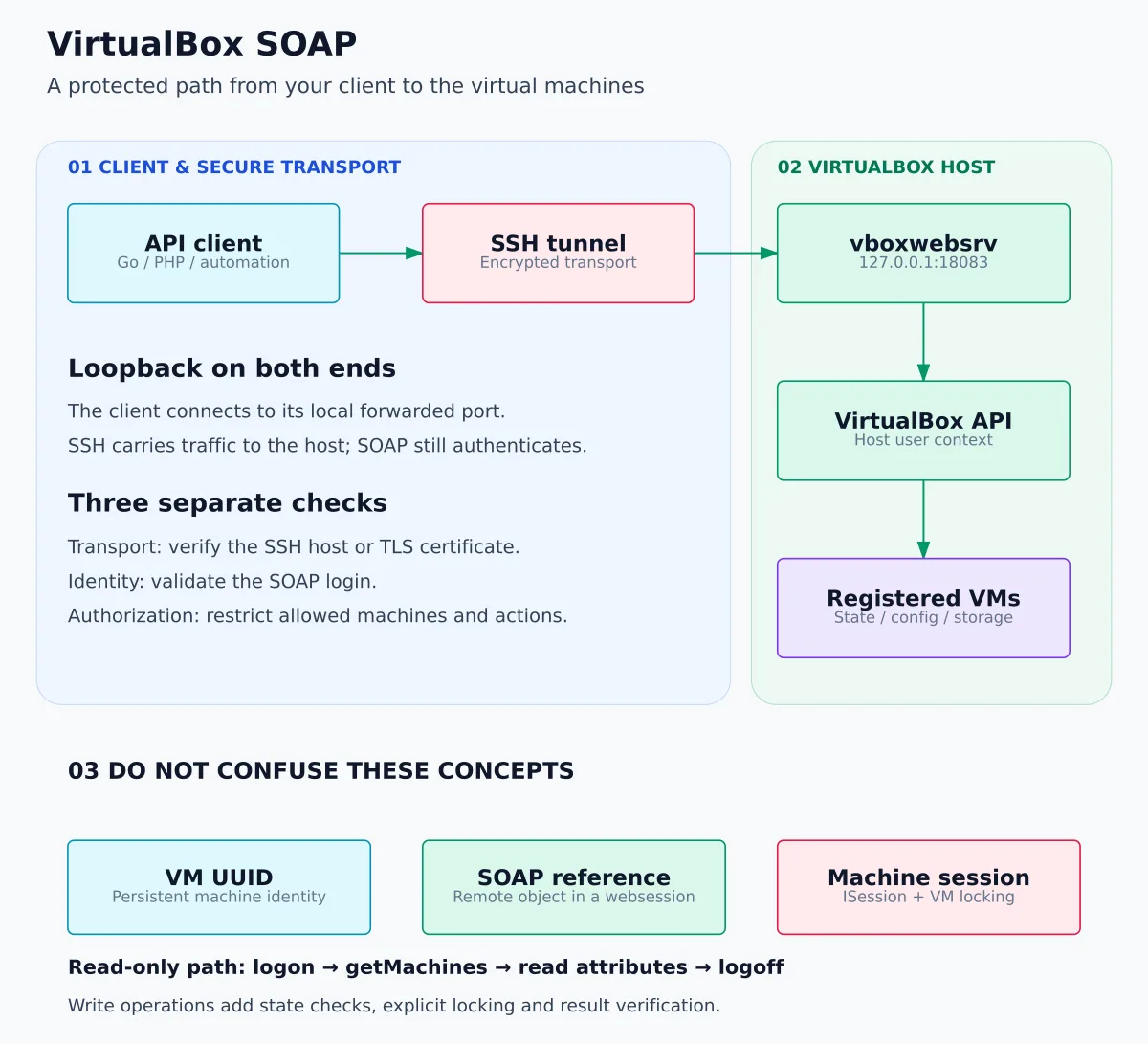
Three responsibilities: transport, identity, and authorization
| Question | Responsible layer | Error to avoid |
|---|---|---|
| Am I talking to the right server without exposing the traffic? | SSH or TLS with host identity validation. | Disabling host/certificate check to hide a problem. |
| Who is calling the service? | Web service authentication. | Assuming the SSH tunnel replaces SOAP login. |
| Which machines and actions can that person access? | Environment and application policy that exposes access. | Giving every panel user the powers of the service account. |
These layers complement each other. HTTPS does not decide whether someone can erase a disk; authentication does not encrypt the traffic; a hidden button does not prevent an improper call to the backend. In the panel, define explicit operations and authorize each one before reaching the SOAP adapter.
The SDK and the WSDL contract
Official API Documentation: consult the VirtualBox Main API — official reference. It brings together the interfaces, methods, attributes and types used in integration. To implement the SOAP client, also consult the WSDL and the SDK reference corresponding to your environment version; the online documentation may follow a different version.
The WSDL describes operations, parameters, namespaces, and responses of the web service. This contract guides the client's implementation; method and field names should not be inferred from an imagined REST API.
The operations and their parameters were verified against the WSDL included in the official SDK 7.2.0, used as documentary reference for the line 7.2. This is not a recommendation to install an old patch: use a maintained version of VirtualBox and check the SDK corresponding to your environment.
Preparing the service with restricted access
You need VirtualBox with vboxwebsrv available on the host and the service authentication configured. The service executable belongs to the VirtualBox package; downloading the SDK alone does not install the server. The official SDK reference describes its options and authentication.
On the lab host, run as the user responsible for the environment, not as root. If the service is not yet active, a foreground start bound only to loopback is:
vboxwebsrv --host 127.0.0.1 --port 18083Do not disable authentication to make the example work. The username and password used in the SOAP login must match the authentication mechanism configured on the service, which is not necessarily identical across all installations.
The web service uses HTTP without encryption by default and usually binds to localhost. For access between machines, use TLS configured properly or a protected tunnel; do not publish the port directly on the internet. Oracle also recommends running the service as a regular user. Security guide.
A lab option is to open this tunnel on the computer where the client will run:
ssh -N -o ExitOnForwardFailure=yes \
  -L 127.0.0.1:18083:127.0.0.1:18083 usuario@host-virtualbox
Replace user and host. The client will keep using http://127.0.0.1:18083/, but the transport between computers will stay inside SSH. If the local port is already in use, pick another one and adjust VBOX_URL.
Understand the two loopback addresses
In the command, the first 127.0.0.1:18083 limits listening to the client computer. The second is the destination as seen by the SSH server, usually the VirtualBox host itself. Forwarding must not listen on 0.0.0.0 not depending on a globally permissive SSH configuration.
ExitOnForwardFailure=yes makes SSH terminate if it cannot establish the forwarding, for example when the local port is in use. This does not prove that the service on the destination is working: failures that occur after connecting to vboxwebsrv still need to be diagnosed. Verify the server's SSH identity through a trusted channel before accepting its key. OpenSSH Reference.
On Linux, check the listening on the service's host:
ss -ltn 'sport = :18083'For the startup command shown, expect 127.0.0.1:18083, not an address that listens on all interfaces. An open socket is only evidence of transport: it does not validate credentials or SOAP calls. If an existing installation is already running, inspect it before starting another process on the same port.
The service account defines the inventory context
Do not start the process with sudo just because a list came back empty. The service's user environment determines which VMs are registered and available. Confirm the responsible account, its permissions, and the VirtualBox configuration; authenticating to SOAP is not the same as freely switching the process user on the host.
Use an account and lab machines for testing. Do not treat loopback as a sufficient barrier against all processes and guests on the host; keep authentication and environment restrictions in place. Local access does not mean that all possible callers are trustworthy.
Understanding references, UUIDs, and sessions
A SOAP reference is an object identifier used by the service during the session; it is not necessarily the VM's UUID. A read-only inventory flow is:
| Operation | Client usage |
|---|---|
IWebsessionManager_logon |
Authenticate and obtain the root reference. |
IVirtualBox_getMachines |
Query the machine references. |
IMachine_getId |
Get the UUID. |
IMachine_getName |
Get the name. |
IMachine_getState |
Get the state. |
IWebsessionManager_logoff |
End the session. |
Do not persist SOAP references as if they were permanent IDs. To relate data in an inventory, use the returned UUID. For the next run, open a new session and obtain valid references again.
UUID, managed reference, and machine session
| Concept | Function | How to use |
|---|---|---|
| VM UUID | Identify the machine in the inventory. | Use it as a key, not the displayed name; do not assume preserved identity when cloning/recreating. |
| SOAP reference | Point to a valid remote object within the service context. | Do not send it to the browser, do not use it as a permanent secret, and do not reuse it across logins. |
| Websession | Context created by SOAP login. | Log out and handle expiration, network failure, and reconnection. |
ISession |
Take part in a machine's access control/locking. | Follow the cycle required by the operation; do not confuse it with the websession. |
The documentation for IWebsessionManager describes login, obtaining a session object, and logoff. Logoff eliminates resources associated with the websession. On the other hand, ISession has specific lock and release rules: when the operation acquires a lock that requires unlockMachine, it must be released explicitly. Do not use ending the websession as a generic substitute for this cycle.
Cleanup is a controlled attempt, not a network guarantee
Register the cleanup as soon as you receive a valid reference. Use a short deadline independent of the main context so that canceling the collection does not immediately prevent the logoff. If the login has been accepted but your response is lost, the client may not even know the reference needed to clean up; the server-side session expiration is still necessary.
The inventory is also not an atomic snapshot: state and configuration can change between calls. An empty response, a SOAP failure, and an expired reference are different outcomes and should appear differently in the client.
And what about starting VMs, creating snapshots, or changing settings?
This is the next level of integration, not just swapping the method name. Write operations must respect the states, locks, machine sessions, and progress tracking defined by the API. The web service login and a session used to lock a machine should not be treated as the same concept.
My recommendation is to implement each operation separately, with authorization, confirmation when destructive, testing, and reconciliation after failure. An account capable of querying may also have other powers on the server; the fact that a client only queries does not reduce the privileges of the credential.
For a dashboard with Echo and Vue, keep this adapter separate from the HTTP handlers. Do not let the browser freely choose the endpoint, SOAP method, and arguments. Define explicit services, such as listing machines, and control destinations and permissions on the backend.
Long operations: track the outcome, not just the HTTP
A successful HTTP response does not prove that a long-running task has finished. When the operation returns IProgress, monitor its completion and the documented result, including error information when applicable. Not every operation returns this object: consult the method's contract. IProgress reference.
If the connection drops after sending, the result may be unknown. Check the actual state before resending: client timeout does not automatically cancel the action on the hypervisor. Distinguish in the panel between “failed”, “in progress”, and “result to confirm”. This is one of the reasons to start with inventory, not destructive operations.
Diagnostics by layer
| Symptom | Investigate first | Do not |
|---|---|---|
| Connection refused | Process, listening address, port and tunnel. | Open the service to the whole network as a random attempt. |
| Unexpected XML or HTML page | URL and intermediaries; a proxy login is not a SOAP response. | Treat any HTTP 200 as an operation success. |
| Fault in login | Authentication mechanism and lab credentials. | Disable authentication. |
| Empty list | Registration of VMs in the service user context. | Re-execute as root without understanding the environment. |
| Invalid reference | Expiration, previous logoff and reuse across sessions. | Persist the reference and try to use it indefinitely. |
| Operation with no result | Real state, progress, and sanitized logs. | Repeat writing automatically. |
Checklist before connecting a panel or agent
- WSDL/SDK compatible contract registered and explicit allowed operations.
- Service under a regular user, with active authentication and restricted network access.
- Protected transport between machines and validated server identity.
- Credentials out of the browser, commits, and prompts sent to agents.
- Response limits, deadlines, and separate handling of HTTP, XML, and SOAP Fault.
- Cleanup and reconnection verified without reusing expired references.
- Authorization by destination and action, before releasing any write.
- Tests with a simulated server separated from staging on a real host.
Scope of this review: documentation and local options of vboxwebsrv --help were checked; we did not start the service nor perform a SOAP login on a real host. In part 2, the client's automated tests are described with their limitations. To turn the integration into a dashboard, also see the proposed architecture with Go, Echo, and Vue.
From theory to a testable integration
Start with a small operation: authenticate, get the machines, query their attributes, and end the session. Validate the contract, handle SOAP failures, and avoid logging credentials. Only afterward, add commands that change the state of the VMs.
At part 2: VirtualBox API in Go, you will find the complete client files, JSON output, timeouts, and automated tests. To learn about a dashboard that uses this integration, also see the article about phpVirtualBox.