
Before you start: read about the original project in the article phpVirtualBox: manage VirtualBox from your browser.
In this series: Part 1: phpVirtualBox, Echo and Vue · Part 2: AI and OpenSpec · Part 3: implementation and tests
Managing virtual machines from the browser is still a useful idea: open the dashboard, check the lab status and manage the environment without relying on the graphical interface on the server. The phpVirtualBox solves this problem for VirtualBox and offers an interesting case to discuss modernization: what would a new dashboard in Go, Echo and Vue, distributed as a single executable look like?
This article separates what the original project already delivers from a proposed implementation. The Go version presented here is a development opportunity, not a finished product nor an officially announced fork. In the next parts, we show how to use AI and OpenSpec to turn the idea into small tasks, with acceptance criteria and tests.
What is phpVirtualBox
The phpVirtualBox is a web interface for managing Oracle VirtualBox machines. The browser presents the panel, while the PHP backend talks to the virtualization environment services. It is a management tool: the VirtualBox itself is still the one that runs the machines.
In the documentation consulted in September of 2026, the requirements include PHP 8.x, a web server, and VirtualBox 7.2.x. This matters because old tutorials found on the internet may point to version combinations different from those currently documented. Before installing, check the README and the compatibility of the chosen version.
The code gathers machine administration features, storage and network configuration, cloning, snapshots, and operation tracking. For those who maintain a lab, the conceptual advantage is centralizing these activities in a browser-accessible interface, without confusing the panel with a complete cloud platform.
An old project does not mean a stalled project
It is easy to look at a traditional PHP application with a traditional interface and conclude that everything needs to be replaced. The history of phpVirtualBox shows a more interesting situation: the changelog records compatibility updates and interface maintenance, including an entry 7.2-3, dated 5 April 2026, with a jQuery update and related fixes. This is an entry from the consulted history, not an assertion that a given branch is the latest published stable version.
Another important change: entry 7.2-2 records the removal of the old Console tab with Flash and Java RDP and VNC clients. Therefore, it is not appropriate to market the current project as if those old consoles were still available. Check the original changelog.
The useful question is not “how to eliminate PHP?”, but “which installation, maintenance, and user experience issues would justify another project?”. Switching languages without answering that may just recreate the same problems with different tools.
How the panel talks to VirtualBox
A central point of the analysis is SOAP integration. The PHP connector uses SoapClient and WSDL descriptions to access the VirtualBox API. It's not just about running a shell command for each interface button.
Navegador
    ↓
Interface web + backend PHP
    ↓ SOAP
vboxwebsrv
    ↓
VirtualBox → máquinas virtuais
The sample configuration file points the service to http://127.0.0.1:18083/. This address is for the integration service, not the public panel URL. It is also necessary to distinguish the panel access credentials from the credentials used to talk to the VirtualBox service.
This separation determines the difficulty of a reimplementation. The important work is not designing a VM table: it is correctly handling sessions, object references, failures, locks, and operations that take time to complete.
Security before putting the panel on the network
Oracle's documentation states that the SOAP service uses unencrypted HTTP by default and binds to localhost by default. For a remote connection, plan for transport protection and restricted access; do not expose the service directly to the internet as an installation shortcut. Reference: VirtualBox security guide.
The phpVirtualBox README provides initial credentials admin/admin. Change them before making the panel available and keep access restricted during configuration. My operational recommendation is to use a private network or VPN, HTTPS on the panel, and a service account with only the necessary access.
Do not put passwords in commits, container images, screenshots, or prompts sent to the AI. In tests, use your own lab credentials and sanitized responses. A virtualization panel manages infrastructure; it deserves the same care as any administrative console.
The opportunity: Go, Echo, and Vue in a single executable
The proposal is to rebuild the panel with clear responsibilities:
- Go: integration, business rules, configuration, and service execution.
- Echo: HTTP routes, middleware, and API delivery.
- Vue: interface, forms, loading states, and operation tracking.
- go:embed: inclusion of the compiled frontend files inside the executable.
Navegador com Vue
    ↓ HTTPS / JSON
Echo: autenticação e autorização
    ↓
Serviços: inventário, operações e auditoria
    ↓
Adaptador SOAP
    ↓
vboxwebsrv → VirtualBox → VMs
Echo documents the publication of embedded resources with Go's embed mechanism. Thus, the files produced by the Vue build can accompany the API in the same artifact. Official example of embedded resources.
A single binary does not mean an entire infrastructure lives inside the file. The executable would bundle the dashboard and its static files. VirtualBox, disk images, certificates, secrets, and persistent data would still stay external. Node would be used to compile the frontend, but it would not need to run in production just to serve those files. Builds for different systems and architectures would also need to be produced and tested separately.
The expected advantage is to simplify the dashboard distribution and make the internal contracts more explicit. There is no benchmark in this article that lets me promise lower consumption or higher speed than PHP. The gain needs to be measured, not assumed by language.
This discussion is close to other projects we have already presented: go-postfixadmin, go-imapsync and mcp-wp-go. They are different contexts, but they help us think about administrative tools with a more straightforward installation and automation.
A small MVP with well-defined boundaries
The proposed first milestone is an authenticated inventory of a single host configured by the administrator. The browser requests GET /api/v1/vms; the API authorizes the user before querying the adapter. The client does not freely choose a SOAP URL nor sends service credentials on every request.
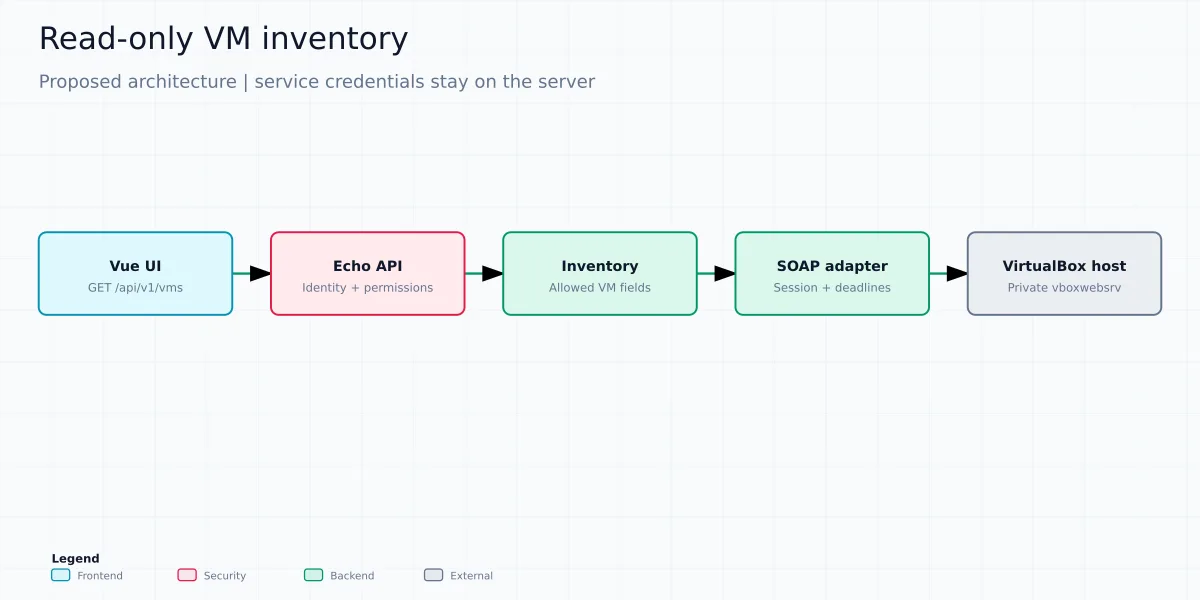
| Layer | Responsibility | What it must not know |
|---|---|---|
| Vue | Loading, empty list, data, and errors. | Service password, SOAP references and disk paths. |
| Echo | Authentication, authorization, validation and HTTP contract. | VM lock details. |
| Inventory service | Apply policy and return allowed fields. | Visual components and raw HTTP response. |
| SOAP adapter | Session, type conversion, timeouts and resource cleanup. | Browser cookies. |
In addition to reducing the scope, this design avoids turning the panel into an arbitrary proxy for the internal network. A future multi-host version should receive identifiers of previously registered hosts and apply authorization by host and by VM; it is not enough to accept any address sent by the user.
Web session, VM lock, and UUID are not the same thing
Logging in to the SOAP service creates a remote access context. Machine sessions and their locks, on the other hand, have a different life cycle. Object references from the service should not be treated as permanent VM identifiers nor exposed as a public contract. The adapter must convert the objects to the panel's model, with UUID, name and state, and release any resources it obtains, including on error paths.
Also confirm which system user the service runs as: seeing a different set of machines may be a problem with the account context, not with serialization. To explore the differences between references, sessions and security in more depth, read the VirtualBox SOAP API and the inventory in Go.
Beyond the first milestone
Starting, shutting down, cloning, restoring snapshots, changing disks, managing multiple hosts, and opening a remote console are explicitly out of scope for the MVP. These are future changes, each with its own authorization and tests. For SSH, RDP, or VNC sessions via the browser, the Apache Guacamole addresses a different problem; it does not replace the hypervisor management API.
What cannot be oversimplified
Generating a client from the WSDL can be part of the solution, but it does not prove that the integration is correct. The adapter needs to be validated against the real service and with the VirtualBox version adopted in the lab. Types, SOAP errors, session duration, and intermediate states must have their own tests.
An alternative for a local prototype would be to integrate the VBoxManage, but I would treat it as a separate architectural decision. I would not create an API that receives arbitrary commands from the browser. If processes are executed, the arguments need to be structured and validated, without assembling a shell line with user input.
I would also separate management from remote console. Listing machines and starting a VM does not implement access to your desktop from the browser. An HTML5 console would require its own integration, additional security requirements, and testing; it would be outside the first MVP.
The next step: specify before implementing
The opportunity lies in reducing distribution complexity without hiding domain complexity. In part 2, we will turn this proposal into requirements and tasks with AI and OpenSpec. In part 3, we will address incremental implementation, testing, and deployment. This series is an engineering roadmap: there is no Go version delivered by this article yet.
In this series: Part 1: phpVirtualBox, Echo and Vue · Part 2: AI and OpenSpec · Part 3: implementation and tests