

Migrating email is not just copying the INBOX: it involves moving folders, attachments, and dates without deleting the source, verifying the result, and retrieving the messages that arrived during the migration. The go-imapsync is a tool written in Go for copying IMAP mailboxes in one direction, from host1 to host2, to, distributed as a single binary and detecting already-copied messages by headers.
The project draws inspiration from the behavior of Gilles Lamiral's imapsync, but has a smaller scope: it is not a substitute with all the options of the original imapsync. This guide uses version 0.1.3 and presents a practical sequence for testing, copying, and validating one account before migrating the rest.
How the copy works
The program runs on a machine that can reach both servers. It opens an IMAP connection with each account, lists the folders, queries the existing headers, and transfers messages not yet recognized in the destination. It does not need to be installed inside the mail server and does not use SMTP to transport the messages.
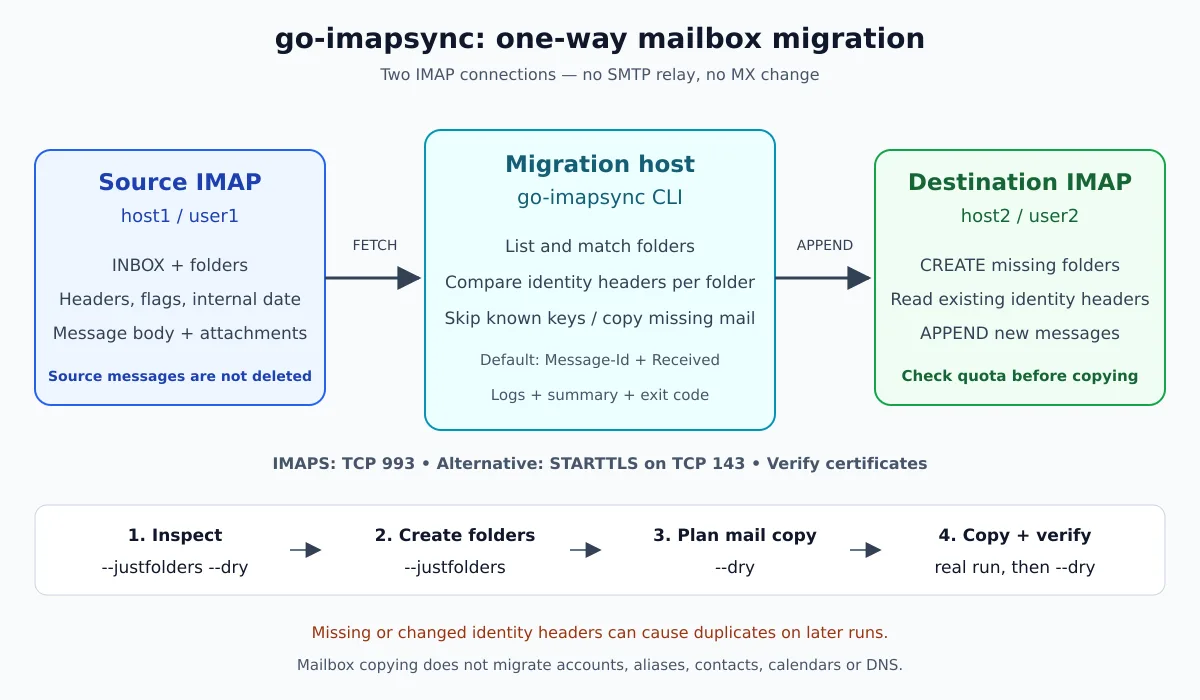
The workflow is unidirectional. The source is not deleted; the destination receives folders and messages. The tool does not create users, does not change MX records, and does not migrate contacts, calendars, aliases, or server-side filtering rules. These tasks are part of the migration plan, but not part of the IMAP copy.
When inserting a message, its content, the internal IMAP date, and the flags supported by the implementation and the destination are sent. This does not mean keeping two mailboxes continuously identical: messages recognized as already existing are skipped, even without a step to update flags that have changed afterwards.
Before you begin
- Authorization and accounts: use only mailboxes that you administer or are authorized to migrate. The destination account must exist.
- Quota: check the available space on the destination, including Sent, attachments, and growth during the migration.
- Authentication: confirm that the provider allows the login method used. Version 0.1.3 does not implement XOAUTH2; do not assume compatibility with a service that requires OAuth.
- Connectivity: the migration machine must be able to reach the IMAP endpoints, typically over TCP port 993 with TLS from the start.
- Pilot: start with a small, representative account, including subfolders, read/unread messages, and attachments.
- Preservation: keep a backup copy and access to the old server until the migration is accepted.
If the destination is part of an in-house installation, account creation and quotas may be managed separately by go-postfixadmin. Copying a mailbox does not provision the infrastructure that will receive it.
Installation on Linux
The example below is for Linux x86_64. A release 0.1.3 also offers files for macOS ARM64 and Windows AMD64. Do not run the package from another architecture.
uname -m
mkdir -p "$HOME/Downloads/go-imapsync-0.1.3"
cd "$HOME/Downloads/go-imapsync-0.1.3"

curl -fL --retry 3 \
  -o go-imapsync_0.1.3_linux_amd64.tar.gz \
  https://github.com/jniltinho/go-imapsync/releases/download/v0.1.3/go-imapsync_0.1.3_linux_amd64.tar.gz

tar -tzf go-imapsync_0.1.3_linux_amd64.tar.gz
tar -xzf go-imapsync_0.1.3_linux_amd64.tar.gz
sudo install -m 0755 go-imapsync /usr/local/bin/go-imapsync

go-imapsync version
go-imapsync --help
The ready-made binary does not require Go to be installed in order to run. Download it only from the official repository and use the verification mechanism provided in the release, when available; computing a local hash without a trusted reference does not authenticate the file.
To compile the same version, the go.mod declares Go 1.26.0. With a compatible Go toolchain, Git, and Make installed:
git clone --branch v0.1.3 --depth 1 https://github.com/jniltinho/go-imapsync.git
cd go-imapsync
make build
make test
./dist/go-imapsync version
make build produces dist/go-imapsync; make test runs the tests with a race condition detector. The Makefile for the version is the reference for the build targets.
Prepare credentials without placing them in history
The next examples use Bash. Enter the passwords interactively: they are not written in the command and are not displayed while you type. Run everything in the same shell session.
umask 077
mkdir -p "$HOME/go-imapsync-logs"

read -rsp 'Senha da origem: ' GOIMAPSYNC_PASSWORD1; printf '\n'
read -rsp 'Senha do destino: ' GOIMAPSYNC_PASSWORD2; printf '\n'
export GOIMAPSYNC_PASSWORD1 GOIMAPSYNC_PASSWORD2

# Substitua servidores e usuários pelos valores reais.
IMAP_ARGS=(
  --host1 imap.origem.example --user1 alice@origem.example
  --host2 imap.destino.example --user2 alice@destino.example
)
Environment variables avoid the password in program arguments, but they are not a vault: processes and operators with sufficient permissions can access them. Do not use set -x, do not print the environment, and do not send logs without review. The program tries to hide passwords in its own logs; this does not protect the shell history, external tools, or a screenshot.
Four steps: simulate, create folders, plan, and copy
Run one step at a time and check the result before the next one. The first one does not create folders or insert messages:
go-imapsync "${IMAP_ARGS[@]}" --justfolders --dryCheck the folder tree. If the names or the hierarchy are wrong, stop: do not try to compensate by creating data in the wrong place. Then create only the structure at the destination:
go-imapsync "${IMAP_ARGS[@]}" --justfoldersNow simulate the message copy. The program connects to the servers and queries headers, but does not perform CREATE or APPEND at the destination:
go-imapsync "${IMAP_ARGS[@]}" --dry \
  --logfile "$HOME/go-imapsync-logs/plano.log"
With no authentication, folder, or connectivity errors, start the actual copy and immediately capture the exit code:
go-imapsync "${IMAP_ARGS[@]}" \
  --logfile "$HOME/go-imapsync-logs/copia.log"
rc=$?
printf 'Código de saída: %s\n' "$rc"
The CLI distinguishes success (0) execution failure (1) and usage/configuration error (2). Also read the summary of transferred, skipped, and failed messages. In a simulation, the transfer count represents what would be done, not messages actually written.
IMAPS and STARTTLS: don't confuse the options
The default is IMAPS with TLS from the start, on port 993. When a server requires STARTTLS on port 143, disable IMAPS mode and explicitly enable the TLS negotiation for that side. Example with both servers using STARTTLS:
# Acrescente estas opções antes das etapas de migração,
# somente se ambos os servidores exigirem STARTTLS:
IMAP_ARGS+=(--nossl1 --tls1 --port1 143 --nossl2 --tls2 --port2 143)
go-imapsync "${IMAP_ARGS[@]}" --justfolders --dry
If only the source uses STARTTLS, apply only the options ending in 1; keep the destination at the default IMAPS. Use the hostname that matches the certificate. A certificate error requires reviewing hostname, validity, and trust chain, not adding --insecuretls in production.
A good practices documentation covers TLS, destination capacity, resumption, and credential care.
Incremental does not mean “impossible to duplicate”
The comparison happens per folder and uses, by default, the headers Message-Id and Received, not the IMAP UID. If the calculated key already exists at the destination, the message is skipped. This decision allows rerunning to fetch what arrived later, but does not compare the full content byte by byte.
- If none of the selected headers provide an identity, the message may be transferred again on another run.
- If the headers used in the identity are modified between servers, the comparison may not recognize the previous copy.
- Different messages with the same identity may be considered equal; reducing the comparison to fewer fields requires assessing this risk.
- Changing
--useheaderbetween rounds alters the identification criterion. Run tests on a pilot account, not by trial and error across all mailboxes.
The detail lies in the identity calculation and in the synchronization flow. For this reason, “skipping recognized messages” is a more accurate description than guaranteeing the absolute absence of duplicates.
How to check and complete the migration
After the copy, run another simulation with the same parameters:
go-imapsync "${IMAP_ARGS[@]}" --dry \
  --logfile "$HOME/go-imapsync-logs/verificacao.log"
In a mailbox without new deliveries and with stable identities, no pending messages are expected. This is an operational check, not a full cryptographic validation. Open the destination webmail and check samples in INBOX, Sent, and subfolders: body, attachments, dates, and read status. Compare counts per folder investigating differences, rather than assuming equal totals prove a correct migration.
Plan the change of clients and email delivery separately. One operational strategy is to perform the initial copy, coordinate the cutover, and repeat the synchronization to capture messages still received on the old server. Avoid letting users freely modify both mailboxes: the tool does not reconcile changes in two directions.
Keep the source available until you validate the actual usage. If you have to go back after receiving messages on the destination, those new messages also need a recovery plan; just pointing the clients back may hide part of the history. When you are done, remove the session passwords:
unset GOIMAPSYNC_PASSWORD1 GOIMAPSYNC_PASSWORD2
unset IMAP_ARGS
Common mistakes and what to verify
| Symptom | Action |
|---|---|
OVERQUOTA on the destination |
Increase the quota or free up space with authorization. Then repeat the copy and check the summary; do not delete the source to work around the error. |
| Connection closed or timeout | Check the network, server limits, and logs. Fix the root cause before retrying; increasing --timeout does not fix credentials or quota. |
| Login failure | Check the full username, password, and provider policy. Access via webmail does not prove that password-based IMAP login is enabled. |
| Invalid certificate | Fix the endpoint or the CA trust. Do not disable TLS verification as a permanent solution. |
| Messages reappear every round | Investigate the identity headers and possible transformations at the destination before making any changes --useheader. |
The tool can be run again after fixing the failure. What has already been copied will be recognized using the same header criteria; this does not eliminate the limitations described above.
Running with Docker
The repository includes a Dockerfile. In the tree of the chosen version, build the image and confirm that it runs. For the connection test, prepare the password variables again if you have already used them unset:
make docker-build
docker run --rm go-imapsync:dev version

docker run --rm \
  -e GOIMAPSYNC_PASSWORD1 \
  -e GOIMAPSYNC_PASSWORD2 \
  go-imapsync:dev \
  --host1 imap.origem.example --user1 alice@origem.example \
  --host2 imap.destino.example --user2 alice@destino.example \
  --justfolders --dry
It is not necessary to use a privileged container. Passwords are provided at runtime, not in the Dockerfile, but users with administrative access to Docker can inspect the container environment. Restrict that access and do not persist credentials in images.
Version limits and next steps
Version 0.1.3 is an MVP focused on IMAP copying. Filters and configurable folder mapping, exclusions with --delete1/--delete2, XOAUTH2, specific Gmail label handling, and bulk migration via CSV appear as future work in the repository, not as delivered features or as a promise of a timeline.
The code uses the MIT. In this review, the release binary's version and help were checked, and the test suite for tag 0.1.3 passed with go test -race ./..., using the project's local tests. This does not replace a trial run against the actual servers of your migration.
The gain is to simplify the execution of the copy; the care is still operational: pilot run, quota, TLS, logs, and validation. For files and cloud storage, the problem is different — see the rclone on Linux. guide. For email, keep the procedure focused on the IMAP mailboxes and only shut down the old server after confirming the data.