
Anyone who manages Active Directory on Linux knows the drill: ADUC and RSAT only run on Windows, the samba-tool output is hard to automate, and folder permissions become a mix of POSIX ACLs and Windows ACLs. The AD Manager project was born to put an end to that juggling act. It is an open source project, under the MIT license, that administers Windows Server or Samba 4 directories — users, groups, OUs, computers, and password policy — through a web panel, a desktop app, and a CLI. On Samba servers, it also handles shares with Windows permissions, backups, and migration.
In this post I show what it does, how the pieces fit together, and how to test it in one minute with Docker.
What is AD Manager
It is a single binary written in Go, with the panel built-in in Vue 3. The same executable works as a web panel, as a CLI, as an MCP server for AI agents, and as an agent on Samba file servers. There is also a native desktop app for Linux, Windows, and macOS (Apple Silicon, Intel, and a .app universal).
The point that mattered most to me in the design: the panel does not require a service account in AD. It speaks LDAPS with the domain using the credentials of the logged-in administrator; by default, access is restricted to members of the Domain Admins group (you can configure another group), and every change goes to the audit log — who did it, from where, what, and when.
What it does
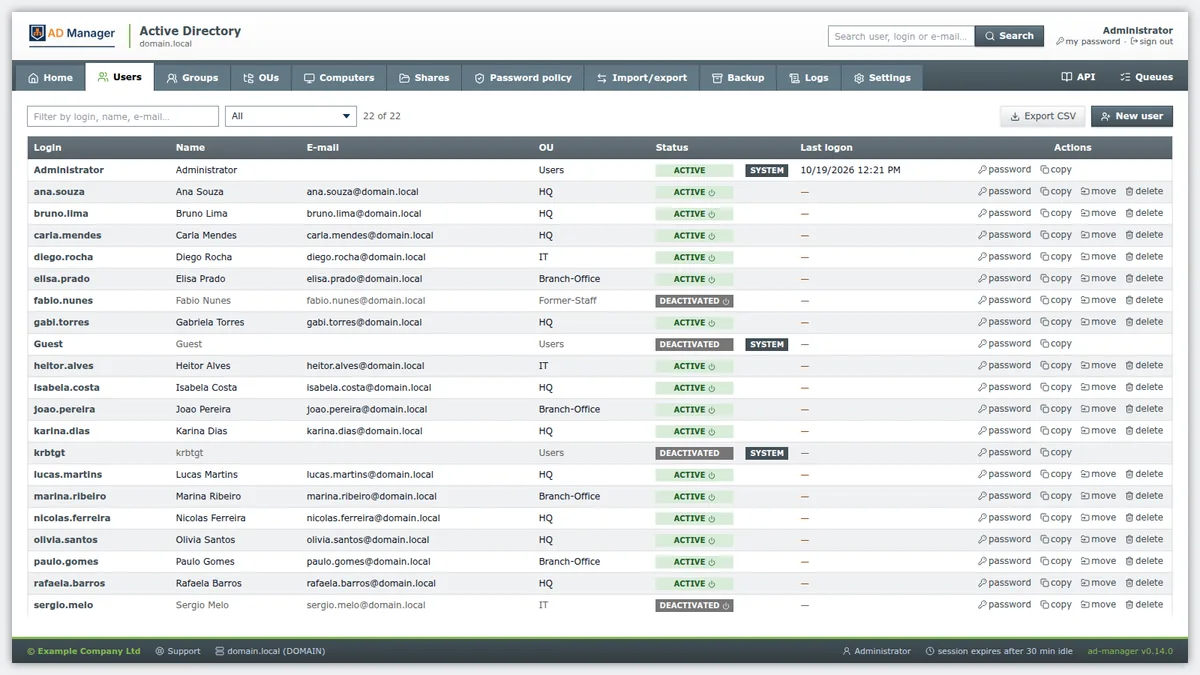
- Directory: users, groups, OUs, computers and password policy. Create, edit, move, enable and disable accounts, delete with typed confirmation, password generator and password change link so the user can choose the new one themselves.
- File servers: folders and shares with Windows ACL (NTFS) per group and per user, permission history with restore, recycle bin, ABE (the user only sees what they can open) and file auditing.
- Backup: of the Samba domain controller and of the file servers, with schedule, retention and restore, and also of the panel itself.
- Folder synchronization: brings folders from another SMB server (Windows or Samba) with wizard, preview, quarantine and verification.
- Browser-based installation: a wizard turns a clean Ubuntu into a domain controller, additional DC or file server.
- Windows → Samba migration: inventory, comparison, import from another AD (users, groups, DNS and shares) and joining a Samba DC.
- DNS, GPOs and SMB sessions, audit, HTTP and Samba logs, 14 themes (light, dark and flat view) and English and Portuguese interface.
How the pieces fit together
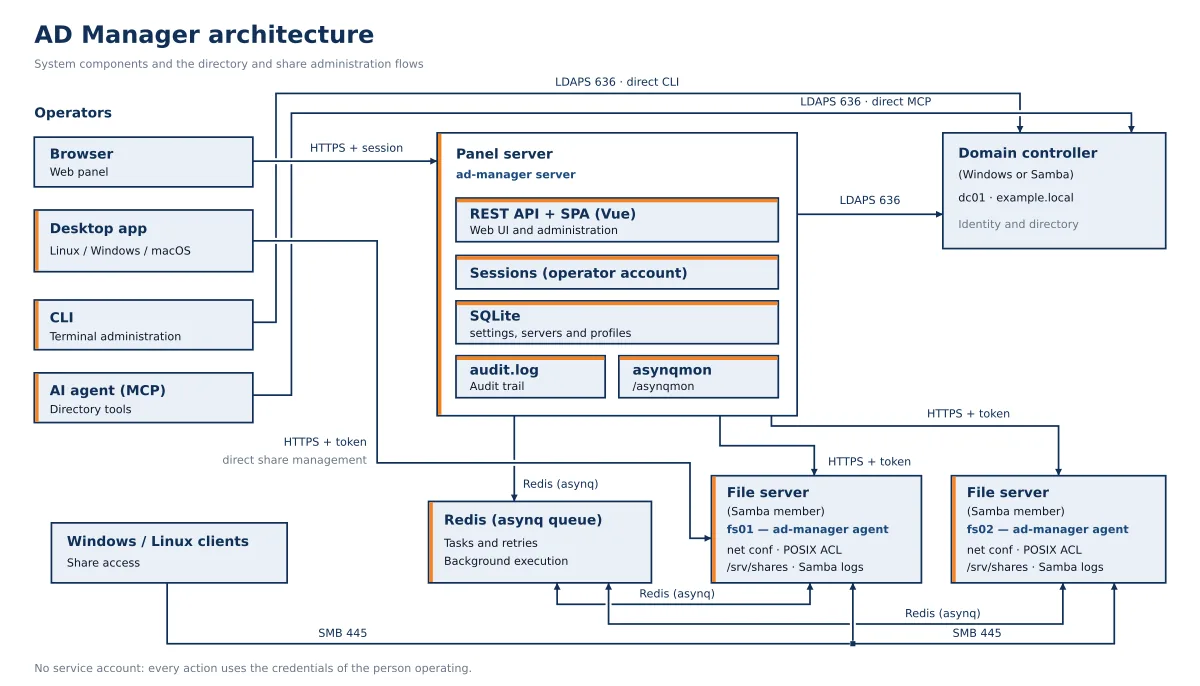
The panel talks to AD over LDAPS. On the Samba file servers (or on the DC itself) runs the agent: it receives requests over HTTPS, queues tasks with Asynq and Redis and tweaks Samba locally. The desktop app uses the panel's API and talks directly to the agents.
| Component | Function |
|---|---|
ad-manager server |
HTTPS web panel and REST API (Swagger in /swagger, after enabling it in Settings) |
ad-manager agent |
Runs on each file server or DC: folders, shares, ACLs, backups and synchronization |
ad-manager (CLI) |
Directory administration from the terminal, in addition to backup, sync, migration, and import commands |
ad-manager mcp |
MCP server for AI agents to query and administer the directory |
ad-manager-desktop |
Native app (Fyne) for Linux, Windows, and macOS |
The stack is the same one I showed in the series Vue.js + Go with Echo v5: Echo on the backend and the SPA embedded in the binary with go:embed.
Test it in one minute with Docker
The demo image brings up a complete Samba domain 4, with the panel and the agent, in a single container:
docker run -d --name ad-manager --hostname dc1 --cap-add SYS_ADMIN -p 8443:8443 jniltinho/ad-manager
docker logs ad-manager
The first start takes about a minute, because it provisions the domain. The log shows the URL, the user, and the password generated for the Administrator. Open https://localhost:8443, accept the untrusted certificate warning (or import the demo CA) and log in. The --cap-add SYS_ADMIN is what allows Samba to write Windows permissions to extended attributes security.*.
If Docker is new to you, it's worth reading the history of Docker before.
Installing on an Ubuntu server 26.04
For a real server, download the .deb da releases page, install, start the services and read the configuration token:
sudo apt install --no-install-recommends ./ad-manager_X.Y.Z_amd64.deb
sudo systemctl enable --now ad-manager ad-manager-agent
sudo cat /opt/ad-manager/data/setup-token
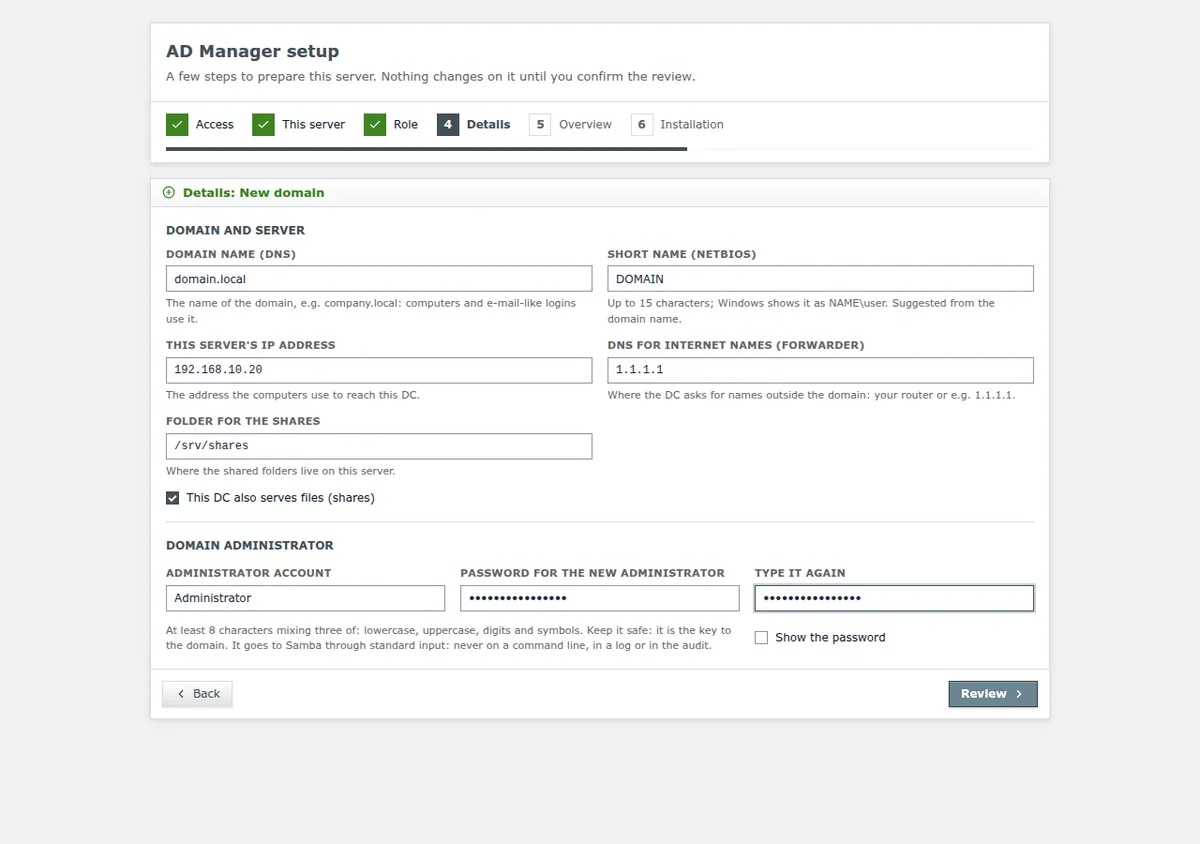
Then open https://IP-DO-SERVIDOR:8443 and enter the token. The setup wizard prepares the machine as a new domain controller, an additional DC, or a file server — or simply connects the panel to an existing Active Directory. Nothing on the server changes before the review screen.
Sharing with real Windows permissions
This is the feature I missed most in Samba. When creating or editing a share, you choose who has full control, write access, or read-only access, by group or by user. The agent writes the Windows ACL using Samba's own code (the module acl_xattr): it lives in the attribute security.NTACL from the folder, and Samba derives an approximate POSIX representation from it. For this reason, avoid changing these permissions directly with setfacl or chmod. Each change saves the previous permission, and it can be restored with one click, including in subfolders and files that inherit.
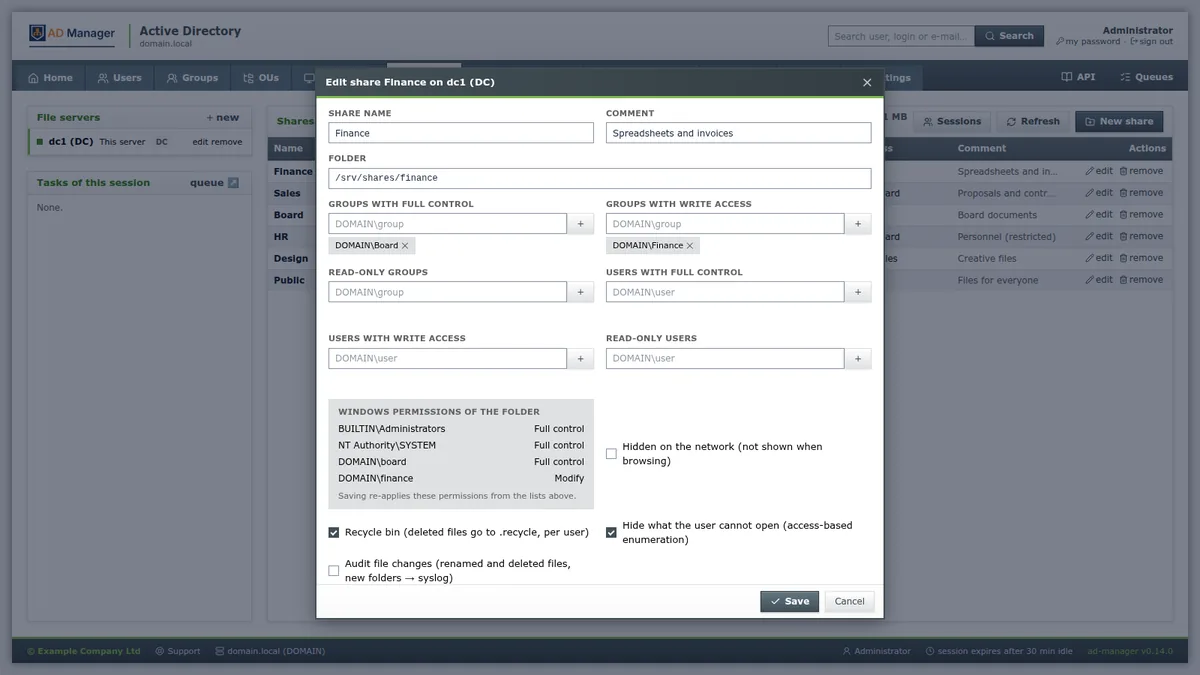
The share is stored in the Samba registry (the same one the net conf edits), and not in the smb.conf. This way each change is a transaction and does not require restarting the service.
Backup, synchronization, and migration
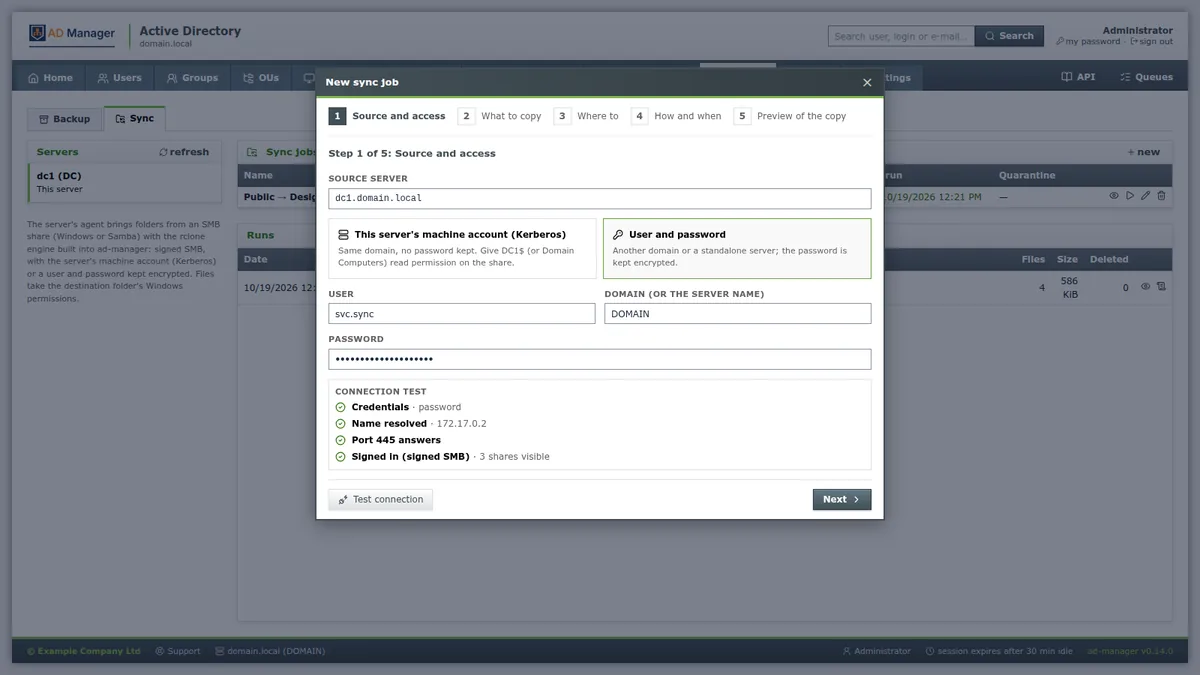
On the Backup screen you schedule copies of the DC and file servers, with retention and restore, and back up the panel itself. In Synchronization, a five-step wizard brings folders from another SMB server: source and connection test, what to copy, where to, when, and a preview before copying any file. What would be deleted goes to a quarantine, not to the trash.
For those who still have a Windows DC, the project provides a migration roadmap with pre-verification, before-and-after inventory, and import from another AD. If your environment also uses LDAP for remote access, it pairs with Apache Guacamole with LDAP.
Desktop app and AI
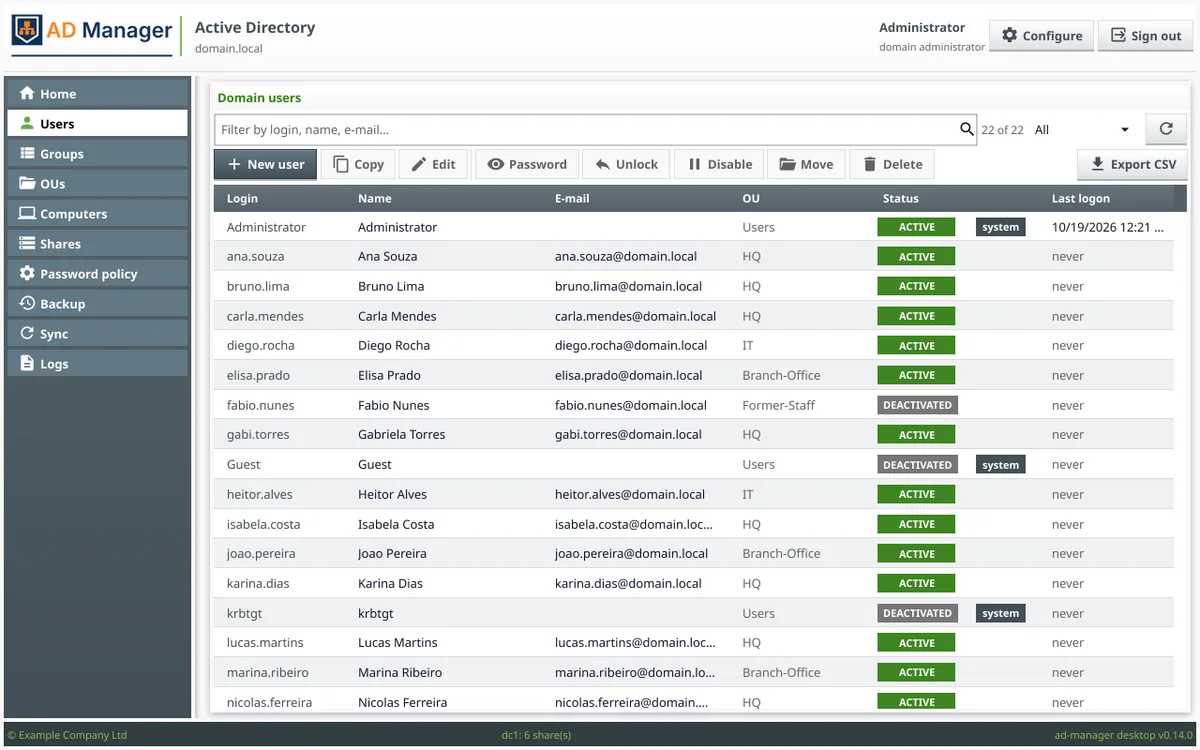
The desktop app brings together the main administration tasks — users, groups, OUs, computers, shares, password policy, backup, synchronization, and logs — and uses the same 14 themes as the web panel. It uses the panel's API and talks directly to the agents for the shares.
And with the built-in MCP server, an AI agent queries and administers the directory using the same rules and the same auditing as the panel. It's the same idea I used in mcp-wp-go for WordPress: giving the agent well-scoped tools, instead of a shell.
Open source
The project is on GitHub at github.com/jniltinho/ad-manager, under the MIT license. Each release brings .deb, the server binaries for Linux and Windows and the desktop app for Linux, Windows, and macOS. The documentation, in English, covers installation, panel, CLI, MCP, agent, backup, synchronization, and migration.
If AD Manager saves you time, leave a star on the repository and open an issue with what's missing in your environment. Contributions are welcome.