

An email server without DKIM and DMARC in 2026 is a server whose messages end up in spam — or bounce back. Since February 2024, Gmail and Yahoo have required authentication from every sender, and starting in November 2025 Gmail began rejecting, temporarily or permanently, traffic that does not comply with the rules. Below is the complete path on a Postfix setup: SPF, DKIM signing with OpenDKIM, DMARC policy, and recipient-side verification with OpenDMARC. All tested in a lab on Ubuntu 24.04 and on 26.04.
What the major providers require
The rules that pushed everyone toward this:
- Gmail, since February 1, 2024: every senders need SPF or DKIM, valid reverse DNS (PTR), TLS, and spam rate below 0,3%. Anyone sending more than 5.000 messages per day to Gmail accounts needs SPF and DKIM, DMARC published (
p=noneenough),From:aligned and one-click unsubscribe on marketing emails. In November 2025 Google began hardening the application, with temporary and permanent rejections. - Yahoo: the same requirements since February 2024, without disclosing a minimum number of messages to be considered bulk sending.
- Outlook.com: since 5 May 2025, domains sending more than 5.000 messages per day need SPF, DKIM, and DMARC. Those who don't have them end up in the junk folder.
Even those who send little benefit from the three: without them, anyone can send email with your domain in the From:, and the destination cannot tell the difference.
The three pieces and alignment
- SPF (RFC 7208): a TXT record on the domain lists which IPs may deliver mail on its behalf. The destination compares it with the IP that opened the connection. It applies to the envelope (
MAIL FROM), not for theFrom:that the reader sees. - DKIM (RFC 6376): the sending server signs headers and body with a private key; the public key lives in DNS. If anyone tampers with the message along the way, the signature breaks. It survives forwarding, which SPF does not.
- DMARC: ties the two together with
From:. It requires that SPF or DKIM pass and that the validated domain is the same as theFrom:— that's alignment. It also tells the destination what to do when it fails (none,quarantine,reject) and where to send reports. In May 2026 the specification became an IETF standard as RFC 9989, with the reports in RFCs 9990 and 9991, replacing RFC 7489.
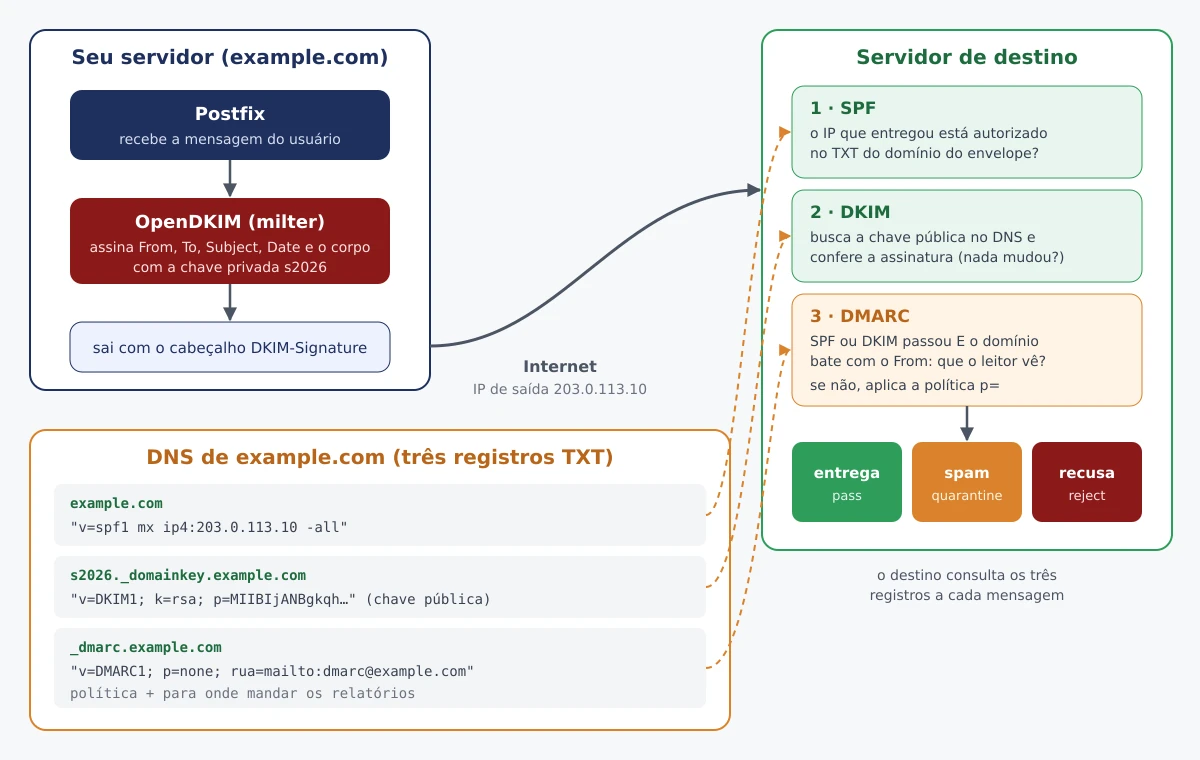
In this post: domain example.com, server mail.example.com, outbound IP 203.0.113.10. Replace with yours.
Versions and the chroot detail
| Package | Ubuntu 24.04 | Ubuntu 26.04 | Debian 13 |
|---|---|---|---|
| postfix | 3.8.6 | 3.10.6 | 3.10.13 |
| opendkim | 2.11.0~beta2 | 2.11.0~beta2 | 2.11.0~beta2 |
| opendmarc | 1.4.2 | 1.4.2 | 1.4.2 |
| postfix-policyd-spf-python | 3.0.4 | 3.1.0 | 3.1.0 |
OpenDKIM has never had a final 2.11: the upstream stopped at beta2 of 2018 and distributions package that, with their own patches. OpenDMARC has been on 1.4.2 since 2021. The two remain the default milters for Postfix.
The difference that matters: on Ubuntu 24.04 and on Debian 13 the smtpd does Postfix run in chroot in /var/spool/postfix; in 26.04 the package finally turned off chroot by default. Check yours:
grep -E '^smtp\s+inet' /etc/postfix/master.cf
# smtp  inet  n  -  y  -  -  smtpd    ← "y" na 5ª coluna = chroot
That's why the milter sockets will be inside from /var/spool/postfix and Postfix will point to them with a relative path — it works with and without chroot, and that's how I tested it on both Ubuntus.
SPF: the first record
In the domain's DNS, a TXT at the root:
example.com. IN TXT "v=spf1 mx ip4:203.0.113.10 -all"
mx authorizes the registry's MX servers, ip4: the outbound IP, and -all says that the rest cannot. If another service sends on your behalf (newsletter, ERP, Google Workspace), add the include: that it documents. Two precautions:
- One SPF record only. Two TXT records starting with
v=spf1give a permanent error. - At most 10 DNS queries (
include,a,mx,redirect…) in the entire evaluation, countingincludefrom the others. It overflowed, the SPF givespermerror.
Until you are sure you have listed everything, use ~all (softfail). With DMARC working, the -all weighs less than it seems — I'll explain why shortly.
While you're at it, check the reverse DNS: the PTR of 203.0.113.10 must point to mail.example.com, and that name must resolve back to the same IP. Gmail requires it.
OpenDKIM: generating the key
sudo apt install -y opendkim opendkim-tools
sudo mkdir -p /etc/opendkim/keys/example.com
sudo opendkim-genkey -b 2048 -h sha256 -r -s s2026 -d example.com \
  -D /etc/opendkim/keys/example.com
This creates s2026.private (the private key) and s2026.txt (the DNS record ready). -s s2026 is the selector, the key name; using the year makes it easier to rotate later. -b 2048 follows RFC 8301, which requires at least 1024 bits and recommends 2048; the Debian/Ubuntu package already uses 2048 by default, but making it explicit doesn't hurt. -r restricts the key to email. The opendkim-genkey packaged one only generates RSA — no Ed25519 for now.
Permissions — the private key can only be read by OpenDKIM:
sudo chown -R opendkim:opendkim /etc/opendkim
sudo chmod 700 /etc/opendkim/keys/example.com
sudo chmod 600 /etc/opendkim/keys/example.com/s2026.private
OpenDKIM: tables and opendkim.conf
Three small files. /etc/opendkim/key.table tells which key each selector uses:
s2026._domainkey.example.com example.com:s2026:/etc/opendkim/keys/example.com/s2026.private
/etc/opendkim/signing.table says which senders sign with which key:
*@example.com s2026._domainkey.example.com
/etc/opendkim/trusted.hosts list of where mail that should be signed (unverified) comes from:
127.0.0.1
::1
localhost
If applications from other machines use this Postfix as a relay, add their IPs. Anyone sending authenticated via SMTP AUTH (port 587, mail client, webmail) is signed automatically: OpenDKIM signs when the IP is internal or when Postfix reports that the session was authenticated.
Now replace the /etc/opendkim.conf:
Syslog                  yes
SyslogSuccess           yes
LogWhy                  yes
Canonicalization        relaxed/simple
Mode                    sv
OversignHeaders         From
UserID                  opendkim
UMask                   007
Socket                  local:/var/spool/postfix/opendkim/opendkim.sock
PidFile                 /run/opendkim/opendkim.pid
TrustAnchorFile         /usr/share/dns/root.key
KeyTable                refile:/etc/opendkim/key.table
SigningTable            refile:/etc/opendkim/signing.table
ExternalIgnoreList      /etc/opendkim/trusted.hosts
InternalHosts           /etc/opendkim/trusted.hosts
Mode sv: signs what goes out and checks what comes in.Canonicalization relaxed/simple: tolerates whitespace changes in headers along the way; the body must arrive identical.OversignHeaders From: prevents someone from adding a secondFrom:without breaking the signature.refile:inSigningTableis what does the*@example.comact as a wildcard.Socketinside/var/spool/postfix, because of the chroot.
The file /etc/default/opendkim still exists, but the package itself marks it as legacy: everything goes into opendkim.conf. Create the socket directory, put Postfix in the OpenDKIM group (the UMask 007 grants access to the group) and test the configuration:
sudo mkdir -p /var/spool/postfix/opendkim
sudo chown opendkim:postfix /var/spool/postfix/opendkim
sudo chmod 750 /var/spool/postfix/opendkim
sudo usermod -aG opendkim postfix
sudo opendkim -n -x /etc/opendkim.conf && echo config OK
sudo systemctl restart opendkim
Publishing the key in DNS
sudo cat /etc/opendkim/keys/example.com/s2026.txt
s2026._domainkey	IN	TXT	( "v=DKIM1; h=sha256; k=rsa; s=email; "
	  "p=MIIBIjANBgkqhkiG9w0BAQEFAAOCAQ8AMIIBCgKCAQEA2pGx9Ms2..."
	  "tyJOiuSbPxdG4hH7kpWfJscarmix9gP6iAVhM+Dieij2..." )
Create a TXT with name s2026._domainkey in the domain. A 2048-bit key does not fit in a single DNS string (limit of 255 characters), so the file comes split into multiple quoted strings; the destination joins everything together without spaces. In BIND, paste the block as-is. In provider panels, most accept the entire value pasted on a single line — v=DKIM1; h=sha256; k=rsa; s=email; p=MIIB...IDAQAB — and split it automatically.
Once DNS propagates, test:
dig +short TXT s2026._domainkey.example.com
sudo opendkim-testkey -d example.com -s s2026 -vvv
opendkim-testkey: checking key 's2026._domainkey.example.com'
opendkim-testkey: key not secure
opendkim-testkey: key OK
key OK is what matters: the public key in DNS matches the private one on disk. key not secure only warns that the domain does not have DNSSEC — it does not prevent anything. If it shows Revoked key, the DNS returned a record with p= empty: wrong selector, record not yet propagated, or a wildcard on the domain.
A detail that confuses on internal networks: with TrustAnchorFile configured, OpenDKIM resolves DNS on its own, starting from the root, and ignores the /etc/resolv.conf. If you published the key only in an internal DNS, it won't find it.
Wiring the milters into Postfix
sudo postconf -e \
  'smtpd_milters = local:opendkim/opendkim.sock, local:opendmarc/opendmarc.sock' \
  'non_smtpd_milters = $smtpd_milters' \
  'milter_default_action = accept'
sudo postfix check
The relative path (opendkim/opendkim.sock) is resolved starting from /var/spool/postfix, with or without chroot. non_smtpd_milters also causes signing of what comes in via the local sendmail command (cron, scripts, PHP applications). OpenDMARC comes up in the next section; if you want to test only DKIM now, leave just the first socket.
milter_default_action decides what happens if the milter is down. The default is tempfail: Postfix temporarily refuses and the sender retries later — nothing is lost, but nothing goes in or out while OpenDKIM is stopped. With accept, the mail keeps flowing, just without a signature. Conscious choice; I prefer accept with service monitoring.
sudo systemctl restart postfix
echo "teste" | mail -s "teste DKIM" voce@gmail.com   # pacote mailutils
sudo grep opendkim /var/log/mail.log | tail -3
opendkim[4242]: 52C29B42EDE: DKIM-Signature field added (s=s2026, d=example.com)
DMARC: publishing the policy
Another TXT, in _dmarc.example.com. Start by watching:
_dmarc.example.com. IN TXT "v=DMARC1; p=none; rua=mailto:dmarc@example.com"
p=none: nothing changes in delivery; providers just start sending reports.rua=: where the aggregate reports go — one XML per day, per provider, listing each IP that sent a message with your domain and whether it passed SPF and DKIM. That's where the forgotten system that also sends on your behalf shows up.adkimandaspf(defaultr, relaxed): in relaxed mode,news.example.comaligns withexample.com. Leave the default.sp=: policy for subdomains, if you want it different.
After two to four weeks reading reports with no surprises, move up to p=quarantine (failure goes to spam) and, finally, p=reject (failure is rejected). The tag pct=, used to apply the policy to only a percentage of messages, was removed in RFC 9989 and replaced by t=y (test mode). Many receivers still follow the old RFC; the stepped ramp-up of none to reject works with both.
If rua= point to another domain (a reporting service, for example), that domain needs to authorize by publishing example.com._report._dmarc.relatorios.example.net TXT "v=DMARC1" — without this, providers will not submit reports.
To read the XML without hassle, the parsedmarc (Apache 2.0) reads the reports mailbox via IMAP and generates JSON, CSV or sends to Elasticsearch/OpenSearch. OpenDMARC itself includes opendmarc-import and opendmarc-reports, but they are used to generate reports about who sends email to you — and they require MySQL.
OpenDMARC: verifying what comes in
Up to this point, you sign and publish. On the other side, your server also receives email — and can reject senders that spoof domains with p=reject. That is the job of OpenDMARC:
sudo apt install -y opendmarc publicsuffix
During installation, debconf asks whether to configure a database with dbconfig-common; answer no — it is only used to generate reports. Replace the /etc/opendmarc.conf:
AuthservID                 mail.example.com
TrustedAuthservIDs         mail.example.com
IgnoreAuthenticatedClients true
IgnoreHosts                /etc/opendmarc/ignore.hosts
RejectFailures             true
RequiredHeaders            true
SPFSelfValidate            true
FailureReports             false
PidFile                    /run/opendmarc/opendmarc.pid
PublicSuffixList           /usr/share/publicsuffix/public_suffix_list.dat
Socket                     local:/var/spool/postfix/opendmarc/opendmarc.sock
Syslog                     true
UMask                      0002
UserID                     opendmarc
AuthservIDandTrustedAuthservIDs: the name that appears in the headersAuthentication-Results. OpenDMARC reads the DKIM result that OpenDKIM annotated with that name.RejectFailures true: rejects when the sender's domain publishesp=rejectand the message fails. Withfalse, just note the header.SPFSelfValidate true: OpenDMARC evaluates SPF on its own, without depending on another component.IgnoreAuthenticatedClientsandIgnoreHosts: it does not check your users' mail or the local.RequiredHeaders true: rejects messages withoutFrom:valid — a common spoofing trick.FailureReports false: it does not send individual failure reports, which carry snippets of the message.
sudo mkdir -p /etc/opendmarc /var/spool/postfix/opendmarc
printf '127.0.0.1\n::1\n' | sudo tee /etc/opendmarc/ignore.hosts
sudo chown opendmarc:postfix /var/spool/postfix/opendmarc
sudo chmod 750 /var/spool/postfix/opendmarc
sudo usermod -aG opendmarc postfix
sudo opendmarc -n -c /etc/opendmarc.conf && echo config OK
sudo systemctl restart opendmarc postfix
The smtpd_milters from the previous section already lists the OpenDMARC socket after OpenDKIM — the order matters, because DMARC needs the DKIM result.
The test that convinces
In the lab, with the three records published on a local DNS and p=reject, I sent two messages from outside with From: ana@example.com, from an IP that SPF no authorizes. The first, with the original DKIM signature, was delivered with these headers:
Authentication-Results: mail.example.com; dmarc=pass (p=reject dis=none) header.from=example.com
Authentication-Results: mail.example.com;
	dkim=pass (2048-bit key; unprotected) header.d=example.com header.i=@example.com header.a=rsa-sha256 header.s=s2026
Received-SPF: Fail (mailfrom) identity=mailfrom; client-ip=172.17.0.2; ...
SPF failed, but DKIM passed and is aligned with the From: — so DMARC passes. This is exactly the case of a forwarded message. The second was the same message with the body changed to “Pague o boleto anexo.”:
opendkim[5617]: 8F25AB44DDF: bad signature data
opendmarc[5622]: 8F25AB44DDF: example.com fail
postfix/cleanup: 8F25AB44DDF: milter-reject: END-OF-MESSAGE ... 5.7.1 rejected by DMARC policy for example.com
Rejected. The same happened with a forged message in the name of paypal.com, which publishes p=reject a real one.
To actually test your domain, send a message to a Gmail account and open Show original: the top shows SPF, DKIM, and DMARC with PASS. The mail-tester.com gives you a disposable address and a score with the diagnosis for each item.
SPF in Postfix: log, don't reject
It's tempting to reject right at the RCPT TO everything that fails SPF, with the postfix-policyd-spf-python. In the lab, this made Postfix reject the message legit the test above before DKIM is even looked at: SPF failed and it ended right there. Forwarders and mailing lists fall into this hole all the time. With DMARC, the decision gets better with it. If you want the header Received-SPF to your antispam, install policyd-spf just to log:
sudo apt install -y postfix-policyd-spf-python
sudo sed -i 's/^Mail_From_reject = Fail/Mail_From_reject = False/' \
  /etc/postfix-policyd-spf-python/policyd-spf.conf
On /etc/postfix/master.cf:
policyd-spf  unix  -       n       n       -       0       spawn
  user=policyd-spf argv=/usr/bin/policyd-spf
And in main.cf, with the check_policy_service after of the reject_unauth_destination:
sudo postconf -e 'policyd-spf_time_limit = 3600' \
  'smtpd_recipient_restrictions = permit_mynetworks, permit_sasl_authenticated, reject_unauth_destination, check_policy_service unix:private/policyd-spf'
sudo systemctl reload postfix
Two gotchas. In policyd-spf.conf, TestOnly = 1 it's the mode normal, which applies the rejections; 0 turns it off — the name is misleading. And the policyd-spf process stays alive for up to an hour (policyd-spf_time_limit) without rereading the configuration: after editing, restart Postfix.
Switching the key without losing messages
Rotate the DKIM key once a year, and immediately if the private key leaks. The selector in the name is what lets you do this without a failure window:
- Generate the new one with another selector:
opendkim-genkey -b 2048 -h sha256 -r -s s2027 -d example.com -D /etc/opendkim/keys/example.com, and set the correct permissions. - Publish
s2027._domainkeyin DNS and wait for propagation (opendkim-testkey -s s2027). - Replace
s2026bys2027inkey.tableand in thesigning.tableand restart OpenDKIM. - Keep the
s2026record in DNS for one or two weeks — messages signed with it are still in queues and mailboxes being verified. - Remove the
s2026from DNS and delete the old key.
What usually breaks
warning: connect to Milter service local:opendkim/opendkim.sock: No such file or directory— theSocketof theopendkim.confis not inside/var/spool/postfix, or the service did not start.Permission deniedon the socket — it's missingusermod -aG opendkim postfix(and restart Postfix afterwards), or the socket directory is not owned by the grouppostfix.- Message goes out unsigned — the sender does not match
signing.table(withoutrefile:, the*@does not work) or the source IP is not inInternalHostsand the session was not authenticated.LogWhy yesexplains it in the log. dkim=failat destination with signature present — something altered the message after signing: a content filter, disclaimer, or antivirus re-injecting after the milter.- DKIM record pasted with a space or quotes in the middle of the key in the provider's panel. Compare with
dig +short TXT s2026._domainkey.example.com. - Slow queries — the SPF of some large domains generates dozens of DNS queries. In the lab, with a router's slow DNS, a single evaluation took almost a minute. A local resolver with caching on the mail server solves it.
What about Rspamd?
Rspamd does DKIM signing, SPF, DKIM and DMARC verification, ARC, and antispam in a single service, also as a Postfix milter, and is packaged in all the mentioned distributions. For a new server with volume, it's the modern choice. OpenDKIM and OpenDMARC still make sense when you only want authentication, with small pieces and configuration in text files — which is what I've shown here.
To set up the rest of the server: go-postfixadmin for the virtual mailboxes, and the story behind the pieces in The history of Postfix and The history of Dovecot. Those using a panel have DMARC integrated into the ISPConfig 3.3.2.