
The File Browser had been, for a decade, the simplest answer for anyone who wanted to access a server's files through the browser: a Go binary, a folder, a port. On September 1st, 2026 the repository filebrowser/filebrowser, with nearly 36 thousand stars, was archived. There will be no more releases, bug fixes, or security fixes. Anyone still running File Browser in production needs a plan, and the natural candidate is FileBrowser Quantum, a fork that had already gone its own way long before the original came to an end. In this post, you'll understand why the project ended, what Quantum changes, and how to deploy Quantum with Docker, systemd, and Nginx.
Why File Browser came to an end
File Browser was born as a web server plugin Caddy, written by Henrique Dias when he was 15 years old, and became an independent project later. In 2020, Henrique had already said goodbye once (Goodbye File Browser) and handed maintenance over to the community. Maintainers came and went, and by the end of 2025 the project had been unmaintained for about a year. He took it back.
In 2026 March, in the text Update On File Browser, he put the project in maintenance onlymode: no new features, priority for bugs and security. The problem is that the security alerts kept coming. In 28 July 2026, came the definitive announcement, Goodbye File Browser, for Real This Time. The last planned version, the v2.63.23, was released in 27 of July, and the archiving was scheduled for September 1st.
The reasons are in the text itself, and there are three:
- The code cannot be fixed by patching. According to the author, File Browser would need to be rewritten from scratch with security and a good API in mind, things that were not on the mind of a 15-year-old teenager. The clearest example is sessions: expired tokens continue to work in some situations, and logout does not invalidate the token.
- Lack of time. A few hours on most weekends, reading issues and alerts, wasn't enough to maintain the quality he wanted.
- Lack of motivation. It was a project from over ten years ago that had fulfilled its purpose, and maintaining code he himself didn't consider good had stopped being enjoyable.
The numbers confirm the diagnosis. The security alerts page of the repository lists 62 published advisories, 50 of them only in 2026, four classified as critical. Among them is pre-authentication command injection in hook de login, users from self-registration inheriting the server root as scope, and symbolic links that let a user read and write outside their folder.
What was left unpatched
The archived project README lists two classes of problems that will not be fixed:
- Execution of commands, runner and hooks. The feature accumulates vulnerabilities and would need to be rewritten. It ships disabled by default; if someone turns it back on with
--disable-exec=false, running commands through the interface is equivalent to having a shell on the server. - Sessions and JWT. Sessions are self-contained JWTs, with no identifier on the server, and therefore cannot be revoked. Logout, password change, and renewal leave the old tokens valid until they expire, and the same renewal token can be used multiple times. A leaked token is good until the end of its validity.
The official guidance for those who continue using it is to treat File Browser as unmaintained software: do not expose it directly to the internet, put a reverse proxy in front that terminates TLS and handles its own authentication, keep the command runner disabled, and run it without privileges, inside a container, mounting only the folder that needs to be served. Henrique himself says he prefers that users migrate to an alternative, without recommending any specific one.
What is FileBrowser Quantum
The FileBrowser Quantum is a fork maintained by Graham Steffaniak. The repository has existed since June 2023, well before the end of the original, and today has about 8,4 thousand stars. The license is still the same, Apache 2.0, and the code is also Go, with the web interface embedded in the binary.
The README describes Quantum as a “massive fork”: it changed the way to configure, authenticate, search, and share. In practice, what changes for those coming from the original:
- Multiple file sources (sources) at the same time, each with include and exclude rules.
- Authentication password authentication with 2FA, OIDC (SSO), LDAP, JWT, and proxy.
- Configuration in a single
config.yaml, instead of command-line flags and settings stored in the database. - Indexed search, with results as you type and filters by size, including folders.
- Thumbnails for video, office documents, album covers, and 3D models, plus folder sizes in the listing.
- WebDAV to mount the files as a network drive.
- Configurable shares: validity, allowed users (including anonymous), theme, and permission to view, edit, or upload files.
- API with long-lived tokens and Swagger documentation at
/swagger. - Access control by user or group and by path within each source.
And, as important as what came in, what went out: the terminal and command execution have been removed, and the README says they will not return. This is precisely the area the original author declared impossible to fix.
Stable or beta: which version to use
Quantum has two channels, and the version documentation explains well the difference:
- stable (v1.5.x): the recommended version for those who are starting out and for production. It updates every one to three months. As of the date of this post, the most recent is the
v1.5.6-stable, from 4 of September 2026. It uses the legacy databasedatabase.db. - beta (v2.0.0): updates every one to three weeks and swaps the key-value store for SQLite (
filebrowser.sqlite), with an in-memory state layer, activity log, and permissions per source (view, download, modify, create, and delete). It requires a one-time migration of the database and configuration.
This guide uses the stable. The images are on Docker Hub (gtstef/filebrowser) and on GitHub Container Registry (ghcr.io/gtsteffaniak/filebrowser). The tag stable includes FFmpeg and document preview; the stable-slim it only has the service and also runs on ARM 32 bits, like older Raspberry Pis. In production, the documentation suggests pinning the series, for example 1.5-stable, to receive fixes without jumping to a major version.
Guide architecture
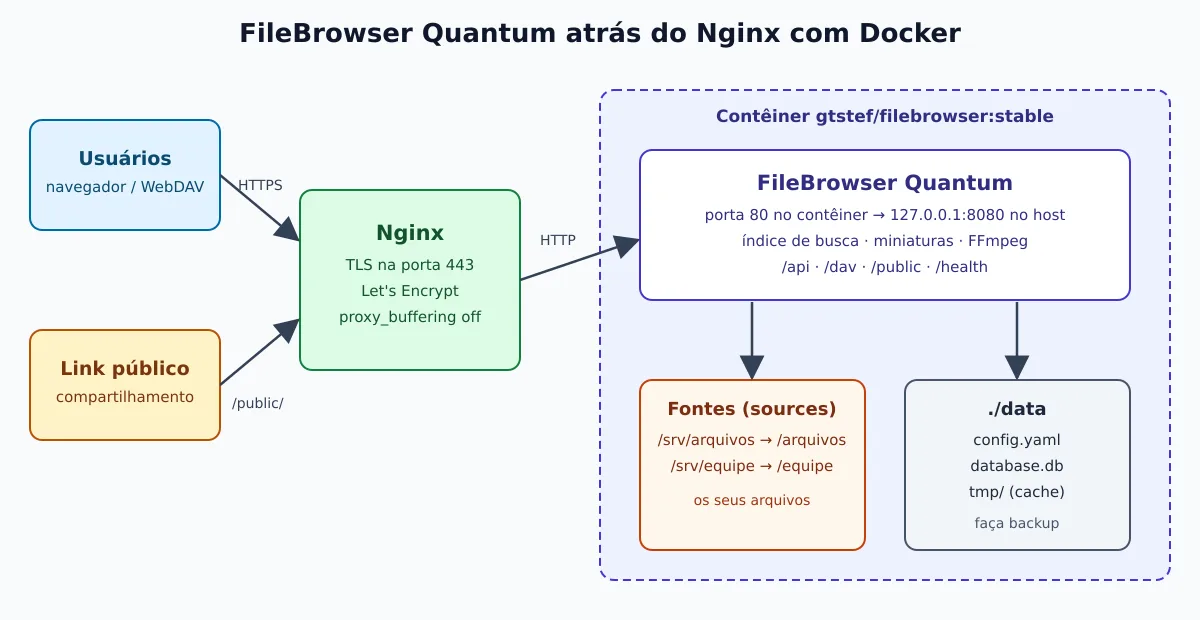
The setup we're going to do is the most common on a server: Quantum runs in a container, published only on 127.0.0.1, and Nginx sits in front with TLS. The file folders come in as volumes (the sources), and the configuration, database, and cache all live together in the directory data, which is what you need to copy in the backup.
Quick test with Docker
To look at the interface before configuring anything, without persistence:
docker run --rm -p 127.0.0.1:8080:80 -v "$PWD:/srv" gtstef/filebrowser:stableOpen http://127.0.0.1:8080 and log in with admin / admin. The current folder shows up as a source. When you close the container, everything that was configured is gone.
Installation with Docker Compose
Create the structure. In the container, the default configuration file is at /home/filebrowser/data/config.yaml, which is why the configuration, database, and cache all go into ./data:
mkdir -p filebrowser/data && cd filebrowserCreate data/config.yaml with two sources, a general files folder and another for the team:
server:
  cacheDir: /home/filebrowser/data/tmp
  externalUrl: "https://arquivos.exemplo.com.br"
  sources:
    - path: /arquivos
      name: "Arquivos"
      config:
        defaultEnabled: true
    - path: /equipe
      name: "Equipe"

auth:
  adminUsername: admin
The paths in sources are those of inside the container. defaultEnabled: true grants access to the source to all users; the source Equipe, without that option, must be released by the administrator for each user. externalUrl is the public address used in the sharing links. The documentation warns: never use the root / as the source, nor a folder that includes /var.
Now for compose.yaml:
services:
  filebrowser:
    image: gtstef/filebrowser:1.5-stable
    restart: unless-stopped
    environment:
      FILEBROWSER_ADMIN_PASSWORD: "${FB_ADMIN_PASSWORD}"
    volumes:
      - /srv/arquivos:/arquivos
      - /srv/equipe:/equipe
      - ./data:/home/filebrowser/data
    ports:
      - "127.0.0.1:8080:80"
The administrator password comes from an environment variable, not from the YAML. Store it in a .env with restricted permissions and bring the service up:
printf 'FB_ADMIN_PASSWORD=%s\n' "$(openssl rand -base64 24)" > .env
chmod 600 .env
docker compose up -d
docker compose ps
curl -s -o /dev/null -w '%{http_code}\n' http://127.0.0.1:8080/health
The image already includes a HEALTHCHECK that queries /health on port 80. If you change server.port in config.yaml, overwrite the healthcheck in Compose with the new port. Changes to config.yaml require restarting the container with docker compose restart.
If Docker is still new to you, it is worth reading the history of Docker to understand where volumes, images, and Compose come from.
Without Docker: binary with systemd
Quantum is also distributed as a binary for Linux at amd64, arm64, armv6 and armv7. Video previews depend on FFmpeg installed on the system:
VERSION=v1.5.6-stable
ARCH=amd64    # ou arm64, armv7, armv6

sudo apt install -y ffmpeg
curl -fL -o /tmp/filebrowser \
  "https://github.com/gtsteffaniak/filebrowser/releases/download/${VERSION}/linux-${ARCH}-filebrowser"
sudo install -m 0755 /tmp/filebrowser /usr/local/bin/filebrowser

sudo useradd --system --shell /usr/sbin/nologin --home-dir /opt/filebrowser filebrowser
sudo install -d -o filebrowser -g filebrowser -m 0750 /opt/filebrowser
Create /opt/filebrowser/config.yaml, now with the actual server paths and listening on port 8080 (ports below 1024 would require root):
server:
  port: 8080
  externalUrl: "https://arquivos.exemplo.com.br"
  sources:
    - path: /srv/arquivos
      name: "Arquivos"
      config:
        defaultEnabled: true

auth:
  adminUsername: admin
The user filebrowser needs read and write permission on the font folders. Then, the unit /etc/systemd/system/filebrowser.service, based on the Linux installation documentation:
[Unit]
Description=FileBrowser Quantum
After=network.target

[Service]
Type=simple
User=filebrowser
WorkingDirectory=/opt/filebrowser
EnvironmentFile=/opt/filebrowser/filebrowser.env
ExecStart=/usr/local/bin/filebrowser -c /opt/filebrowser/config.yaml
Restart=on-failure

[Install]
WantedBy=multi-user.target
sudo chown filebrowser:filebrowser /opt/filebrowser/config.yaml
printf 'FILEBROWSER_ADMIN_PASSWORD=%s\n' "$(openssl rand -base64 24)" | sudo tee /opt/filebrowser/filebrowser.env >/dev/null
sudo chmod 600 /opt/filebrowser/filebrowser.env
sudo systemctl daemon-reload
sudo systemctl enable --now filebrowser
journalctl -u filebrowser -fTo go beyond enable and journalctl, see the guide for essential systemd commands.
Behind Nginx with HTTPS
Quantum uses cookies for the session and real-time events (SSE) to update the interface, so the proxy needs to pass through the Host and cannot buffer the response. Large uploads also require increasing the Nginx body limit:
server {
    listen 443 ssl;
    server_name arquivos.exemplo.com.br;

    ssl_certificate     /etc/letsencrypt/live/arquivos.exemplo.com.br/fullchain.pem;
    ssl_certificate_key /etc/letsencrypt/live/arquivos.exemplo.com.br/privkey.pem;

    location / {
        proxy_pass http://127.0.0.1:8080;
        proxy_set_header Host $host;
        proxy_set_header X-Forwarded-For $proxy_add_x_forwarded_for;
        proxy_set_header X-Forwarded-Proto $scheme;
        proxy_buffering off;
        client_max_body_size 10G;
    }
}
The certificate can be issued with certbot --nginx -d arquivos.exemplo.com.br. If you want to serve Quantum under a subpath, such as https://exemplo.com.br/files/, adjust server.baseURL in config.yaml and the location in Nginx. The reverse proxy guide also has examples for Traefik and Caddy.
A useful detail: the sharing routes are kept separate in /public/. If you put authentication on the proxy (a auth_request, for example), you can leave /public/ from outside, and shared links keep working without logging into the proxy, protected by the hash itself and the share's password. Routes such as /api/, /dav/ and /swagger/ always require an authenticated user.
Migrating from the original File Browser
It's not a swap of the image: the configuration format has changed. Quantum reads everything from a config.yaml, whereas the original used command-line flags and settings stored in the database. The configuration migration guide starts by surveying what you use today:
ps aux | grep filebrowser        # flags em uso: --port, --address, --baseurl, --root...
systemctl cat filebrowser        # ou o compose.yaml: veja as flags e a pasta do banco
And the correspondence between the old flags and the new keys:
--port→server.port--address→server.address--baseurl→server.baseURL--root→server.sources[0].path--database→ database path inserver.database(or environment variable)
Three features from the original do not exist in Quantum: the terminal, the runners (event-triggered commands) and the user management via the command line, which is now handled through the configuration file or the API. If you relied on hooks to run scripts after an upload, plan an alternative outside the tool, such as a service that watches the folder.
The guide covers the setup. Plan to recreate users and shares in Quantum, or take advantage of the migration to connect LDAP or OIDC and stop maintaining local passwords. Bring Quantum up in parallel, pointing to the same folders, validate with a few users, and only then shut down the original.
Precautions before exposing
- Change the default password. The quick test logs in with
admin/admin; in production, setFILEBROWSER_ADMIN_PASSWORDand enable 2FA for the administrator. - Publish only on
127.0.0.1and let Nginx handle the TLS. A brute-force block with fail2ban in front costs nothing. - Mount only what needs to be served. No source at the system root; each volume is a specific folder.
- Pin the version (
1.5-stable) and read the release notes before updating, especially when v2.0.0 reaches the stable channel, because it requires a database migration. - Back up
./data: that's where configuration, users, and shares live.
To know when the service goes down, you can monitor the endpoint /health with the Go Uptime, and Quantum pairs well with other self-hosted services that have been featured here, such as the Vaultwarden and the Gitea.
If your files aren't all on a local disk but spread across SFTP, S3, SMB, and WebDAV, it's worth checking out the Filestash, which compares the three options side by side.
Conclusion
The end of File Browser is an honest example of how a personal project can grow beyond what the author can sustain. Henrique Dias preferred to archive it rather than maintain code he himself doesn't consider secure, and left the known vulnerabilities documented. For those who need a lightweight web file manager, FileBrowser Quantum preserves the original idea (a single binary, a folder, the browser) and adds what was missing: SSO, indexed search, shares with control, and no command execution through the interface. Full documentation is at filebrowserquantum.com.