
Gitea (Git with a cup of tea) is the self-hosted forge written in Go: Git repositories, PRs, issues, wiki, package registry, and CI/CD in one binary. A fork of Gogs in 2016, MIT license, fits on a 1 GB VPS. The stable version is the 28.0.0, of 29/09/2026. This text brings up the instance with Docker Compose and MariaDB, registers the Gitea Runner 4 to run Actions and installs the official CLI tea 0.16.
Git itself — BitKeeper, Linus's ten days, 2.55 — is covered in The history of Git. The everyday cheatsheet is in Git made simple and fast. Here the subject is the forge: the GitHub you run on your own machine.
What Gitea is (and is not)
It is not GitLab CE. It doesn't pull Elasticsearch, it doesn't ask for 8 GB of RAM for hello world. It's a binary (or a container) + a database. Gitea talks to SQLite3, MySQL/MariaDB, PostgreSQL, and MSSQL. SQLite is built in and covers labs, a Raspberry Pi, and single-user setups. In production with a team and Actions, use MariaDB (or MySQL: the driver is the same, DB_TYPE=mysql).
Actions have existed since 1.19 and have been enabled by default since 1.21: the YAML is the GitHub Actions syntax, but jobs run on a runner of your own, which you register. tea is the gh of this ecosystem. Forgejo is the community fork from 2022; the codebase is shared, but the two projects have since diverged. Code: github.com/go-gitea/gitea. Docs: docs.gitea.com.
Architecture
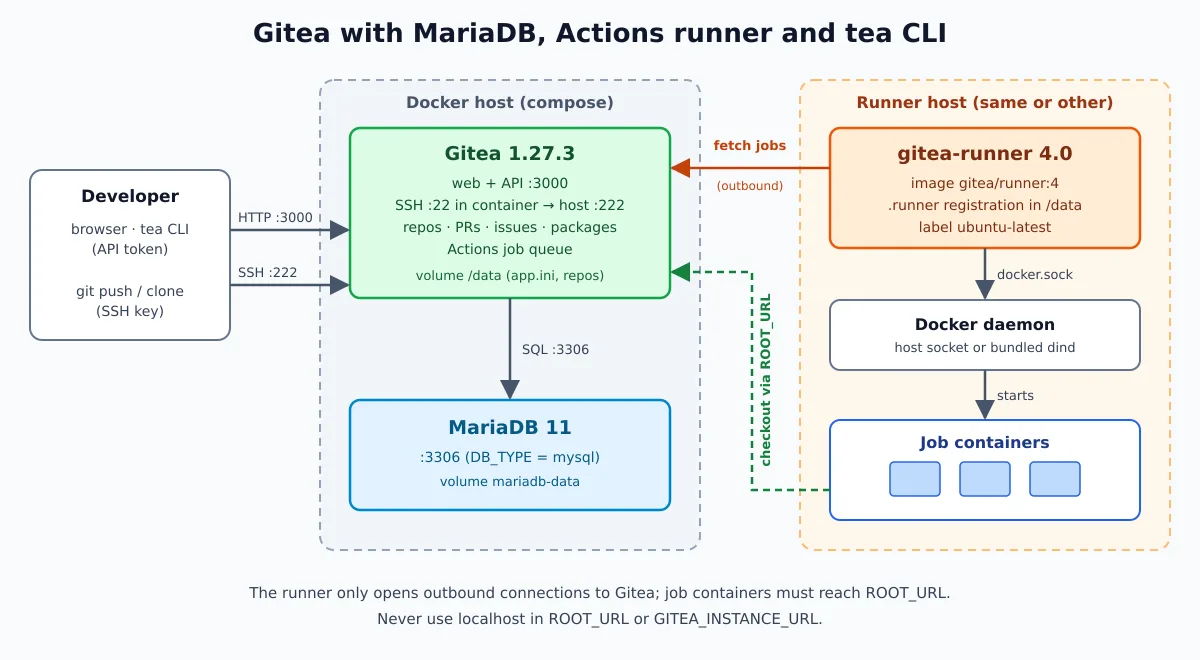
Three pieces. Gitea serves the web UI, API, and SSH, and stores its metadata in MariaDB. The runner can run on the same machine or on another one: it only opens outbound connections to Gitea, fetches jobs from the queue, and starts one container per job in Docker. The step that trips up most new installs is the last one: the job container checks out the code through the instance's ROOT_URL , so it must be an address the job can reach — never localhost.
What's new in 28
The version that would become 1.28.0 shipped as 28.0.0: the project stopped using the “1.” prefix”. No 27 versions were lost — the number that used to come after the “1.” moved to the front. Adjust scripts that compare versions or that look for tags 1.*.
The highlights: audit log, bot accounts managed via the interface, API, and CLI, deploy tokens over HTTPS, user impersonation by the administrator, branch protection that blocks the merge while there is a pending review from a code owner, filters in the diff, and a build queue for Actions. Actions also gained dynamic matrix, max-parallel and more API endpoints to manage runs and logs. The release brings security fixes, such as rejecting invalid or duplicate Git objects on push and ensuring that PR runs coming from a fork remain behind approval; the specifics would be released a week after launch.
Two changes are incompatible and require attention before do upgrade:
- Actions history will start expiring. The new
RUN_RETENTION_DAYSdeletes completed runs older than 400 days, along with jobs and tasks, during the midnight cleanup. To keep everything, setRUN_RETENTION_DAYS = 0in the section[actions](in Compose,GITEA__actions__RUN_RETENTION_DAYS: "0"). Now0means “save forever” as well inLOG_RETENTION_DAYSandARTIFACT_RETENTION_DAYS, that previously wiped everything on the next cleanup with this value. - Outbound Git traffic goes through an internal proxy. Git migrations, mirrors, and other network operations now obey egress rules. The preset
externalno longer exists: to deny everything by default, useEGRESS_MODE = strictand list what is allowed (in[migrations]for migrations and mirrors; in[security]for webhooks and OAuth2). Wildcards in IP and the item*are no longer accepted, domains follow the curl syntax (example.comincludes the subdomains;*.example.com, only the subdomains) and an invalid entry inBLOCKED_HOST_LISTprevents Gitea from starting.ALLOWED_DOMAINS,BLOCKED_DOMAINSandALLOW_LOCALNETWORKSbecome obsolete in favor ofALLOWED_HOST_LISTandBLOCKED_HOST_LIST.
Note for those who download binaries via script: 28 no longer publishes x86 32-bit builds or the variants gogit, and the file names have lost the operating system version suffix.
Deploy with Docker Compose and MariaDB
Official image: docker.gitea.com/gitea:28.0.0 (tested here: it starts, creates the administrator via the CLI and responds {"version":"28.0.0"} in /api/v1/version). Port 3000 on the web; 222 on the host mapped to the container's SSH (22), to avoid clashing with the host's sshd. Replace SEU_IP with the machine's IP or domain, and the passwords with your own values.
mkdir -p ~/gitea && cd ~/gitea# docker-compose.yml
networks:
gitea:
volumes:
gitea-data:
mariadb-data:
services:
server:
image: docker.gitea.com/gitea:28.0.0
container_name: gitea
restart: always
environment:
USER_UID: "1000"
USER_GID: "1000"
GITEA__database__DB_TYPE: mysql
GITEA__database__HOST: db:3306
GITEA__database__NAME: gitea
GITEA__database__USER: gitea
GITEA__database__PASSWD: troque-esta-senha
GITEA__server__ROOT_URL: http://SEU_IP:3000/
GITEA__server__SSH_DOMAIN: SEU_IP
GITEA__server__SSH_PORT: "222"
networks:
- gitea
volumes:
- gitea-data:/data
- /etc/timezone:/etc/timezone:ro
- /etc/localtime:/etc/localtime:ro
ports:
- "3000:3000"
- "222:22"
depends_on:
- db
healthcheck:
test: ["CMD", "curl", "-f", "http://localhost:3000/"]
interval: 10s
timeout: 5s
retries: 6
start_period: 30s
db:
image: docker.io/library/mariadb:11
restart: always
environment:
MARIADB_ROOT_PASSWORD: troque-esta-senha-root
MARIADB_DATABASE: gitea
MARIADB_USER: gitea
MARIADB_PASSWORD: troque-esta-senha
networks:
- gitea
volumes:
- mariadb-data:/var/lib/mysql
command: ["--character-set-server=utf8mb4", "--collation-server=utf8mb4_bin"]docker compose up -d
docker compose ps
docker compose logs -f serverOpen http://SEU_IP:3000 and complete the wizard. The database fields are already filled in by the variables: host db (service name, not localhost), type MySQL (that's how the UI refers to MariaDB). The first user you create becomes the administrator. After the wizard, the app.ini is located at /data/gitea/conf/app.ini on the volume; any key can be overridden by a variable in the format GITEA__secao__CHAVE.
SSH_PORT: "222" only changes the clone URL shown in the UI; SSH keeps listening on 22 inside the container. Clone:
git clone ssh://git@SEU_IP:222/usuario/repo.gitPublic key: Passwordless SSH. In production, put HTTPS in front (nginx or Caddy), replace a ROOT_URL to https://git.seudominio/ and, if no one from outside should create an account, set GITEA__service__DISABLE_REGISTRATION: "true".
SQLite: one container, no extra database
For testing on your machine or a Pi, remove the service db and the variables GITEA__database__*. In the setup wizard choose SQLite3; the file lives at /data/gitea/gitea.db.
services:
  server:
    image: docker.gitea.com/gitea:28.0.0
    container_name: gitea
    restart: always
    environment:
      USER_UID: "1000"
      USER_GID: "1000"
    volumes:
      - ./gitea-data:/data
    ports:
      - "3000:3000"
      - "222:22"
Works for a single user and a few repos. With a team, CI, and registry, stick with MariaDB: SQLite serializes writes and chokes when multiple jobs and users write at the same time.
Binary with systemd, if you don't want a container
Official documentation path, with the system Git and a dedicated git user:
sudo apt install -y git
sudo wget -O /usr/local/bin/gitea \
  https://dl.gitea.com/gitea/28.0.0/gitea-28.0.0-linux-amd64
sudo chmod +x /usr/local/bin/gitea

sudo adduser --system --shell /bin/bash --gecos 'Git Version Control' \
  --group --disabled-password --home /home/git git
sudo mkdir -p /var/lib/gitea/{custom,data,log} /etc/gitea
sudo chown -R git:git /var/lib/gitea
sudo chmod -R 750 /var/lib/gitea
sudo chown root:git /etc/gitea
sudo chmod 770 /etc/gitea   # o assistente web grava o app.ini aqui
# /etc/systemd/system/gitea.service
[Unit]
Description=Gitea
After=network.target mariadb.service
[Service]
User=git
Group=git
WorkingDirectory=/var/lib/gitea/
ExecStart=/usr/local/bin/gitea web --config /etc/gitea/app.ini
Environment=USER=git HOME=/home/git GITEA_WORK_DIR=/var/lib/gitea
Restart=always
[Install]
WantedBy=multi-user.targetsudo systemctl daemon-reload
sudo systemctl enable --now gitea
# depois do assistente, trave a configuração:
sudo chmod 750 /etc/gitea
sudo chmod 640 /etc/gitea/app.iniMore about units and systemctl: Mastering systemd. The binary already ships with SQLite; MariaDB/MySQL and PostgreSQL go into the [database] of the app.ini. Each binary in dl.gitea.com/gitea comes with .sha256, GPG signature (.asc) and Sigstore bundle (.sigstore.json) — check this before putting it into production.
Gitea Actions and the Runner
Gitea does not run workflows on its own. Jobs are picked up by the runner: the binary is called gitea-runner (the project was previously called act_runner), the code is at gitea.com/gitea/runner and the official image is docker.io/gitea/runner. The current version is 4.1.0, from 01/10/2026, which added a backend to run the jobs on Kubernetes. The YAML lives in .gitea/workflows/ and uses the same schema as GitHub Actions.
Registration token: Site Administration → Actions → Runners → Create new runner (it also applies to organization or repository, in each one's settings). If possible, run the runner on another machine — the job consumes CPU and RAM from whoever runs it, and the forge should not compete for resources with a build.
# acrescente em services: no mesmo docker-compose.yml
  runner:
    image: docker.io/gitea/runner:4
    restart: always
    environment:
      GITEA_INSTANCE_URL: http://SEU_IP:3000/
      GITEA_RUNNER_REGISTRATION_TOKEN: COLE_O_TOKEN
      GITEA_RUNNER_NAME: linuxpro-1
    networks:
      - gitea
    volumes:
      - ./runner-data:/data
      - /var/run/docker.sock:/var/run/docker.sock
    depends_on:
      server:
        condition: service_healthy
GITEA_INSTANCE_URL must match Gitea's ROOT_URL setting. You can register with http://server:3000 over the compose network, but the checkout inside the job uses the ROOT_URL, and the job container cannot resolve the name server.
The image comes in three flavors:
gitea/runner:4— just the runner; uses the host's Docker through the mounted socket. Simple, but whoever mounts thedocker.sockhas the equivalent of root on the machine, and the jobs can see the other containers on it.gitea/runner:4-dind— brings its own dockerd, isolated from the host; requiresprivileged: trueand does not use the socket.gitea/runner:4-dind-rootless— same scheme, with the daemon running as UID 1000; less power, more network and cgroups limitations.
The volume /data keeps the registration file .runner. Without it, every container recreation registers a new runner and the old one becomes orphaned in the UI. This volume does not store the image cache: in dind, also mount /var/lib/docker if you don't want to download everything again on every restart.
Coming from the 3.x series? Read the 4.0 release notes: with cache.external_server the jobs now talk to the cache through the runner, jobs in container.network: bridge lose access to the cache and artifacts, and * in valid_volumes no longer crosses / (use **). Version 4.0 also added the action builtin:checkout, which requires no download and no Node in the job image.
Minimal workflow in the repository:
# .gitea/workflows/ci.yml
name: ci
on:
  push:
    branches: [main]
  pull_request:
jobs:
  test:
    runs-on: ubuntu-latest
    steps:
      - uses: actions/checkout@v4
      - run: echo "commit ${{ gitea.sha }}" && uname -a
The label ubuntu-latest comes by default and points to the image docker.gitea.com/runner-images:ubuntu-latest. The context accepts gitea.* and also github.*, so most public actions work without changes; uses: actions/checkout@v4 is downloaded from GitHub, because DEFAULT_ACTIONS_URL is set to github by default — on an isolated network, mirror the actions on the instance itself. Pipeline concepts: DevOps: what is CI/CD?.
tea CLI
tea is the official client (MIT, Go): issues, PR, releases, labels, login on various instances and tea pr checkout in the local repository. The current stable release is 0.16.0, released 2026-09-10, which added tea login status and reading issue or PR descriptions from a file or stdin.
sudo curl -fsSL -o /usr/local/bin/tea \
  https://dl.gitea.com/tea/0.16.0/tea-0.16.0-linux-amd64
sudo chmod +x /usr/local/bin/tea
tea --version
Token: Settings → Applications → Generate New Token, with read and write permission on repository and issue. Login:
tea login add --name casa --url http://SEU_IP:3000 --token SEU_TOKEN
tea login list
tea repos
tea issues
tea pulls
Inside a clone hosted on that instance, tea discovers the remote automatically. Everyday examples:
tea issues list --state open
tea pulls checkout 12
tea pulls approve 12 "LGTM"
tea pulls merge 12
tea releases create --tag v1.0.0 --title v1.0.0 --note "primeiro corte"
For git push over HTTPS without a password, tea login add accepts --git-credentials and registers itself as Git's credential helper. On a workstation with a browser you can use --oauth; on a headless server or in a CI job, a token is still the simplest path. Binaries: dl.gitea.com/tea. Code: gitea.com/gitea/tea.
Backup and upgrade
The gitea dump packages repositories, configuration, attachments, and a SQL dump of the database into a zip. Inside the container it needs to run as git and inside a writable directory:
docker compose exec -u git -w /tmp server \
  gitea dump -c /data/gitea/conf/app.ini --file /tmp/gitea-dump.zip
docker compose cp server:/tmp/gitea-dump.zip ./gitea-dump-$(date +%F).zip
docker compose exec server rm /tmp/gitea-dump.zip
There is no restore command: the way back is manual (unzip, put the files back, and import the SQL). Because of that it is worth also having the native database dump — mariadb-dump — scheduled and tested; Databasus does this with verified restore.
Upgrade of 1.27 to 28, in the order:
- Do the
gitea dumpand the native database dump. - Decide the retention of the Actions: if you want to keep the entire history, add
GITEA__actions__RUN_RETENTION_DAYS: "0"to the serviceserverbefore to bring up the new version. - If you use
ALLOWED_DOMAINS,BLOCKED_DOMAINS,ALLOW_LOCALNETWORKSor the presetexternal, rewrite the rules withALLOWED_HOST_LIST,BLOCKED_HOST_LISTandEGRESS_MODE. - Swap the tag in the compose (
1.27.3→28.0.0) and rundocker compose pull && docker compose up -d. Database migrations run on startup. - Check out
docker compose logs server: Gitea warns at the beginning when it finds an invalid egress rule or a list of hosts withoutEGRESS_MODEexplicitly.
Do not swap the rootful image for the rootless one on the same volume.
Wrap-up
Gitea 28 + MariaDB 11 + runner 4.1 + tea 0.16 is a complete forge on a small VPS. SQLite for the first docker compose up; MariaDB when the team and CI join. Get the ROOT_URL right before registering the runner and half of the Actions problems disappear. Git remains the same as always; the social layer — PR, Actions, registry — is what GitHub charged for and Gogs never quite tied together.
More: history of Git, history of GitLab, history of Docker, Git cheatsheet and the Gogs in 2017.