

Gogs is a self-hosted Git server written in Go: a single binary, no Ruby, no Node, no queue, no Redis. You drop the file on the server, point it to a database, and you get a web interface similar to GitHub, with low memory usage. That's why it still makes sense on a small VPS, a Raspberry Pi, or an internal company machine — scenarios where GitLab simply doesn't fit.
Gogs, Gitea or Forgejo: which to install
All three come from the same code. The split was one of governance, not technology:
| Gogs | Gitea | Forgejo | |
|---|---|---|---|
| Origin | Original, 2014 | Fork of Gogs, 2016 | Fork of Gitea, 2022 (Codeberg) |
| Current version | 0.14.3 (Jun/2026) | 28.0.0 (Sep/2026) | 16.0.5 (Sep/2026) |
| License | MIT | MIT | GPL-3.0 |
| Pace | Slow, few contributors | Fast, large community | Fast, collective governance |
| Built-in CI | No | Gitea Actions | Forgejo Actions |
| Package registry | No | Yes | Yes |
| Resource usage | The lightest | Lightweight | Lightweight |
Gitea jumped from the 1.27 series straight to the 28.0.0 series in September 2026: it's a numbering scheme change, not 27 lost releases.
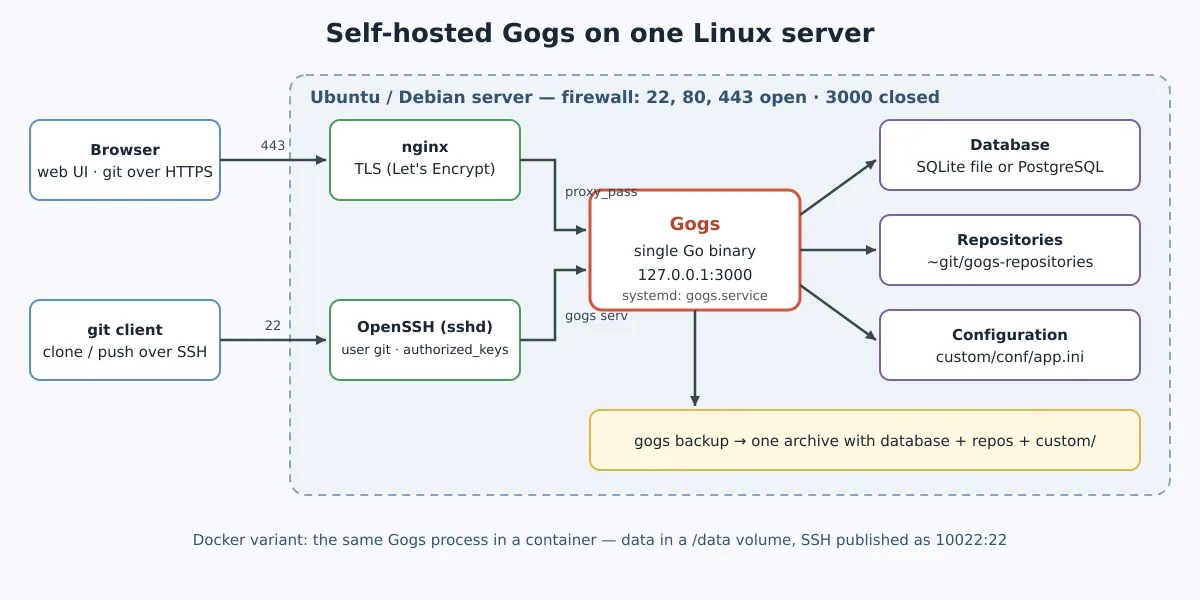
Rule of thumb: if you want just Git with a web interface, with the lowest possible consumption, Gogs delivers and keeps receiving fixes. If you want CI, package registry, and a project with many people contributing, go with Gitea or Forgejo — the step-by-step with an Actions runner is in the post Gitea: self-hosted Git with Actions, runner, and tea CLI. The structure below (user git, systemd, nginx, backup) applies to all three; what changes is the binary and the keys of app.ini.
Preparing the server
Applies to Ubuntu 24.04/26.04 and Debian 12/13. Gogs needs very little: git, a system user and a database.
sudo apt update
sudo apt install -y git curl

# usuário de sistema dedicado, sem senha
sudo adduser --system --group --disabled-password --home /home/git --shell /bin/bash git
The user needs a shell because Git over SSH comes in through it: Gogs writes to /home/git/.ssh/authorized_keys one line per key that forces the command gogs serv, without pty and without port forwarding.
For the database, choose one of the two. SQLite works for personal use or a small team and requires nothing beyond the binary itself. PostgreSQL is what you want if there are more than a handful of people:
sudo apt install -y postgresql
sudo -u postgres psql -c "CREATE ROLE gogs WITH LOGIN PASSWORD 'troque-esta-senha';"
sudo -u postgres psql -c "CREATE DATABASE gogs WITH OWNER gogs ENCODING 'UTF8';"
Installing the binary
cd /tmp
VER=0.14.3
ARCH=amd64   # use arm64 num Raspberry Pi ou servidor ARM

curl -fLO https://github.com/gogs/gogs/releases/download/v${VER}/gogs_v${VER}_linux_${ARCH}.tar.gz
tar xzf gogs_v${VER}_linux_${ARCH}.tar.gz

sudo mv gogs /home/git/gogs
sudo chown -R git:git /home/git/gogs
Check before continuing:
sudo -u git /home/git/gogs/gogs --versionRunning as a service in systemd
Create /etc/systemd/system/gogs.service:
[Unit]
Description=Gogs
After=network-online.target postgresql.service
Wants=network-online.target

[Service]
Type=simple
User=git
Group=git
WorkingDirectory=/home/git/gogs
ExecStart=/home/git/gogs/gogs web
Restart=always
RestartSec=5
Environment=USER=git HOME=/home/git

# endurecimento básico
NoNewPrivileges=true
PrivateTmp=true
ProtectSystem=full
ProtectHome=false

[Install]
WantedBy=multi-user.target
The WorkingDirectory isn't decoration: Gogs looks for custom/conf/app.ini relative to it. And Environment=USER=git HOME=/home/git is what makes Git find the right SSH keys.
sudo systemctl daemon-reload
sudo systemctl enable --now gogs
journalctl -u gogs -f
Open http://SEU-SERVIDOR:3000 and answer the installation wizard: database type, credentials, domain, application URL and administrator account. When saved, it writes everything to /home/git/gogs/custom/conf/app.ini — that's the file you edit later, never the one in the conf/, which is overwritten on update.
Or, if you prefer Docker
sudo mkdir -p /var/lib/gogs
docker run -d --name=gogs \
  --restart=always \
  -p 10022:22 -p 127.0.0.1:3000:3000 \
  -v /var/lib/gogs:/data \
  gogs/gogs:0.14.3
All data — repositories, SQLite database, and configuration — live on the volume /data. Back it up and you have a backup of the entire service. In the container, the directory custom é /data/gogs (on the host, /var/lib/gogs/gogs): that's where the conf/app.ini. The 10022 it is the published SSH port: report it as the SSH port in the wizard, and the clones will use ssh://git@servidor:10022/usuario/repo.git. The port 3000 got stuck on 127.0.0.1 because the nginx from the next section is the one that talks to the world.
Nginx in front, with TLS
Do not expose the port 3000 directly on the internet. Put Gogs behind nginx and close the rest on the firewall. First issue the certificate — with nginx already installed and the DNS of git.exemplo.com.br pointing to the server:
sudo apt install -y nginx certbot python3-certbot-nginx
sudo certbot certonly --nginx -d git.exemplo.com.br
Then create /etc/nginx/sites-available/gogs:
server {
    listen 80;
    server_name git.exemplo.com.br;
    return 301 https://$host$request_uri;
}

server {
    listen 443 ssl;
    http2 on;
    server_name git.exemplo.com.br;

    ssl_certificate     /etc/letsencrypt/live/git.exemplo.com.br/fullchain.pem;
    ssl_certificate_key /etc/letsencrypt/live/git.exemplo.com.br/privkey.pem;

    # push grande não pode esbarrar no limite padrão de 1 MB
    client_max_body_size 512m;

    location / {
        proxy_pass http://127.0.0.1:3000;
        proxy_set_header Host $host;
        proxy_set_header X-Real-IP $remote_addr;
        proxy_set_header X-Forwarded-For $proxy_add_x_forwarded_for;
        proxy_set_header X-Forwarded-Proto $scheme;
    }
}
sudo ln -s /etc/nginx/sites-available/gogs /etc/nginx/sites-enabled/
sudo nginx -t && sudo systemctl reload nginx
sudo ufw allow OpenSSH
sudo ufw allow 'Nginx Full'
sudo ufw deny 3000After that, adjust the app.ini for Gogs to know that it's behind HTTPS — otherwise the clone links come out wrong. Note: since Gogs 0.13 the key is EXTERNAL_URL; the old ROOT_URL, which appears in many tutorials, is ignored:
[server]
EXTERNAL_URL = https://git.exemplo.com.br/
DOMAIN       = git.exemplo.com.br
HTTP_ADDR    = 127.0.0.1
HTTP_PORT    = 3000
DISABLE_SSH  = false
SSH_PORT     = 22
And, on an exposed server, disable public registration. These options are in the section [auth] — the old [service] is no longer read in 0.13, as is ENABLE_CAPTCHA, which became ENABLE_REGISTRATION_CAPTCHA:
[auth]
DISABLE_REGISTRATION        = true
REQUIRE_SIGNIN_VIEW         = true
ENABLE_REGISTRATION_CAPTCHA = true
sudo systemctl restart gogsTest in a private/incognito tab: the home page should prompt for login and the “Sign up” link should not appear. If it does, the configuration was not read — double-check the section and the file path.
Backup
There are three things — database, repositories, and configuration — and Gogs has its own command to combine them into a single file:
sudo mkdir -p /var/backups/gogs
sudo chown git:git /var/backups/gogs
cd /home/git/gogs
sudo -u git ./gogs backup \
  --config /home/git/gogs/custom/conf/app.ini \
  --target /var/backups/gogs
If you prefer doing it manually: repositories live in /home/git/gogs-repositories, configuration in custom/ and the database in PostgreSQL (pg_dump gogs) or in the SQLite file. Without all three, the restore won't complete. To store the copy outside the server, the rclone takes the file to a bucket.
Upgrading
Because it's a single binary, upgrading is just replacing the file — with the service stopped and the backup made beforehand. Preserve the directory custom/, where the app.ini:
cd /home/git/gogs
sudo -u git ./gogs backup --config custom/conf/app.ini --target /var/backups/gogs
sudo systemctl stop gogs

cd /tmp && rm -rf /tmp/gogs
VER=0.14.3   # a nova versão
curl -fLO https://github.com/gogs/gogs/releases/download/v${VER}/gogs_v${VER}_linux_amd64.tar.gz
tar xzf gogs_v${VER}_linux_amd64.tar.gz
sudo cp -a /home/git/gogs/custom /tmp/gogs/
sudo mv /home/git/gogs /home/git/gogs.old
sudo mv /tmp/gogs /home/git/gogs
sudo chown -R git:git /home/git/gogs
sudo systemctl start gogs
Version jumps sometimes require a database migration, which runs automatically on the first startup. Read the changelog first — it's short. After confirming everything came up, delete /home/git/gogs.old.
The original post (April 2017)
Preserved as a record. The script below installed Gogs on Ubuntu 16.04 and should not be used today:
## Script Install on Debian, Ubuntu, OpenSUSE 64Bits !!!
wget https://gist.githubusercontent.com/jniltinho/280573e10206e31ab1c7/raw/6d9eb2c6abff9d61f903b2704c50926915b531cb/install_gogs_ubuntu.sh
bash install_gogs_ubuntu.sh
Original gist: jniltinho/280573e10206e31ab1c7
Gogs installation video (2017)
Links
- gogs.io · github.com/gogs/gogs · Docker image
- Gitea · Forgejo
- Here on the blog: Gitea with Actions and runner · DevOps: what is CI/CD? · The history of Git · The history of GitLab · Installing Go on Linux
Gogs remains the most lightweight way to have Git with a web interface on your own server: one binary, one user, one database, and one app.ini with the right keys. When CI is missing, the natural path is Gitea or Forgejo — the server structure remains the same.