
On Getting Started with Ansible you installed Ansible, set up the inventory, ran ad-hoc commands, and wrote your first playbook. This post picks up from there and solves a problem every administrator has: granting and revoking people's access to the servers. Accounts created by hand on each machine become a mess quickly — no one knows who has sudo, the SSH key of the intern who left is still there, and the only record is someone's memory. Here the list of users becomes code: a YAML file in a Git repository, applied by Ansible. Creating, locking, or removing someone becomes a commit, with author, date, and review, and the git log becomes the audit trail.
Everything shown below was actually executed in a lab with two servers — Ubuntu 24.04 and Debian 13 — and an Ubuntu 24.04 control machine with Ansible from the distribution's official repository (ansible 9.2.0, ansible-core 2.16.3). The outputs are real.
What we're going to build
The project has a file with the list of people (name, public key, groups, sudo and state), a playbook that turns that list into accounts on the servers, and a template for sudo. The control machine only applies what is on the main branch; what gets there has been committed and, if you wish, reviewed.
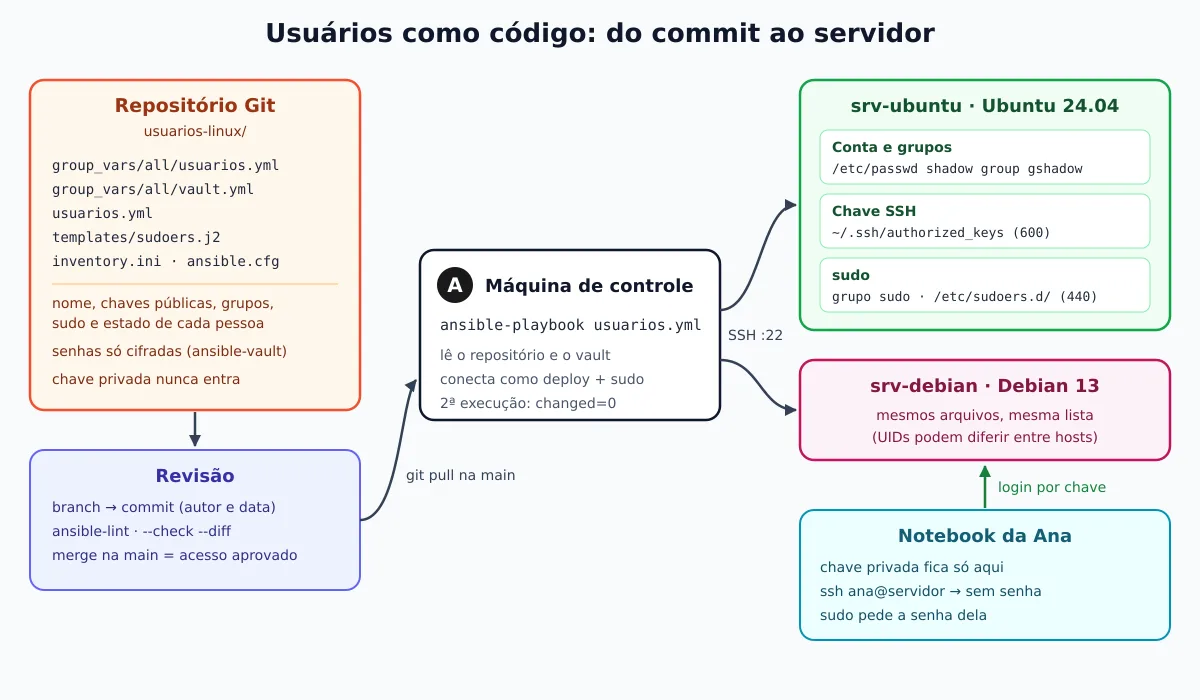
Each person goes through three states, always declared in YAML:
ativo— account created, SSH key installed, groups and sudo applied;bloqueado— nobody logs in anymore, not even by key, but the account and files remain for analysis;removido— account, personal group, and home deleted.
The project structure in Git
On the control machine, create the directory and the repository. The final structure is this:
usuarios-linux/
├── .gitignore
├── ansible.cfg
├── inventory.ini
├── usuarios.yml              # o playbook
├── templates/
│   └── sudoers.j2
└── group_vars/
    └── all/
        ├── usuarios.yml      # a lista de pessoas
        └── vault.yml         # senhas, sempre cifradas
The ansible.cfg points to the inventory, the file with the vault password (outside the repository) and connects the become:
[defaults]
inventory = inventory.ini
vault_password_file = ~/.vault-pass-usuarios
nocows = true
retry_files_enabled = false

[privilege_escalation]
become = true
The inventory uses an automation user, deploy, with SSH key and passwordless sudo — the same scheme as the previous post. In the lab the addresses were containers; here they are documentation IPs:
[servidores]
srv-ubuntu ansible_host=192.0.2.10
srv-debian ansible_host=192.0.2.11

[servidores:vars]
ansible_user=deploy
And .gitignore exists for one thing only: to ensure that secrets do not enter the history. Key private and plaintext password never go to Git — what goes is the public key and password encrypted with ansible-vault.
# segredos e chaves privadas nunca entram no repositório
.vault-pass*
id_*
*.pem
*.key
*.retry
The list of users
group_vars/all/usuarios.yml is the file that people will edit. Each entry has a name, full name, a list of public keys, extra groups, and the status. In the first commit the list starts empty; this is the state after granting access to Ana and Bruno:
---
# Contas de pessoas nos servidores. Cada mudança aqui é um commit revisado.
# estado: ativo | bloqueado | removido
# Nunca apague uma entrada: mude o estado para "removido".
usuarios:
  - nome: ana
    nome_completo: Ana Souza
    chaves:
      - ssh-ed25519 AAAAC3NzaC1lZDI1NTE5AAAAIFheyJLtuZlL6mZue2Ha2VlsOrCpQokkeAI+MQAbIozQ ana@notebook
    grupos: [sudo]          # sudo pedindo a senha (hash no vault)
    estado: ativo

  - nome: bruno
    nome_completo: Bruno Lima
    chaves:
      - ssh-ed25519 AAAAC3NzaC1lZDI1NTE5AAAAIKEvt3LKu4Ue9C2ewbKyC1F41f//kWyOoGLZ5RXeMJEq bruno@notebook
    grupos: [adm]           # lê os logs em /var/log
    sudo_nopasswd: true     # sudo sem senha, via /etc/sudoers.d
    estado: ativo
The keys were generated with ssh-keygen -t ed25519 on each person's notebook, sending only the .pub. If you're not yet familiar with SSH keys, see Using SSH authentication keys.
Two ways to grant sudo
A user logging in only via key has no password — and the default sudo requires the user's password. There are two ways out, and the project uses both to show the difference:
- Ana: group
sudo, with password. Both Ubuntu and Debian already come with%sudo ALL=(ALL:ALL) ALLin/etc/sudoers. The initial password comes from a hash stored in the vault; it's the most secure model, because stealing the SSH key isn't enough to become root. - Bruno:
NOPASSWDvia/etc/sudoers.d/. Practical for automation and on-call duty, but whoever has its private key becomes root without any extra barrier. Use it for a few people, with a passphrase-protected key, and review this list frequently.
Ana's password hash is generated with openssl passwd -6 and stored encrypted:
openssl passwd -6                       # digita a senha, recebe o hash $6$...
echo 'senha-longa-do-vault' > ~/.vault-pass-usuarios && chmod 600 ~/.vault-pass-usuarios
cat > group_vars/all/vault.yml <<'EOF'
---
vault_senhas:
  ana: "$6$...hash gerado acima..."
EOF
ansible-vault encrypt group_vars/all/vault.yml
head -2 group_vars/all/vault.yml
Encryption successful
$ANSIBLE_VAULT;1.1;AES256
30613166333535333030386164623937653739393238316439323662363831393935353039613739The encrypted file can go to Git; the vault password cannot. For more about the vault, see Automating Linux Servers with Ansible.
The passwordless sudo rule comes from a template. It only lists who is ativo and has sudo_nopasswd: true — so blocking someone already removes their sudo:
# Gerenciado pelo Ansible (repositório usuarios-linux). Não edite à mão.
{% for u in usuarios if u.estado == 'ativo' and u.sudo_nopasswd | default(false) %}
{{ u.nome }} ALL=(ALL:ALL) NOPASSWD: ALL
{% endfor %}
The playbook
usuarios.yml splits the list by the three states and handles each one. Under the hood, the module ansible.builtin.user runs useradd, usermod and userdel — the same commands you would run by hand, only across all servers and always in the same way.
---
- name: Usuários Linux declarados no Git
  hosts: servidores
  become: true
  vars:
    ativos: "{{ usuarios | selectattr('estado', 'eq', 'ativo') | list }}"
    bloqueados: "{{ usuarios | selectattr('estado', 'eq', 'bloqueado') | list }}"
    removidos: "{{ usuarios | selectattr('estado', 'eq', 'removido') | list }}"

  tasks:
    - name: Grupo comum da equipe
      ansible.builtin.group:
        name: equipe
        state: present

    - name: Contas ativas
      ansible.builtin.user:
        name: "{{ item.nome }}"
        comment: "{{ item.nome_completo }}"
        shell: /bin/bash
        groups: "{{ ['equipe'] + item.grupos | default([]) }}"
        append: true
        create_home: true
        password: "{{ vault_senhas[item.nome] | default(omit) }}"
        update_password: on_create
        expires: -1
      loop: "{{ ativos }}"
      loop_control:
        label: "{{ item.nome }}"

    - name: Chaves SSH autorizadas (somente as do repositório)
      ansible.posix.authorized_key:
        user: "{{ item.nome }}"
        path: "/home/{{ item.nome }}/.ssh/authorized_keys"  # permite o --check antes de a conta existir
        key: "{{ item.chaves | join('\n') }}"
        exclusive: true
      loop: "{{ ativos }}"
      loop_control:
        label: "{{ item.nome }}"

    - name: Regras de sudo sem senha
      ansible.builtin.template:
        src: sudoers.j2
        dest: /etc/sudoers.d/90-usuarios-ansible
        owner: root
        group: root
        mode: "0440"
        validate: /usr/sbin/visudo -cf %s

    - name: Contas bloqueadas - trava a senha e expira a conta
      ansible.builtin.user:
        name: "{{ item.nome }}"
        password_lock: true
        expires: 86400  # 1970-01-02: o PAM recusa até o login por chave
      loop: "{{ bloqueados }}"
      loop_control:
        label: "{{ item.nome }}"

    - name: Contas bloqueadas - remove as chaves SSH
      ansible.builtin.file:
        path: "/home/{{ item.nome }}/.ssh/authorized_keys"
        state: absent
      loop: "{{ bloqueados }}"
      loop_control:
        label: "{{ item.nome }}"

    - name: Contas bloqueadas - encerra processos e sessões abertas
      ansible.builtin.command: pkill -KILL -u {{ item.nome }}
      register: pkill
      changed_when: pkill.rc == 0
      failed_when: pkill.rc > 1
      loop: "{{ bloqueados }}"
      loop_control:
        label: "{{ item.nome }}"

    - name: Contas removidas - apaga usuário e home
      ansible.builtin.user:
        name: "{{ item.nome }}"
        state: absent
        remove: true
      loop: "{{ removidos }}"
      loop_control:
        label: "{{ item.nome }}"
The details that matter:
append: trueadds the listed groups without removing the user from groups they already have — the equivalent ofusermod -aG. The-Gwithout-areplaces the entire list; see the gotcha with this below.update_password: on_createwrites the vault password only on creation; afterwards the person changes their own password withpasswdand Ansible won't overwrite it.expires: -1ensures the account has no expiration date — this undoes a lock if someone returns toativo.ansible.posix.authorized_keywithexclusive: trueleaves in~/.ssh/authorized_keysonly the repository keys. A key added by hand disappears on the next run. The module creates~/.sshwith mode 700 and the file with 600, as sshd requires. The collectionansible.posixcomes in the packageansible(on Ubuntu 24.04, version 1.5.4); with only theansible-core, install it withansible-galaxy collection install ansible.posix.- The
pathexplicit inauthorized_keyexists for a practical reason: without it, the--checkfails for users that don't yet exist, with “Either the user must exist or you must provide the full path to the key file in check mode”. validate: /usr/sbin/visudo -cf %stests the sudo file before installing it. A syntax error in/etc/sudoers.d/can break sudo on the entire machine; with the validation, Ansible fails and the old file remains in place.
Before the first commit, run the ansible-lint (package ansible-lint on Ubuntu 24.04, version 6.17.2):
ansible-lintPassed: 0 failure(s), 0 warning(s) on 7 files. Last profile that met the validation criteria was 'production'.First commit and first application
git init -b main
git add -A
git commit -m "Estrutura inicial: inventário, playbook e lista vazia de usuários"
# ... edita group_vars/all/usuarios.yml e cria o vault.yml ...
git add -A
git commit -m "Concede acesso a Ana (sudo com senha) e Bruno (sudo sem senha)"
Before touching any server, see what will change with --check --diff:
ansible-playbook usuarios.yml --check --diff --limit srv-ubuntuPLAY [Usuários Linux declarados no Git] ****************************************
TASK [Gathering Facts] *********************************************************
ok: [srv-ubuntu]
TASK [Grupo comum da equipe] ***************************************************
changed: [srv-ubuntu]
TASK [Contas ativas] ***********************************************************
changed: [srv-ubuntu] => (item=ana)
changed: [srv-ubuntu] => (item=bruno)
TASK [Chaves SSH autorizadas (somente as do repositório)] **********************
--- before: /home/ana/.ssh/authorized_keys
+++ after: /home/ana/.ssh/authorized_keys
@@ -0,0 +1 @@
+ssh-ed25519 AAAAC3NzaC1lZDI1NTE5AAAAIFheyJLtuZlL6mZue2Ha2VlsOrCpQokkeAI+MQAbIozQ ana@notebook
changed: [srv-ubuntu] => (item=ana)
--- before: /home/bruno/.ssh/authorized_keys
+++ after: /home/bruno/.ssh/authorized_keys
@@ -0,0 +1 @@
+ssh-ed25519 AAAAC3NzaC1lZDI1NTE5AAAAIKEvt3LKu4Ue9C2ewbKyC1F41f//kWyOoGLZ5RXeMJEq bruno@notebook
changed: [srv-ubuntu] => (item=bruno)
TASK [Regras de sudo sem senha] ************************************************
--- before
+++ after: /root/.ansible/tmp/ansible-local-369ok2z5l9m/tmp9vnvv456/sudoers.j2
@@ -0,0 +1,2 @@
+# Gerenciado pelo Ansible (repositório usuarios-linux). Não edite à mão.
+bruno ALL=(ALL:ALL) NOPASSWD: ALL
changed: [srv-ubuntu]
TASK [Contas bloqueadas - trava a senha e expira a conta] **********************
TASK [Contas bloqueadas - remove as chaves SSH] ********************************
TASK [Contas bloqueadas - encerra processos e sessões abertas] *****************
TASK [Contas removidas - apaga usuário e home] *********************************
PLAY RECAP *********************************************************************
srv-ubuntu : ok=5 changed=4 unreachable=0 failed=0 skipped=4 rescued=0 ignored=0The diff shows exactly the keys and the sudo line that will be added. All good, apply for real on both servers:
ansible-playbook usuarios.ymlPLAY [Usuários Linux declarados no Git] ****************************************
TASK [Gathering Facts] *********************************************************
ok: [srv-ubuntu]
ok: [srv-debian]
TASK [Grupo comum da equipe] ***************************************************
changed: [srv-debian]
changed: [srv-ubuntu]
TASK [Contas ativas] ***********************************************************
changed: [srv-debian] => (item=ana)
changed: [srv-ubuntu] => (item=ana)
changed: [srv-debian] => (item=bruno)
changed: [srv-ubuntu] => (item=bruno)
TASK [Chaves SSH autorizadas (somente as do repositório)] **********************
changed: [srv-debian] => (item=ana)
changed: [srv-ubuntu] => (item=ana)
changed: [srv-debian] => (item=bruno)
changed: [srv-ubuntu] => (item=bruno)
TASK [Regras de sudo sem senha] ************************************************
changed: [srv-debian]
changed: [srv-ubuntu]
PLAY RECAP *********************************************************************
srv-debian : ok=5 changed=4 unreachable=0 failed=0 skipped=4 rescued=0 ignored=0
srv-ubuntu : ok=5 changed=4 unreachable=0 failed=0 skipped=4 rescued=0 ignored=0And run it again. A well-written playbook is idempotent: the second run doesn't change anything.
PLAY RECAP *********************************************************************
srv-debian                 : ok=5    changed=0    unreachable=0    failed=0    skipped=4    rescued=0    ignored=0
srv-ubuntu                 : ok=5    changed=0    unreachable=0    failed=0    skipped=4    rescued=0    ignored=0
Checking on the servers
The classic commands are still valid for verifying what Ansible did: getent reads /etc/passwd and /etc/group, id shows the groups and chage -l shows expiration.
getent passwd ana bruno
id ana; id bruno
getent group equipe sudo
cat /etc/sudoers.d/90-usuarios-ansible
chage -l bruno | head -4
== ubuntu2404
ana:x:1002:1003:Ana Souza:/home/ana:/bin/bash
bruno:x:1003:1004:Bruno Lima:/home/bruno:/bin/bash
uid=1002(ana) gid=1003(ana) groups=1003(ana),27(sudo),1002(equipe)
uid=1003(bruno) gid=1004(bruno) groups=1004(bruno),4(adm),1002(equipe)
equipe:x:1002:ana,bruno
sudo:x:27:ubuntu,ana
# Gerenciado pelo Ansible (repositório usuarios-linux). Não edite à mão.
bruno ALL=(ALL:ALL) NOPASSWD: ALL
-r--r----- 1 root root 111 Sep 23 16:16 /etc/sudoers.d/90-usuarios-ansible
Last password change : Sep 23, 2026
Password expires : never
Password inactive : never
Account expires : never
== debian13
ana:x:1001:1002:Ana Souza:/home/ana:/bin/bash
bruno:x:1002:1003:Bruno Lima:/home/bruno:/bin/bash
uid=1001(ana) gid=1002(ana) groups=1002(ana),27(sudo),1001(equipe)
uid=1002(bruno) gid=1003(bruno) groups=1003(bruno),4(adm),1001(equipe)Two differences between the distributions showed up here:
- Different UIDs — the Ubuntu 24.04 image already had the user
ubuntuwith UID 1000, so Ana kept 1002 there and 1001 on Debian. It doesn't matter for login and sudo, but it matters if the servers share files via NFS or restore backups between each other. In that case, pin ituid:in each person's entry. - Home permission —
HOME_MODEin/etc/login.defsé0750on Ubuntu 24.04 and0700on Debian 13. Another Debian 13 detail:ENCRYPT_METHODéYESCRYPT, versusSHA512on Ubuntu; the hash$6$(SHA-512) of the vault works on both.
Testing passwordless login and sudo
From each person's “notebook” (another container in the lab), with their private key:
ssh -i ~/chaves/ana ana@srv-ubuntu 'whoami; sudo -n true; sudo -S -p "" id -un <<< "a-senha-da-ana"'
ssh -i ~/chaves/bruno bruno@srv-ubuntu 'whoami; sudo -n id -un'
ssh -i ~/chaves/ana bruno@srv-ubuntu true      # chave da Ana na conta do Bruno
ana
sudo: a password is required
root
bruno
root
bruno@users-lab-ubuntu2404: Permission denied (publickey,password).Ana logged in without a password and her sudo asked for the password, as expected; Bruno became root without a password; and one person's key does not open the other's account. The result was identical on Debian 13. With everyone logging in via key, the next natural step is to turn off PasswordAuthentication in sshd.
New person: branch, review, and merge
With the repository on a Git server (Gitea, GitLab or GitHub), granting access becomes a pull request: someone proposes, another person reviews, and only what gets into the main is applied. Here Ana requests Carla's account, who will read logs during on-call shifts but doesn't have sudo:
git switch -c acesso-carla
cat >> group_vars/all/usuarios.yml <<'EOF'

  - nome: carla
    nome_completo: Carla Mendes
    chaves:
      - ssh-ed25519 AAAAC3NzaC1lZDI1NTE5AAAAIBVS+xmSmHpXvCptaasmycC0QDTcPDfQ6UaLpnNx9+ai carla@notebook
    grupos: [adm]           # só leitura de logs, sem sudo
    estado: ativo
EOF
git commit -am "Cria conta da Carla (plantão, leitura de logs)"   # autora: Ana Souza
# revisão aprovada:
git switch main
git merge --no-ff -m "Merge: acesso da Carla (revisado por Nilton)" acesso-carla
git log --oneline --graph
* 7749b7e Merge: acesso da Carla (revisado por Nilton)
|\
| * b49a9f8 Cria conta da Carla (plantão, leitura de logs)
|/
* 87268a9 Concede acesso a Ana (sudo com senha) e Bruno (sudo sem senha)
* 16c8739 Estrutura inicial: inventário, playbook e lista vazia de usuáriosTo test the exclusive: true, before applying, someone manually added a “forgotten” key to Bruno's authorized_keys on Ubuntu. Running with --diff created Carla and removed the intrusive key:
TASK [Chaves SSH autorizadas (somente as do repositório)] **********************
ok: [srv-debian] => (item=ana)
ok: [srv-ubuntu] => (item=ana)
ok: [srv-debian] => (item=bruno)
--- before: /home/bruno/.ssh/authorized_keys
+++ after: /home/bruno/.ssh/authorized_keys
@@ -1,2 +1 @@
 ssh-ed25519 AAAAC3NzaC1lZDI1NTE5AAAAIKEvt3LKu4Ue9C2ewbKyC1F41f//kWyOoGLZ5RXeMJEq bruno@notebook
-ssh-ed25519 AAAAC3NzaC1lZDI1NTE5AAAAIHnDTe6LIwLxY8m0dTCmmv2L1d0cNQ9DxbhGnBgd7W8z intruso@fora-do-git
changed: [srv-ubuntu] => (item=bruno)
--- before: /home/carla/.ssh/authorized_keys
+++ after: /home/carla/.ssh/authorized_keys
@@ -0,0 +1 @@
+ssh-ed25519 AAAAC3NzaC1lZDI1NTE5AAAAIBVS+xmSmHpXvCptaasmycC0QDTcPDfQ6UaLpnNx9+ai carla@notebook
changed: [srv-debian] => (item=carla)
Carla logs in, reads /var/log through the adm group, and has no sudo:
uid=1003(carla) gid=1004(carla) groups=1004(carla),4(adm),1001(equipe)
sudo: a password is required
Lock before removing
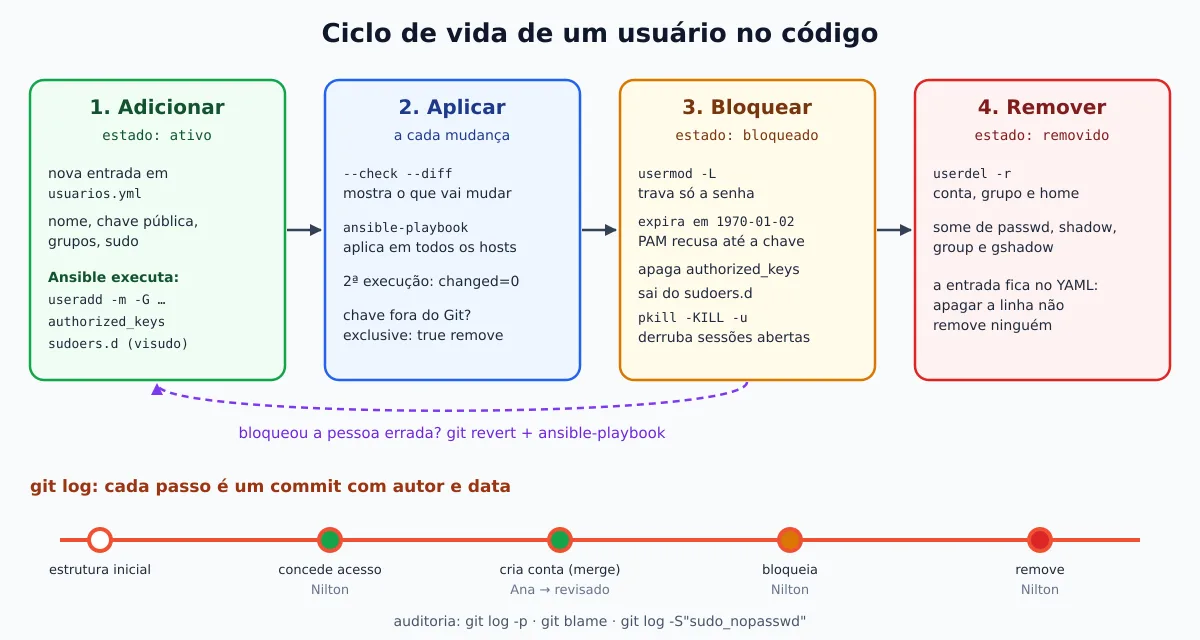
When someone leaves, the temptation is to delete the account right away. It's better to disable it first: the person loses access immediately, but the home, the crontabs, and the files remain there so you can check what needs to be transferred. Only after that comes the removal.
The usermod -L does not disable key-based login
This is the most common error. usermod -L (and passwd -l, and password_lock: true in Ansible) just puts an ! in front of the hash in /etc/shadow: invalid password. Login by key does not use a password. I tested each method in isolation, on both servers, with an account that only had an SSH key:
# senha já é "!" (conta criada sem senha): chave funciona
teste:!:20719:0:99999:7:::           -> login OK (Ubuntu e Debian)
# usermod -L teste
teste:!:20719:0:99999:7:::           -> login OK (Ubuntu e Debian)
# usermod -e 1 teste   (expira em 1970-01-02)
teste:!:20719:0:99999:7::1:          -> Connection closed (Ubuntu e Debian)
# usermod -s /usr/sbin/nologin teste
                                      -> "This account is currently not available."
With expiration, the server records the reason — it's the module pam_unix, in the account, phase, which refuses even after the key has been accepted:
sshd[307]: pam_unix(sshd:account): account teste has expired (account expired)
sshd[307]: fatal: Access denied for user teste by PAM account configuration [preauth]
This holds true because Ubuntu and Debian use UsePAM yes in sshd, and PAM checks the expiration date for any authentication method. The manual page for usermod warns: to lock the account, not just the password, also set the expiration to 1. And the shell nologin on its own is not enough either: it refuses the interactive shell, but the connection stays open for tunnels — someone ssh -N with the account in nologin stayed connected until I killed it.
That's why the playbook's bloqueado state does four things: locks the password, expires the account on 1970-01-02 (expires: 86400, one day after the Unix epoch), wipes the authorized_keys and kills that person's processes. The sudo template stops listing anyone who isn't ativo.
Blocking Bruno with an open session
With Bruno connected to the Ubuntu running an sleep 900:
git diff@@ -16,7 +16,7 @@ usuarios:
- ssh-ed25519 AAAAC3NzaC1lZDI1NTE5AAAAIKEvt3LKu4Ue9C2ewbKyC1F41f//kWyOoGLZ5RXeMJEq bruno@notebook
grupos: [adm] # lê os logs em /var/log
sudo_nopasswd: true # sudo sem senha, via /etc/sudoers.d
- estado: ativo
+ estado: bloqueado # saiu da equipe em 2026-09-23git commit -am "Bloqueia Bruno: saiu da equipe"
ansible-playbook usuarios.yml --diffTASK [Regras de sudo sem senha] ************************************************
--- before: /etc/sudoers.d/90-usuarios-ansible
+++ after: /root/.ansible/tmp/ansible-local-107075lrwl0p/tmpq25ijl7j/sudoers.j2
@@ -1,2 +1 @@
# Gerenciado pelo Ansible (repositório usuarios-linux). Não edite à mão.
-bruno ALL=(ALL:ALL) NOPASSWD: ALL
changed: [srv-debian]
--- before: /etc/sudoers.d/90-usuarios-ansible
+++ after: /root/.ansible/tmp/ansible-local-107075lrwl0p/tmpd2p_rq9_/sudoers.j2
@@ -1,2 +1 @@
# Gerenciado pelo Ansible (repositório usuarios-linux). Não edite à mão.
-bruno ALL=(ALL:ALL) NOPASSWD: ALL
changed: [srv-ubuntu]
TASK [Contas bloqueadas - trava a senha e expira a conta] **********************
changed: [srv-debian] => (item=bruno)
changed: [srv-ubuntu] => (item=bruno)
TASK [Contas bloqueadas - remove as chaves SSH] ********************************
--- before
+++ after
@@ -1,4 +1,4 @@
{
"path": "/home/bruno/.ssh/authorized_keys",
- "state": "file"
+ "state": "absent"
}
changed: [srv-debian] => (item=bruno)
--- before
+++ after
@@ -1,4 +1,4 @@
{
"path": "/home/bruno/.ssh/authorized_keys",
- "state": "file"
+ "state": "absent"
}
changed: [srv-ubuntu] => (item=bruno)
TASK [Contas bloqueadas - encerra processos e sessões abertas] *****************
changed: [srv-ubuntu] => (item=bruno)
TASK [Contas removidas - apaga usuário e home] *********************************
PLAY RECAP *********************************************************************
srv-debian : ok=8 changed=3 unreachable=0 failed=0 skipped=1 rescued=0 ignored=0
srv-ubuntu : ok=8 changed=4 unreachable=0 failed=0 skipped=1 rescued=0 ignored=0On Bruno's laptop, the session dropped immediately:
Connection to users-lab-ubuntu2404 closed by remote host.And, to prove that the expiration secures access even if someone returns the key by hand, I put the authorized_keys I deleted it and tried again:
bruno:!:20719:0:99999:7::1:
Account expires						: Jan 02, 1970
Your account has expired; please contact your system administrator.
Connection closed by 192.168.48.2 port 22
Same result on Debian 13. Before removing, look for what Bruno left outside of home — files in /srv, /var/www, crontab in /var/spool/cron/crontabs:
ansible servidores -m ansible.builtin.command -a "find / -xdev -user bruno -not -path '/home/bruno*'"
ansible servidores -m ansible.builtin.command -a "crontab -l -u bruno"
Here a FAILED is the good answer: the crontab -l exits with code 1 and the message “no crontab for bruno” when there is no crontab. In the lab there was nothing. Also back up the home, if he has anything of value.
Removing the account
The removal is another commit — and here the golden rule of the project: do not delete the YAML entry, change the state to removido.
sed -i 's/estado: bloqueado      # saiu/estado: removido       # saiu/' group_vars/all/usuarios.yml
git commit -am "Remove a conta do Bruno (bloqueada desde 2026-09-23)"
ansible-playbook usuarios.yml
TASK [Contas removidas - apaga usuário e home] *********************************
changed: [srv-debian] => (item=bruno)
changed: [srv-ubuntu] => (item=bruno)
PLAY RECAP *********************************************************************
srv-debian : ok=6 changed=1 unreachable=0 failed=0 skipped=3 rescued=0 ignored=0
srv-ubuntu : ok=6 changed=1 unreachable=0 failed=0 skipped=3 rescued=0 ignored=0The state: absent with remove: true is equivalent to userdel -r: deletes the account, the personal group, and the home. On both servers, Bruno disappeared from all files:
id: 'bruno': no such user
ls: cannot access '/home/bruno': No such file or directory
/etc/passwd:0
/etc/shadow:0
/etc/group:0
/etc/gshadow:0
/etc/sudoers.d/90-usuarios-ansible:0
If there is still a user process running, it userdel refuses to delete the account and Ansible fails on that task with “userdel: user … is currently used by process …” (I tested it) — yet another reason to go through the lock, which kills the processes first. Files left outside the home end up belonging to an “orphan” UID, which the next user created can inherit; hence the search with find -user before removal.
Why not just remove the entry? Because Ansible only manages what is on the list. I tested by removing Carla from the YAML and running the playbook: changed=0, and she kept logging in via SSH normally. Deleting the line does not remove anyone — it just makes Ansible forget that the account exists.
Auditing with git log
Now the question “who gave access to whom, and when?” has an answer in seconds:
git log --format="%h %ad %an %s" --date=short491d64d 2026-09-23 Nilton Remove a conta do Bruno (bloqueada desde 2026-09-23)
500ce95 2026-09-23 Nilton Bloqueia Bruno: saiu da equipe
7749b7e 2026-09-23 Nilton Merge: acesso da Carla (revisado por Nilton)
b49a9f8 2026-09-23 Ana Souza Cria conta da Carla (plantão, leitura de logs)
87268a9 2026-09-23 Nilton Concede acesso a Ana (sudo com senha) e Bruno (sudo sem senha)
16c8739 2026-09-23 Nilton Estrutura inicial: inventário, playbook e lista vazia de usuáriosThe full history of a person, with the diff of each state change:
git log -p -G"estado: (bloqueado|removido)" -- group_vars/all/usuarios.yml491d64d Nilton 2026-09-23 16:17:56 +0000
Remove a conta do Bruno (bloqueada desde 2026-09-23)
...
- estado: bloqueado # saiu da equipe em 2026-09-23
+ estado: removido # saiu da equipe em 2026-09-23
...
500ce95 Nilton 2026-09-23 16:17:28 +0000
Bloqueia Bruno: saiu da equipe
...
- estado: ativo
+ estado: bloqueado # saiu da equipe em 2026-09-23Who wrote each line of Carla's account:
git blame --date=short -L "/nome: carla/,+6" group_vars/all/usuarios.ymlb49a9f8d (Ana Souza 2026-09-23 21) - nome: carla
b49a9f8d (Ana Souza 2026-09-23 22) nome_completo: Carla Mendes
b49a9f8d (Ana Souza 2026-09-23 23) chaves:
b49a9f8d (Ana Souza 2026-09-23 24) - ssh-ed25519 AAAAC3NzaC1lZDI1NTE5AAAAIBVS+xmSmHpXvCptaasmycC0QDTcPDfQ6UaLpnNx9+ai carla@notebook
b49a9f8d (Ana Souza 2026-09-23 25) grupos: [adm] # só leitura de logs, sem sudo
b49a9f8d (Ana Souza 2026-09-23 26) estado: ativoAnd who granted passwordless sudo at any point in history — the -S searches for commits that added or removed the text:
git log -S"sudo_nopasswd: true" --format="%h %ad %an %s" --date=short -- group_vars/all/usuarios.yml87268a9 2026-09-23 Nilton Concede acesso a Ana (sudo com senha) e Bruno (sudo sem senha)The author of a commit is whatever the person configured in Git, so it's worth as much as you trust them. For serious auditing, require signed commits (git commit -S) and protect the branch main on the Git server, accepting only reviewed merges.
Git doesn't replace the server log, it complements it. The useradd, the usermod and the userdel record every operation in the journal, and sudo records what the user deploy executed from Ansible:
journalctl -t useradd -t usermod -t userdel | grep brunouseradd[926]: new user: name=bruno, UID=1003, GID=1004, home=/home/bruno, shell=/bin/bash, from=/dev/pts/1
usermod[2253]: change user 'bruno' expiration from 'never' to '1970-01-02'
userdel[2901]: delete user 'bruno'
userdel[2901]: removed group 'bruno' owned by 'bruno'
userdel[2901]: removed shadow group 'bruno' owned by 'bruno'The timestamp in the journal matches the commit: you can tie each change on the server to the commit that requested it.
Undoing a mistake with git revert
Locked the wrong person? The fix is the same flow in reverse. In the lab, I locked Carla on purpose, confirmed her login started failing, and undid it:
git commit -am "Bloqueia Carla"
ansible-playbook usuarios.yml        # Carla: Permission denied (publickey,password)
git revert --no-edit HEAD
ansible-playbook usuarios.yml --diff
[main 456bd14] Revert "Bloqueia Carla"
...
TASK [Contas ativas] ***********************************************************
changed: [srv-ubuntu] => (item=carla)
TASK [Chaves SSH autorizadas (somente as do repositório)] **********************
--- before: /home/carla/.ssh/authorized_keys
+++ after: /home/carla/.ssh/authorized_keys
@@ -0,0 +1 @@
+ssh-ed25519 AAAAC3NzaC1lZDI1NTE5AAAAIBVS+xmSmHpXvCptaasmycC0QDTcPDfQ6UaLpnNx9+ai carla@notebook
changed: [srv-ubuntu] => (item=carla)The account no longer expires again, the key is back, and Carla logged in again — and both the mistake and the correction remain in the history. One limitation: for accounts with a password (like Ana), the lock also locks the password with !, and the revert doesn't unlock it; in that case run usermod -U or set a new password. The playbook doesn't use password_lock: false on active accounts because, in an account with only a key, the usermod -U refuses (“unlocking the user’s password would result in a passwordless account”) and Ansible would mark changed on every run.
Trick: append doesn't remove anyone from a group
append: true protects groups that other roles have added (the docker, for example), but it has a cost: removing sudo from Ana's group list no removes Ana from the group. I tested: with grupos: [], the playbook gave changed=0 and the id ana kept showing 27(sudo). To revoke, you have two options:
- remove the group explicitly, once:
ansible servidores -m ansible.builtin.user -a "name=ana groups=ana,equipe append=false"(tested: Ana left thesudo); - or switch to
append: falseno playbook, if YAML becomes the single source of truth for the user's groups — then the list becomes exact, and any group added outside of it disappears.
It is the same danger as usermod -G without -a in the terminal, but the opposite: there you accidentally remove groups; here you think you removed them but you didn't.
Complete code
The project became a repository on GitHub, ready to clone: jniltinho/ansible-linux-users. There the code is organized into a reusable role, linux_users, with list validation before any change, integration tests on Ubuntu 24.04 and Debian 13 and CI on GitHub Actions. For those who just want the files from this post, they are also in a Gist.
The code in the repository and the Gist is in English, with the same steps as this post: usuarios becomes linux_users_accounts (in the Gist, users), estado becomes state, and the states ativo, bloqueado and removido became active, locked and removed. The example keys are public and were generated only for the lab, the IPs are from documentation, and the vault file appears as an example in plain text: encrypt yours before the first commit.
References
- ansible.builtin.user module
- ansible.posix.authorized_key module
- ansible.builtin.template module (validate parameter)
- Ansible Vault Guide
- usermod(8) and shadow(5)
Conclusion
With the user list in Git, server access no longer depends on memory: each account has a commit explaining why it exists, each sudo has an author, and each exit has a date. Ansible ensures that the servers match the repository — including deleting the key that someone added manually. Two lessons from the lab to take away: block before removing, and remember that usermod -L locks the password, not the account; what blocks the SSH key is expiration. For the fundamentals, go back to Getting Started with Ansible; for vault, roles, and larger cases, move on to Automating Linux Servers with Ansible. And, if Git is still new to you, start with Git made simple and fast.