

Managing a server by hand is easy. Managing ten, SSH-ing into one at a time, is asking for trouble. Ansible Ansible fixes that: you describe the desired state in YAML and it applies it across all servers, agentless, using just SSH and Python on the other end. This guide is the next step for those who already know how to install Ansible and run their first playbook. If you are starting from scratch, read our first steps with Ansible.
Here we will build a real project: inventory with groups, firewall, Nginx with template and handler that tests the configuration before reloading, password kept in the vault, and a rolling update that stops on its own if a server does not come back. All commands and outputs were tested on three Ubuntu 24.04 virtual machines with ansible-core 2.21.
Project structure
projeto/
├── ansible.cfg
├── inventario.ini
├── requirements.yml
├── group_vars/
│   ├── all/main.yml
│   └── web/
│       ├── main.yml
│       └── vault.yml        # criptografado
├── templates/
│   ├── site.conf.j2
│   ├── index.html.j2
│   └── app.env.j2
├── site.yml                 # estado desejado de todos os servidores
└── atualiza.yml             # atualização em ondas
The ansible.cfg in the root avoids repeating -i inventario.ini in every command:
[defaults]
inventory = inventario.ini
Careful with comments on the same line inside the ansible.cfg: in host_key_checking = True # comentário the integer value becomes a string that is not a valid boolean and Ansible starts reading False. Put comments on their own line, starting with # or ;.
Inventory with groups
Servers are split into groups, and a group can contain others (:children). So a variable defined in producao applies to web and database at the same time:
[web]
web1 ansible_host=10.0.10.11
web2 ansible_host=10.0.10.12

[db]
db1 ansible_host=10.0.10.21

[producao:children]
web
db

[producao:vars]
ansible_user=deploy
ansible_python_interpreter=/usr/bin/python3
Check the tree before running anything:
ansible-inventory --graph
@all:
  |--@ungrouped:
  |--@producao:
  |  |--@web:
  |  |  |--web1
  |  |  |--web2
  |  |--@db:
  |  |  |--db1
Each group's variables live in group_vars/, named after the group:
# group_vars/all/main.yml
---
pacotes_base:
  - htop
  - vim
  - unattended-upgrades
# group_vars/web/main.yml
---
dominio: exemplo.com.br
app_env: producao
app_db_senha: "{{ vault_app_db_senha }}"
Collections: ufw is not included in ansible-core
The module community.general.ufw is part of the community.general. The full package ansible already brings this collection, but whoever installed only the ansible-core need to install it. Declare the dependencies in requirements.yml:
---
collections:
  - name: community.general
ansible-galaxy collection install -r requirements.yml
ansible-galaxy collection list community.general
The complete playbook
The site.yml has two plays. The first applies to all servers: basic packages and firewall. The second only applies to the group web: Nginx, site, and application configuration file.
---
- name: Base de todos os servidores
  hosts: producao
  become: true
  tags: [base]
  tasks:
    - name: Instalar pacotes básicos
      ansible.builtin.apt:
        name: "{{ pacotes_base }}"
        state: present
        update_cache: true
        cache_valid_time: 3600

    - name: Liberar SSH no ufw antes de ativar o firewall
      community.general.ufw:
        rule: allow
        name: OpenSSH

    - name: Ativar o ufw bloqueando o resto por padrão
      community.general.ufw:
        state: enabled
        policy: deny
        direction: incoming

- name: Servidores web
  hosts: web
  become: true
  tags: [web]
  tasks:
    - name: Instalar o Nginx
      ansible.builtin.apt:
        name: nginx
        state: present

    - name: Liberar HTTP e HTTPS no ufw
      community.general.ufw:
        rule: allow
        port: "{{ item }}"
        proto: tcp
      loop: ["80", "443"]

    - name: Criar a raiz do site
      ansible.builtin.file:
        path: /var/www/{{ dominio }}
        state: directory
        mode: "0755"

    - name: Publicar a página inicial
      ansible.builtin.template:
        src: templates/index.html.j2
        dest: /var/www/{{ dominio }}/index.html
        mode: "0644"

    - name: Configurar o site
      ansible.builtin.template:
        src: templates/site.conf.j2
        dest: /etc/nginx/sites-available/{{ dominio }}.conf
        mode: "0644"
      notify: Nginx alterado

    - name: Ativar o site
      ansible.builtin.file:
        src: /etc/nginx/sites-available/{{ dominio }}.conf
        dest: /etc/nginx/sites-enabled/{{ dominio }}.conf
        state: link
      notify: Nginx alterado

    - name: Remover o site padrão
      ansible.builtin.file:
        path: /etc/nginx/sites-enabled/default
        state: absent
      notify: Nginx alterado

    - name: Garantir o Nginx ativo no boot
      ansible.builtin.service:
        name: nginx
        state: started
        enabled: true

    - name: Criar o diretório da aplicação
      ansible.builtin.file:
        path: /etc/meuapp
        state: directory
        mode: "0750"

    - name: Gravar as variáveis da aplicação, com a senha vinda do vault
      ansible.builtin.template:
        src: templates/app.env.j2
        dest: /etc/meuapp/app.env
        owner: root
        group: root
        mode: "0600"
      no_log: true

  handlers:
    - name: Testar a configuração do Nginx
      ansible.builtin.command: nginx -t
      changed_when: false
      listen: Nginx alterado

    - name: Recarregar o Nginx
      ansible.builtin.service:
        name: nginx
        state: reloaded
      listen: Nginx alterado
Three details deserve attention:
- The order of the firewall matters. First allow OpenSSH, then enable ufw with policy
deny. In the reverse order, Ansible drops its own connection and you lose access to the server. - Handlers com
listen. The three tasks that touch the configuration notify the same event,Nginx alterado. At the end of the play, the two handlers run once, in the order they were declared: firstnginx -t, then the reload. If the configuration is broken, the test fails and the reload does not happen, and Nginx keeps serving the previous version. no_log: truehides from the output the content of the task that writes the password. Without it, a-vor a--diffprints the secret in the terminal and in the CI log.
Jinja2 templates
A template is a file with variables. The same site.conf.j2 works for any domain:
# {{ ansible_managed }}
server {
    listen 80;
    server_name {{ dominio }} www.{{ dominio }};
    root /var/www/{{ dominio }};
    index index.html;

    location / {
        try_files $uri $uri/ =404;
    }
}
<!-- templates/index.html.j2 -->
<h1>{{ dominio }}</h1>
<p>Servido por {{ inventory_hostname }}</p>
# templates/app.env.j2
# {{ ansible_managed }}
APP_ENV={{ app_env }}
DB_PASSWORD={{ app_db_senha }}
The line {{ ansible_managed }} turns into a comment warning that the file is managed by Ansible, which helps anyone opening the file on the server and thinking about editing it by hand. If you need multiple versions of PHP behind that Nginx, the template is the right place for the blocks location. See how to put this together in Nginx and multiple PHP versions on Debian and Ubuntu.
Secrets with ansible-vault
The database password cannot sit in YAML open in Git. Store it in group_vars/web/vault.yml and encrypt the file:
cat > group_vars/web/vault.yml <<'EOF'
---
vault_app_db_senha: "troque-esta-senha"
EOF
ansible-vault encrypt group_vars/web/vault.yml
head -1 group_vars/web/vault.yml       # $ANSIBLE_VAULT;1.1;AES256
ansible-vault view group_vars/web/vault.yml
ansible-vault edit group_vars/web/vault.yml
The convention of prefixing with vault_ and referencing the variable in main.yml (app_db_senha: "{{ vault_app_db_senha }}") makes it visible, without opening the vault, which variables exist and where they come from.
For a one-off value, without creating a file, use encrypt_string and paste the result directly into the YAML:
ansible-vault encrypt_string 'meu-token' --name api_token
A gotcha that appears on first use: Ansible loads the vault.yml for any play that touches the group, even if no task uses the password. Running the playbook without providing the password fails before the first task:
[ERROR]: Attempting to decrypt but no vault secrets found.
Provide the password with --ask-vault-pass or point to a file outside the repository, with permission 600. The environment variable avoids repeating the option in every command and does not break the project for anyone who doesn't have the file:
export ANSIBLE_VAULT_PASSWORD_FILE=~/.config/ansible/vault-pass
Putting vault_password_file in ansible.cfg also works, but then the playbook fails on any machine where that file doesn't exist.
First run and idempotency
Before applying, validate the syntax and list what will run:
ansible-playbook site.yml --syntax-check
ansible-playbook site.yml --list-tasks
ansible-playbook site.yml
Summary of the first run in the lab:
RUNNING HANDLER [Testar a configuração do Nginx] ****
ok: [web1]
ok: [web2]

RUNNING HANDLER [Recarregar o Nginx] ****
changed: [web1]
changed: [web2]

PLAY RECAP ****
db1   : ok=4    changed=3    unreachable=0    failed=0
web1  : ok=17   changed=13   unreachable=0    failed=0
web2  : ok=17   changed=13   unreachable=0    failed=0
Now run it again. The second time nothing changes, and the handlers don't even appear, because no task notified:
db1   : ok=4    changed=0    unreachable=0    failed=0
web1  : ok=15   changed=0    unreachable=0    failed=0
web2  : ok=15   changed=0    unreachable=0    failed=0
That's it idempotency: Ansible only acts when the actual state differs from the declared one. That's why you can run the same playbook every night, and the changed non-zero becomes an alert that someone messed with the server outside of Ansible.
On the server, the result is as expected: ufw status verbose shows Default: deny (incoming) with 22, 80, and 443 allowed on the web servers and only OpenSSH on the database, and the /etc/meuapp/app.env is at -rw------- root root.
Simulate before applying: --check --diff
Changed the template? See the effect beforehand, on a single server and only on the web part:
ansible-playbook site.yml --tags web --limit web1 --check --diff
TASK [Configurar o site] ****
--- before: /etc/nginx/sites-available/exemplo.com.br.conf
+++ after: .../site.conf.j2
@@ -3,7 +3,7 @@
     listen 80;
     server_name exemplo.com.br www.exemplo.com.br;
     root /var/www/exemplo.com.br;
-    index index.html;
+    index index.html index.htm;
Check mode doesn't change anything on the server. The tags that we put in each play (base and web) let you run only part of the project, and the --limit restricts to a host or group. Together, they serve to test a change on one machine before the others.
Updating in waves (rolling update)
With servers behind a load balancer, nobody wants to update and restart all of them at the same time. The atualiza.yml updates one server at a time, restarts only if the system asks, and checks whether the site is back before moving on to the next one:
---
- name: Atualizar a frota web sem derrubar tudo
  hosts: web
  become: true
  serial: 1
  max_fail_percentage: 0
  tasks:
    - name: Atualizar os pacotes
      ansible.builtin.apt:
        upgrade: dist
        update_cache: true

    - name: Verificar se o sistema pede reinício
      ansible.builtin.stat:
        path: /var/run/reboot-required
      register: reinicio

    - name: Reiniciar se for preciso
      ansible.builtin.reboot:
        reboot_timeout: 600
      when: reinicio.stat.exists

    - name: Conferir se o site responde antes de seguir para o próximo
      ansible.builtin.uri:
        url: "http://{{ ansible_host }}/"
        status_code: 200
      delegate_to: localhost
      become: false
      register: saude
      retries: 5
      delay: 3
      until: saude.status == 200
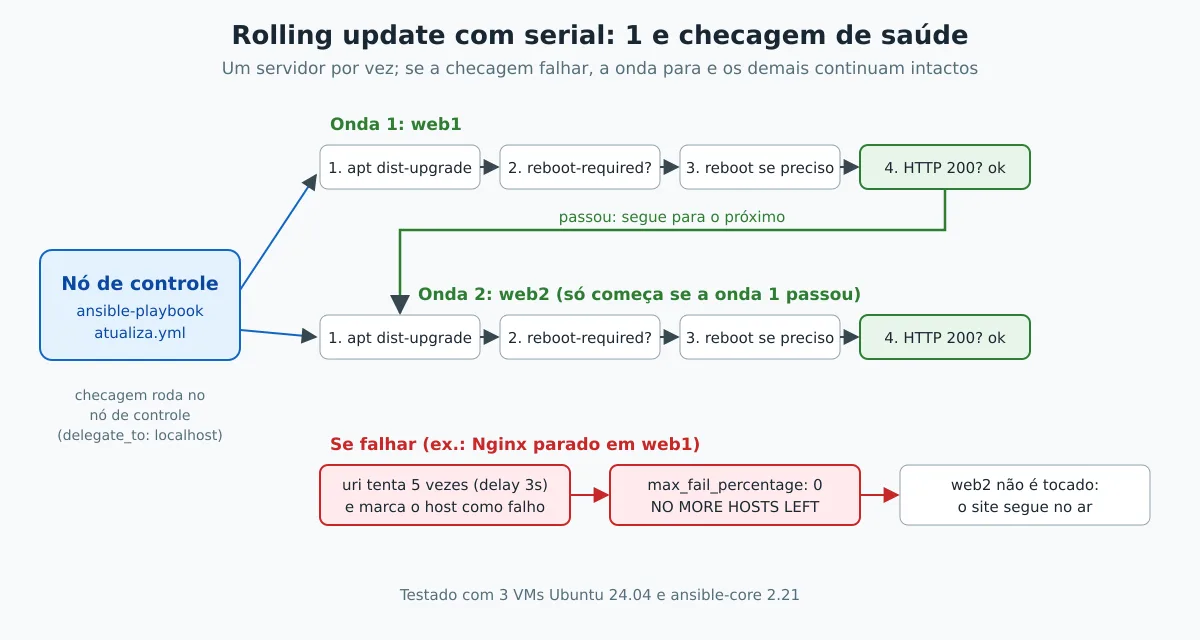
serial: 1processes one host at a time. It also accepts a percentage (serial: "25%") or a growing list, such as[1, 5, "50%"].max_fail_percentage: 0stops everything on the first failure.- The check runs on the control node (
delegate_to: localhost) from the same point of view as the person accessing the site, and tries five times before giving up.
Remember the vault: since atualiza.yml also touches the group web, it needs the password even without using any secret.
In the lab, web1 and web2 were updated and restarted one after the other. To see the protection working, we stopped the Nginx on web1 and ran it again:
FAILED - RETRYING: [web1 -> localhost]: Conferir se o site responde antes de seguir para o próximo (4 retries left).
...
fatal: [web1 -> localhost]: FAILED! => {"attempts": 5, "changed": false, "msg": "Status code was -1 and not [200]: Connection failure: [Errno 104] Connection reset by peer", "status": -1, ...}

NO MORE HOSTS LEFT ****
web2 wasn't touched and stayed running. A new run of site.yml restarted Nginx on web1, because the task state: started fixes the drift.
Quick commands (ad-hoc)
Not everything needs a playbook. For a one-off action, use the command ansible with a module:
# quanto tempo cada servidor está no ar
ansible producao -a "uptime -p"

# reiniciar o Nginx nos servidores web
ansible web -b -m ansible.builtin.systemd_service -a "name=nginx state=restarted"

# espaço em disco no banco
ansible db -a "df -h /"
If the action becomes routine, turn it into a playbook task: then it gains history in Git and idempotency.
Quality: ansible-lint
The ansible-lint flags modules without the full name (FQCN), implicit file permissions, unnamed tasks, and other issues that become bugs in production. Both playbooks in this post pass the production, profile, the strictest one:
pipx install ansible-lint
ansible-lint site.yml atualiza.yml
Put lint in CI. That way the error shows up in the pull request, before it reaches a server.
Next Steps
When the site.yml grows, break it into roles: one for the database, one for Nginx, and one for the application. A complete role example, with tests and CI, is the ansible-linux-users on GitHub, explained step by step in Linux users with Ansible: SSH keys, sudo, and history on Git. To go beyond the modules used here, refer to the official Ansible documentation. And if automation is your career path, Ansible is a central piece of the LPI DevOps Tools Engineer certification.
Start by automating a task you repeat every week. In a month, you won't remember how you lived without it.