
A mail server without TLS gives two things away for free to anyone in the middle: the contents of the messages and each user's password, which travels every time the phone checks the mailbox. And it's not just about privacy: since February 2024, Gmail has required a TLS connection from every the sender. Below, full SSL/TLS on a Postfix + Dovecot server — Let's Encrypt certificate, the right ports, minimum versions, authentication only with encryption, and protection against the attack that strips STARTTLS. Everything tested in a lab on Ubuntu 24.04 and on 26.04, which ship Dovecots of different versions, with different syntaxes.
Why the mail server needs TLS
- Passwords. IMAP, POP3, and authenticated SMTP send the username and password at the beginning of every session. Without TLS, anyone on the café Wi-Fi, the ISP, or a compromised router reads it in plain text. A single captured login gives access to the entire mailbox — and to the password reset of everything tied to that email.
- Content. Contracts, bills, invoices, medical exams: the entire message travels in cleartext between the client and the server and between servers.
- Deliverability. The Gmail's rules for any sender include “Use a TLS connection for transmitting email”, alongside SPF/DKIM and reverse DNS — the same package as the post about DKIM and DMARC in Postfix.
- Old protocol is broken protocol. A RFC 8996 (March 2021) says that TLS 1.0 and 1.1 “MUST NOT be used”. The minimum today is TLS 1.2, and TLS 1.3 is what modern clients negotiate.
The ports and the type of TLS for each one
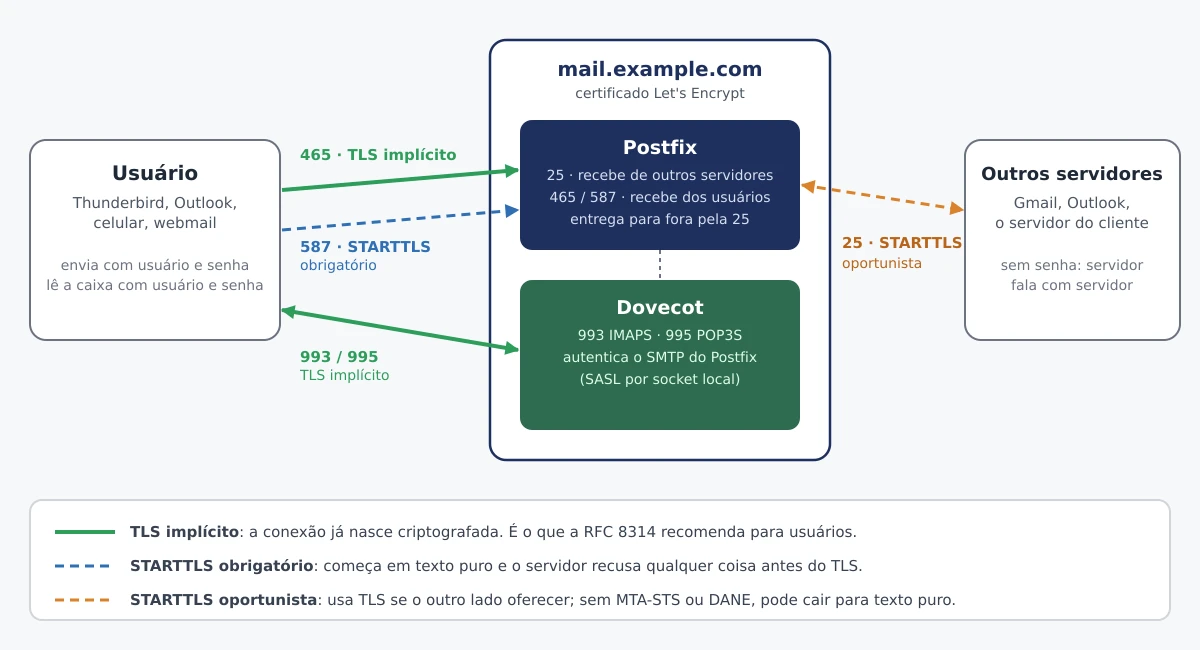
- 25 (SMTP) — server talking to server. Uses opportunistic STARTTLS (RFC 3207): the conversation starts in plain text and upgrades to TLS if both sides offer it. You can't require TLS here for everyone — much of the internet still delivers without it — so the standard is
may. - 465 (submissions) — the user submitting, with implicit TLS: the connection is born encrypted, like HTTPS.
- 587 (submission) — the user sending with STARTTLS, but required: the server refuses any command before TLS.
- 993 (IMAPS) and 995 (POP3S) — mailbox reading with implicit TLS.
- 143 and 110 — IMAP and POP3 without implicit TLS. Do not expose it to the internet.
A RFC 8314 (January 2018) recommends implicit TLS for sending and reading — 465, 993 and 995 — and accepts 587 with STARTTLS during the transition. In practice, offer 465 and 587: older clients and some phones still come configured on 587.
Versions in the lab
| Package | Ubuntu 24.04 | Ubuntu 26.04 | Debian 13 |
|---|---|---|---|
| postfix | 3.8.6 | 3.10.6 | 3.10.13 |
| dovecot-core | 2.3.21 | 2.4.2 | 2.4.1 |
| certbot | 2.9.0 | 4.0.0 | 4.0.0 |
| openssl | 3.0.13 | 3.5.5 | — |
The line that matters is the one from Dovecot: 2.4 changed the names of the TLS options and does not accept the configuration from 2.3 without an adjustment. I'll show both.
The certificate: Let's Encrypt on the server's name
The certificate must have the name that clients and other servers use to reach you — the one from the MX record and the one configured in Thunderbird and on the phone. In this post, mail.example.com. If you use aliases such as smtp. and imap., include them all in the same certificate with multiple -d.
Mail server usually doesn't have a website; the certbot standalone mode spins up a temporary web server on port 80 just for validation:
sudo apt install -y certbot
sudo ufw allow 80/tcp
sudo certbot certonly --standalone -d mail.example.com \
  --agree-tos -m postmaster@example.com --no-eff-email
If there is already an nginx or Apache on the machine, use --webroot -w /var/www/html instead of --standalone. The result goes into /etc/letsencrypt/live/mail.example.com/: fullchain.pem (certificate + intermediates) and privkey.pem (the key). The live and archive directories are readable only by root — and that's fine: Postfix and Dovecot open the certificate as root, before dropping privileges. Don't change the permissions.
Renewal and the deadlines that are getting shorter
The package installs the certbot.timer, which renews itself. What it doesn't do is notify Postfix and Dovecot: they keep serving the old certificate from memory until they reload. A deploy hook resolve — certbot only runs the scripts in that directory when a renewal succeeds:
sudo tee /etc/letsencrypt/renewal-hooks/deploy/recarrega-email.sh >/dev/null <<'EOF'
#!/bin/sh
systemctl reload postfix dovecot
EOF
sudo chmod 755 /etc/letsencrypt/renewal-hooks/deploy/recarrega-email.sh
sudo certbot renew --dry-run
On Ubuntu 24.04 (certbot 2.9), the hooks in that directory only run with the subcommand renew — which is what the timer uses, so automatic renewal works; on the first issuance, reload it manually.
This is no longer a minor detail. Let’s Encrypt announced that the default certificate of 90 days drops to 64 days on 10 February 2027 and to 45 days on 16 February 2028. And the CA/Browser Forum approved in 2025 a cap for all CAs: 200 days from 15 March 2026, 100 days starting March 2027 and 47 days starting March 2029. Manual renewal is over; renewal without reload is an expired certificate in production.
Postfix: TLS in main.cf
Debian and Ubuntu already install Postfix with TLS enabled, but with the self-signed certificate ssl-cert-snakeoil and no version floor on user ports. Swap the certificate and fix the rest:
sudo postconf -X smtpd_tls_cert_file smtpd_tls_key_file
sudo postconf -e \
  'smtpd_tls_chain_files = /etc/letsencrypt/live/mail.example.com/privkey.pem, /etc/letsencrypt/live/mail.example.com/fullchain.pem' \
  'smtpd_tls_security_level = may' \
  'smtpd_tls_auth_only = yes' \
  'smtpd_tls_mandatory_protocols = >=TLSv1.2' \
  'smtp_tls_security_level = may' \
  'smtp_tls_mandatory_protocols = >=TLSv1.2' \
  'smtpd_tls_loglevel = 1' \
  'smtp_tls_loglevel = 1' \
  'smtpd_tls_received_header = yes'
smtpd_tls_chain_files(Postfix 3.4+): the key first, then the chain. Replace the pairsmtpd_tls_cert_file/smtpd_tls_key_file, so thepostconf -Xbefore.smtpd_*is Postfix receiving;smtp_*is Postfix delivering to other servers. Both need configuration.security_level = mayon port 25, in both directions: TLS when the other side offers it. The user ports stay withencryptinmaster.cf, below.smtpd_tls_auth_only = yes: the server neither advertisesAUTHbefore TLS. Plain-text passwords become impossible, not just inadvisable.*_mandatory_protocols = >=TLSv1.2(Postfix 3.6+ syntax): applies where TLS is required — the user ports 465 and 587, below. In the lab, with this line, both refused TLS 1.1 (Cipher is (NONE)) on both Ubuntu.- Why not require TLS 1.2 on port 25 as well? Because there TLS is opportunistic and, if the handshake fails, Postfix delivers in plain text. Refusing TLS 1.0 from an old server doesn't block the message — it only makes it travel with no encryption at all, which is worse. That's why port 25 stays with the Postfix default (
smtpd_tls_protocolsandsmtp_tls_protocolsin>=TLSv1, without SSLv2/SSLv3). In the lab, the stock Postfix on 24.04 and 26.04 negotiated real TLS 1.0 and 1.1 on 25 — this is expected. Those who want truly strong TLS between servers use MTA-STS or DANE, at the end of the post. loglevel = 1records one line per TLS connection, andreceived_headerwrites the version and cipher in the headerReceived:of each message — useful for later proving that it arrived encrypted.
Postfix: ports 465 and 587 in master.cf
The /etc/postfix/master.cf in the package already has both entries commented out. Uncomment or add, using in the 5th column the same value as the line smtp inet in your file (y in 24.04, which runs the smtpd in chroot; n in 26.04):
submission inet n       -       y       -       -       smtpd
  -o syslog_name=postfix/submission
  -o smtpd_tls_security_level=encrypt
  -o smtpd_sasl_auth_enable=yes
  -o smtpd_client_restrictions=permit_sasl_authenticated,reject
  -o smtpd_recipient_restrictions=permit_sasl_authenticated,reject
submissions inet n      -       y       -       -       smtpd
  -o syslog_name=postfix/submissions
  -o smtpd_tls_wrappermode=yes
  -o smtpd_tls_security_level=encrypt
  -o smtpd_sasl_auth_enable=yes
  -o smtpd_client_restrictions=permit_sasl_authenticated,reject
  -o smtpd_recipient_restrictions=permit_sasl_authenticated,reject
smtpd_tls_security_level=encrypt makes TLS mandatory — that's what activates the smtpd_tls_mandatory_protocols — and smtpd_tls_wrappermode=yes is the implicit TLS of 465. In both, only those who authenticated get through. Dovecot checks the password via SASL:
sudo postconf -e 'smtpd_sasl_type = dovecot' 'smtpd_sasl_path = private/auth'
sudo postfix check && sudo systemctl restart postfix
The path private/auth is relative to /var/spool/postfix and works both with and without chroot.
Dovecot 2.3 (Ubuntu 24.04)
Create /etc/dovecot/conf.d/99-tls.conf — the 99 ensures it is read last and takes precedence over the 10-ssl.conf of the package:
ssl = required
ssl_cert = </etc/letsencrypt/live/mail.example.com/fullchain.pem
ssl_key = </etc/letsencrypt/live/mail.example.com/privkey.pem
ssl_min_protocol = TLSv1.2
ssl_prefer_server_ciphers = yes
disable_plaintext_auth = yes
In 2.3, the < before the path is mandatory: it says “read the contents of this file”. Without it, Dovecot tries to use the path itself as the certificate.
Dovecot 2.4 (Ubuntu 26.04 and Debian 13)
The same file, with the new names:
ssl = required
ssl_server_cert_file = /etc/letsencrypt/live/mail.example.com/fullchain.pem
ssl_server_key_file = /etc/letsencrypt/live/mail.example.com/privkey.pem
ssl_min_protocol = TLSv1.2
auth_allow_cleartext = no
ssl_cert/ssl_keybecamessl_server_cert_file/ssl_server_key_file, with a pure path, without<.disable_plaintext_auth = yesbecame an officialauth_allow_cleartext = no(which is already the default).ssl_prefer_server_ciphersbecame an officialssl_server_prefer_ciphers, andssl_dhbecame an officialssl_server_dh_file.- The
dovecot.confmust start withdovecot_config_versionand havingdovecot_storage_version— the package already includes it. A configuration copied from a server 2.3 will not come up: see the migration guide 2.3 → 2.4.
The authentication socket for Postfix (2.3 and 2.4)
In /etc/dovecot/conf.d/99-postfix-auth.conf, the same in both versions:
service auth {
  unix_listener /var/spool/postfix/private/auth {
    mode = 0660
    user = postfix
    group = postfix
  }
}
sudo doveconf -n >/dev/null && echo config OK
sudo systemctl restart dovecot
ssl = required with non-plaintext authentication makes Dovecot refuse login outside TLS. In the lab, coming from another machine on port 143:
# Dovecot 2.4
a1 NO [PRIVACYREQUIRED] Cleartext authentication disallowed on non-secure (SSL/TLS) connections.
# Dovecot 2.3 (POP3 na 110)
-ERR [AUTH] Plaintext authentication disallowed on non-secure (SSL/TLS) connections.
Be careful when testing: Dovecot considers connections from the server itself 127.0.0.1. to be safe. Login without TLS from the server works — the test that matters is from another machine.
Firewall
sudo ufw allow 25,465,587,993,995/tcp
Keep 143 and 110 closed to outsiders. Those who use webmail on the same machine access it via localhost; external clients go through 993 and 995.
Testing each port
The openssl s_client shows version, cipher, and whether the certificate chain was verified:
openssl s_client -brief -starttls smtp -connect mail.example.com:25  </dev/null
openssl s_client -brief -connect mail.example.com:465 </dev/null
openssl s_client -brief -starttls smtp -connect mail.example.com:587 </dev/null
openssl s_client -brief -connect mail.example.com:993 </dev/null
openssl s_client -brief -connect mail.example.com:995 </dev/null
Protocol version: TLSv1.3
Ciphersuite: TLS_AES_256_GCM_SHA384
Verification: OK
That was the output on all five ports, on both Ubuntu versions. To confirm that old TLS is refused on the user ports, force the version — and look at the cipher, not the protocol line, which the openssl prints even when the handshake fails:
openssl s_client -tls1_1 -cipher 'DEFAULT:@SECLEVEL=0' \
  -connect mail.example.com:465 </dev/null 2>&1 | grep 'Cipher is'
# Cipher is (NONE)   ← recusado, como deve ser
Authenticated submission, verifying the certificate, with the swaks:
sudo apt install -y swaks
swaks --server mail.example.com:465 --tlsc --tls-verify \
  --auth PLAIN --auth-user ana --from ana@example.com --to voce@gmail.com
=== TLS started with cipher TLSv1.3:TLS_AES_256_GCM_SHA384:256
<~  235 2.7.0 Authentication successful
<~  250 2.0.0 Ok: queued as 4D83AB47D87
Replace :465 --tlsc by :587 --tls to test the other port. On 587, without STARTTLS, Postfix responds 530 5.7.0 Must issue a STARTTLS command first to any command — and the EHLO not even lists AUTH.
For the server-to-server side, Postfix brings the posttls-finger, which connects as Postfix would connect to an MX and reports the trust level obtained:
posttls-finger -c -P /etc/ssl/certs "[mail.example.com]:25"
The result ends in Verified TLS connection established when the name matches the certificate and the chain is valid. Untrusted indicates an unknown chain or a different name — in the lab, this appeared when connecting by IP instead of the name. For a complete analysis of ciphers and vulnerabilities, the testssl.sh (GPLv2) accepts --starttls smtp; and the internet.nl tests STARTTLS, DANE, and DNSSEC of your domain over the internet.
The attack that removes STARTTLS
The weak point of the 25 port is the “opportunist” itself. STARTTLS is advertised in clear text; anyone in the middle can remove the line 250-STARTTLS from the response, and the sender, configured with may, delivers in clear text thinking the other side doesn't support TLS. On ports 587 and 993 this doesn't happen, because TLS is mandatory and the connection simply drops.
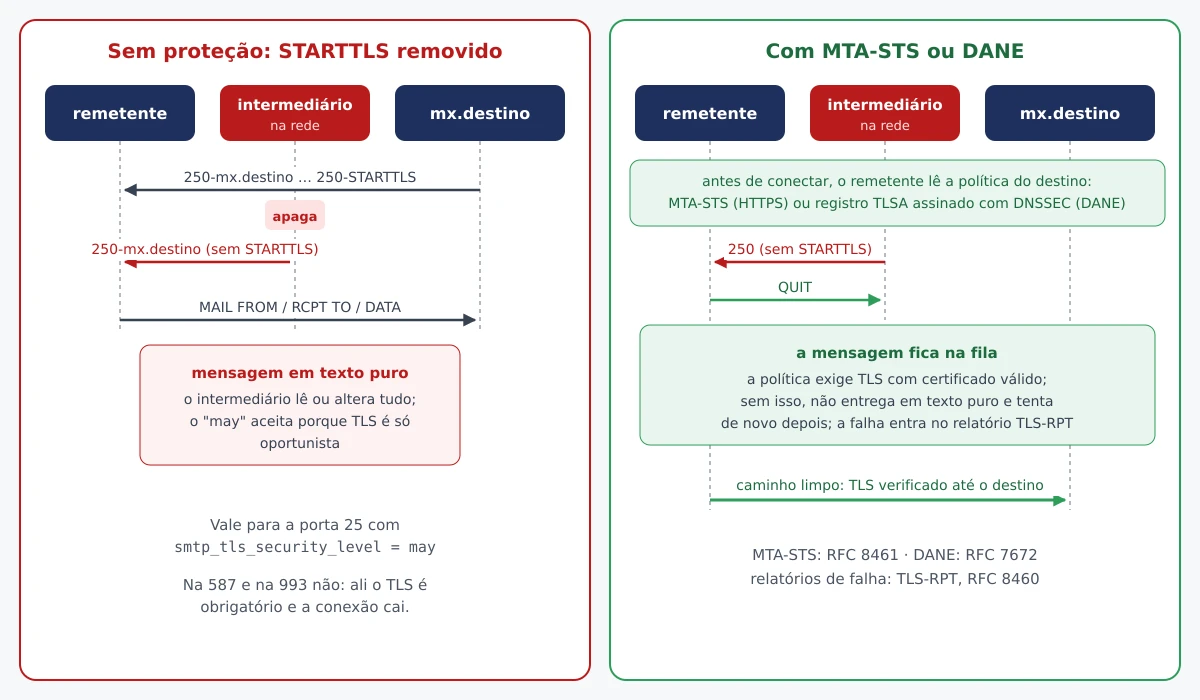
Two solutions that protect the messages that arrive at your domain:
- MTA-STS (RFC 8461): you publish, via HTTPS, a policy stating “my MX servers require TLS with a valid certificate.” Senders that implement the standard will then refuse to deliver without it.
- DANE (RFC 7672): the MX's certificate is pinned in a TLSA record signed with DNSSEC. It requires DNSSEC on the domain.
MTA-STS is the simplest to get started with. Two records and a file:
_mta-sts.example.com.   IN TXT  "v=STSv1; id=20260923T120000;"
_smtp._tls.example.com. IN TXT  "v=TLSRPTv1; rua=mailto:tls-reports@example.com"
And in https://mta-sts.example.com/.well-known/mta-sts.txt, served with a valid certificate:
version: STSv1
mode: testing
mx: mail.example.com
max_age: 604800
Start with mode: testing: senders deliver normally, but send failure reports to the address in the record _smtp._tls (TLS-RPT, RFC 8460). With no surprises for a few weeks, switch to mode: enforce and change the id of the TXT record — that's the change of id that tells senders to look up the policy again. Each MX of the domain must be on a line mx:.
To protect messages that leave, Postfix knows how to use DANE on the sender side: smtp_dns_support_level = dnssec and smtp_tls_security_level = dane. Destinations with a TLSA record start requiring verified TLS; those without a record continue with may. This depends on a local resolver that validates DNSSEC (unbound, for example) — without it, do not enable it.
What usually breaks
- Client complains about an invalid certificate — it is configured with a name that is not in the certificate (
imap.example.com, the IP, the server's old name). Issue it with all the names used, or standardize the clients. - It works in Thunderbird but fails on another server — you used
cert.peminstead offullchain.pemand missed the intermediate. Browsers and some clients complete the chain on their own; mail servers do not. - The certificate expired, but the renewal ran — the deploy hook was missing and the service kept using the old certificate in memory.
openssl s_client ... | openssl x509 -noout -enddateshows what is actually being served. - Dovecot does not start after upgrading to 26.04 — configuration 2.3 in 2.4.
doveconf -npoints to the line. certbot --standalonefailure — port 80 is occupied by a web server or blocked by the firewall. Use--webroot.- Old clients stop connecting after requiring TLS 1.2 — very old mail systems and clients, without TLS support 1.2. It is the right price; TLS 1.0 is forbidden by RFC 8996.
- Nothing goes out on port 25 — many cloud providers block outgoing 25 by default. It is not TLS: it is a request for clearance in the provider's panel.
Summary
Valid certificate on the MX name, renewal with reload, TLS 1.2 as the floor on everything that carries a password (465, 587, 993, 995), port 25 opportunistic as it should be, password only inside TLS, 465/587/993/995 open and 143/110 closed. With this the server is up to date; with MTA-STS, it also starts to protect what arrives. The next steps of the same stack: DKIM and DMARC in Postfix, the panel go-postfixadmin for the virtual mailboxes and the story of the pieces in The history of Postfix and The history of Dovecot.