
A terminal for SSH, another program for files, an RDP client, a VNC window, and a list of servers scattered across notes. Anyone managing infrastructure knows that collection of windows. rustXterm proposes bringing these tasks together in a native application: remote sessions in tabs, local terminal, file transfer, tunnels, and monitoring — without Electron.
The version 0.4.0 adds an important detail for everyday use: the + button also opens the shell of the machine itself. This way, the same application can handle both local work and connections to servers. Let's explore the features, install it on Linux, and understand where security, automation, and MCP come in.
jniltinho, account of the LinuxPro author; the text is a technical presentation, not an independent review. The analysis considers the release 0.4.0, published on 15/10/2026, commit 85cc8fb2c3fa1b0723768a373c4b43b9ca1ad71f. The tests in this article were isolated, without accessing real servers or personal configurations.More than a terminal emulator
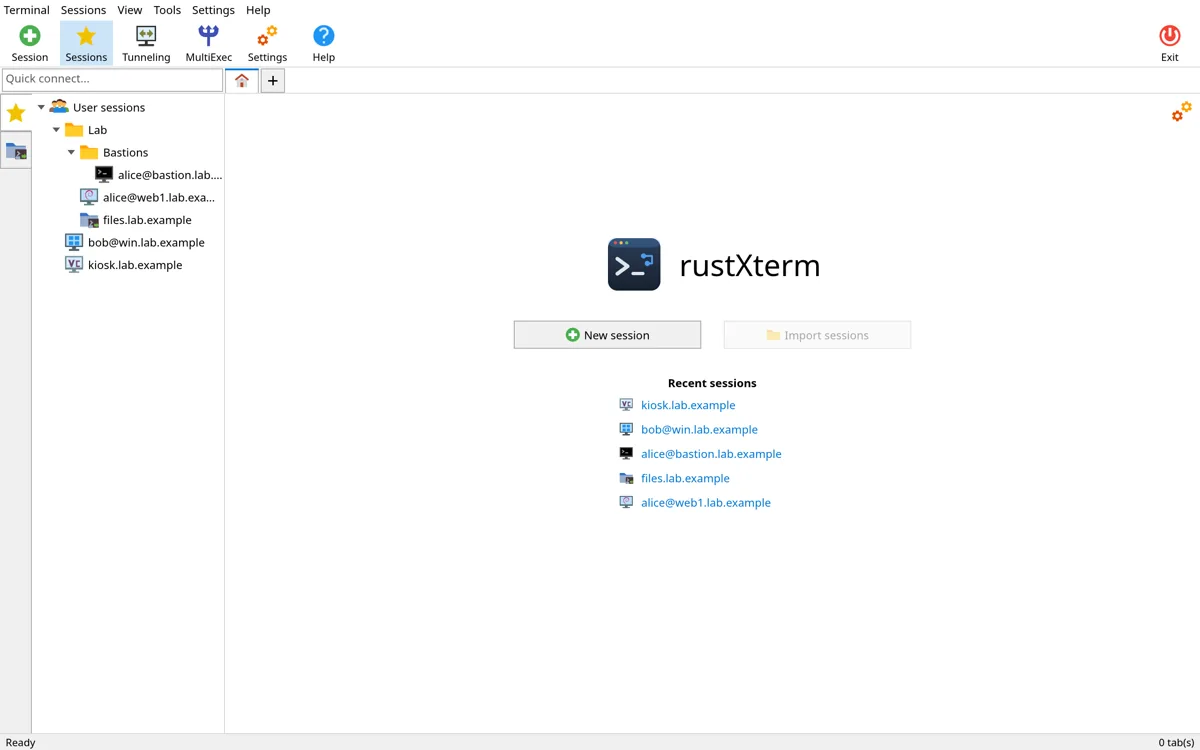
The focus of rustXterm is to be an administration workbench. It combines different protocols with a session tree, colored folders, tabs, per-connection configurations and light, dark, or system-following themes.
| Area | What it offers | Usage example |
|---|---|---|
| SSH | Terminal, different authentication methods, jump hosts, and auxiliary channels. | Manage servers and traverse a bastion. |
| SFTP | Side panel and file transfer. | Download a log without switching apps. |
| FTP/FTPS | File tabs in two panels; explicit or implicit TLS. | Access a legacy transfer service. |
| RDP/VNC | Remote desktop inside a tab; VNC can also use SSH. | Switch between Linux console and remote desktop. |
| Telnet/Serial | Legacy connections and serial consoles with command-line parameters. | Work in a lab or on an equipment console. |
| Local terminal | Machine shell via button + or Ctrl+Shift+T. |
Use Git, scripts, and local tools alongside remote sessions. |
| Tunnels | Local, remote, and dynamic SOCKS5 forwarding. | Reach a service through an authorized SSH connection. |
| CLI/MCP | Controlled session query and operation. | Automate diagnostics or integrate an agent. |
This is reminiscent of the type of integrated workflow popularized by MobaXterm, but it does not imply complete feature parity or compatibility with all of its formats. rustXterm has its own architecture and is still on the 0.x line.
Architecture: Rust, native interface and separate protocols
The interface uses egui/eframe with rendering via wgpu. The terminal model relies on alacritty_terminal; SSH uses russh; RDP uses IronRDP. The project does not bundle a web application inside Electron.
The code is organized into crates: domain and platform contracts at the base, storage and terminal above them, protocol adapters, command engine, and finally interface and agent integration. The GUI and CLI share command contracts, rather than each path inventing its own implementation.
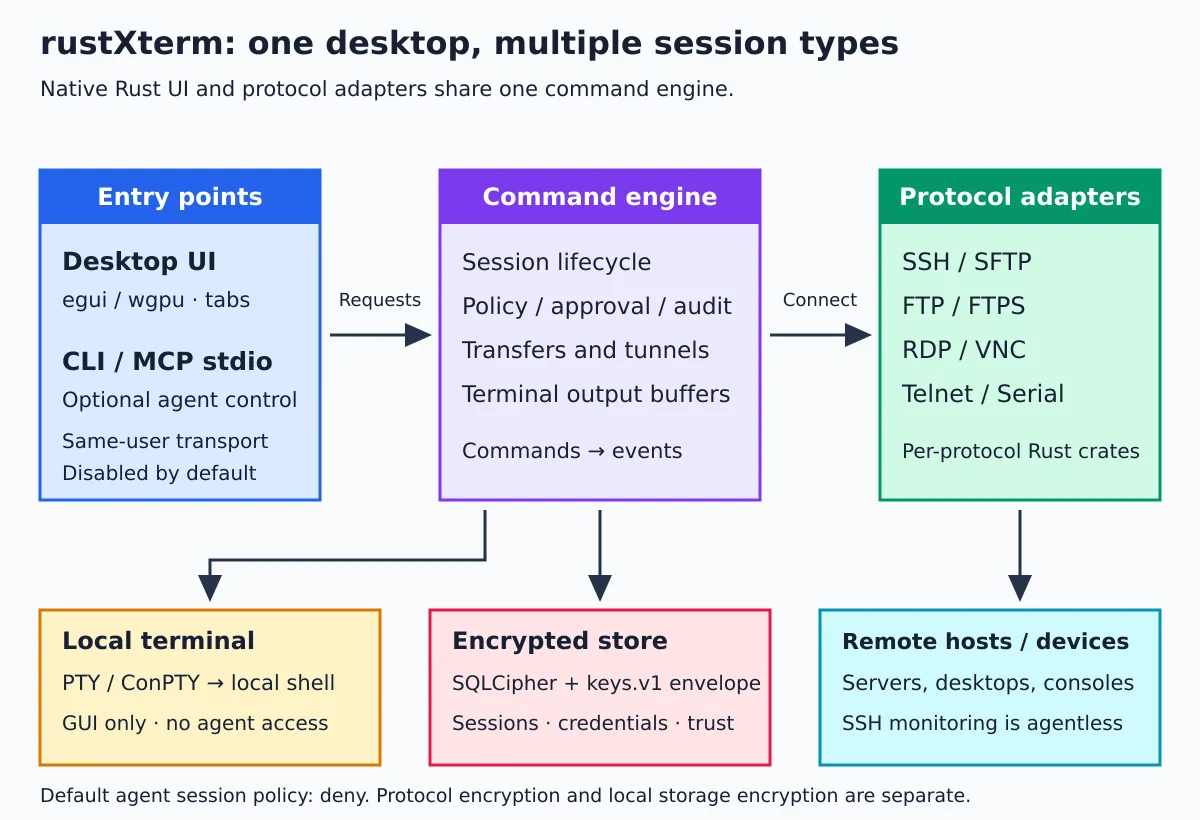
There is a layer check, cargo xtask layers, to prevent improper architectural dependencies. The development guide explains this separation. To understand the language behind the project, see also The history of the Rust language.
“Native” is not a benchmark: means an implementation and distribution choice. We do not measure in this article any memory or speed advantage over other terminals; that kind of comparison needs its own scenario and methodology.
Quick installation on Linux
The examined release provides binary and packages for Linux x86_64 with glibc 2.31 or newer. This is not a Linux ARM package nor a musl distribution like Alpine. The interface needs an X11 or Wayland session and a usable graphics backend.
The straightforward way is to download the portable binary, verify its checksum, and install it only for your user:
version=0.4.0
asset="rustxterm-${version}-x86_64"
base="https://github.com/jniltinho/rustXterm/releases/download/v${version}"

# A cadeia para no primeiro erro, inclusive se o checksum não conferir.
mkdir -p "$HOME/Downloads/rustxterm-${version}" &&
cd "$HOME/Downloads/rustxterm-${version}" &&
curl -fL --retry 3 "$base/$asset" -o "$asset" &&
curl -fL --retry 3 "$base/SHA256SUMS" -o SHA256SUMS &&
sha256sum --check --ignore-missing SHA256SUMS &&
install -Dm755 "$asset" "$HOME/.local/bin/rustxterm" &&
export PATH="$HOME/.local/bin:$PATH" &&
rustxterm --version &&
rustxterm --self-test &&
rustxterm
There is no need to install Rust to use the release. The checksum helps detect corruption or a download different from the published one; it does not replace an independent verification of the source's authenticity. Always download from official repository.
If the command vanishes when you open another terminal, include ~/.local/bin in PATH of your shell. On the first graphical launch, the application may also create its menu entry and icon for the user, when a system-wide entry does not exist.
AppImage and tar.gz file
The AppImage is another option. However, “portable” does not mean every environment can mount it automatically. In our FUSE-less container, direct execution failed; extraction worked, and the extracted application went through the same six self-tests.
# Depois de baixar o AppImage e conferir seu SHA-256:
chmod +x rustxterm-0.4.0-x86_64.AppImage
./rustxterm-0.4.0-x86_64.AppImage

# Alternativa sem montagem FUSE:
./rustxterm-0.4.0-x86_64.AppImage --appimage-extract
./squashfs-root/AppRun --self-test
./squashfs-root/AppRun
Extract to a dedicated folder, to avoid confusing the directory squashfs-root with another installation. The tar.gz includes a binary, file .desktop, icon, and license notices.
First connection: vault, SSH and organization
- Set the master password. It protects the vault of sessions and credentials. Keep it safe; do not rely on a “forgot my password” option to decrypt your data.
- Create a session in New session. Choose the protocol, host, user, and port. The quick connect field also accepts
usuario@host. - Choose the authentication. SSH offers password, public key, SSH agent, and keyboard-interactive depending on the server.
- Check the fingerprint. Only accept a host key after confirming it matches the correct destination.
- Organize by environment. Separate folders for lab, staging, and production reduce the chance of operating on the wrong host.
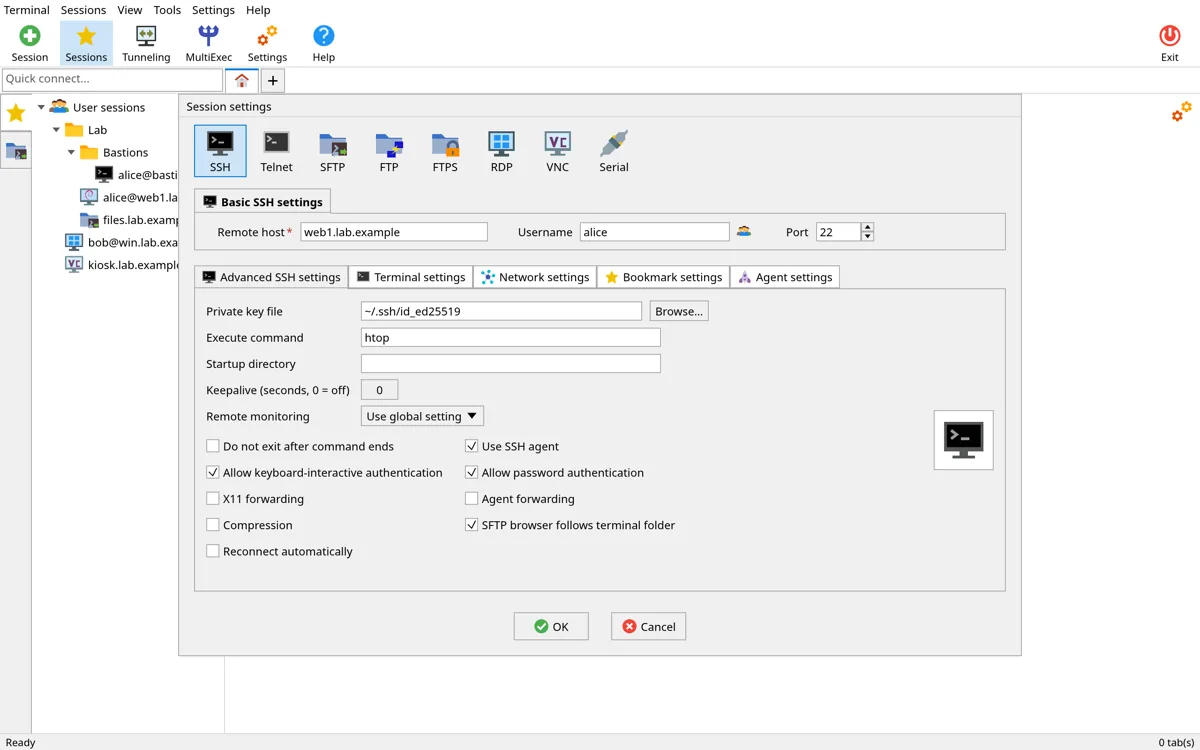
The client consults the trust sources planned by the project, including ~/.ssh/known_hosts and own records. Changed or revoked keys are refused. In the analyzed implementation, SSH host certificates are not supported; do not confuse user public key support with support for a CA infrastructure for hosts.
If you still use passwords on all connections, our guide on SSH authentication keys helps understand the model — but security also depends on protecting the private key and validating the server.
SFTP, monitoring and tunnels in the same flow
A practical convenience is the SFTP panel alongside the SSH session. It can follow the directory you are working in on the shell, list files, and allow transfers without switching to another client. There is also a per-tab transfer list, with actions for downloaded files.
Remote monitoring shows information such as CPU, memory, disk, network, and uptime using the SSH connection. It does not require installing a dedicated monitoring agent on the server, but it still depends on the remote account's permissions and the information the host makes available. It is a quick operational view, not a replacement for Prometheus or historical observability.
Local, remote, and SOCKS5 tunnels help you reach services through the infrastructure's authorized paths. The bind pattern in 127.0.0.1 avoids exposing a listener unnecessarily. Before changing this to other interfaces, understand who will be able to access the forwarded port.
FTP is not FTPS, and neither is SFTP. The local encrypted vault does not turn FTP or Telnet into secure protocols on the network. Prefer SSH/SFTP or protected alternatives; use unencrypted protocols only in environments where the risks are known and controlled.
Local terminal: what arrived in 0.4.0
The button + after the last tab, or Ctrl+Shift+T, opens the local shell. On Linux, the application picks a valid shell from $SHELL, of the login shell or, as a fallback, /bin/sh, usually starting in the home folder.
The local tab does not become a saved remote session, does not automatically enter the connection history, and does not write its own log file. This does not prevent the shell from keeping its normal history or programs run in it from writing files. If you want to keep the visible output, use the save terminal text action.
Closing the tab ends the shell and processes that remain attached to your session. There is an important limitation on Linux: a program that deliberately detaches itself from the session, for example with daemonization mechanisms, can keep running. Do not treat the terminal as a sandbox.
The release also adds terminal context menu, glyph alignment adjustments to the physical pixel grid, and graphics startup recovery. The changes are in the release notes.
CLI and MCP: automation with a permission boundary
The same executable provides CLI and MCP server. Queries to saved data have an offline path; operations on tabs depend on the open application and agent control being enabled. “Offline” does not eliminate vault protection: access must respect the unlock state and the available credentials.
# Consulte a ajuda sem alterar configurações.
rustxterm --help
rustxterm sessions list --help

# Com o cofre acessível:
rustxterm sessions list --json

# Com a GUI aberta, controle habilitado e política permitindo:
rustxterm open lab-web
rustxterm tabs list --json

# Troque 3 pelo ID real retornado para a aba remota.
rustxterm send 3 'uptime' --enter
rustxterm wait 3 'load average' --timeout 10s
rustxterm read 3 --lines 20

# Transferência depende também do workspace autorizado para arquivos locais.
rustxterm files get 3 /var/log/syslog syslog.txtlab-web, the ID 3 and the log file are examples: create the session, consult the tabs, and adjust the paths to your host. Not every distribution uses /var/log/syslog, and the remote account may not have permission to read it.
An MCP client can register the server like this, adapting the format to the client and using the full executable path when necessary:
{
  "mcpServers": {
    "rustxterm": {
      "command": "rustxterm",
      "args": ["mcp"]
    }
  }
}
In the analyzed version, the interface documents 17 tools in the mode with GUI and five read tools in offline mode. We confirmed the MCP initialization and the five offline tools in the lab: list_sessions, show_session, list_folders, list_tunnels and export. We did not test all commands of all remote sessions in this article.
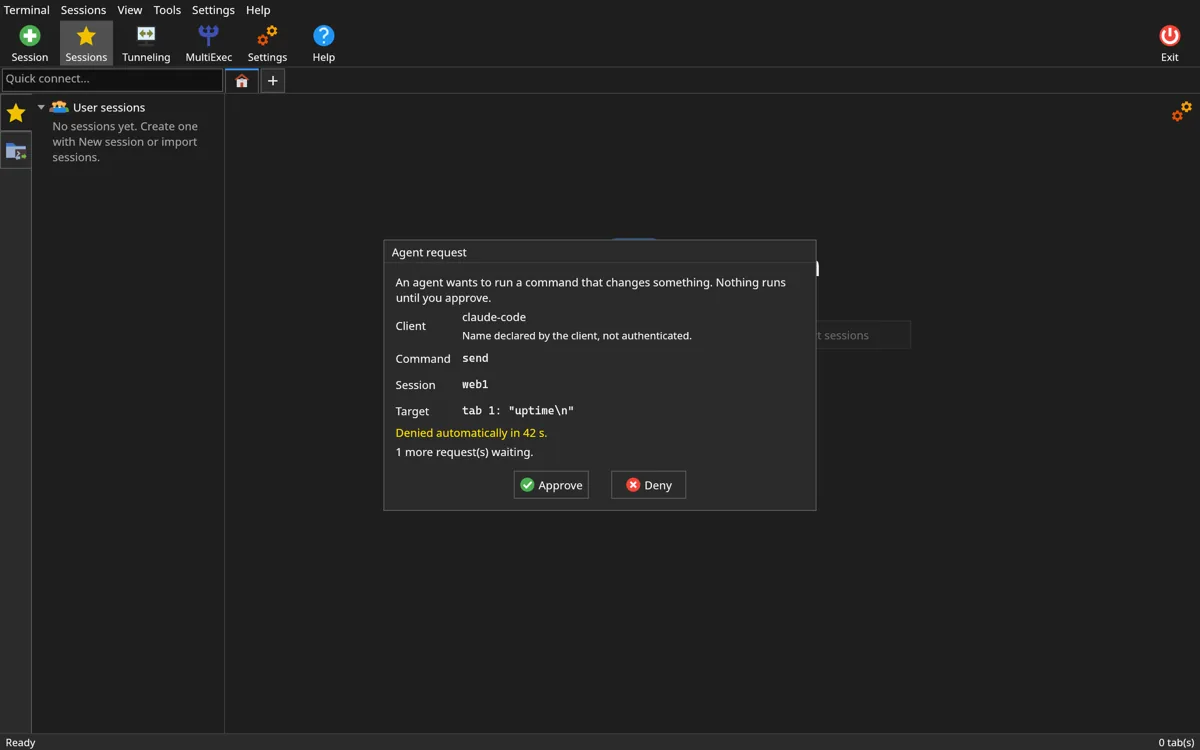
The control stays disabled by default. New sessions begin with policy deny; there is also ask and allow. The implementation distinguishes operation types, content read permissions, and write effects: ask confirms write effects; content reading also requires its specific permission, including under allow. Do not assume every query generates a confirmation.
Local terminal is not available to agents. CLI and MCP can see its existence in the tab listing, but are not authorized to read, type, or close it. The project also prevents an agent MultiExec broadcast from writing to local tabs.
For users, AI assistants in the terminal, this difference matters: enabling MCP is granting capabilities, not simply improving the interface. A terminal output may contain secrets or malicious instructions; retrieved content should continue to be treated as data, and not as authorization to execute actions.
Vault security and limits that cannot be forgotten
Sessions, credentials, and sensitive records are stored in SQLCipher. The database key is protected by an envelope keys.v1, with Argon2id and XChaCha20-Poly1305; there may be auxiliary unlocking by the desktop keyring. The storage model explains this separation.
- Back up the set. Database and key envelope must remain consistent; copying only one of them may not be enough.
- Protect the master password. There is no reset that magically recovers encrypted data without a valid unlock mechanism.
- Exporting is not a backup of the vault. The sessions TOML excludes credentials and serves a different purpose.
- Disk encryption does not protect everything. Open sessions, clipboard, downloaded files, and the compromised computer remain risk surfaces.
- MultiExec deserves attention. A command sent to multiple tabs also multiplies the impact of an error. Use it first in a lab and check the selected destinations.
- Cloud AI has its own boundary. If an agent receives logs or results via MCP, that data may enter the context sent to the model provider.
Before using automation in production, test with a least-privilege account, lab destination, and restrictive policy. The application has checks and auditing; this does not amount to a security certification.
Import sessions from MobaXterm
The importer reads bookmarks from a file MobaXterm.ini, offers a preview and reports ignored entries. Passwords are not imported. This avoids confusing connection migration with transfer of a proprietary vault.
rustxterm import mobaxterm-ini MobaXterm.ini

# Exportação sem credenciais; o arquivo ainda contém metadados de infraestrutura.
rustxterm export --out sessoes-rustxterm.toml
Review hosts, protocols, ports, jump hosts, and private key paths before connecting. Also store the TOML carefully: internal names, users, and addresses are still sensitive information, even without passwords.
Themes, fonts and video issues
The interface offers light, dark, and system themes. The terminal includes fonts such as Cascadia Mono, JetBrains Mono, Hack, and DejaVu Sans Mono, as well as cursor and scrollback options. Adjust font size and interface scale to your monitor; “more pixels” does not make up for a tiny font.
Non-secret settings are kept in ~/.config/rustxterm/config.toml; data is normally kept in ~/.local/share/rustxterm/. There are variables RXT_* and support for --env-file, but passwords and keys should not be placed in a text configuration file.
# Uma execução no tema escuro
RXT_THEME=dark rustxterm

# Diagnóstico de inicialização gráfica
rustxterm --safe-gpu

# Seleção explícita do backend, quando disponível no ambiente
WGPU_BACKEND=gl rustxterm
The 0.4.0 searches for a safer backend after a driver failure during startup. --safe-gpu requests software rendering for that run; it does not mean faster GPU acceleration. In X11/Xwayland, a missing library like libxkbcommon-x11 can also prevent opening — check the README requirements before blaming the application.
Maturity and what we verified
It is a new project in public distribution and still in the 0.x series. The 0.4.0 release has Linux binaries and Windows x86_64 builds in preview; there is no equivalent macOS release among the examined artifacts. Having separate platform crates makes evolution easier, but it does not turn a planned platform into delivered support.
There are positive signs: verified layers, pinned dependencies, unit and interface tests, a protocols lab, and license and advisory checks. On the release commit, we consulted the workflows ci and release, both completed successfully. This does not mean we repeated the entire CI.
| Test of this article | Result |
|---|---|
| 256 SHA of the binary and the 0.4.0 AppImage | Both matched the published file. |
--version and CLI help |
0.4.0 version and example syntaxes confirmed. |
--self-test of the binary |
6 passed, 0 failed: configuration, terminal, themes, engine, encrypted database, and MCP handshake. |
| AppImage without FUSE in the container | Direct execution failed due to lack of mounting; extraction followed by AppRun --self-test passed. |
| MCP offline | Initialization and listing of the five tools confirmed. |
| CLI without active instance | Returned the expected error and exit code. |
| Isolated graphical initialization | Process remained active for eight seconds in Xvfb with software rendering; it was not a full interactive session. |
We did not connect this test to a production machine, we did not repeat the entire protocol suite, and we did not perform an independent audit. There are also open acceptance tasks and specification synchronization tasks still in development. The responsible path is to start in the lab, validate the protocols you actually need, and only then expand usage.
Build and contribute without installing a toolchain on the desktop
The documented flow runs builds, lints, and tests in Docker. You need Docker and Git; make is a convenient shortcut. No need to install Rust, Zig, and the compilation stack on the main computer.
git clone https://github.com/jniltinho/rustXterm.git
cd rustXterm
git checkout v0.4.0

make help
make build
make check

# Sem make:
scripts/cargo-docker.sh cargo test --workspace --locked
The integration lab has disposable services and fake credentials. If you start it, shut it down when you're done; do not use personal servers to test code in development. See the developer guide and the protocols lab.
Who is it for?
For those who live switching between shell, files, and remote desktop. The appeal is in the integration: organized sessions, SFTP near the terminal, monitoring in sight, and a local shell in the same window. Those who like a minimalist terminal and separate tools may prefer to continue that way.
rustXterm doesn't need to promise to replace every existing tool to be interesting. A good start is to install the binary, run the self-test, open the local terminal, and create a lab SSH connection. If the flow makes sense, move on to files, tunnels, and finally automation. The project is MIT and accepts contributions and bug reports on GitHub.