
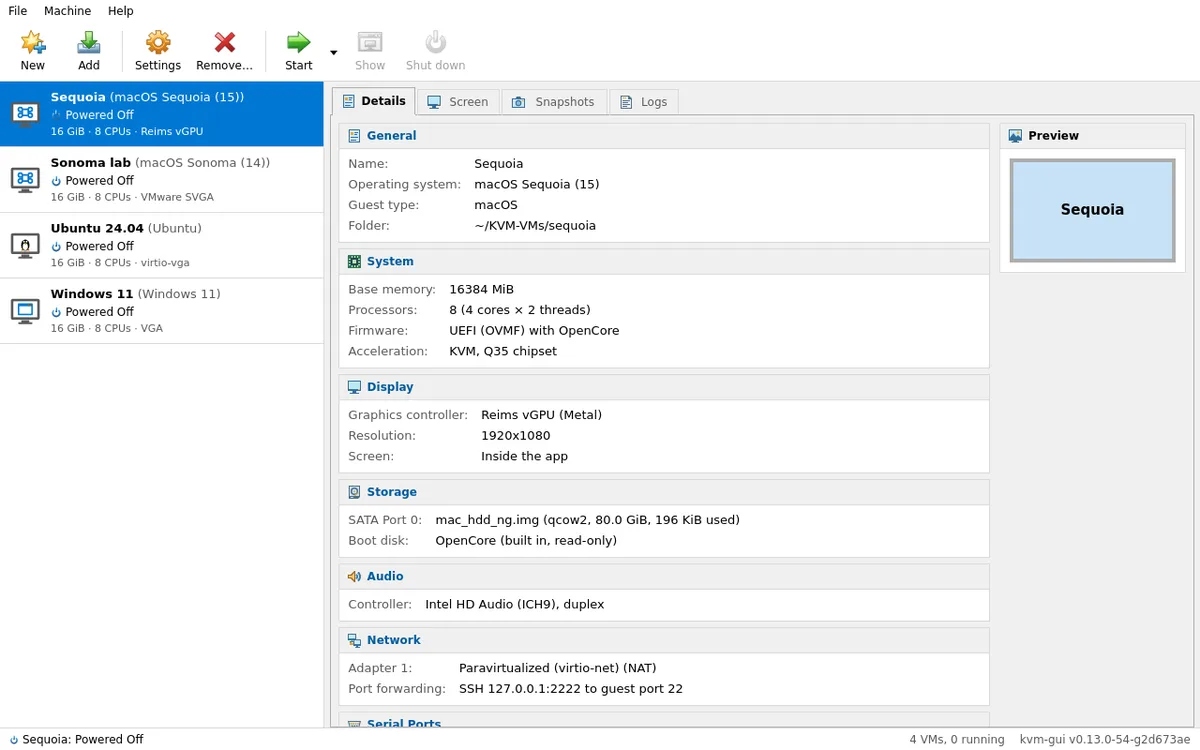
People who use Linux on the desktop and want virtual machines usually choose between two options: VirtualBox, which is comfortable but has its own kernel module and performance below KVM, or pure KVM, which is fast but full of command-line tools, libvirt XML, and, on macOS, a repository of scripts and a config.plist hand-edited OpenCore. The kvm-gui is my project to bring the two worlds together: an app with the look and workflow of VirtualBox, running directly on QEMU/KVM, that creates macOS, Linux, and Windows at native speed — everything in a single Go binary that is also a command-line tool and MCP server for AI agents.
What the kvm-gui delivers
- macOS in just a few clicks — you choose the version and the app downloads the recovery directly from Apple, verifying the signature. OpenCore and OVMF are built in: no need to clone OSX-KVM or edit
config.plist - Metal on macOS with the Reims vGPU, a paravirtual GPU that uses the host's Vulkan driver — without needing a second graphics card
- Linux, Windows, and others from an ISO — OS profiles, UEFI with Secure Boot, TPM 2.0 for Windows 11, and displays from HD to 4K
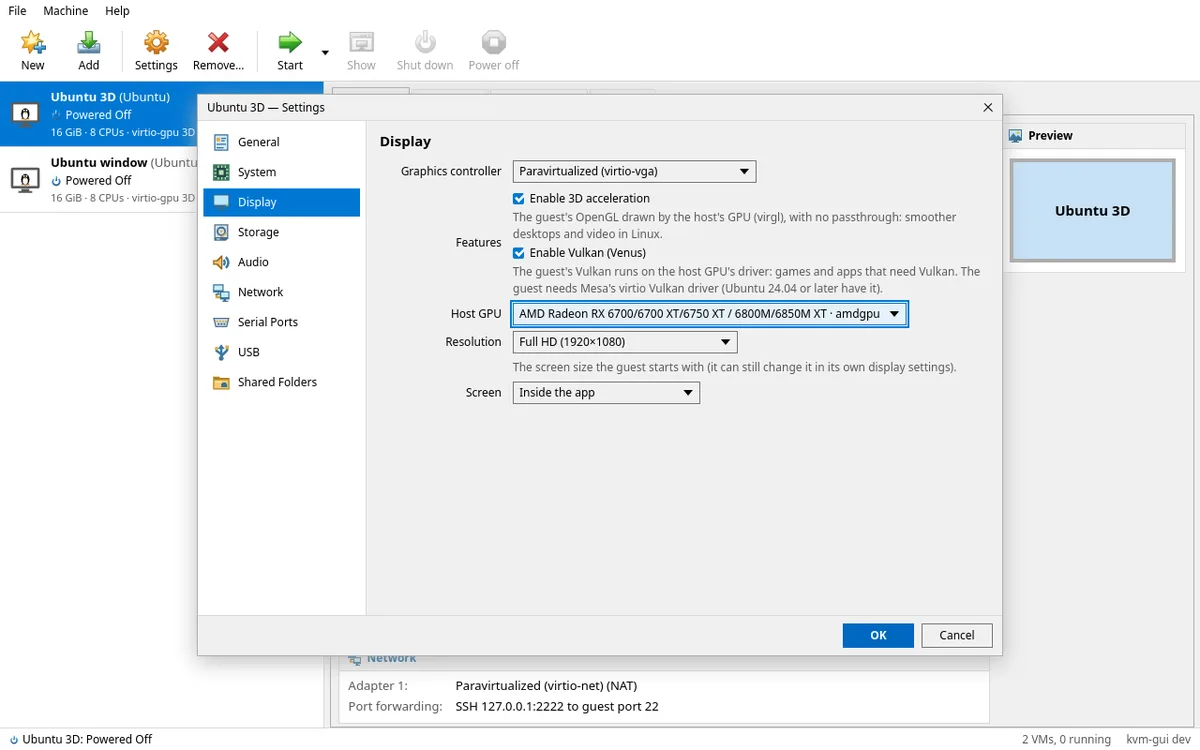
- 3D and Vulkan on Linux guests on the host GPU of your choice, without passthrough: OpenGL via virgl and Vulkan via Venus
- The VirtualBox workflow — manager with Details, Display, Snapshots, and Logs tabs, new VM wizard, Settings, snapshots, full clones, and import and export
.ovaVirtualBox-compatible - Native KVM speed, and VMs keep running after you close the app
- Automatable — everything the GUI does is a command, and AI agents (Claude, Codex, Cursor) control the VMs through the MCP server
How it works under the hood
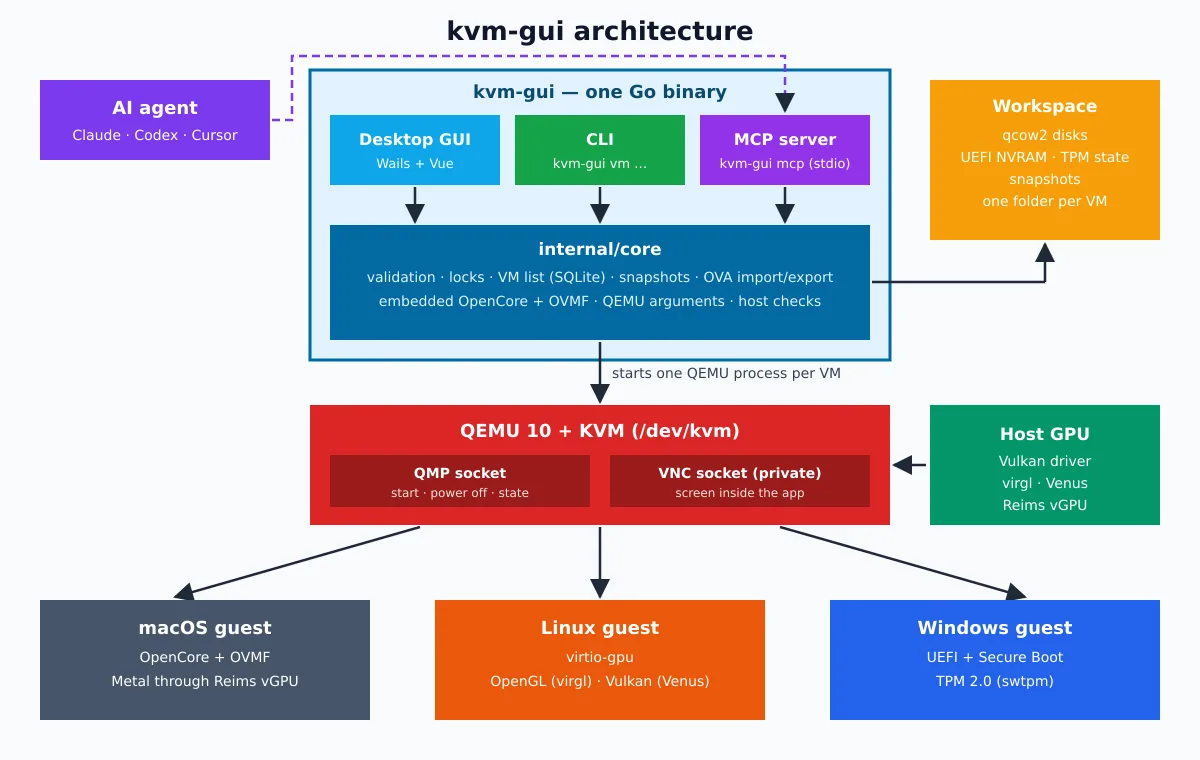
kvm-gui is not a frontend for libvirt. The same binary has three entry points — the desktop GUI (Go + Wails), the CLI (kvm-gui vm …) and the MCP server (kvm-gui mcp, via stdio) — and all three go through the same Go core, which validates the configuration, locks the VM folder against concurrent use, stores the VM list in SQLite, and assembles the QEMU arguments. For each VM it starts a QEMU process with KVM, controlled by a private QMP socket; the display reaches the app through a private VNC socket as well, with no network port open. qcow2 disks, UEFI NVRAM, TPM state, and snapshots are kept in a per-VM folder.
Installation
You need an x86_64 CPU with virtualization (VT-x / AMD-V) enabled in the firmware and QEMU 10.0 or newer — the packages install QEMU for you. Download the package for your distro from latest release and verify the download:
sha256sum -c --ignore-missing SHA256SUMS
sudo apt install ./kvm-gui_*_amd64.deb          # Ubuntu 26.04, Debian 13
On Rocky Linux 10, WebKitGTK comes from EPEL:
sudo dnf install epel-release && sudo dnf install ./kvm-gui-*-1.x86_64.rpmThere are also an AppImage and a plain binary, which depend on GTK 4, WebKitGTK 6, and the distribution's QEMU. On Ubuntu 24.04, stick with v0.15.0, the last release for it.
Your first VM
One-time setup: prepare the host: setup install whatever is missing from QEMU, load the KVM module, add yourself to the group kvm and adjust the necessary kernel parameters, asking for the password only once via pkexec. Then open the app:
kvm-gui setup
kvm-gui
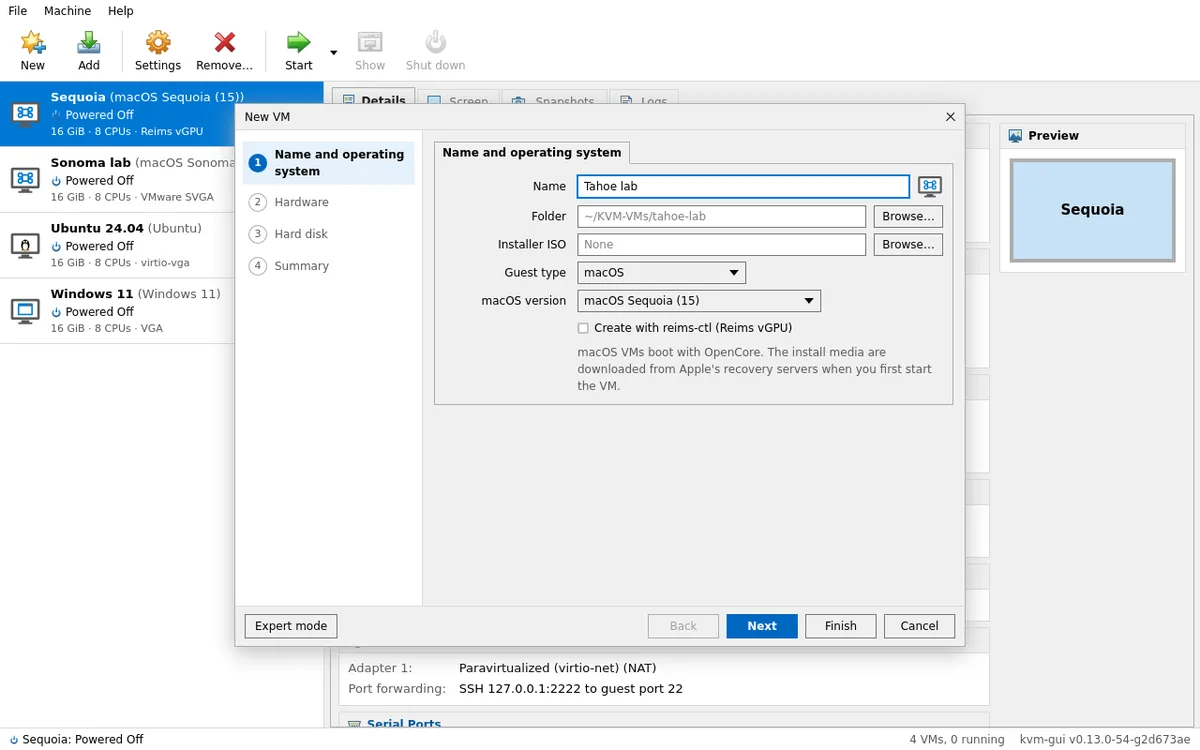
Click New, choose macOS and the version, or Linux / Windows / Other with an ISO. kvm-gui detects the system and suggests CPU, memory, and disk according to your host. Click Start and the screen appears inside the app; a macOS VM boots straight into Recovery, where you install the system.
The same steps from the terminal:
kvm-gui vm create Ubuntu --guest linux --profile ubuntu --iso ubuntu-26.04.iso
kvm-gui vm start
Linux and Windows with 3D, Vulkan, and TPM
Windows guests use UEFI with Secure Boot and a 2.0 emulated TPM, swtpm, which meets the requirements for Windows 11. On Linux guests, the 3D acceleration option enables virtio-gpu with virgl (OpenGL), and Vulkan (Venus) brings the guest's Vulkan to the host GPU you choose: the vulkaninfo inside the VM shows your AMD or NVIDIA card, without passthrough. Vulkan was validated on the reference host, Ubuntu 26.04; on Debian 13, there is 3D without Vulkan.
Coming from VirtualBox
If you have VMs on the VirtualBox, use File › Import Appliance… with a .ova, or:
kvm-gui vm import-ova box.ova --dry-run   # mostra o que será criado e o que não é mantido
kvm-gui vm import-ova box.ova
The appliance is treated as untrusted: the manifest, headers, and disks are checked before conversion to qcow2, and a failed import leaves no residue. The path back also exists — kvm-gui vm export-ova generates a .ova that VirtualBox 7 imports. macOS VMs are left out of the OVA and migrate between hosts with kvm-gui vm export --full.
macOS with Metal: Reims vGPU
macOS has no driver for QEMU's emulated video cards, so without acceleration the interface becomes sluggish. kvm-gui integrates the Reims vGPU, a paravirtual GPU that delivers Metal to the guest using the Vulkan driver of the GPU that already renders your desktop. The app installs QEMU from Reims from a ready-made package, with a verified SHA-256:
kvm-gui reims install
kvm-gui reims status
On the reference host, macOS Sequoia 15.8.1 boots on Reims vGPU with Metal enabled. Sonoma is the version validated end to end; the others, from High Sierra to Tahoe, are experimental.
Your VMs in the hands of an AI agent
The same binary is an MCP server. To use it in Claude Code:
claude mcp add kvm-gui -- kvm-gui mcpThen you can ask, for example, “create an Ubuntu VM from ~/Downloads/ubuntu.iso and start it”. The agent creates, starts, and shuts down VMs, views the screen and types on it, runs commands over SSH, takes snapshots, and imports and exports appliances. Destructive actions, such as forcing a shutdown or running commands on the guest, require explicit confirmation. If you like the topic, the mcp-wp-go follows the same idea for WordPress.
Supported hosts
| Host | Package | Status |
|---|---|---|
| Ubuntu 26.04 | .deb |
tested on every CI; reference host (3D and Vulkan validated) |
| Debian 13 | .deb |
tested on every CI; 3D without Vulkan |
| Rocky Linux 10 | .rpm |
tested on every CI; macOS VMs require the Reims vGPU, and the distro's QEMU has no 3D |
| Ubuntu 24.04 | — | unsupported; use v0.15.0 |
Under the hood
Backend in Go with Cobra for the CLI, the official Go MCP SDK, and SQLite in pure Go (modernc.org/sqlite); the GUI is Wails with Vue. OpenCore, Lilu, VirtualSMC, WhateverGreen, and OVMF are bundled from the official releases. Everything compiles into a Docker image (make image test dist) and each release is installed and run in clean Ubuntu 26.04, Debian 13, and Rocky Linux 10 containers. BSD-3-Clause license, with credits to OSX-KVM, acidanthera, TianoCore, Dortania, and Reims vGPU.
Try it
If you live between the comfort of VirtualBox and the performance of KVM, kvm-gui is for your home lab: one binary, the VMs you already know, and a bonus AI agent. Install it, create your first VM, and tell me what you thought — stars and issues on GitHub are very welcome. For historical context, also see the history of Proxmox, another project that made KVM user-friendly, and the ova2xva, for migrating VMs from VirtualBox to XCP-ng.