

The end of File Browser left many people looking for a web file manager to put on their server. FileBrowser Quantum is the direct replacement, but it is not the only option. The Filestash starts from another idea: instead of showing a folder on disk, it is a web client for almost any storage, from SFTP and FTP to S3, SMB, WebDAV, NFS, and Git. In this guide, you'll compile Filestash from source, install the binary on Debian or Ubuntu with systemd and Nginx, and compare the three options to know which makes sense in your case.
What is Filestash
The Filestash has been maintained by Mickael Kerjean since 2017, written in Go, with the web interface in pure JavaScript, and has about 14,7 thousand stars on GitHub. The license is the AGPL-3.0: you can use and modify it freely, but if you offer a modified version as a service on the network, you must publish the source code for those modifications.
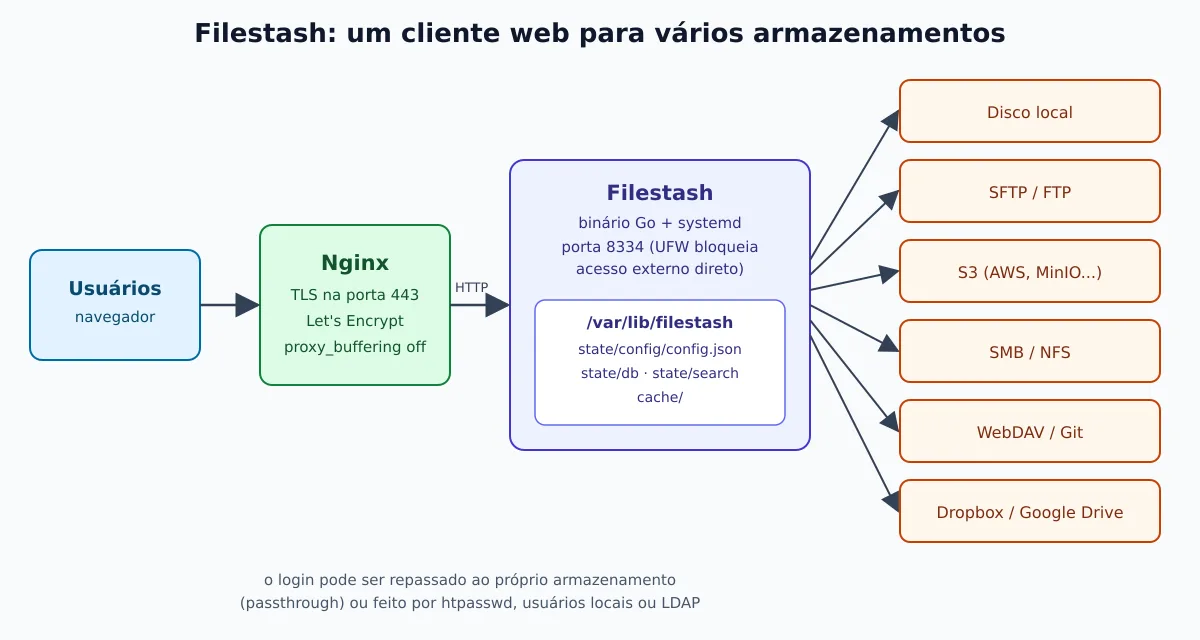
The architecture revolves around plugins. The README itself sums up the philosophy: anything that isn't a “fundamental truth of the universe” lives in a plugin. In practice, this translates into three types of pieces:
- Storage (backends): local disk, SFTP, FTP, S3 and compatible, SMB, NFS, WebDAV, Git, Dropbox, Google Drive, Backblaze, Storj, Artifactory and others.
- Authentication: only the administrator, file
htpasswdin the Apache style, local users with MFA, LDAP/Active Directory, passthrough (the login is forwarded to the storage itself) and even users from a WordPress. - Viewer apps: code editor, RAW images, PDF, video with on-demand transcoding, office documents via Collabora/WOPI and, as extra plugins, viewers for formats from fields such as GIS, CAD, and data.
It's worth knowing from the start where the line lies between what is open and what is paid. The official documentation marks as features of the commercial edition the login via OpenID Connect and SAML, the role-based authorization rules (RBAC), and native HTTPS with your own certificate or ACME. In the AGPL build that you compile, those plugins aren't included; LDAP, htpasswd and local users are.
How it works
Filestash doesn't store your files: it connects to the storages you enable and shows them all in the same interface. The configuration, the metadata database, the search index, and the cache live in a state directory. In our guide, the binary runs with systemd, listens on port 8334 and sits behind Nginx with TLS.
Why compile
Filestash doesn't ship a ready-made binary. The official installation is the docker-compose.yml da documentation, with the image machines/filestash:latest, and the last numbered tag on GitHub is the v0.4, from 2019: the project is distributed as a rolling release, from the main branch. To run without Docker, the path is to compile, exactly as the Dockerfile official one does: Go for the server, C libraries for image thumbnails, and FFmpeg for video.
We tested the procedure below in clean containers of Debian 13 and Ubuntu 24.04, with code from 21 September 2026. There is an important difference between the two:
- On Debian 13, the same base as the
Dockerfileofficial one, the compilation completes successfully. - On Ubuntu 24.04, the video transcoding plugin does not compile: it uses FFmpeg functions 7.1, and 24.04 ships FFmpeg 6.1. The solution is to take that plugin out of the build, with a line of
sed. The rest of the application compiles and works normally; only the on-demand video conversion is left out.
Build dependencies
Install the tools and development libraries, the same ones that the Dockerfile official uses:
sudo apt update
sudo apt install -y git curl make gcc g++ pkg-config ca-certificates apache2-utils \
  libjpeg-dev libtiff-dev libpng-dev libwebp-dev libraw-dev libheif-dev libgif-dev libvips-dev \
  libavcodec-dev libavdevice-dev libavfilter-dev libavformat-dev \
  libswresample-dev libswscale-dev libavutil-dev ffmpeg poppler-utils
The go.mod of the project requires Go 1.26, newer than the one in the Debian and Ubuntu repositories. Install the official version at /usr/local/go:
GO_VERSION=1.26.8
curl -fsSL "https://go.dev/dl/go${GO_VERSION}.linux-amd64.tar.gz" | sudo tar -C /usr/local -xz
export PATH=/usr/local/go/bin:$PATH
go version
On an ARM server, replace amd64 by arm64.
Compiling the binary
git clone --depth 1 https://github.com/mickael-kerjean/filestash ~/filestash-src
cd ~/filestash-src

# Somente no Ubuntu 24.04 (FFmpeg 6.1): remove o plugin de transcodificação
sed -i '/plg_video_transcoder/d' server/plugin/index.go

make init
make build
ls -lh dist/
make init downloads the Go modules and generates the embedded code; make build produces dist/filestash with the web interface inside the binary. C compiler warnings during the build are normal; what matters is that the file exists at the end.
The binary is dynamic: it depends on the image and video libraries installed in the previous step. For this reason, the easiest way is to compile on the server itself. If you compile on another machine, use the same distribution version and install the corresponding runtime libraries on the server (those listed by ldd dist/filestash).
Installing with systemd
Create a system user, copy the contents of dist/ to /opt/filestash and reserve /var/lib/filestash for the state. The variable FILESTASH_PATH tells Filestash where to store configuration, database, search index, and cache; without it, it uses data/ relative to the working directory.
sudo useradd --system --home-dir /var/lib/filestash --shell /usr/sbin/nologin filestash
sudo install -d -o root -g root -m 0755 /opt/filestash
sudo cp -a ~/filestash-src/dist/. /opt/filestash/
sudo install -d -o filestash -g filestash -m 0750 /var/lib/filestash
sudo install -d -o root -g filestash -m 0750 /etc/filestash
Administrator password before bringing it up
This is the most important caution in the guide. While there is no administrator password, Filestash redirects everything to /admin/setup, and whoever arrives first becomes the administrator. We confirmed in the code: with no password set, the dashboard session check returns “authenticated” for anyone. And the HTTP server listens on all interfaces, not just on 127.0.0.1.
So, set the password before the first run, using the variable ADMIN_PASSWORD. It does not take the password in plaintext: it takes the bcrypt hash, which htpasswd generates:
read -rsp 'Senha do admin: ' SENHA; echo
HASH=$(htpasswd -bnBC 10 "" "$SENHA" | tr -d ':\n')
unset SENHA
printf 'FILESTASH_PATH=/var/lib/filestash/\nADMIN_PASSWORD=%s\n' "$HASH" | sudo tee /etc/filestash/filestash.env >/dev/null
sudo chown root:filestash /etc/filestash/filestash.env
sudo chmod 0640 /etc/filestash/filestash.env
On startup, Filestash writes this hash into the configuration itself. Keep the variable in the file: if you ever change the password through the dashboard, remember that the variable takes effect again on the next restart.
The unit
Create /etc/systemd/system/filestash.service:
[Unit]
Description=Filestash
After=network-online.target
Wants=network-online.target

[Service]
User=filestash
Group=filestash
WorkingDirectory=/var/lib/filestash
EnvironmentFile=/etc/filestash/filestash.env
ExecStart=/opt/filestash/filestash
Restart=on-failure

NoNewPrivileges=true
PrivateTmp=true
ProtectSystem=strict
ProtectHome=true
ReadWritePaths=/var/lib/filestash

[Install]
WantedBy=multi-user.target
With ProtectSystem=strict, the service only writes to /var/lib/filestash. If you are using storage local to serve a server folder, add that folder to ReadWritePaths and grant permission to the user filestash; for SFTP, S3, and the others, nothing changes.
sudo systemctl daemon-reload
sudo systemctl enable --now filestash
curl -s http://127.0.0.1:8334/healthz; echo
journalctl -u filestash -f
The /healthz responds with a status JSON, useful for monitoring. For the basics of units and logs, see the guide on essential systemd commands.
Close the door 8334
Since Filestash listens on all interfaces, block port 8334 on the firewall and only allow external access through Nginx:
sudo ufw allow OpenSSH
sudo ufw allow 'Nginx Full'
sudo ufw deny 8334/tcp
sudo ufw enable
sudo ufw status
Nginx with HTTPS
The configuration follows what the author publishes for the official demo: no buffer, with a long timeout for large uploads and transfers.
server {
    listen 80;
    server_name arquivos.exemplo.com.br;
    return 301 https://$host$request_uri;
}

server {
    listen 443 ssl;
    server_name arquivos.exemplo.com.br;

    ssl_certificate     /etc/letsencrypt/live/arquivos.exemplo.com.br/fullchain.pem;
    ssl_certificate_key /etc/letsencrypt/live/arquivos.exemplo.com.br/privkey.pem;

    client_max_body_size 0;

    location / {
        proxy_pass http://127.0.0.1:8334;
        proxy_buffering off;
        proxy_cache off;
        proxy_read_timeout 86400;
        proxy_set_header Host $host:$server_port;
        proxy_set_header X-Real-IP $remote_addr;
        proxy_set_header X-Forwarded-For $proxy_add_x_forwarded_for;
        proxy_set_header X-Forwarded-Proto $scheme;
    }
}
Issue the certificate with sudo certbot --nginx -d arquivos.exemplo.com.br and reload Nginx. client_max_body_size 0 removes the upload size limit on the proxy; if you prefer a cap, use something like 10G.
First configuration
Open https://arquivos.exemplo.com.br/admin and enter the password defined in the hash. The panel has three main areas:
- Storage: check the storages users are allowed to use (for example, only SFTP and S3). Each one becomes an option on the login screen.
- Authentication: choose who logs in. Without an authentication plugin, the user enters the storage's own details (host, port, user), as in an FTP client. With passthrough, you set the host and port and the user only enters the SFTP login and password. With htpasswd, local or LDAP, Filestash authenticates and then connects to the storage with credentials defined by you, including a different path per user.
- Settings: site name,
hostpublic (used in links), port, and optional features. The web console (/admin/tty/) comes disabled by default; leave it that way.
A common example for a Linux server: enable only SFTP, use passthrough with hostname fixed at 127.0.0.1, and each person logs in with their own system user. The permissions are Linux's, and Filestash becomes a web interface for the SSH you already administer.
Upgrading
No numbered versions, updating means recompiling from the main branch. Keep a copy of the previous binary and the state directory before:
sudo tar czf /root/filestash-estado-$(date +%F).tar.gz -C /var/lib filestash
sudo cp -a /opt/filestash /opt/filestash.anterior

cd ~/filestash-src
git pull
sed -i '/plg_video_transcoder/d' server/plugin/index.go   # só no Ubuntu 24.04
make init && make build
sudo systemctl stop filestash
sudo cp -a dist/. /opt/filestash/
sudo systemctl start filestash
curl -s http://127.0.0.1:8334/healthz; echo
On Ubuntu, git pull may complain about the local change in server/plugin/index.go; run git checkout server/plugin/index.go before pull and apply the sed again afterwards.
File Browser, FileBrowser Quantum and Filestash side by side
The three are web file managers written in Go, but they solve different problems:
| File Browser | FileBrowser Quantum | Filestash | |
|---|---|---|---|
| Status | Archived on 1/9/2026, with no corrections | Active: stable v1.5.x, beta v2.0 | Active, rolling release |
| License | Apache 2.0 | Apache 2.0 | AGPL-3.0 |
| Official binary | Yes | Yes (amd64, arm64, armv6, armv7) | No; Docker or compile |
| What it accesses | A folder on disk | Several folders on the disk | Disk, SFTP, FTP, S3, SMB, NFS, WebDAV, Git, clouds |
| Login | User and password, proxy, hook | Password + 2FA, OIDC, LDAP, JWT, proxy | htpasswd, local + MFA, LDAP, passthrough; OIDC and SAML only in the paid edition |
| Search | Simple | Indexed, in real time | By scan in the default build; full-text index is a separate plugin |
| Sharing | Links with expiration and password | Links with expiration, password and permissions | Links with validity, password, users, and read, write, and upload permissions |
| Command execution | Exists, with flaws that will not be fixed | Removed | Optional web console, off by default |
| Configuration | Flags and database | config.yaml |
Panel /admin (writes config.json) |
The login, search, and sharing data come from the documentation and code of each project; features from the commercial edition of Filestash are marked in the installation documentation.
Which one to choose
- original File Browser: no new project should start with it. If it is still running, treat it as unmaintained software and plan your exit. The reasons are in the post about the end of File Browser and FileBrowser Quantum.
- FileBrowser Quantum: the natural choice when the files are on the server's disk and you want a “Google Drive” experience with users, sharing, search, and SSO via OIDC without paying anything. It is also the shortest migration for those coming from File Browser.
- Filestash: the choice when the files no are all on a local disk. An S3 bucket, a legacy SFTP server, an SMB share, and a Git repository on the same screen, with login forwarded to the storage itself. The price is a more cumbersome installation without Docker and the AGPL license, which requires attention if you intend to modify and offer the service to third parties.
If your object storage is a MinIO, the post about OpenObserve with S3 and MinIO shows how to prepare the bucket and credentials that Filestash will use. And to monitor the availability of any of the three options, the Go Uptime can check the health endpoint and notify you when the service goes down.
Conclusion
Filestash does not compete with FileBrowser Quantum on the same ground: it is a universal web storage client, not a folder explorer. Compiled on Debian or Ubuntu, it becomes a single binary managed by systemd, without Docker. The two precautions that must not be overlooked are the administrator password set before the first run and the 8334 port closed in the firewall. Documentation and plugins are available at filestash.app.