

Create a Service of type LoadBalancer in a Kubernetes cluster on AWS or Google Cloud and, in seconds, it gets an external IP. Do the same in a cluster on your own servers and the EXTERNAL-IP is located at <pending> forever. Kubernetes does not ship a network load balancer for bare metal: the implementations that come with the project only talk to the clouds. The MetalLB fills that gap. It distributes IPs from a pool you define and advertises those IPs on the network using standard protocols, ARP/NDP or BGP. In this guide, you'll understand how it works, install version 0.16.1, configure Layer 2 and BGP modes, and troubleshoot the most common issues. All commands were tested in a lab with kind and an FRR router.
The problem: LoadBalancer in
In a bare-metal cluster without MetalLB, the symptom is this:
kubectl create deployment nginx --image=nginx:1.29 --replicas=2
kubectl expose deployment nginx --type=LoadBalancer --port=80
kubectl get svc nginx
NAME TYPE CLUSTER-IP EXTERNAL-IP PORT(S) AGE
nginx LoadBalancer 10.96.187.200 <pending> 80:32251/TCP 5sWithout a load balancer, there are two bad options left. NodePort exposes the service on a high port (30000 to 32767) on all nodes, and the client needs to know the IP of a node that is up. externalIPs depends on you manually routing the IP to some node. The MetalLB documentation summary: these options transform bare metal into a second-class citizen in Kubernetes.
What is MetalLB
The MetalLB it is a network load balancer implementation for bare metal Kubernetes clusters, written in Go, under license Apache 2.0. The repository has been around since 2017, has about 8,4 thousand stars, and the project is sandbox of the Cloud Native Computing Foundation. The API is still marked as beta, but the documentation itself states that MetalLB is stable and reliable in production. If you want to understand where the Services and controllers model comes from, see the history of Kubernetes.
It does two things that work together:
- Address assignment: the
controller, a single Deployment in the cluster, grabs a free IP from aIPAddressPooland writes it to the Service. It doesn't make up IPs: it only hands out the ones you put in the pools, whether public ones rented from your datacenter or private ones from your LAN. - External advertisement: the
speaker, a DaemonSet that runs on every node, lets the network outside the cluster know that this IP “lives” in the cluster. In Layer 2 mode it responds to ARP (IPv4) and NDP (IPv6); in BGP mode it establishes sessions with your routers and advertises routes.
After the packet arrives at the node, MetalLB's job is done. From there on, what forwards it to the pod is the kube-proxy and the cluster's network plugin (CNI).
Requirements
- Kubernetes 1.13 or newer, with no other load balancer installed.
- A compatible network plugin; the compatibility page marks Cilium, Flannel, Antrea, and Canal as compatible, and Calico and kube-router as compatible with caveats.
- Some free IPv4 addresses for MetalLB to distribute.
- In BGP mode, one or more routers that speak BGP.
- In Layer 2 mode, port 7946 TCP and UDP open between the nodes, used by memberlist to detect offline nodes.
In a public cloud, most providers do not work with MetalLB because the virtual network does not accept IPs advertised by the VM. The cloud compatibility page details each case. On OpenStack it works, as long as you allow the IPs in the port's antispoofing protection.
Layer 2 mode: simple and universal
In Layer 2 mode, a single cluster node is elected “owner” of each service IP. When someone on the network asks via ARP who has that IP, the speaker from that node responds with the MAC of its own interface. To the LAN, it just looks like the machine has multiple IPs. It works on any Ethernet network, without special equipment.
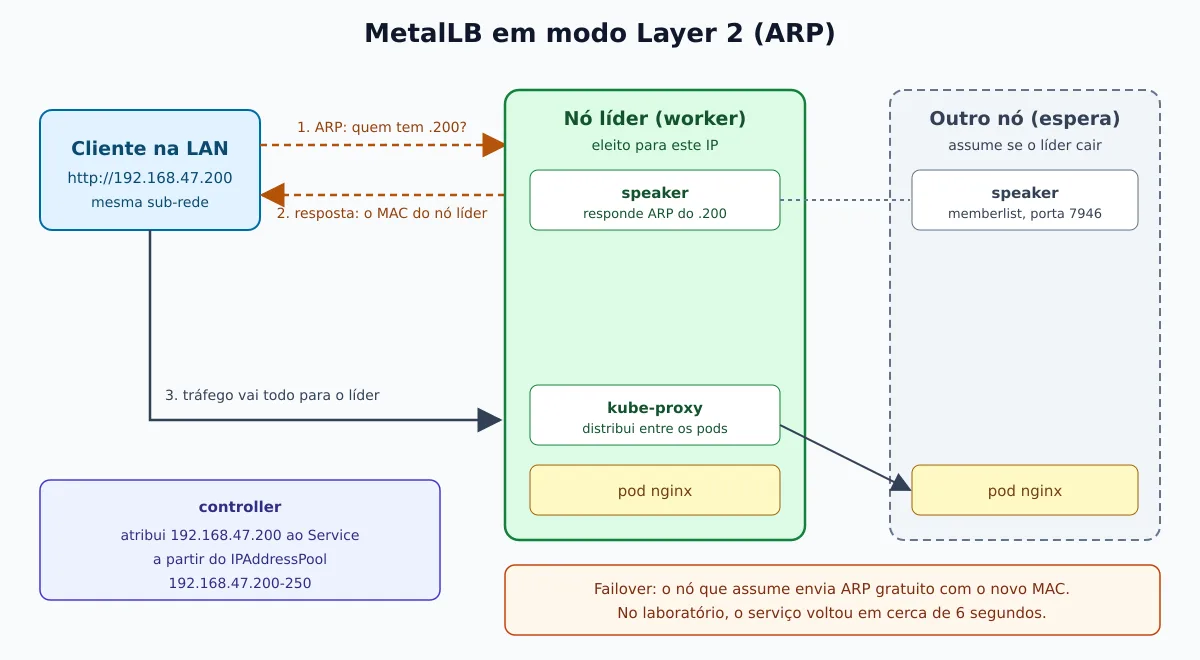
This has two consequences you need to know about:
- It is not load balancing between nodes. All traffic for an IP comes in through a single node, and the inbound bandwidth is limited to that node's interface. What L2 mode offers is failover: if the leader goes down, another node takes over the IP.
- Failover depends on the clients. The node that takes over sends gratuitous ARP packets announcing the new MAC. Modern systems (Linux, Windows, macOS) update the cache immediately, and the swap takes a few seconds. Older equipment or equipment with a poor implementation may take longer.
The leader election does not keep state: each speaker computes, for each IP, a list ordered by the hash of “node + IP” among the eligible nodes, and whoever is first announces. Adding a node only changes the leader if the new node reaches the top of the list; removing a node that is not the leader changes nothing.
Those familiar with Keepalived will find this similar: from the client's point of view, the IP “jumps” from one machine to another. The difference is that MetalLB does not use VRRP, but rather memberlist. Therefore there is no limit of 255 virtual routers per network nor virtual router IDs to configure. On the other hand, it does not talk to third-party VRRP equipment.
BGP mode: real load balancing
In BGP mode, each node opens a BGP session with the routers on its network and announces the IP of each service as a route /32. If the router is configured for multiple paths (ECMP), it treats all nodes as equivalent next hops and spreads the connections among them.
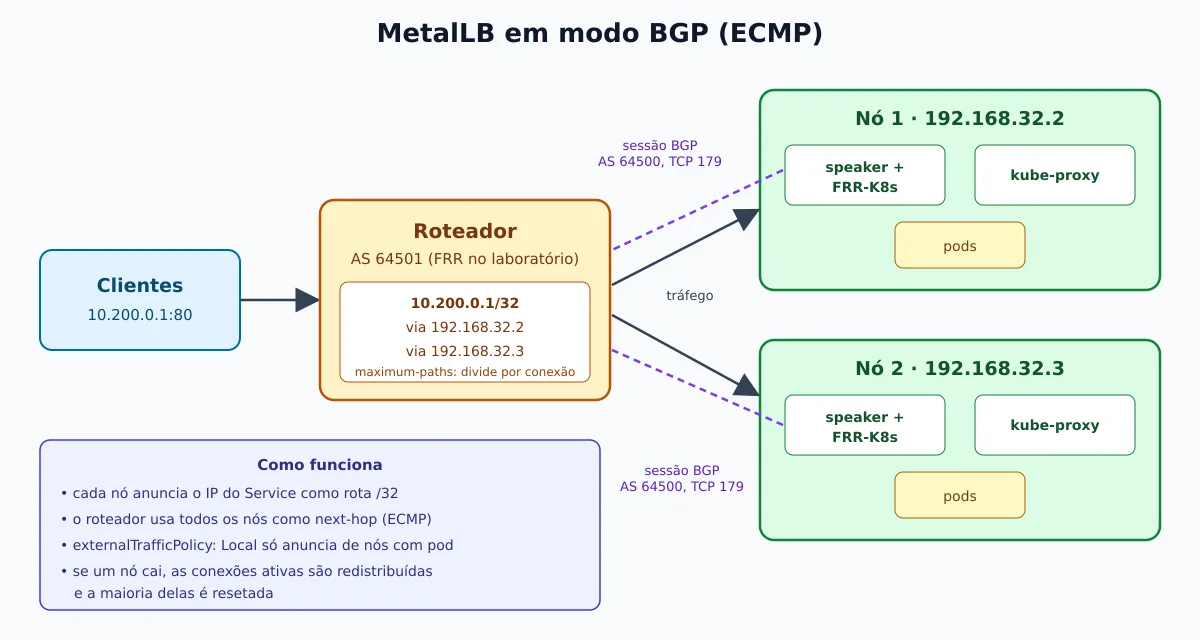
The distribution is per connection, with a hash of packet fields: all packets of a TCP connection go to the same node. Hashing 5 fields (protocol, source and destination IPs and ports) spreads better than 3, because it separates different connections from the same client.
The main limitation: when the set of nodes changes, for example because a node has gone down, the router recalculates the hash and most active connections will land on another node, which does not know that connection. The client receives connection reset. It is a single cut, not continuous loss. To soften this, the documentation suggests “resilient” ECMP on the router, placing an Ingress Controller between the BGP and the services, and making changes during low-traffic periods.
The three BGP backends
MetalLB has three BGP implementations, and the v0.16.0, from 20 May 2026, changed which one is the default:
- FRR-K8s (default and recommended): uses FRR through the FRR-K8s, which runs as its own DaemonSet. It brings BFD, BGP over IPv6, and allows adding extra FRR configuration to the same sessions. New BGP features only land here.
- Native: its own implementation, lighter, without BFD and without BGP over IPv6. Good for those who only use Layer 2 or simple BGP.
- FRR (deprecated): configures FRR directly, without the FRR-K8s layer. It will be removed in a future version.
Lab: kind with three nodes
To reproduce everything without touching production, we use the kind, which runs Kubernetes on top of us as Docker containers. The versions used in the test were kind 0.33.0, Kubernetes 1.37.0, and MetalLB 0.16.1.
cat > kind.yaml <<'EOF'
kind: Cluster
apiVersion: kind.x-k8s.io/v1alpha4
name: metallb-lab
nodes:
- role: control-plane
- role: worker
- role: worker
EOF
kind create cluster --config kind.yaml
docker network inspect kind -f '{{range .IPAM.Config}}{{.Subnet}} {{end}}'
The last command shows the subnet of the network kind in Docker, which plays the role of your LAN. In our case it was 192.168.32.0/20, and we reserved the range 192.168.47.200-192.168.47.250 for MetalLB. In your real network, choose a range outside of DHCP and that no device uses.
kind gotcha: if any pod enters CrashLoopBackOff with too many open files in the log, the problem is the host's inotify limit, not MetalLB. Increase it with sudo sysctl fs.inotify.max_user_instances=512, as recommended by the kind documentation. It happened in our test with three nodes on a host that was already running several containers.
Installation
Preparation: kube-proxy in IPVS mode
If your kube-proxy runs in IPVS mode, enable the strictARP; without it, nodes reply to ARP for IPs they shouldn't. In iptables mode (the kubeadm and kind default), skip this step.
kubectl get configmap kube-proxy -n kube-system -o yaml | \
  sed -e "s/strictARP: false/strictARP: true/" | \
  kubectl apply -f - -n kube-system
By manifest
The recommended manifest includes the FRR-K8s backend:
kubectl apply -f https://raw.githubusercontent.com/metallb/metallb/v0.16.1/config/manifests/metallb-frr-k8s.yaml
kubectl wait -n metallb-system --for=condition=ready pod --all --timeout=240s
kubectl get pods -n metallb-system
NAME READY STATUS RESTARTS AGE
controller-75db68c68f-69tsz 1/1 Running 0 2m
frr-k8s-daemon-fvd4w 5/5 Running 0 2m
frr-k8s-daemon-rdc2p 5/5 Running 0 2m
frr-k8s-statuscleaner-867ddf64df-h9rzt 1/1 Running 0 2m
speaker-kqhsl 1/1 Running 0 2m
speaker-mk2jq 1/1 Running 0 2mFor a slimmer installation without FRR, swap it for metallb-native.yaml at the same URL. The manifest already creates the namespace metallb-system with the labels pod-security.kubernetes.io/*: privileged, required because the speaker needs network privileges. Freshly installed, MetalLB stays idle: nothing happens until you create the configuration.
By Helm
kubectl create namespace metallb-system
kubectl label namespace metallb-system \
  pod-security.kubernetes.io/enforce=privileged \
  pod-security.kubernetes.io/audit=privileged \
  pod-security.kubernetes.io/warn=privileged
helm repo add metallb https://metallb.github.io/metallb
helm install metallb metallb/metallb --namespace metallb-system
The 0.16.1 chart also installs FRR-K8s by default. To use the native backend, pass --set speaker.frr.enabled=false --set frrk8s.enabled=false. With Helm, the configuration resources need to live in the same namespace where MetalLB was installed.
Those coming from older versions: up to v0.12 the configuration was a ConfigMap. Since v0.13 only the custom resources (CRDs) shown below exist, and there is a conversion tool.
Configuring Layer 2 mode
There are two resources: the address pool and the Layer 2 advertisement that points to it.
apiVersion: metallb.io/v1beta1
kind: IPAddressPool
metadata:
  name: lan
  namespace: metallb-system
spec:
  addresses:
  - 192.168.47.200-192.168.47.250
---
apiVersion: metallb.io/v1beta1
kind: L2Advertisement
metadata:
  name: lan
  namespace: metallb-system
spec:
  ipAddressPools:
  - lan
The addresses accept ranges (inicio-fim), CIDR (192.168.10.0/24), and IPv6, and you can have as many pools as you want. One L2Advertisement without ipAddressPools applies to all pools. Without any L2Advertisement, the IP is assigned but not advertised, and the service does not respond; it is the most common error for those coming from versions with ConfigMap.
kubectl apply -f l2.yaml
kubectl get svc nginx
curl -s -o /dev/null -w '%{http_code}\n' http://192.168.47.200/
kubectl describe svc nginx | sed -n '/Events/,$p'
NAME TYPE CLUSTER-IP EXTERNAL-IP PORT(S) AGE
nginx LoadBalancer 10.96.187.200 192.168.47.200 80:32251/TCP 4m45s
200
Events:
Type Reason Age From Message
---- ------ ---- ---- -------
Normal IPAllocated 5s metallb-controller Assigned IP ["192.168.47.200"]
Normal nodeAssigned 5s metallb-speaker announcing from node "metallb-lab-worker2" with protocol "layer2"The Service that was in <pending> got the IP right away. The events show the two steps: the controller assigned the IP and the speaker of the worker2 started advertising it. To see which node advertises each service without reading events:
kubectl get servicel2statuses -n metallb-systemNAME ALLOCATED NODE SERVICE NAME SERVICE NAMESPACE
l2-vc27l metallb-lab-worker2 nginx defaultTesting failover
In the lab, we took down the leader node with docker stop while a loop of curl hits the IP every half second. The service started responding again in about 6,3 seconds, and the host's ARP table switched on its own to the other worker's MAC:
ip neigh show 192.168.47.200# antes: MAC do worker2
192.168.47.200 dev br-a312a0b87cf9 lladdr a2:7a:02:df:0c:57 REACHABLE
# depois: MAC do worker
192.168.47.200 dev br-a312a0b87cf9 lladdr c2:00:6c:c6:41:63 DELAYA testing detail: docker pause doesn't work to simulate the failure, because the paused node's kernel keeps forwarding packets and the service doesn't even blink. Use docker stop, or shut down the machine for real.
Limiting nodes, interfaces, and services
By default, any node with speaker can be elected, and the advertisement goes out over all interfaces. When only some nodes are connected to a network, restrict it:
apiVersion: metallb.io/v1beta1
kind: L2Advertisement
metadata:
  name: dmz
  namespace: metallb-system
spec:
  ipAddressPools:
  - dmz
  nodeSelectors:
  - matchLabels:
      rede: dmz
  interfaces:
  - eth1
  serviceSelectors:
  - matchLabels:
      tier: frontend
serviceSelectors arrived in v0.16.0 and limits the advertisement to Services with those labels. Be careful with interfaces: it doesn't influence the leader election. If the elected node doesn't have the interface, the service isn't advertised; always combine it with nodeSelectors.
Configuring BGP mode
For the BGP test, we recreated the cluster with two nodes (the control-plane, 192.168.32.2, and a worker, 192.168.32.3) and we bring up a router FRR 10.7.1 in a container, on the same network as the kind cluster, with AS 64501:
docker run -d --name metallb-lab-router --network kind --ip 192.168.40.10 \
  --privileged -v "$PWD/router:/etc/frr" quay.io/frrouting/frr:10.7.1
In the directory router/ are the file daemons, with bgpd=yes, and frr.conf with the router configuration:
router bgp 64501
 bgp router-id 192.168.40.10
 no bgp ebgp-requires-policy
 neighbor 192.168.32.2 remote-as 64500
 neighbor 192.168.32.3 remote-as 64500
 !
 address-family ipv4 unicast
  maximum-paths 8
 exit-address-family
maximum-paths is what enables ECMP: without it, the router picks a single node. no bgp ebgp-requires-policy is required in FRR to accept eBGP routes without an explicit policy; in a production router, prefer prefix filters that accept only your pool.
On the MetalLB side, there are three resources: the BGP peer, the pool, and the advertisement.
apiVersion: metallb.io/v1beta2
kind: BGPPeer
metadata:
  name: roteador
  namespace: metallb-system
spec:
  myASN: 64500
  peerASN: 64501
  peerAddress: 192.168.40.10
---
apiVersion: metallb.io/v1beta1
kind: IPAddressPool
metadata:
  name: bgp
  namespace: metallb-system
spec:
  addresses:
  - 10.200.0.0/24
  avoidBuggyIPs: true
---
apiVersion: metallb.io/v1beta1
kind: BGPAdvertisement
metadata:
  name: bgp
  namespace: metallb-system
spec:
  ipAddressPools:
  - bgp
Use metallb.io/v1beta2 in BGPPeer; the v1beta1 is deprecated. The avoidBuggyIPs isn't there by chance: without it, the first Service in our test received 10.200.0.0, and some older equipment discards addresses ending in .0 and .255. With the option enabled, the Service started receiving 10.200.0.1.
On the router, the sessions come up and the route shows up with two next hops:
docker exec metallb-lab-router vtysh -c "show bgp summary"
docker exec metallb-lab-router vtysh -c "show ip route bgp"
Neighbor V AS MsgRcvd MsgSent TblVer InQ OutQ Up/Down State/PfxRcd PfxSnt
192.168.32.2 4 64500 4 6 1 0 0 00:00:15 1 1
192.168.32.3 4 64500 7 6 1 0 0 00:00:15 1 1
B>* 10.200.0.1/32 [20/0] via 192.168.32.2, eth0, weight 1, 00:00:09
* via 192.168.32.3, eth0, weight 1, 00:00:09To see what each node intends to advertise, without going into the router:
kubectl get servicebgpstatuses -n metallb-systemBFD for faster failure detection
BGP alone can take dozens of seconds to notice a dead peer. On FRR backends, you can attach a BFD session to the peer:
apiVersion: metallb.io/v1beta1
kind: BFDProfile
metadata:
  name: rapido
  namespace: metallb-system
spec:
  receiveInterval: 380
  transmitInterval: 270
---
apiVersion: metallb.io/v1beta2
kind: BGPPeer
metadata:
  name: roteador
  namespace: metallb-system
spec:
  myASN: 64500
  peerASN: 64501
  peerAddress: 192.168.40.10
  bfdProfile: rapido
The router also needs to have BFD enabled for that peer. The BGPPeer also accepts session password (password or passwordSecret), ebgpMultiHop, VRF, and graceful restart, and the advanced BGP configuration shows route aggregation, local preference and communities. The same pool can be advertised by L2 and BGP at the same time: just one L2Advertisement and a BGPAdvertisement pointing to it.
Using on Services
With MetalLB configured, just type: LoadBalancer. The annotations below provide fine-grained control; all were tested in the lab.
Fixed IP
apiVersion: v1
kind: Service
metadata:
  name: nginx-fixo
  annotations:
    metallb.io/loadBalancerIPs: 192.168.47.210
spec:
  type: LoadBalancer
  selector:
    app: nginx
  ports:
  - port: 80
The field spec.loadBalancerIP also works, but is deprecated in Kubernetes and doesn't accept two IPs. The annotation accepts a comma-separated list, required for dual-stack. services. If the IP doesn't belong to any pool, or is already in use, the Service stays in <pending> and the reason appears in kubectl describe svc.
Specific pool and “expensive” IPs”
A common scenario: a large pool of private IPs and few leased public IPs. Mark the expensive pool with autoAssign: false, and it will only be used by those who explicitly request it:
apiVersion: metallb.io/v1beta1
kind: IPAddressPool
metadata:
  name: publico
  namespace: metallb-system
spec:
  addresses:
  - 203.0.113.10/32
  autoAssign: false
---
apiVersion: v1
kind: Service
metadata:
  name: site
  annotations:
    metallb.io/address-pool: publico
spec:
  type: LoadBalancer
  selector:
    app: site
  ports:
  - port: 443
Remember to include the pool in one L2Advertisement or BGPAdvertisement. In our test, a pool left out of the announcement gave the IP to the Service, but the curl failed and the ARP stayed INCOMPLETE on the host. For environments with multiple teams, the pool also accepts serviceAllocation, which restricts it to namespaces or Services by label and defines priority between pools.
Sharing an IP between Services
By default, each Service gets its own IP. To put two Services on the same address, for example DNS on TCP and UDP or applications on different ports, use the same sharing key:
apiVersion: v1
kind: Service
metadata:
  name: web-http
  annotations:
    metallb.io/allow-shared-ip: "web"
    metallb.io/loadBalancerIPs: 192.168.47.220
spec:
  type: LoadBalancer
  selector:
    app: nginx
  ports:
  - port: 80
---
apiVersion: v1
kind: Service
metadata:
  name: web-alt
  annotations:
    metallb.io/allow-shared-ip: "web"
    metallb.io/loadBalancerIPs: 192.168.47.220
spec:
  type: LoadBalancer
  selector:
    app: nginx
  ports:
  - port: 8080
    targetPort: 80
The conditions: same key, different ports, and both with externalTrafficPolicy: Cluster (or exactly the same pod selector). In the lab, 192.168.47.220:80 and 192.168.47.220:8080 answered both.
externalTrafficPolicy: Cluster or Local
This Service option changes MetalLB's behavior:
- Cluster (default): the node that receives the traffic forwards it to any pod of the service, including on another node. Distribution across pods is even, but the pod sees the node's IP as the source, not the client's.
- Local: traffic only goes to pods on the node itself, and the pod sees the real client IP. In BGP, only nodes with pods advertise the route. In L2, only nodes with pods can be elected.
In the BGP test, with both pods on the same worker, it was enough to change to Local and the route shrunk to a single next hop:
kubectl patch svc web -p '{"spec":{"externalTrafficPolicy":"Local"}}'
docker exec metallb-lab-router vtysh -c "show ip route bgp"
B>* 10.200.0.1/32 [20/0] via 192.168.32.3, eth0, weight 1, 00:00:04The cost of Local in BGP is the imbalance: the router divides by node, not by pod. With two pods on node A and one on node B, each pod on node A receives 25% of the traffic and the one on node B receives 50%. Use anti-affinity to spread the pods one per node.
Troubleshooting
A troubleshooting page starts from a simple split: if the Service does not get an IP, the problem is in the controller; if it gets an IP but does not respond, the issue is in the speakers (or in the network). The commands we use most often are:
kubectl describe svc <servico>                           # eventos IPAllocated e nodeAssigned
kubectl logs -n metallb-system deploy/controller           # atribuição de IPs
kubectl logs -n metallb-system -l component=speaker        # anúncios
kubectl get servicel2statuses,servicebgpstatuses -n metallb-system
kubectl get configurationstates -n metallb-system          # configuração válida por componente
Invalid configuration
Webhooks reject most errors right away. In the lab, a second pool with the same range was blocked:
admission webhook "ipaddresspoolvalidationwebhook.metallb.io" denied the request:
CIDR "10.200.0.0/24" in pool "errado" overlaps with already defined CIDR "10.200.0.0/24"
Not everything is caught by the webhook, because the configuration is the sum of several resources. When the sum is invalid, MetalLB ignores the change and keeps using the last valid configuration. The resource ConfigurationState, since v0.15.3, shows the result per component, and the logs contain failed to parse the configuration.
The control-plane does not advertise
Nodes with the label node.kubernetes.io/exclude-from-external-load-balancers are ignored, and kubeadm and kind apply this label to the control-plane. In our BGP test, the control-plane closed the session but sent zero prefixes, and the speaker log said exactly why:
"event":"skipping should announce bgp","ips":["10.200.0.0"],"protocol":"bgp",
"reason":"speaker's node has labeled 'node.kubernetes.io/exclude-from-external-load-balancers'"
In a single-node cluster or when you really want to advertise from the control-plane, remove the label (kubectl label node <no> node.kubernetes.io/exclude-from-external-load-balancers-) or pass --ignore-exclude-lb aos speakers.
Advertises, but does not respond
- Do not test with ping. The service IP does not respond to ICMP; test the application port.
- Testing from inside a node proves nothing. A node reaches the IP via the CNI even if the advertisement is broken. Test from a machine outside the cluster.
- On L2, use
arpingfrom a host on the same subnet:arping -I eth0 192.168.47.200should show a single MAC, that of the leader node. Two MACs indicate two speakers fighting, a duplicate IP on the network, or the CNI answering ARP. No response is usually MAC anti-spoofing protection on the switch or hypervisor; confirm withtcpdump -n -i eth0 arpon the elected node. - Wi-Fi: some devices, such as the Raspberry Pi, stop responding ARP on the wireless interface. The workaround mentioned in the docs is promiscuous mode (
ip link set wlan0 promisc on). - On BGP, check the session and the route:
vtysh -c "show bgp neighbor"on the router or on the node's FRR container, and the metricfrrk8s_bgp_session_up. - Asymmetric return: if the client is on a different subnet and the packet comes in through an interface that is not the default gateway's, the
rp_filterLinux drops the response. Fix this with static routes on the nodes or source-based routing.
To file a bug, the docs request logs at level debug and the output of the script collect.sh, which gathers logs and resources. MetalLB's images don't have a shell; to debug inside the pod, use kubectl debug with an ephemeral container.
Monitoring and updating
MetalLB and FRR-K8s expose Prometheus metrics. Since v0.16.0, the endpoint is HTTPS only, with a self-signed certificate or one provided by you, and the 0.16.1 chart fixed the scrape annotations for that scheme. The most useful ones are frrk8s_bgp_session_up for the BGP sessions and metallb_k8s_client_config_stale_bool for stalled configuration. The guide of monitoring with Prometheus shows how to collect and alert; and the Go Uptime can watch the service IP from outside the cluster, which is the test that really matters.
To upgrade, read the release notes and reapply the new version's manifest or run helm upgrade; the chart updates the CRDs by itself. Attention to anyone who installed via Helm with the default values before 0.16: the backend changed from FRR to FRR-K8s, which swaps the topology of the pods and the prefix of the metrics from metallb_ to frrk8s_. To keep the old FRR during the transition, pin speaker.frr.enabled=true and frrk8s.enabled=false. And remember the failover limitations: in L2 the IP changes nodes, in BGP active connections are reset; perform the upgrade during low-traffic hours.
To tear down the lab: kind delete cluster --name metallb-lab and docker rm -f metallb-lab-router.
L2 or BGP?
- Layer 2 if you have a simple LAN, don't control the router, or want to solve it in five minutes. Accept that one node receives all traffic for each IP and that failover takes a few seconds.
- BGP if you have routers running BGP and need real load balancing between nodes, more bandwidth than a single interface can handle, or you already operate a routed network in the datacenter. Plan for node changes because of the resets.
MetalLB does a small and well-defined job: give an IP to the Service and carry the traffic to some node. That is enough to take bare metal out of the second-class condition, and it is the foundation on which you put an Ingress Controller, a Gateway API, or your own TCP and UDP services. Code and full documentation are at metallb.io.