

Every web system reaches a point where the user cannot wait: the welcome email, the photo thumbnail, the report that takes two minutes to generate. If that runs inside the HTTP request, the page freezes, the timeout blows up, and an SMTP failure becomes a 500 error right in the user's face. The way out is a task queue: the API registers the job and responds right away, and separate processes run the service in the background, with retry when something fails. In the Go world, the most widely used library for this is Asynq, which uses Redis as its broker and ships with a web dashboard, Asynqmon. This guide puts together a complete example, actually tested against Redis and Valkey in containers, and finishes with a systemd deploy and Prometheus metrics.
What is Asynq
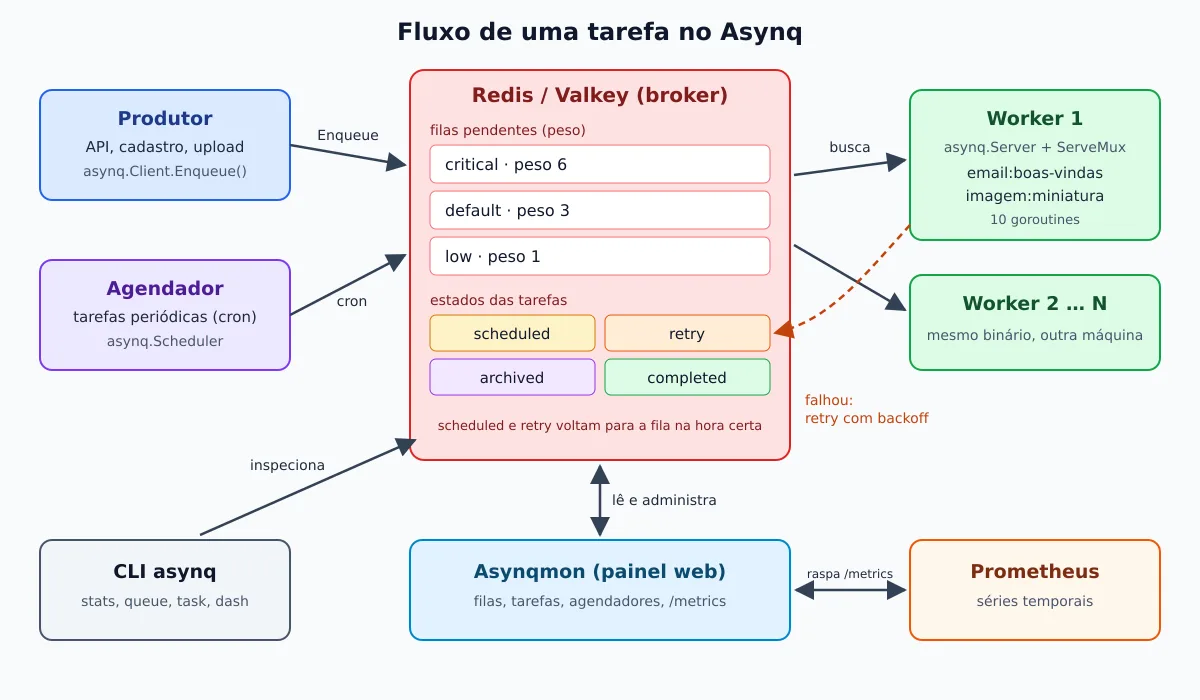
The Asynq is a Go library, MIT license, created by Ken Hibino. The model is simple:
- o client (
asynq.Client) writes the task to a queue in Redis; - o server (
asynq.Server) pulls tasks from the queues and opens a goroutine per task, up to the limit ofConcurrency; - a ServeMux routes each task by type (
email:boas-vindas,imagem:miniatura), the same way thenet/httproutes URLs.
A task is just a type (string) plus a payload in bytes, typically JSON. Because the entire state lives in Redis, you scale by running more copies of the worker on other machines, with no extra coordination. If you're new to the language, it's worth reading the history of the Go language and the guide on installing Go on Linux.
Architecture and features
What Asynq delivers out of the box, with the API option name:
- At-least-once delivery (at-least-once): if the worker dies in the middle, the task goes back to the queue. That's why the handler needs to be idempotent.
- Priority queues:
Queues: map[string]int{"critical": 6, "default": 3, "low": 1}divides time into 60/30/10% when they all have work (weighted priority). WithStrictPriority: true, the lower priority queue only runs when the ones above are empty. - Retries with backoff: the pattern is
MaxRetry25 and exponential delay (the Sidekiq formula, n4 + 15 s + a random value). All adjustable per task and perRetryDelayFunc(wiki: Task Retry). An error wrapped withasynq.SkipRetryskips the retries. - Scheduled tasks:
ProcessIn(30*time.Second)orProcessAt(t)leaves the task in the statescheduleduntil the time. - Periodic tasks: the
asynq.Schedulerqueues tasks by cron expression or@every(wiki: Periodic Tasks). - Deduplication:
Unique(ttl)refuses a second task with the same type, payload, and queue while the first is not successfully processed or the TTL has not expired, and returnsErrDuplicateTask.TaskID("...")gives the task a fixed ID and refuses repetition withErrTaskIDConflict(wiki: Unique Tasks). - Group aggregation: tasks queued with
Group("nome")stay inaggregatingand aGroupAggregatorjoins them into a single one, controlled byGroupGracePeriod,GroupMaxDelayandGroupMaxSize. It is useful, for example, to send a single email with ten notifications (wiki: Task aggregation). - Timeout and deadline:
Timeout(d)(default of 30 minutes) andDeadline(t)cancel thecontext.Contextdo handler (wiki: Timeout and Cancelation). - Archived tasks: the one that exhausts the attempts or returns
SkipRetrygoes toarchived, where it is available for inspection and manual reprocessing via the CLI or dashboard. - Retention:
Retention(24*time.Hour)stores the completed task ascompleted, useful for auditing.
The path of a task, from the producer to the dashboard:
Current status of the projects
Before putting a dependency in production, take a look at it. Checked on GitHub on September 23, 2026:
- Asynqlatest version v0.26.0, from February 3, 2026. It raised the minimum to Go 1.24 and introduced headers in tasks,
--tlsinasynq dash, Redis ACL user in the CLI (--username) andUpdateTaskPayloadin the Inspector. The branchmasterhas 25 commits beyond the tag, with the most recent on June 12, 2026 (among them aBatchEnqueuestill without a release). The repository has about 13,7 thousand stars and more than 290 open issues. The README says the project is “relatively stable” and remains in versionv0.x: the public API may still break between minor versions. - Go: the README promises support for the two most recent versions of Go, and the CI tests against 1.24.x and 1.25.x
redis:7. I built it with Go 1.27.1 without any tweaks. - Redis: the README requires Redis 4.0 or higher and warns that some Lua scripts may not be compatible with Redis Cluster. Redis Sentinel is supported.
- Valkey: there is no official statement of support. The issue #981 gathers reports of use in production with Valkey (and with Dragonfly, using
--default_lua_flags=allow-undeclared-keys), and the request for documentation (#985) remains open. In my test below, the entire example ran the same on Valkey 8.1. - Asynqmon: here the situation is worse. The latest release is the v0.7.1, from May 2022. The latest commit is from July 2023, and the image
hibiken/asynqmon:0.7.2(alsolatest) on Docker Hub was published on the same day, with no corresponding release on GitHub. The code depends on Asynq v0.24.1, and the README compatibility table stops at “Asynq 0.23.x ↔ Asynqmon 0.7.x”. In practice, it read and managed without error the queues created by Asynq v0.26.0 in my test, but treat it as a tool frozen in time, not as a maintained product.
Lab: Redis and Valkey in a container
For the test, I brought up a Redis 8 and a Valkey 8 on a private Docker network, plus Asynqmon pointing to Redis. If Docker is still new to you, start with the Docker story.
docker network create filas
docker run -d --name redis  --network filas -p 127.0.0.1:6379:6379 redis:8-alpine
docker run -d --name valkey --network filas -p 127.0.0.1:6380:6379 valkey/valkey:8-alpine

docker exec redis redis-server --version
docker exec valkey valkey-server --version
Redis server v=8.10.2 sha=00000000:1 malloc=jemalloc-5.3.0 bits=64 build=6583f6419e33bdeb
Valkey server v=8.1.8 sha=00000000:0 malloc=jemalloc-5.3.0 bits=64 build=288c3332651d2a23The ports get stuck in 127.0.0.1: a passwordless Redis exposed on the internet is guaranteed compromise.
The example: Go module with producer, worker, and scheduler
The module has three binaries and one shared package:
filas/
├── go.mod
├── tarefas/tarefas.go      # tipos, payloads e handlers
└── cmd/
    ├── produtor/main.go    # enfileira as tarefas
    ├── worker/main.go      # asynq.Server + ServeMux
    └── agendador/main.go   # tarefas periódicas
mkdir filas && cd filas
go mod init exemplo.com/filas
go get github.com/hibiken/asynq@v0.26.0Task types and handlers
Each type gets a function that creates the task and a handler that runs it. The thumbnail handler simulates flaky storage: it fails on the first two attempts and only works on the third. A file .bmp is a permanent error and goes straight to the file, with no retry.
// Package tarefas define os tipos de tarefa, os payloads e os handlers.
package tarefas

import (
	"context"
	"encoding/json"
	"fmt"
	"log"
	"os"
	"strings"
	"time"

	"github.com/hibiken/asynq"
)

// Tipos de tarefa: o ServeMux roteia pelo prefixo, como rotas HTTP.
const (
	TipoEmailBoasVindas = "email:boas-vindas"
	TipoMiniatura       = "imagem:miniatura"
	TipoRelatorio       = "relatorio:diario"
)

// RedisAddr lê o endereço do Redis/Valkey do ambiente.
func RedisAddr() string {
	if a := os.Getenv("REDIS_ADDR"); a != "" {
		return a
	}
	return "127.0.0.1:6379"
}

type EmailPayload struct {
	UsuarioID int    `json:"usuario_id"`
	Email     string `json:"email"`
}

type MiniaturaPayload struct {
	Origem  string `json:"origem"`
	Largura int    `json:"largura"`
}

func NovaTarefaEmail(id int, email string) (*asynq.Task, error) {
	p, err := json.Marshal(EmailPayload{UsuarioID: id, Email: email})
	if err != nil {
		return nil, err
	}
	// Opções padrão da tarefa; podem ser sobrescritas no Enqueue.
	return asynq.NewTask(TipoEmailBoasVindas, p,
		asynq.Queue("critical"), asynq.MaxRetry(5), asynq.Timeout(30*time.Second)), nil
}

func NovaTarefaMiniatura(origem string, largura int) (*asynq.Task, error) {
	p, err := json.Marshal(MiniaturaPayload{Origem: origem, Largura: largura})
	if err != nil {
		return nil, err
	}
	return asynq.NewTask(TipoMiniatura, p, asynq.MaxRetry(3), asynq.Timeout(2*time.Minute)), nil
}

func HandleEmail(ctx context.Context, t *asynq.Task) error {
	var p EmailPayload
	if err := json.Unmarshal(t.Payload(), &p); err != nil {
		// Payload inválido nunca vai dar certo: não adianta tentar de novo.
		return fmt.Errorf("payload inválido: %v: %w", err, asynq.SkipRetry)
	}
	id, _ := asynq.GetTaskID(ctx)
	log.Printf("e-mail de boas-vindas para %s (usuário %d, tarefa %s)", p.Email, p.UsuarioID, id)
	return nil
}

func HandleMiniatura(ctx context.Context, t *asynq.Task) error {
	var p MiniaturaPayload
	if err := json.Unmarshal(t.Payload(), &p); err != nil {
		return fmt.Errorf("payload inválido: %v: %w", err, asynq.SkipRetry)
	}
	if strings.HasSuffix(p.Origem, ".bmp") {
		// Erro permanente: vai direto para "archived", sem retry.
		return fmt.Errorf("formato não suportado: %s: %w", p.Origem, asynq.SkipRetry)
	}
	tentativa, _ := asynq.GetRetryCount(ctx)
	if tentativa < 2 {
		// Simula falha transitória (storage fora do ar) nas duas primeiras tentativas.
		return fmt.Errorf("storage indisponível ao ler %s (tentativa %d)", p.Origem, tentativa+1)
	}
	select {
	case <-time.After(3 * time.Second): // "trabalho" pesado
	case <-ctx.Done(): // timeout, deadline ou desligamento
		return ctx.Err()
	}
	log.Printf("miniatura %dpx gerada para %s na tentativa %d", p.Largura, p.Origem, tentativa+1)
	return nil
}

func HandleRelatorio(ctx context.Context, t *asynq.Task) error {
	log.Printf("relatório diário gerado às %s", time.Now().Format("15:04:05"))
	return nil
}
Producer: enqueue, deduplicate, and schedule
The producer plays the role of your API: it writes four tasks. The email is queued twice with Unique to show deduplication. The banner is scheduled for 30 seconds later, with its own ID and a retention of 24 hours.
package main

import (
	"errors"
	"log"
	"time"

	"exemplo.com/filas/tarefas"
	"github.com/hibiken/asynq"
)

func main() {
	client := asynq.NewClient(asynq.RedisClientOpt{Addr: tarefas.RedisAddr()})
	defer client.Close()

	// 1) E-mail imediato na fila "critical". Unique evita duplicar o envio
	//    se o cadastro for reprocessado dentro de 1 hora.
	for i := 0; i < 2; i++ {
		t, _ := tarefas.NovaTarefaEmail(42, "ana@exemplo.com.br")
		info, err := client.Enqueue(t, asynq.Unique(time.Hour))
		if errors.Is(err, asynq.ErrDuplicateTask) {
			log.Printf("duplicada, ignorada: %v", err)
			continue
		}
		if err != nil {
			log.Fatal(err)
		}
		log.Printf("enfileirada: id=%s fila=%s tipo=%s", info.ID, info.Queue, info.Type)
	}

	// 2) Miniatura na fila "default" (falha 2x e é reprocessada).
	t, _ := tarefas.NovaTarefaMiniatura("uploads/foto-42.jpg", 320)
	info, err := client.Enqueue(t)
	if err != nil {
		log.Fatal(err)
	}
	log.Printf("enfileirada: id=%s fila=%s tipo=%s", info.ID, info.Queue, info.Type)

	// 3) Miniatura agendada para daqui a 30 s, na fila "low", com ID próprio.
	t, _ = tarefas.NovaTarefaMiniatura("uploads/banner.png", 1200)
	info, err = client.Enqueue(t, asynq.ProcessIn(30*time.Second),
		asynq.Queue("low"), asynq.TaskID("miniatura-banner"), asynq.Retention(24*time.Hour))
	if err != nil {
		log.Fatal(err)
	}
	log.Printf("agendada: id=%s fila=%s estado=%s para=%s",
		info.ID, info.Queue, info.State, info.NextProcessAt.Format("15:04:05"))

	// 4) Erro permanente: termina em "archived" sem retry.
	t, _ = tarefas.NovaTarefaMiniatura("uploads/antiga.bmp", 320)
	info, err = client.Enqueue(t)
	if err != nil {
		log.Fatal(err)
	}
	log.Printf("enfileirada: id=%s fila=%s tipo=%s", info.ID, info.Queue, info.Type)
}
Worker with ServeMux, retries, and graceful shutdown
The RetryDelayFunc this one is intentionally short so the demo fits in one minute. In production, omit the field and stick with the default exponential backoff. The srv.Run handles signals on its own: SIGTERM or SIGINT shut down gracefully, and SIGTSTP stops pulling new tasks without killing the process.
package main

import (
	"context"
	"log"
	"time"

	"exemplo.com/filas/tarefas"
	"github.com/hibiken/asynq"
)

func main() {
	srv := asynq.NewServer(
		asynq.RedisClientOpt{Addr: tarefas.RedisAddr()},
		asynq.Config{
			Concurrency: 10,
			// Prioridade ponderada: 60% critical, 30% default, 10% low.
			Queues: map[string]int{"critical": 6, "default": 3, "low": 1},
			// Backoff curto só para a demonstração: 5 s, 10 s, 15 s...
			// Em produção, omita e use o exponencial padrão.
			RetryDelayFunc: func(n int, err error, t *asynq.Task) time.Duration {
				return time.Duration(n+1) * 5 * time.Second
			},
			ErrorHandler: asynq.ErrorHandlerFunc(func(ctx context.Context, t *asynq.Task, err error) {
				n, _ := asynq.GetRetryCount(ctx)
				max, _ := asynq.GetMaxRetry(ctx)
				log.Printf("ERRO %s (retry %d/%d): %v", t.Type(), n, max, err)
			}),
			// No SIGTERM, espera até 20 s as tarefas em andamento terminarem.
			ShutdownTimeout: 20 * time.Second,
		},
	)

	mux := asynq.NewServeMux()
	mux.HandleFunc(tarefas.TipoEmailBoasVindas, tarefas.HandleEmail)
	mux.HandleFunc(tarefas.TipoMiniatura, tarefas.HandleMiniatura)
	mux.HandleFunc(tarefas.TipoRelatorio, tarefas.HandleRelatorio)

	// Run bloqueia até receber SIGTERM/SIGINT e então desliga com calma.
	if err := srv.Run(mux); err != nil {
		log.Fatal(err)
	}
}
Periodic task scheduler
package main

import (
	"log"
	"time"

	"exemplo.com/filas/tarefas"
	"github.com/hibiken/asynq"
)

func main() {
	// Sem Location, o Scheduler interpreta o cron em UTC.
	fuso, err := time.LoadLocation("America/Sao_Paulo")
	if err != nil {
		log.Fatal(err)
	}
	s := asynq.NewScheduler(asynq.RedisClientOpt{Addr: tarefas.RedisAddr()}, &asynq.SchedulerOpts{
		Location: fuso,
		PostEnqueueFunc: func(info *asynq.TaskInfo, err error) {
			if err != nil {
				log.Printf("falha ao enfileirar periódica: %v", err)
				return
			}
			log.Printf("periódica enfileirada: %s id=%s", info.Type, info.ID)
		},
	})

	// Sintaxe cron (robfig/cron): todo dia às 03:00...
	if _, err := s.Register("0 3 * * *", asynq.NewTask(tarefas.TipoRelatorio, nil), asynq.Queue("low")); err != nil {
		log.Fatal(err)
	}
	// ...ou intervalo fixo, útil para testar.
	id, err := s.Register("@every 20s", asynq.NewTask(tarefas.TipoRelatorio, []byte(`{"teste":true}`)), asynq.Queue("low"))
	if err != nil {
		log.Fatal(err)
	}
	log.Printf("entrada registrada: %s", id)

	if err := s.Run(); err != nil {
		log.Fatal(err)
	}
}
Watch out for the time zone: without Location, the Scheduler interprets the cron in UTC. In the first test, without this option, the 0 3 * * * was scheduled for 11:35 from then on, i.e., midnight in Brasília time. With America/Sao_Paulo, the log confirms:
2026/09/23 12:24:53 entrada registrada: 4e28eaa1-ddd4-40d5-9dc6-2e96f770e600
asynq: pid=416391 2026/09/23 15:24:53.136229 INFO: Scheduler starting
asynq: pid=416391 2026/09/23 15:24:53.136232 INFO: Scheduler timezone is set to America/Sao_Paulo
asynq: pid=416391 2026/09/23 15:24:53.136241 INFO: Send signal TERM or INT to stop the scheduler
2026/09/23 12:25:13 periódica enfileirada: relatorio:diario id=217bb335-888a-4148-bdb2-121c19f6d8a8
2026/09/23 12:25:33 periódica enfileirada: relatorio:diario id=9d80f7ea-26c1-4e08-b0ee-124579c81e88
2026/09/23 12:25:53 periódica enfileirada: relatorio:diario id=1e43a446-4fc8-41c7-ab44-6285a8e53203
2026/09/23 12:26:13 periódica enfileirada: relatorio:diario id=399dc3e0-5d5d-4407-b10c-f14ba55c9eb3
asynq: pid=416391 2026/09/23 15:26:17.022259 INFO: Scheduler shutting down
asynq: pid=416391 2026/09/23 15:26:17.022798 INFO: Scheduler stopped
Just run a scheduler per environment: two copies enqueue each periodic task twice. The workers, on the other hand, you replicate as you wish.
Running the example
Compile, start the worker and the scheduler, pause the queue default via the CLI (to see the tasks stopped in the dashboard) and run the producer:
go build -o bin/ ./cmd/...
export REDIS_ADDR=127.0.0.1:6379

bin/worker &
bin/agendador &
asynq queue pause default
bin/produtor
2026/09/23 12:24:55 enfileirada: id=542783fc-53f6-48c4-bff3-b3ded2e72681 fila=critical tipo=email:boas-vindas
2026/09/23 12:24:55 duplicada, ignorada: task already exists
2026/09/23 12:24:55 enfileirada: id=3b3008d8-9889-497a-aca8-3dd2cab5f84c fila=default tipo=imagem:miniatura
2026/09/23 12:24:55 agendada: id=miniatura-banner fila=low estado=scheduled para=12:25:25
2026/09/23 12:24:55 enfileirada: id=16d93751-6b19-4ca7-84fa-71cc2a20c306 fila=default tipo=imagem:miniaturaThe second call with Unique returned task already exists, again, and the banner stayed at scheduled. After asynq queue unpause default, the worker log tells the whole story:
asynq: pid=416390 2026/09/23 15:24:53.136156 INFO: Starting processing
asynq: pid=416390 2026/09/23 15:24:53.136186 INFO: Send signal TSTP to stop processing new tasks
asynq: pid=416390 2026/09/23 15:24:53.136187 INFO: Send signal TERM or INT to terminate the process
2026/09/23 12:24:55 e-mail de boas-vindas para ana@exemplo.com.br (usuário 42, tarefa 542783fc-53f6-48c4-bff3-b3ded2e72681)
2026/09/23 12:25:14 ERRO imagem:miniatura (retry 0/3): storage indisponível ao ler uploads/foto-42.jpg (tentativa 1)
2026/09/23 12:25:14 ERRO imagem:miniatura (retry 0/3): formato não suportado: uploads/antiga.bmp: skip retry for the task
asynq: pid=416390 2026/09/23 15:25:14.093162 WARN: Retry exhausted for task id=16d93751-6b19-4ca7-84fa-71cc2a20c306
2026/09/23 12:25:14 relatório diário gerado às 12:25:14
2026/09/23 12:25:23 ERRO imagem:miniatura (retry 1/3): storage indisponível ao ler uploads/foto-42.jpg (tentativa 2)
2026/09/23 12:25:28 ERRO imagem:miniatura (retry 0/3): storage indisponível ao ler uploads/banner.png (tentativa 1)
2026/09/23 12:25:33 relatório diário gerado às 12:25:33
2026/09/23 12:25:33 ERRO imagem:miniatura (retry 1/3): storage indisponível ao ler uploads/banner.png (tentativa 2)
2026/09/23 12:25:36 miniatura 320px gerada para uploads/foto-42.jpg na tentativa 3
2026/09/23 12:25:47 miniatura 1200px gerada para uploads/banner.png na tentativa 3
2026/09/23 12:25:53 relatório diário gerado às 12:25:53
2026/09/23 12:26:11 ERRO imagem:miniatura (retry 0/3): formato não suportado: uploads/antiga.bmp: skip retry for the task
asynq: pid=416390 2026/09/23 15:26:11.619533 WARN: Retry exhausted for task id=16d93751-6b19-4ca7-84fa-71cc2a20c306
2026/09/23 12:26:13 relatório diário gerado às 12:26:13
asynq: pid=416390 2026/09/23 15:26:14.020184 INFO: Stopping processor
asynq: pid=416390 2026/09/23 15:26:14.449245 INFO: Processor stopped
asynq: pid=416390 2026/09/23 15:26:14.449276 INFO: Starting graceful shutdown
asynq: pid=416390 2026/09/23 15:26:14.449296 INFO: Waiting for all workers to finish...
asynq: pid=416390 2026/09/23 15:26:14.449300 INFO: All workers have finished
asynq: pid=416390 2026/09/23 15:26:14.449797 INFO: Exiting
Read in order:
- the e-mail went out right away, via queue
critical, which was not paused; - a
foto-42.jpgfailed twice and succeeded on the third try, with 9 and 13 seconds between the attempts (delay of 5 s and 10 s plus the Asynq periodic check); - a
antiga.bmpwas sent toarchivedon the first failure, because ofSkipRetry. The warningRetry exhaustedis the message that Asynq itself uses in this case; - the banner scheduled for 12:25:25 started at 12:25:28: Asynq checks scheduled tasks every 5 seconds, so don't count on second-level precision;
- at 12:26:11, I reprocessed the archived task with
asynq task run, and it went back to the archive, as expected; - in
SIGTERM, the server stopped pulling tasks, waited for the workers, and exited. If a task goes past theShutdownTimeout, it goes back to Redis and runs again on another worker, and that's where the idempotency requirement comes from.
The timestamps prefixed with asynq: are in UTC (the library's internal logger), and the others are in local time.
The same test on Valkey
I only changed the variable: REDIS_ADDR=127.0.0.1:6380. Deduplication, retries, scheduling, archiving and periodic tasks behaved the same. The task in retry in the summary below is the banner: I shut down the worker before the third attempt. The CLI shows the version 7.2.4 because Valkey presents itself with that compatibility version on INFO:
Task Count by State
active     pending    aggregating  scheduled  retry      archived   completed
---------  ---------  ---------    ---------  ---------  ---------  ---------
0          0          0            0          1          1          0

Task Count by Queue
critical  default   low
--------  --------  --------
0         1         1

Daily Stats 2026-09-23 UTC
processed  failed  error rate
---------  ------  ----------
9          5       55.56%

Redis Info
version  uptime  connections  memory usage  peak memory usage
-------  ------  -----------  ------------  -----------------
7.2.4    0 days  1            1.70MB        1.71MB
The asynq CLI
The command-line tool lives in a separate module of the repository:
go install github.com/hibiken/asynq/tools/asynq@latestOne detail: the module tools does not have its own tag, so the @latest resolves to a commit on the master (in my case, from 12 in June 2026) that still declares a dependency on Asynq v0.25.0. It worked without issue against v0.26.0 queues. The commands I use the most:
asynq stats                                   # visão geral por estado e por fila
asynq queue ls                                # lista as filas
asynq queue inspect default                   # detalhes de uma fila
asynq queue pause default                     # para de entregar tarefas da fila
asynq task ls --queue=default --state=archived
asynq task run --queue=default --id=<ID>     # reprocessa uma arquivada
asynq server ls                               # workers conectados
asynq cron ls                                 # entradas do Scheduler
asynq dash                                    # painel no terminal (TUI)
For another server, use --uri host:porta, --password, --username and --tls. Real lab outputs:
$ asynq stats
Task Count by State
active     pending    aggregating  scheduled  retry      archived   completed
---------  ---------  ---------    ---------  ---------  ---------  ---------
0          0          0            0          0          1          1

Task Count by Queue
critical  default   low
--------  --------  --------
0         1         1

Daily Stats 2026-09-23 UTC
processed  failed  error rate
---------  ------  ----------
13         6       46.15%

Redis Info
version  uptime  connections  memory usage  peak memory usage
-------  ------  -----------  ------------  -----------------
8.10.2   0 days  4            2.32MB        2.38MB


$ asynq task ls --queue=default --state=archived
ID                                    Type              Payload                                        Last Failed                   Last Error
--                                    ----              -------                                        -----------                   ----------
16d93751-6b19-4ca7-84fa-71cc2a20c306  imagem:miniatura  {"origem":"uploads/antiga.bmp","largura":320}  Wed Sep 23 12:26:11 -03 2026  formato não suportado: uploads/antiga.bmp: skip retry for the task
Asynqmon: the web dashboard
The Asynqmon runs as a binary, container, or library embedded in your application (asynqmon.New(...) returns a http.Handler). The fastest way is the Docker image, on the same network as Redis:
docker run -d --name asynqmon --network filas \
  -p 127.0.0.1:8080:8080 \
  hibiken/asynqmon:0.7.2 \
  --redis-addr=redis:6379 \
  --enable-metrics-exporter
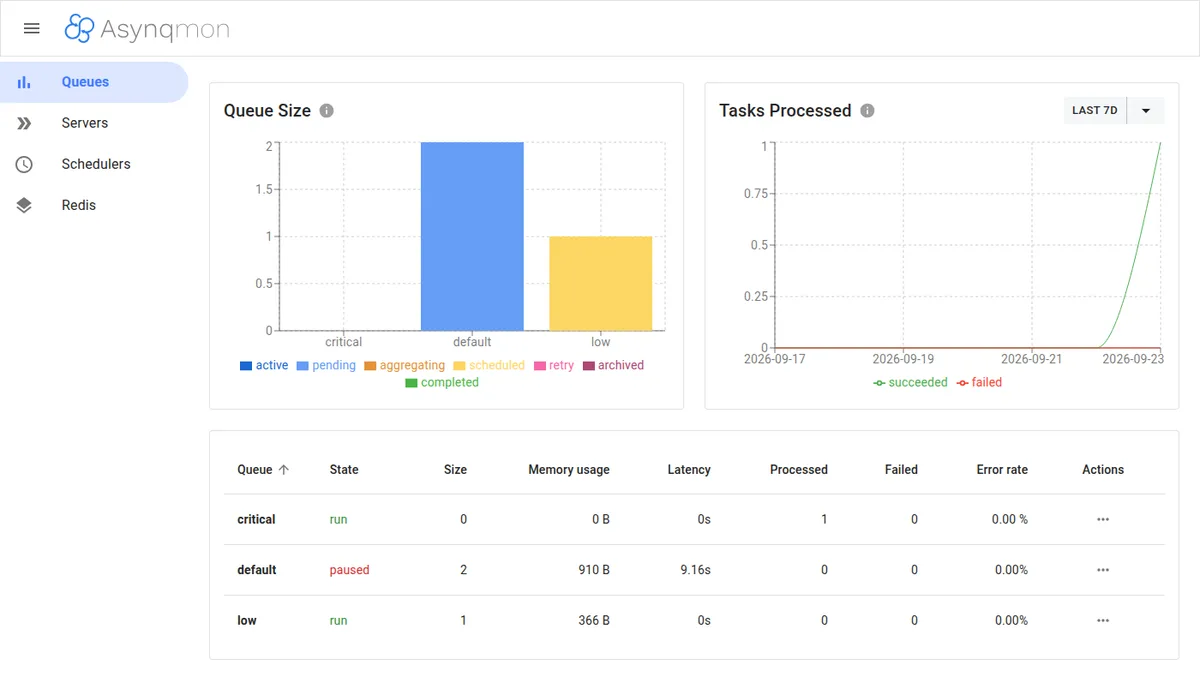
Open http://127.0.0.1:8080. The tab Queues shows size, memory, latency, processed, and error rate per queue. In the screenshot below, the default appears paused, with the two pending thumbnails:
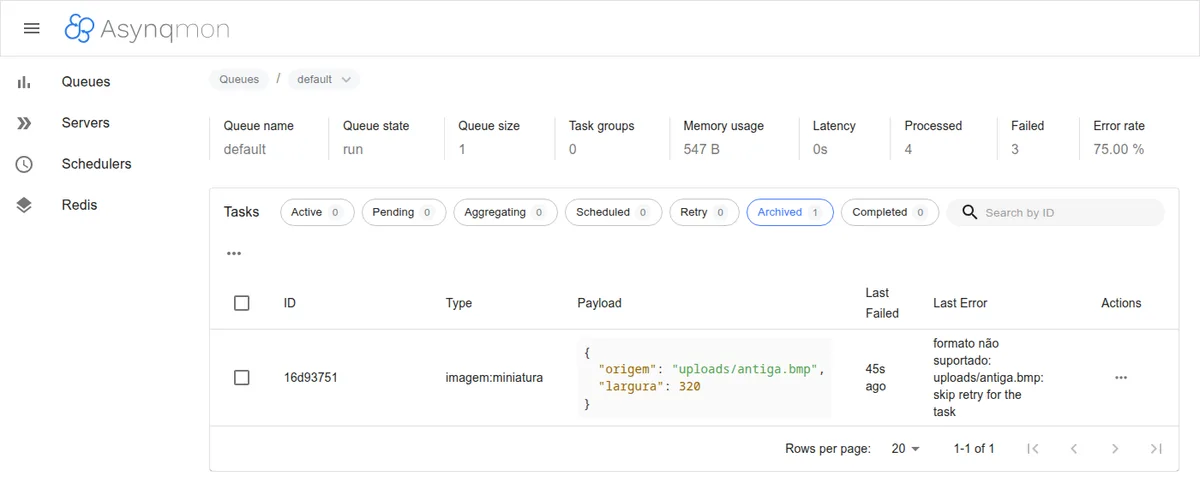
Clicking on a queue, you see the tasks by state (active, pending, aggregating, scheduled, retry, archived, completed), with payload and last error. From there you can re-run, delete, or archive in bulk:
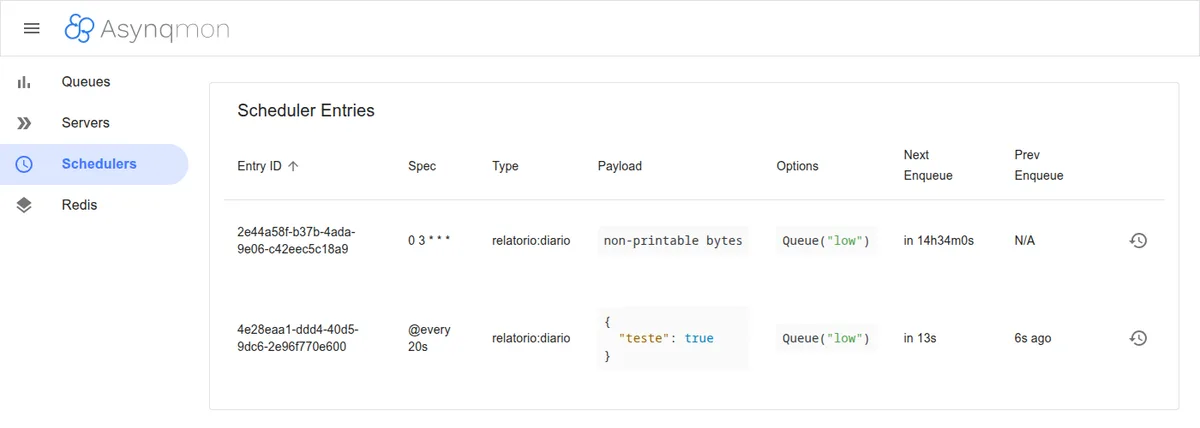
The Schedulers tab lists the registered periodic entries, with the next and last enqueuing:
The dashboard has no authentication at all: anyone who accesses it can delete entire queues. Keep it locked down in 127.0.0.1 and publish it behind a reverse proxy with login, VPN, or SSH tunnel. For those who only need to look, there's --read-only.
Metrics in Prometheus
There are two paths, both verified in the code:
- Through Asynqmon: with
--enable-metrics-exporter, it exposes/metricswith the state of the queues. With--prometheus-addr=http://prometheus:9090, it also queries Prometheus and links the historical graphs tab. - Inside your application: the package
github.com/hibiken/asynq/x/metricscontains aNewQueueMetricsCollector(inspector)that you register in your ownprometheus.Registry, without depending on Asynqmon.
The actual output from the Asynqmon exporter in the lab:
curl -s 127.0.0.1:8080/metrics | grep '^asynq_' | grep defaultasynq_queue_latency_seconds{queue="default"} 0
asynq_queue_memory_usage_approx_bytes{queue="default"} 547
asynq_queue_paused_total{queue="default"} 0
asynq_queue_size{queue="default"} 1
asynq_tasks_enqueued_total{queue="default",state="active"} 0
asynq_tasks_enqueued_total{queue="default",state="archived"} 1
asynq_tasks_enqueued_total{queue="default",state="completed"} 0
asynq_tasks_enqueued_total{queue="default",state="pending"} 0
asynq_tasks_enqueued_total{queue="default",state="retry"} 0
asynq_tasks_enqueued_total{queue="default",state="scheduled"} 0
asynq_tasks_failed_total{queue="default"} 4
asynq_tasks_processed_total{queue="default"} 5And the snippet from prometheus.yml:
scrape_configs:
  - job_name: asynq
    static_configs:
      - targets: ["127.0.0.1:8080"]
Alerts worth having: asynq_queue_size growing nonstop (insufficient or stalled workers), asynq_queue_latency_seconds high in the queue critical and any increase in asynq_tasks_enqueued_total{state="archived"}. If you don't have Prometheus yet, the guide Monitoring Linux servers with Prometheus and Node Exporter sets up the foundation.
Deploy: the worker as a systemd service
The worker is a static binary, no runtime, and runs fine with an unprivileged user. The key point is the TimeoutStopSec, which needs to be greater than the ShutdownTimeout of the code (20 s). Without that, systemd sends SIGKILL before Asynq returns the in-flight tasks.
# /etc/systemd/system/filas-worker.service
[Unit]
Description=Worker Asynq (filas)
After=network-online.target
Wants=network-online.target

[Service]
Type=simple
User=filas
Group=filas
Environment=REDIS_ADDR=127.0.0.1:6379
ExecStart=/usr/local/bin/filas-worker
KillSignal=SIGTERM
TimeoutStopSec=30
Restart=on-failure
RestartSec=5
NoNewPrivileges=true
ProtectSystem=strict
ProtectHome=true
PrivateTmp=true

[Install]
WantedBy=multi-user.target
sudo useradd --system --no-create-home --shell /usr/sbin/nologin filas
sudo install -m 755 bin/worker /usr/local/bin/filas-worker
sudo systemctl daemon-reload
sudo systemctl enable --now filas-worker
journalctl -u filas-worker -fThe scheduler gets an identical unit, with ExecStart=/usr/local/bin/filas-agendador, in a machine only. For more day-to-day commands, see Mastering systemd. If your producer is a Go API, the series Vue.js + Go with Echo v5 shows how to set it up, and the part 5 covers single binary, Docker, and systemd, a natural fit for calling client.Enqueue inside handlers.
Best practices
- Idempotency always: delivery is “at least once”. Save in the database that the user email 42 has already been sent and check before sending again.
UniqueandTaskIDavoid duplicating the task in the queue, but they don't protect against re-execution after a crash. - Small payload: send IDs and paths, not the file. The image stays in storage, and the task carries only
uploads/foto-42.jpg. A large payload weighs heavily on Redis memory and on every read. - Separate queues by profile: transactional email on
critical, heavy processing onlow. If the volume justifies it, run dedicated workers just for the heavy queue (Queues: {"low": 1}) on another machine. - Permanent error without retry: invalid payload or unsupported format will never work. Use
SkipRetryand leave the task in the file for analysis. - Respect the context: pass the
ctxfrom the handler to HTTP, database, and SMTP. It is through it that timeout, deadline, and cancellation arrive. - Redis with persistence and password: the queue lives in Redis. Enable AOF or RDB, configure
requirepassor ACL and don't expose it outside the internal network. Don't use the same instance as a cache withmaxmemory-policydump, or Redis can wipe tasks. - Pin versions: with the API still in
v0.x, read the notes before each Asynq update.
Conclusion
Asynq solves the classic problem of offloading work from the request well: priority queues, retry with backoff, scheduling, cron, deduplication, and clean shutdown, all with a Redis or Valkey you probably already have. The library remains active, with a release in 2026 and recent commits. Asynqmon works, but has been stalled since 2023, so use it as an internal dashboard and rely on Prometheus for alerts. If Asynqmon ever breaks on a new Asynq version, the CLI and the x/metrics cover the essentials.