
Updating only the WordPress core does not fix a flaw in a plugin. In the week of 28 through 4 of 2026, advisories involving ConvertPlus, WPMobile.App, Download Monitor, and CTX Feed Pro showed different risks: PHP object injection, account takeover, and persistent malicious JavaScript. See what to check, which versions to look for, and how to reduce exposure while the fix is not yet in production.
Reporting in 05/10/2026. This is a selection of four relevant CVEs, not a complete inventory of the week. The dates below are from public disclosure by Wordfence; in the three advisories for 01/10, the CVE records were published in 02/10. There is also an earlier core alert, set apart because it already has confirmed exploitation.
CVEs of the week: affected components and fixes
| Component and CVE | Disclosure | Affected versions | Action |
|---|---|---|---|
| ConvertPlus CVE-2026-87741 |
28/09/2026 | Up to 3.6.3 | Update to 3.6.4 or a later fixed version. |
| WPMobile.App CVE-2026-94541 |
01/10/2026 | Up to 11.82 | The advisory recommends 11.85 or a later fixed version. |
| Download Monitor CVE-2026-100182 |
01/10/2026 | Up to 5.2.10 | Apply the security update 5.2.11 or a later fixed version. |
| CTX Feed Pro CVE-2026-10026 |
01/10/2026 | Through 7.6.12 | No known fix in the advisory consulted on 05/10/2026. Evaluate deactivation and replacement. |
ConvertPlus: a subscriber login is enough to reach the flaw
Insecure deserialization allows an authenticated user with subscriber or higher capabilities to inject a PHP object. The impact depends on a POP chain: a sequence of class behaviors in another plugin or theme. The advisory does not identify that chain within ConvertPlus itself. Therefore, it is not correct to advertise guaranteed remote code execution across every installation. The reference assigns CVSS 3.1 of 8,8.
Update through the vendor's official channel. If the plugin came bundled with a theme, check whether the distributor already provides the fix. Without access to the patched package, disable the component and plan its removal or replacement; first assess the popups and forms that depend on it. Blocking new signups does not eliminate already existing accounts.
WPMobile.App: a recovery email cannot become a public push
With mail-to-push enabled, password reset links can be copied into an accessible queue without authentication. This allows accounts to be taken over, including administrative ones. The advisory assigns CVSS 3.1 of 9,8 and recommends version 11.85.
The developer changelog records a temporary deactivation of the feature in 11.83, reinforcement in 11.84, and another security fix in 11.85. Do not treat the interim solution as the end point. If you cannot update, shut down the feature and disable the plugin until you can patch it. Turning off sending does not prove that previously queued data has been deleted; ask the vendor for guidance on cleaning and invalidating links, preserving evidence if there is suspicion of abuse.
Download Monitor: the administrator is also part of the attack path
The persistent XSS involves messages between browser pages and the download editing screen. According to the CVE record, the attacker needs to trick an authenticated administrator into visiting a page controlled by them, targeted at an open download editor. It is not a zero-interaction exploit just because the attacker does not need an account.
The official changelog lists the security update 5.2.11 in 28/09/2026, before disclosure. Update; in the meantime, avoid external browsing on the same profile used to manage the site and close the affected screen. This reduces the opportunity, but it does not replace the patch. Investigate already-altered content: fixing the plugin does not automatically remove a script that may have been written beforehand.
CTX Feed Pro: PHP execution requires administrative access
A CVE-2026-10026 affects the CTX Feed Pro through 7.6.12. The field Feed Config reaches the function eval() without sufficient validation, allowing arbitrary PHP to be executed on the server. The attacker must be authenticated as an administrator or higher: it is not an intrusion available to any visitor. The Wordfence advisory, disclosed on 01/10, assigns CVSS 3.1 of 7,2; the CVE record was published in 02/10.
No known fix in the query at 05/10/2026. Do not assume that a later version fixes the flaw without confirmation from the vendor. Consider disabling and removing the component, after exporting the settings and planning an alternative for the commercial feeds. The disruption may affect the update of the catalogs used in campaigns and marketplaces.
While you arrange the replacement, reduce administrative access, require MFA, and review changes to the plugin settings. These measures reduce the risk of account abuse, but they do not fix the code. Disabling the file editor with DISALLOW_FILE_EDIT also does not block this path via eval(). If you suspect improper execution, follow the incident response procedure below.
Earlier alert: the core flaw remains a priority
A CVE-2026-87902 was disclosed on 22/09/2026, outside the selected week. The official WordPress advisory describes improper inclusion of a local PHP file while resolving templates. Exploitation depends on the active theme containing a top-level directory whose name starts with page- and on a usable, readable local PHP file; whether it escalates to remote code execution also depends on the environment.
Among the fixes are 7.1.2, 7.0.6, 6.9.9 and 6.8.10, each in its respective series. The advisory lists the other branches. This does not mean that every version numerically lower than 7.1.2 remains vulnerable: there are backports.
The Canadian Centre for Cyber Security confirmed exploitation in the wild and reported inclusion in the CISA KEV catalog at 25/09. Prioritize the update. MFA on the dashboard does not fix an inclusion of a file accessible without login.
Defense in layers: where each protection acts
The diagram presents a reference logical architecture: the WAF filters requests before the application, WordPress receives the patches, the database remains in a private connection, and the backups stay separate. Logs help investigate; backup helps recover. None of these layers turn vulnerable code into fixed code.
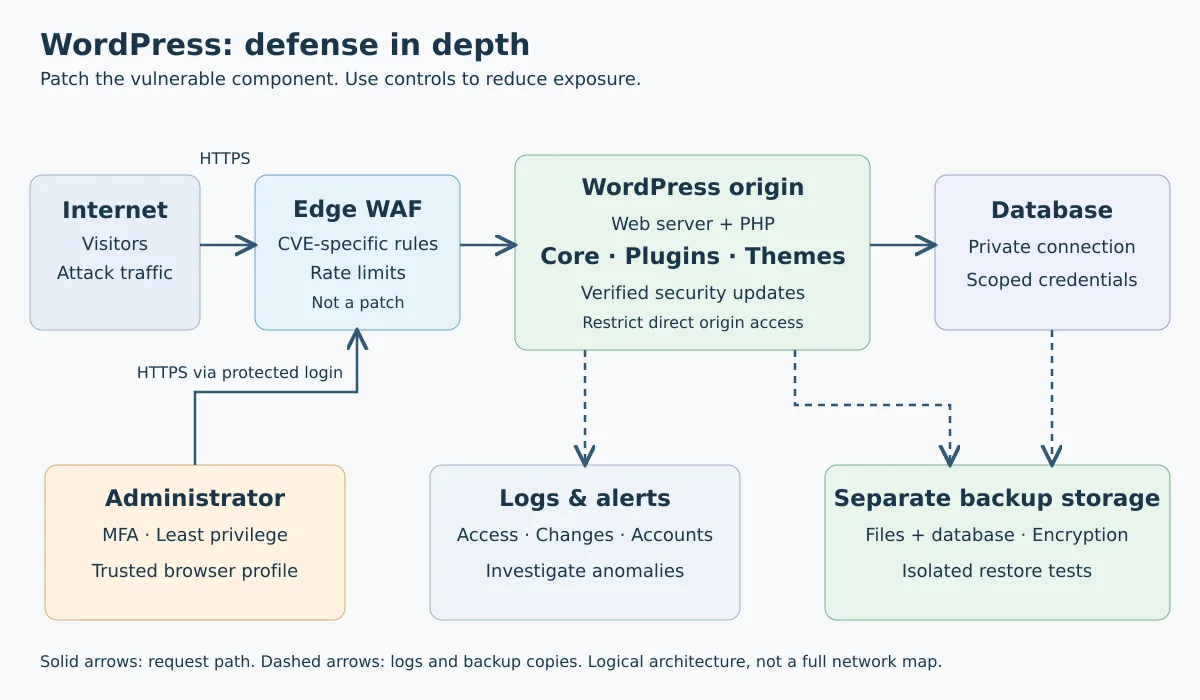
In an edge WAF, confirm specific coverage for the CVE, that the rule is enabled, and the paths through which the origin server can still be reached directly. Do not block the entire REST API or the whole admin-ajax.php blindly: that can break the site without addressing the cause. Legitimate integrations, such as WordPress automation via MCP, also use the API.
Fix playbook with WP-CLI
The examples are for a simple installation with WP-CLI already installed, run by the user who administers the files — not by root. Replace the path. On managed hosting, use the panel or ask the provider to run them. In Multisite, plan the update and testing for the entire network. Do not run these commands as triage on a possibly compromised environment: commands that load WordPress can execute tampered code; in that case, isolate and preserve a copy first.
1. Inventory before changing
cd /var/www/seu-site
wp core version
wp plugin list --fields=name,status,version,update,update_version
wp theme list --fields=name,status,version,update
Compare the technical name, version, and conditions of each advisory. The slugs involved are convertplug, wpappninja, download-monitor and webappick-product-feed-for-woocommerce-pro. For CTX Feed Pro, with no known patch at the time of investigation, follow the mitigation from the dedicated section; there is no update command in this script that is proven to be corrective. Do not install one just to follow the example. The absence of an update in the panel does not prove safety, especially in commercial plugins. References: plugin inventory and themes.
2. Prepare a working recovery
Before maintenance, ensure a consistent copy of the files and the database outside the public root and test the restore in an isolated environment. In stores, plan how to preserve orders received during the window. Do not leave a SQL dump in public_html. See the guide on backup with tested restore.
3. Update effectively installed components
# Veja primeiro o que seria atualizado; não altera os plugins.
wp plugin update --all --dry-run

# Núcleo: atualiza para a versão estável oferecida pelo WordPress.org.
# Teste antes a compatibilidade se houver mudança de série.
wp core update
wp core update-db

# Execute apenas as linhas dos plugins presentes no seu inventário.
wp plugin update wpappninja
wp plugin update download-monitor
wp plugin update convertplug
The last command depends on the commercial update channel being configured. If it fails or keeps offering a vulnerable release, get the package from the vendor; do not use ZIPs from third parties. The versions in the table are references for the fix, not a reason to downgrade. The option wp core update --minor limits the update to the current series, but you still need to check whether it received the fix. Documentation: core update, update-db and plugin update.
4. Verify integrity and operation
wp core version
wp plugin list --fields=name,status,version,update
wp core verify-checksums --include-root
wp plugin verify-checksums --all
The core checksums and the plugin checksums compare files against WordPress.org references. Commercial or proprietary components may not have checksums available. Mismatches require investigation, not automatic deletion; a clean result does not scan the entire database nor prove the absence of an intrusion.
Check login, public pages, forms, downloads, password recovery, and application features. Clear the affected caches after the update and watch for errors. These commands were verified against the documentation; they do not represent exploitation tests nor an audit of your server.
Best practices that reduce risk
- Keep the core, plugins, themes, PHP, and operating system up to date. Assign responsible parties and alerts for update failures.
- Use MFA and unique passwords; reserve the administrator profile for maintenance and remove unnecessary access.
- Remove unused components. Download software only from legitimate sources.
- Limit write permissions; do not fix errors with
chmod -R 777. Separate credentials and databases for different sites. - Protect backups and monitor changes to files, accounts, and settings.
The official hardening guide also allows you to disable the file editor in the dashboard by adding the following configuration to wp-config.php, before WordPress loads and without duplicating an existing definition:
define( 'DISALLOW_FILE_EDIT', true );
This does not stop malicious uploads, does not remove backdoors, and does not replace patches. To review the execution layer, see Nginx and various PHP versions.
Suspected intrusion: updating is not enough
If unknown administrators, redirects, or unexpected files appear, treat it as an incident. Restrict exposure, preserve logs and a copy of the environment, contact the hosting provider, and investigate the entry and persistence. Avoid wiping everything before preserving evidence.
After containment and rebuilding from trusted sources, revoke application sessions and passwords, replace potentially exposed credentials, and review integrations. Restore only assessed backups and fix the vulnerability before reopening. The official hacked sites playbook helps organize the response.
Summary: take inventory, compare with the correct advisory, apply the patched version, and validate. Mitigation buys time; updating closes the flaw; investigation determines whether someone has already gained access.