

Gitea jumped from 1.27 to 28 — and no, 27 versions weren't lost in between. Announced 28.0.0, announced in 30 of September 2026, is the version that would be called 1.28.0: the project simply dropped the “1.” that was going nowhere. Behind the new number is a large release, with an audit log, bot accounts, deploy tokens, administrator impersonation, and several improvements to Actions — along with breaking changes that require reviewing security, retention, and workflows before upgrading. This post summarizes what changed and shares what we learned while updating a production instance.
Why 28 and not 1.28
Since the fork from Gogs, in 2016, Gitea numbered its versions as 1.x. The first number never changed; the second one carried the information. Starting with this release, that second number has moved to the front: 1.27 → 28. There is no rewrite or general compatibility break because of the number — there are incompatible changes that need to be evaluated, described below.
The practical effect is on automation: scripts that look for tags 1.*, compare versions as text or build the download URL by hand. Along with the change, 28 stopped publishing 32-bit x86 binaries and the variants gogit, and the file names lost the operating system version suffix. For Linux amd64, the binary remains at https://dl.gitea.com/gitea/28.0.0/gitea-28.0.0-linux-amd64, with .sha256, GPG signature and Sigstore package alongside.
Audit log
An important feature for those who manage Gitea in a company. Relevant security events are now logged in the GitHub style: action, author, scope, source (interface, API, CLI, or system) and metadata. The events appear in the administrator, organization, repository, and user settings, with filters. Actions performed during an impersonation record both people.
The detail that matters: logging is disabled by default. To enable it, in app.ini:
[audit]
RECORD_OUTPUT  = database
RETENTION_DAYS = 90   ; padrão 30; 0 guarda para sempre
Cleaning up old events is done by the task cron.delete_old_audit_events.
Bot accounts and deploy tokens
Automation in Gitea used to mean creating a regular user, generating a token, and hoping nobody logged in with it. 28 brings bot accounts for real: users without passwords that only authenticate via token, don't receive notifications or emails, and can't open an interactive session — not via login, not via reverse proxy, or any external source. They can be administered through the interface, the API, or the CLI. The command gitea admin user change-type converts an existing local account into a bot or does the inverse conversion.
The deploy tokens are the pair to deploy keys for HTTPS: a credential restricted to one repository, with read or read and write access, used as a password in a Git operation — including LFS. They allow the production server to pull a repository without an SSH key and without using a person's account.
Rounding out the package are the regenerable personal tokens: it's possible to rotate a token's value while keeping the same name and permissions, useful when it has leaked or been handed to a third party — the PR itself cites the case of a token given to an AI agent.
Administration and code review
- Impersonation: the administrator can view the instance as a specific user to investigate a permission issue. The action is recorded when the audit log is enabled.
- Required code owners: a new branch protection rule requires approval from an owner or team member matching the rule in
CODEOWNERS. - More navigable diff: search and filter by extension in the file sidebar, and long lines truncated but visible.
- Notifications via WebSocket: the real-time event channel (notification counter, timer, logout) switched from SSE to WebSocket in
/-/ws. If the WebSocket fails to connect, the interface falls back to periodic polling.
Gitea Actions
Actions — the built-in CI/CD, with YAML compatible with GitHub Actions' — gained:
- Build queue: a read-only view of jobs, with running ones first and then those waiting, in the order a runner will pick them up. It appears in the administration for the entire instance and in each repository.
- Dynamic matrix: o
strategy.matrixfor a job can be assembled from the outputs of previous jobs. max-parallelin the matrix, forced cancellation of runs via the API and more endpoints to manage runs and logs.- Artifact preview right on the run page.
On the executor side, the runner reached 4.1.0 on October 1st, with a backend to run the jobs on Kubernetes.
Retention and egress: two precautions before the upgrade
Start with data retention and egress permissions. There are other compatibility requirements in the following section.
1. Actions history now expires
Until 1.27, completed runs stayed in the database forever. 28 creates the RUN_RETENTION_DAYS, with standard of 400 days: in the midnight cleanup following the upgrade, runs older than that are deleted, along with jobs, logs, and artifacts. Without a backup, there is no automatic restore. To keep the old behavior, set before upgrading:
[actions]
RUN_RETENTION_DAYS = 0   ; 0 = guardar para sempre
Pay attention to 0: now it also means “keep forever” in LOG_RETENTION_DAYS and ARTIFACT_RETENTION_DAYS. Until 1.27, anyone who put 0 in those two keys had their logs and artifacts deleted in the following cleanup.
2. Outbound Git traffic now goes through an internal proxy
Migrations, mirrors, and other Git network operations now go through an internal proxy, which applies the egress rules to direct connections. The rules gained a mode:
EGRESS_MODE = lax(default): allows public hosts on any port, except for explicit blocks; private and loopback addresses require permission.EGRESS_MODE = strict: only allows what is on the allow list, respecting the blocks; entries without a port are valid only for 80 and 443.
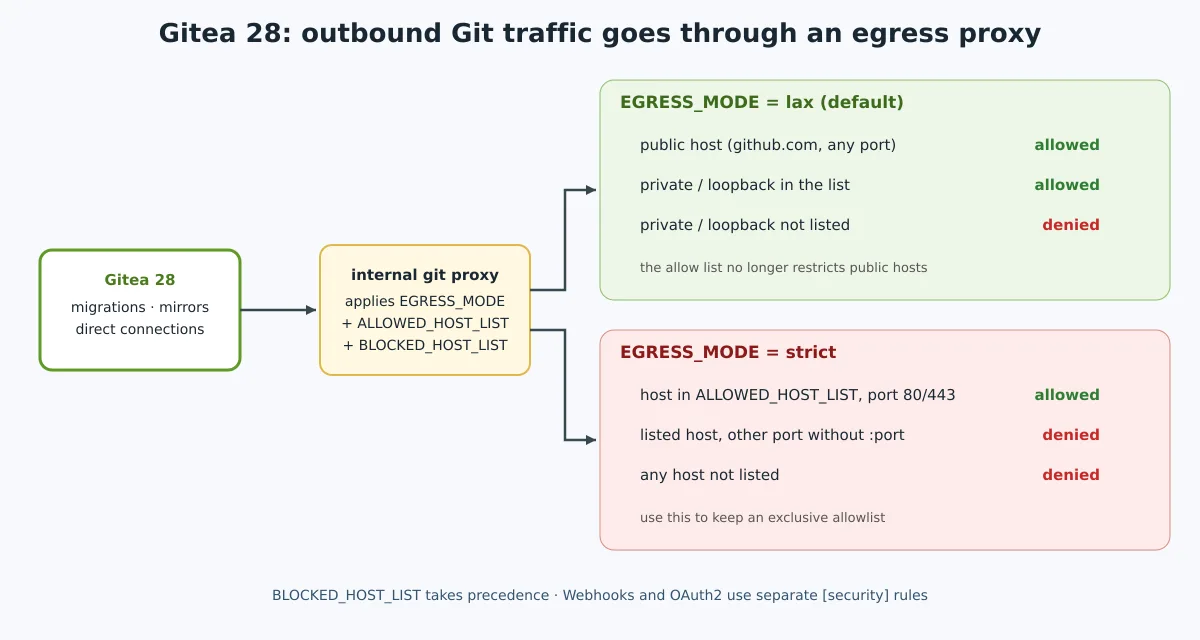
The release notes alert is specific: in [security], a ALLOWED_HOST_LIST that previously restricted public traffic is no longer exclusive in the default mode lax. To keep that restriction for webhooks and OAuth2, configure EGRESS_MODE = strict. Do not copy this configuration without listing the destinations actually needed.
There is an important exception in the configuration migration: in [migrations], if the new list is missing, a ALLOWED_DOMAINS legacy keeps the strict mode for compatibility and allows all ports for the listed hosts. When adopting the new list, review the ports explicitly. See the migration reference, instead of assuming equivalence between old and new keys.
The lists control direct connections. If there is an outbound proxy configured, blocking of forwarded destinations becomes the responsibility of that proxy.
In addition:
- The preset
externalno longer exists. - Wildcards in IP addresses and the
*entry are no longer accepted. - Domains follow curl's syntax:
example.comapplies to the domain and all subdomains;*.example.com, applies only to subdomains. - An invalid entry in
[migrations] BLOCKED_HOST_LISTprevents Gitea from starting. ALLOWED_DOMAINS,BLOCKED_DOMAINSandALLOW_LOCALNETWORKSbecome obsolete in favor ofALLOWED_HOST_LISTandBLOCKED_HOST_LIST.- The
[migrations]controls migrations and mirrors; the[security], webhooks and OAuth2.
Other breaking changes
- Minimal Git: version 28 requires Git 2.25.0 or later. Check
git --versionin the environment running Gitea. - Registration: self-registration is disabled by default. To allow it deliberately, configure
[service] DISABLE_REGISTRATION = false. - Instance URL:
[server] DOMAINis no longer read; reviewROOT_URL, also used to derive the default SSH domain. - Workflows: o
if:of the job is evaluated before matrix expansion. Conditions withmatrixneed to be moved into steps or into the matrix configuration. - Matrix failure:
strategy.fail-fastnow applied; configurefalsewhen every combination needs to finish. - Reusable workflows: public repositories can't call private workflows, and nested calls can't elevate the caller's token permissions.
These items are part of the breaking changes documented by the project.
In practice: upgrading a production instance
When upgrading an installation set up as a binary with systemd and MySQL, with its own runner and mirrors, three points deserved attention.
The legacy migrations configuration deserved a review. The app.ini had:
[migrations]
ALLOW_LOCALNETWORKS = true
ALLOWED_DOMAINS     = github.com,api.github.com,gitlab.com
An explicit configuration with the new list can use strict mode. It isn't an exact equivalence: entries without a port will now allow only 80 and 443. In addition, github.com already covers api.github.com:
[migrations]
EGRESS_MODE       = strict
ALLOWED_HOST_LIST = github.com,gitlab.com,private,loopback
The example allows private networks and loopback: remove those presets if they aren't needed and prefer specific destinations. Also check where the mirrors come from — in strict mode, an internal Git on a port like 3000 needs an entry with the port, like 10.0.0.15/32:3000 (replace with the real IP of your environment). Validate the configuration and access to destinations before the cutover.
The Actions history would be partially cleared. With the default of 400 days, runs older than that would be removed during the scheduled cleanup. We defined RUN_RETENTION_DAYS = 0 before the upgrade.
nginx was not forwarding the WebSocket. After the upgrade, the handshake at /-/ws responded 101 Switching Protocols directly on Gitea, but 426 Upgrade Required through nginx. The proxy block did forward the headers Upgrade and Connection, but the protocol version was missing — in nginx 1.18.0 verified, the default for the upstream is HTTP/1.0, which does not allow that upgrade:
For a new configuration, the example below uses the map recommended in the nginx documentation. The map belongs to the context http; the location, to the block server existing:
# Dentro de http {}, fora de server {}
map $http_upgrade $connection_upgrade {
    default upgrade;
    ''      close;
}

# Dentro do server {} existente
location / {
    proxy_pass http://127.0.0.1:3000;
    proxy_http_version 1.1;              # a linha que faltava
    proxy_set_header Upgrade $http_upgrade;
    proxy_set_header Connection $connection_upgrade;
    proxy_set_header Host $host;
    proxy_set_header X-Forwarded-For $proxy_add_x_forwarded_for;
    proxy_set_header X-Forwarded-Proto $scheme;
}
To test, without a browser:
curl -s --max-time 5 -o /dev/null -w '%{http_code}\n' --http1.1 \
  -H 'Connection: Upgrade' -H 'Upgrade: websocket' \
  -H 'Sec-WebSocket-Version: 13' -H 'Sec-WebSocket-Key: dGhlIHNhbXBsZSBub25jZQ==' \
  https://git.exemplo.com.br/-/ws
# 101 = handshake concluído; 426 = investigar o upgrade no proxy
After receiving 101, the connection remains open; the curl timeout and exit code 28 after five seconds are expected in this test. Validate the configuration with nginx -t before reloading the service.
Notifications keep working if you forget — the interface falls back to periodic polling —, but notifications are no longer instant. Anyone using Caddy in front doesn't need to do anything: reverse_proxy to handle WebSocket with no extra configuration.
On the verified nginx proxy 1.18.0, add proxy_http_version 1.1, maintaining the existing upgrade headers, changed the answer from 426 to 101. The home page kept responding 200 after reload.
Upgrade script
- Consistent backup: interrupt writes according to the backup documentation. Preserve database, repositories, configuration, and data files at the same consistent point; use the native database dump when indicated and test the restore. The database migration does not have automatic rollback.
- Compatibility: check Git,
ROOT_URL, registry and workflows before restarting. - Retention: decide the
RUN_RETENTION_DAYSbefore uploading 28. - Egress: if you use
ALLOWED_DOMAINS,BLOCKED_DOMAINS,ALLOW_LOCALNETWORKSor the presetexternal, rewrite withALLOWED_HOST_LIST,BLOCKED_HOST_LISTandEGRESS_MODE. If the list needs to be unique, usestrict. - Scripts: adjust what assembles download URLs or compares versions with “1.”.
- Swap: replace the binary or the image tag (
docker.gitea.com/gitea:28.0.0) and restart. Check the SHA-256 sum beforehand. - Verification:
/api/healthz, the version in/api/v1/version, the warnings in the startup log and the WebSocket test above.
The complete step-by-step installation guide — Docker Compose with MariaDB, binary with systemd, runner and tea CLI — is available in the guide Gitea: self-hosted Git with Actions, runner, and tea CLI, already updated for 28.
Security
28 brings security fixes, including the rejection of invalid or duplicate Git objects on push, identification of SSH keys by fingerprint, ensuring that PR runs coming from forks continue waiting for approval even after being canceled, a denial-of-service fix in SSH, and authorization verification by repository in team accesses, exclusions, and packages. The full details — with identifiers and severity — were left for about a week after the release and, as of 5 October 2026, had still not been published. That alone is reason enough not to delay the upgrade.
Is it worth upgrading?
Yes, after reviewing the breaking changes and having a restorable backup. 28 is a maturation release: auditing, bots, deploy tokens, and code owner approval expand the controls available to teams without losing what has always been its advantage — one binary, one database, and little memory. The new version number is scarier than the upgrade itself.
Read also: the history of GitLab, Gogs, where Gitea came from and DevOps: what is CI/CD?.
References: release 28.0.0, Gitea settings and runner 4.1.0. Reviewed on 5 October 2026.