

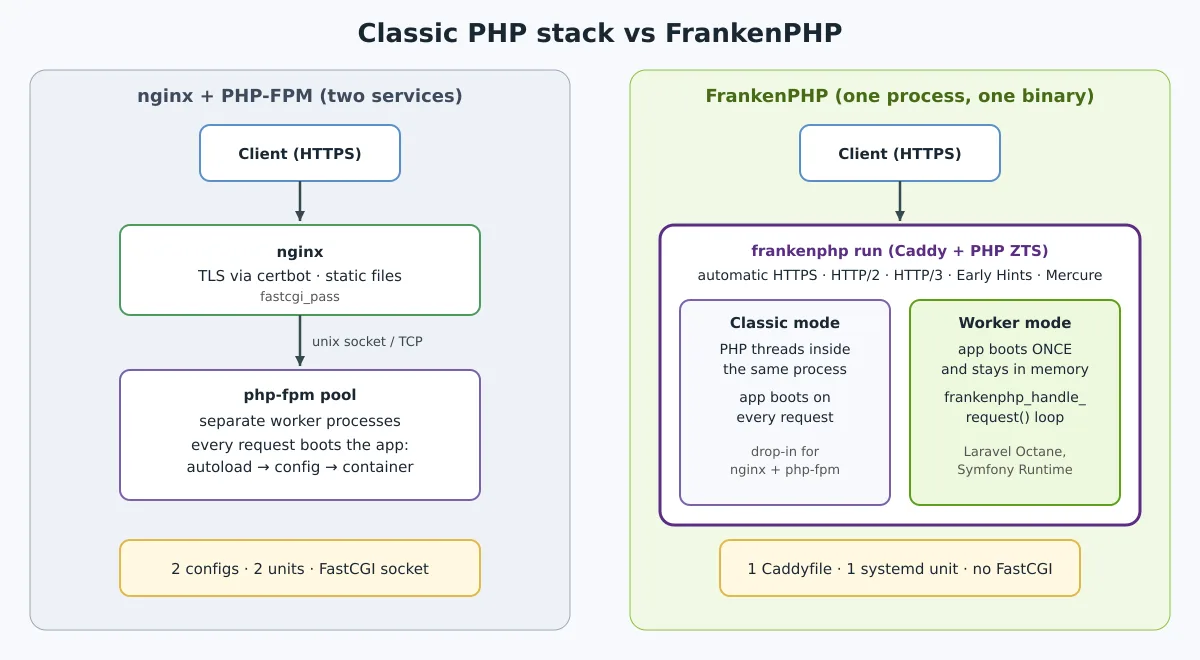
For a long time, serving PHP in production meant two pieces: a web server in front (Apache or nginx) and PHP-FPM in the back, talking over FastCGI, each with its own configuration, service, and logs. The FrankenPHP brings everything together into a single binary: the web server Caddy with the PHP interpreter built in. You get automatic HTTPS, HTTP/3, and, as a bonus, a worker mode that keeps the application loaded in memory between requests. This guide explains what it is, installs it on Debian and Ubuntu using the official packages, and shows the two modes in action.
What is FrankenPHP
FrankenPHP is a PHP application server written in Go, created by Kévin Dunglas — the author of API Platform — with sponsorship from the cooperative Les-Tilleuls.coop. Version 1.0 was released in December 2023. In May 2025, the PHP Foundation officially began supporting the project and the code moved to the official PHP organization on GitHub (php/frankenphp), with governance maintained by the original maintainers. The license is MIT.
The current version is 1.13.0, from 4 October 2026, which embeds Caddy 2.11.7 and Mercure 1.0 and fixes five security flaws (two rated as high). The name is literal: it's a PHP stitched inside Caddy, hence the elephant with screws in the logo.
What it brings:
- A single process. PHP runs in threads within the Caddy process, with no FastCGI and no separate pool to manage. That's why FrankenPHP uses PHP compiled in ZTS (thread safe).
- Everything Caddy does. Automatic certificate, HTTP/2, HTTP/3, zstd/brotli/gzip compression, reverse proxy, and the same Caddyfile.
- Worker mode. The application initializes once and serves subsequent requests already loaded. Laravel (via Octane) and Symfony (via Runtime) have official integration.
- Web application extras. Early Hints (status 103), real-time with Mercure, hot reload and X-Sendfile for large files.
Installing on Debian and Ubuntu
There are three paths: packages .deb/.rpm, static binary, and Docker. For servers, the package is the most practical, because it comes with a systemd service, php.ini production setup, and extensions installable via apt. The packages are maintained by the project team in their own repository, with one variant per PHP version (8.2 to 8.5):
sudo apt install -y curl ca-certificates
sudo mkdir -p /etc/apt/keyrings

VERSION=85   # 82, 83, 84 ou 85
sudo curl -fsS https://pkg.henderkes.com/api/packages/${VERSION}/debian/repository.key \
  -o /etc/apt/keyrings/static-php${VERSION}.asc
echo "deb [signed-by=/etc/apt/keyrings/static-php${VERSION}.asc] https://pkg.henderkes.com/api/packages/${VERSION}/debian php-zts main" \
  | sudo tee /etc/apt/sources.list.d/static-php${VERSION}.list
sudo apt update
sudo apt install frankenphp
I tested these commands on a clean Debian 13. The result:
$ frankenphp version
FrankenPHP v1.13.0 PHP 8.5 Caddy v2.11.7

$ php-zts -v
PHP 8.5.11 (cli) (ZTS gcc 16.2.0 x86_64)
The package creates the user frankenphp (group member www-data), installs the service frankenphp.service and the CLI php-zts. Use this CLI for Composer and scripts: in 1.13, the subcommand frankenphp php-cli began using the native PHP command-line SAPI and, with PHP under 8.6, refuses to run with the message this functionality is not available.
The files are located at:
| Item | Path (deb/ rpm package) |
|---|---|
| Server configuration | /etc/frankenphp/Caddyfile |
| Extra settings (loaded automatically) | /etc/frankenphp/Caddyfile.d/*.caddyfile |
| php.ini (already with production preset) | /etc/php-zts/php.ini |
| ini adicionais | /etc/php-zts/conf.d/*.ini |
| Example Site | /usr/share/frankenphp/ |
Extensions are installed via apt with the prefix php-zts-. The base installation already includes OPcache, mbstring, curl, sodium, dom, and others; the rest are installed like this:
apt-cache search php-zts- | grep -v debuginfo
sudo apt install php-zts-pdo-mysql php-zts-gd php-zts-intl php-zts-redis
php-zts -m
Prefer not to add a repository? The official script downloads the static binary, which runs on any distribution without dependencies: curl https://frankenphp.dev/install.sh | sh. The trade-off is that extensions now have to be compiled into the binary.
Classic mode: replacing nginx + PHP-FPM
In the classic mode, FrankenPHP behaves like the traditional pair: each request loads the script from scratch. It's the mode for any existing PHP application — WordPress, Nextcloud, a legacy system. The Caddyfile for a production site:
{
	frankenphp
}

app.exemplo.com.br {
	root /var/www/app/public
	encode zstd br gzip
	php_server
	log
}
The directive php_server summarizes what in nginx would require try_files, location ~ \.php$ and fastcgi_pass: serves static files, sends .php . index.php. As with Caddy, the domain in the address of the block is enough for the certificate to be issued and renewed automatically, with DNS pointed and ports 80 and 443 open.
sudo frankenphp fmt --overwrite /etc/frankenphp/Caddyfile
sudo frankenphp validate --config /etc/frankenphp/Caddyfile
sudo systemctl enable --now frankenphp
sudo systemctl reload frankenphp
journalctl -u frankenphp -f
To test without touching the service, run it in the project folder frankenphp php-server: it serves the current directory on the fly. For WordPress, the official documentation recommends an equivalent block: domain, php_server, compression, and log.
Worker mode: the application stays in memory
In a modern framework, much of the time for each request is spent on initialization: autoloading, reading configuration, assembling the dependency container. In worker mode, the entry script does this once and enters a loop that serves request after request with frankenphp_handle_request(). The superglobals ($_GET, $_POST, $_SERVER) are renewed on each loop iteration; everything else stays loaded.
A minimal worker, to see the effect:
<?php
// /srv/app/worker.php
$boot = microtime(true);   // executa uma única vez
$count = 0;

$handler = function () use (&$count, $boot) {
    $count++;
    echo "requisição $count, app iniciada em " . round($boot) . "\n";
};

while (frankenphp_handle_request($handler)) {
    gc_collect_cycles();
}
{
frankenphp {
worker {
file /srv/app/worker.php
num 4
}
}
}
app.exemplo.com.br {
root /srv/app
php_server
}In the test, three consecutive requests responded requisição 1, 2 and 3, all with the same initialization time: the state survived between requests. In the classic mode, the same counter would always go back to 1.
This is powerful and demands discipline. Static variables, singletons, and connections persist across users; memory leaks accumulate; an unhandled exception brings down the worker. That's why the documentation recommends catching exceptions within the handler, and FrankenPHP restarts workers that fail (the limit is configurable with max_consecutive_failures). For code changes in development, the option watch restarts the worker when files change.
Laravel and Symfony
You don't need to write the loop yourself. In Laravel, Octane takes care of this:
composer require laravel/octane
php-zts artisan octane:install --server=frankenphp
php-zts artisan octane:frankenphp
In Symfony, the Runtime component has native support; the configuration is on the Symfony page of the documentation. In both cases, run the application's tests in worker mode before going to production — code that assumes “new process per request” shows up quickly.
Docker
The official image is dunglas/frankenphp, with variants per PHP version and Debian or Alpine base. To spin up the current directory:
docker run -v $PWD:/app/public \
  -p 80:80 -p 443:443 -p 443:443/udp \
  dunglas/frankenphp:1.13-php8.5
Open https://localhost (not https://127.0.0.1, for which there is no certificate by default) and accept the local certificate. For a production image, the extensions go in with the install-php-extensions that already comes in the base, and the worker with the variable FRANKENPHP_CONFIG:
FROM dunglas/frankenphp:1.13-php8.5
RUN install-php-extensions pdo_mysql gd intl zip opcache
RUN cp $PHP_INI_DIR/php.ini-production $PHP_INI_DIR/php.ini
COPY . /app
ENV FRANKENPHP_CONFIG="worker ./public/index.php"
Prefer Debian-based images. Alpine and the static binary use musl libc, and the documentation lists incompatibilities, such as the lack of the GLOB_BRACE of the glob(). flag. For the basics of containers, see the Docker course.
Precautions before migrating
- Extensions not thread safe.
imap, the agent do New Relic e opcovnão funcionam; oimagickconflita com as threads do ImageMagick, and the documentation tells you to turn those threads off; the Datadog and Blackfire profilers still have limitations. The full list is in Known issues. - Threads, not processes. The default is twice the number of CPUs. In 1.13,
num_threadsit now counts only threads for requests outside the workers, which are added on top; anyone setting this value together with workers should review the configuration before upgrading. - Worker mode is optional. Start in classic mode, which doesn't change application behavior, and only enable worker after testing.
- Stay up to date. The 1.13 fixed, among others, a header spoofing via names with periods and an
putenv()that leaked values between requests. Upgrading issudo apt upgrade.
If you keep several PHP versions side by side with nginx, the post Nginx and various PHP versions shows the traditional approach — useful for comparison and for applications that still rely on an incompatible extension.
Links
- frankenphp.dev · documentation · github.com/php/frankenphp
- Worker mode · Configuration · Laravel · Production
- Here on the blog: Caddy on Linux · The history of the Go language
FrankenPHP does not ask you to rewrite anything to get started: in classic mode, it simply swaps two services for one and brings Caddy's automatic HTTPS along. The big gain comes later, with worker mode — and then it's worth treating the migration as an architectural change, with tests, rather than just a server swap.