
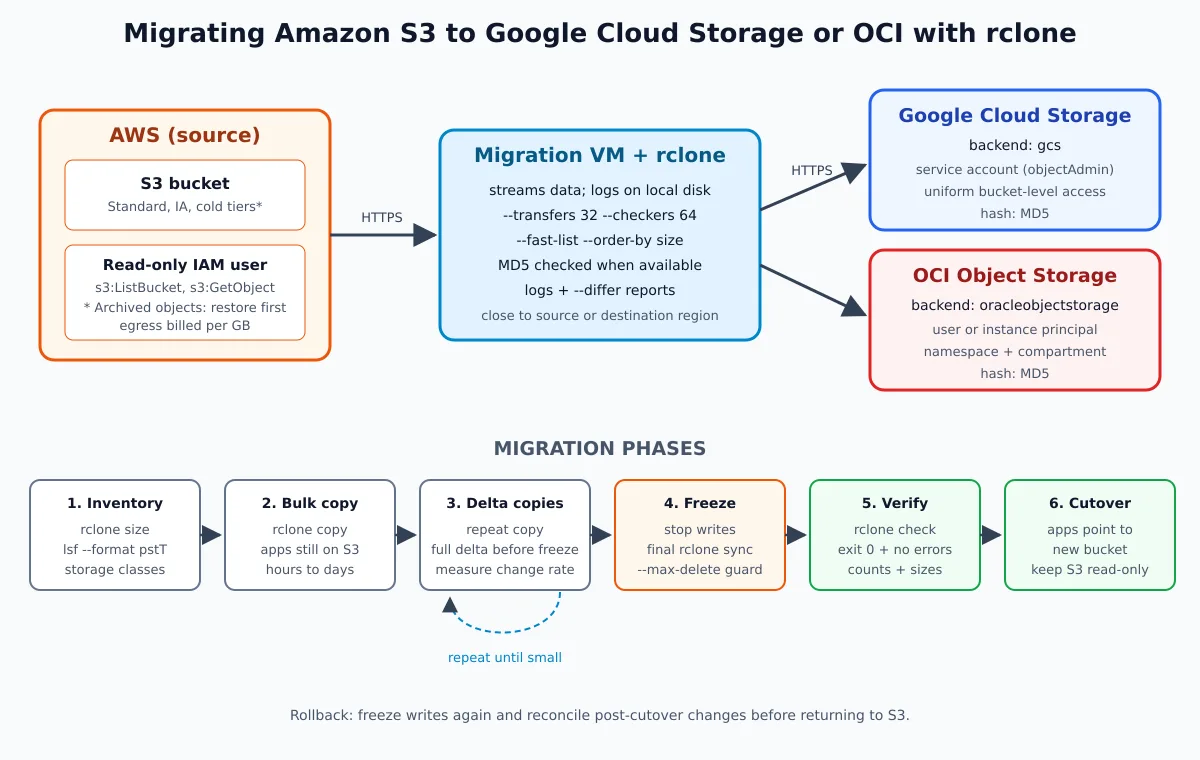
At part 1, rclone took files from the server to the cloud. Here it takes one cloud to another: buckets from Amazon S3 migrated to Google Cloud Storage (GCS) or to OCI Object Storage, from Oracle. The process is the same for both destinations — only the destination remote changes — and it was put together to migrate without a long downtime window: bulk copy with the applications still on S3, deltas until the lag becomes small, a short freeze, verification, and cutover.
The commands use rclone 1.75.1. The copy, delta, final sync, and verification flow was rehearsed end to end against a local S3 (the rclone serve s3); the syntax of the GCS and OCI remotes was checked in the binary and in the providers' documentation. There was no test against real AWS, GCP, or OCI accounts. Real accounts have their own limits, policies, and quotas — run a rehearsal with a small bucket before the big one.
Before you start: cost, place, and scope
Cost. What weighs most in a migration out of AWS is data egress: AWS charges per GB transferred from S3 to the internet. Since March 2024 there has been a program that waives this fee for those leaving AWS, but it is not automatic: you need to open a support ticket, approval is per account, and the deadline to complete the migration is 90 days (official announcement). Ask before you start, not after the invoice. Add up the listing, read, and write requests (LIST, GET, HEAD and PUT), the recovery of cold classes, the VM, and any egress traffic from the destination during verification. Many small objects can make the cost of requests significant; calculate for your regions and classes.
Place. In a copy between different providers there is no “server-side copy”: each object leaves S3, passes through the memory of the machine running rclone, and is written to the destination. The content of the objects is transmitted without needing to store the bucket on local disk; logs and inventories stay on disk. Bandwidth, CPU, and API limits can constrain the transfer. Run rclone on a VM close to one of the ends — an instance on GCP or OCI in the same region as the destination bucket is the most practical, because it allows authenticating without a key in a file (see below) — and not on your home laptop.
Scope. rclone migrates objects: content, name, Content-Type and modification date. Bucket policies, ACLs, lifecycle rules, versioning, event notifications, and replication are bucket configuration and need to be recreated on the destination, in each provider's language. List that at the beginning so you don't discover it at cutover.
Migration architecture and phases
The VM with rclone reads from S3 with a read-only IAM user and writes to the destination with an object credential restricted to the destination bucket. The migration goes through six phases: inventory, bulk copy, repeated deltas, freeze with final sync, verification, and application cutover. The S3 bucket remains intact and read-only until the new one is validated in production — that's your rollback plan.
Preparing the migration VM
Install rclone as shown in 1, along with tmux and Python 3. The examples below use Bash and illustrative bucket names: replace names, project, namespace, compartment, and regions. Creating buckets, accounts, and policies requires a separate administrative identity; the copy process uses only the restricted permissions shown below. Install and authenticate the CLI of the chosen destination before the provisioning steps.
umask 077
mkdir -p "$HOME/rclone-migracao/logs" "$HOME/.config/rclone"
cd "$HOME/rclone-migracao"
rclone version
All inventory files and reports will be generated in this directory. Do not put keys in repositories, in the shell history, or in arguments visible in the process list.
Source: read-only credential in AWS
Create an IAM user (or a role, if rclone runs on an EC2) with read-only access on the source bucket. No admin key on a migration VM:
{
  "Version": "2012-10-17",
  "Statement": [
    {
      "Effect": "Allow",
      "Action": ["s3:ListBucket", "s3:GetBucketLocation"],
      "Resource": "arn:aws:s3:::meu-bucket"
    },
    {
      "Effect": "Allow",
      "Action": ["s3:GetObject"],
      "Resource": "arn:aws:s3:::meu-bucket/*"
    }
  ]
}
And the source remote, with the bucket's region:
rclone configCreate the remote aws, type s3, provider AWS, region us-east-1 (replace with the actual one). For keys provided by the administrator, use env_auth=false and enter the access key and secret key in the wizard, without placing them on the command line. Temporary credentials also need the session token. Test the authorized bucket directly:
rclone lsf aws:meu-bucket --max-depth 1If rclone runs on an EC2 with an instance profile, use env_auth=true and do not save any keys. As in the 1 part, encrypt the rclone.conf with rclone config encryption set after configuring all remotes. If there is SSE-KMS, reading may also require kms:Decrypt and authorization in the key policy. Do not expand IAM just to list all buckets in the account.
Phase 1: inventory
Before moving a byte, know what exists. Total size and number of objects:
rclone size aws:meu-bucket --fast-listThe full list, with path, size, date and storage class, in a CSV that will serve as a reference during verification:
rclone lsf -R --files-only --fast-list \
  --format "pstT" --csv \
  aws:meu-bucket > inventario-s3.csv

# objetos por classe de armazenamento
python3 - <<'PYCSV'
import csv
from collections import Counter
with open("inventario-s3.csv", newline="") as f:
    counts = Counter(row[3] or "not-reported" for row in csv.reader(f))
for storage_class, count in sorted(counts.items()):
    print(count, storage_class)
PYCSV
Three things the inventory needs to answer:
- Are there objects in the Glacier Flexible Retrieval or Deep Archive classes? Without restoration, rclone cannot read their contents: the copy fails with
Object in GLACIER, restore first. Ask an operator withs3:RestoreObjectto restore them first (this action is not covered by the read-only migration credential). Using that operator's authorized remote, the commands are:rclone backend restore aws:meu-bucket/arquivo-morto -o priority=Bulk -o lifetime=7 rclone backend restore-status aws:meu-bucket/arquivo-mortoThe timeframe depends on the class and priority and can exceed one day; wait for the restoration status before copying. Glacier Instant Retrieval does not require this procedure.
- Does the bucket have versioning? rclone copies the current version of each object. If the version history needs to come along, that is a separate project (
--s3-versionslists older versions as files with a date suffix); for most migrations, the current version is sufficient. - How much changes per day? Compare two inventories taken one day apart. This determines how many deltas will be needed and how long the freeze lasts.
Destination A: Google Cloud Storage
Create the bucket in the right region with uniform access-level permissions (granted through bucket-level IAM, without per-object ACLs — the standard recommended by Google):
gcloud storage buckets create gs://meu-bucket-gcs \
  --location=southamerica-east1 \
  --default-storage-class=STANDARD \
  --uniform-bucket-level-access
Create a service account solely for the migration and grant it object permission in that bucket, not in the entire project:
gcloud iam service-accounts create rclone-migracao \
  --display-name="rclone migracao S3"

gcloud storage buckets add-iam-policy-binding gs://meu-bucket-gcs \
  --member=serviceAccount:rclone-migracao@MEU-PROJETO.iam.gserviceaccount.com \
  --role=roles/storage.objectAdmin
Keyless authentication (preferred). Run rclone on a Compute Engine VM with that service account attached and OAuth scope cloud-platform. The VM's IAM and scopes must allow the operation; a read-only scope blocks uploads even with the right role. rclone uses the VM's own Application Default Credentials:
rclone config create gcs gcs \
  env_auth=true \
  bucket_policy_only=true

rclone lsf gcs:meu-bucket-gcs --max-depth 1
Authentication with a JSON key. Outside GCP, create a service account key. Organizations created after May 3 2024 come with the policy iam.disableServiceAccountKeyCreation enabled by default, and the command below fails until an administrator grants an exception — another reason to run it inside GCP:
umask 077
mkdir -p "$HOME/.config/rclone"
gcloud iam service-accounts keys create "$HOME/.config/rclone/gcs-migracao.json" \
  --iam-account=rclone-migracao@MEU-PROJETO.iam.gserviceaccount.com
chmod 600 "$HOME/.config/rclone/gcs-migracao.json"

rclone config create gcs gcs \
  service_account_file="$HOME/.config/rclone/gcs-migracao.json" \
  bucket_policy_only=true
With bucket_policy_only=true rclone does not try to write an ACL per object, which would error on a bucket with uniform access. Once the migration is finished, delete the key (gcloud iam service-accounts keys delete).
Managed alternative. For S3 → GCS, Google has the Storage Transfer Service, which reads from Amazon S3 without a VM or agent. For a single, large bucket with no transformation in between, it's worth comparing. rclone wins when you want the same procedure for GCS and OCI, filters, difference reports, and fine-grained control of each phase.
Destination B: OCI Object Storage
rclone has a native backend for OCI (oracleobjectstorage), which uses Oracle's own authentication. You will need the namespace of the tenancy (oci os ns get), the OCID of the compartment and the region. Create the bucket:
oci os bucket create \
  --name meu-bucket-oci \
  --compartment-id ocid1.compartment.oc1..aaaa... \
  --storage-tier Standard
This policy allows querying metadata of the compartment's buckets Storage, but restricts object management to the migration bucket. For a VM, replace group MigracaoS3 by dynamic-group NomeDoGrupo:
Allow group MigracaoS3 to read buckets in compartment Storage
Allow group MigracaoS3 to manage objects in compartment Storage where target.bucket.name='meu-bucket-oci'
User principal (rclone outside of OCI): the user has an API key and an OCI configuration file, the same one that the oci CLI uses rclone config to register the remote and select the file and the profile. The resulting block should match the example below, adapting the path and profile name from your OCI file. Do not paste INI text into an rclone.conf already encrypted file: use the wizard.
[oci]
type = oracleobjectstorage
provider = user_principal_auth
namespace = meunamespace
compartment = ocid1.compartment.oc1..aaaa...
region = sa-saopaulo-1
config_file = /etc/rclone/oci/config
config_profile = MIGRACAO
Instance principal (rclone on an OCI VM, preferred): the VM joins a dynamic group, the policy is granted to the dynamic group, and no key is stored on disk:
rclone config create oci oracleobjectstorage \
  provider=instance_principal_auth \
  namespace=meunamespace \
  compartment=ocid1.compartment.oc1..aaaa... \
  region=sa-saopaulo-1

rclone lsf oci:meu-bucket-oci --max-depth 1
S3-compatible API alternative. OCI also exposes an S3-compatible API, with Customer Secret Keys (access/secret pair generated in the console) and an endpoint in the format https://<namespace>.compat.objectstorage.<região>.oci.customer-oci.com. It works for applications that already speak S3 — useful during the transition — but for the migration, prefer the native backend. One detail: buckets created via the S3 API go into the root compartment, unless you define a different default compartment for it.
Phase 2: bulk copy
With the applications still writing to S3, perform the first full copy. Use copy, not sync: at this stage nothing should be deleted at the destination. Test it first with --dry-run and run it inside a tmux (or screen), because it will take a while:
tmux new -s migracao

rclone copy aws:meu-bucket gcs:meu-bucket-gcs \
  --transfers 32 \
  --checkers 64 \
  --fast-list \
  --order-by size,descending \
  --log-file "$HOME/rclone-migracao/logs"/migracao-copy.log \
  --log-level INFO \
  --stats 1m --stats-one-line
For OCI, just change the destination: oci:meu-bucket-oci. What each flag does here:
--transfers 32 --checkers 64: well above the standard (4 and 8). These are illustrative values, not a guarantee: bandwidth, memory, CPU, and API quotas limit the result. Increase gradually while watching the log.--fast-list: lists the bucket in fewer API calls. Uses more memory (the entire listing stays in RAM), saves time and billed requests.--order-by size,descending: starts with the large objects, which occupy bandwidth in a stable way, and leaves the tail of small files for the end.--log-file: proof of what was copied. Keep it.
If the copy drops in the middle — network, VM restart, session end — run the same command again. rclone compares size and date and only copies what's missing; it does not start over from scratch.
Phase 3: deltas until the lag gets small
While the bulk copy was running, the applications kept writing to S3. Repeat the same copy: now it only transfers new or changed objects. The runs only tend to shorten when the copy capacity exceeds the rate of changes at the source. For intermediate runs on very large buckets, limit the comparison to what changed recently:
rclone copy aws:meu-bucket gcs:meu-bucket-gcs \
  --max-age 2d \
  --transfers 32 --checkers 64 --fast-list \
  --log-file "$HOME/rclone-migracao/logs"/migracao-delta.log --log-level INFO
--max-age filters by the object's modification date, which can come from the metadata X-Amz-Meta-Mtime, not necessarily from the upload date. A freshly uploaded object may retain an old date and fall outside the filter. Use a window larger than the interval between rounds and, before freezing, run one more round of without the filter to catch anything that slipped through. When a full delta takes only a few minutes, it's time for the 4 phase.
Phase 4: freeze and final sync
Stop S3 writes: put the application into maintenance mode, stop upload workers, or temporarily revoke write permission on the bucket. Keep the destination free of application writers as well. Then rehearse and run a sync, which in addition to copying what is missing deletes from the destination what was removed at the source since the bulk copy:
# Primeiro simule e revise especialmente as exclusões:
rclone sync aws:meu-bucket gcs:meu-bucket-gcs \
  --transfers 32 --checkers 64 --fast-list \
  --max-delete 1000 \
  --log-file "$HOME/rclone-migracao/logs"/migracao-final.log --log-level INFO \
  --dry-run

# Só após revisar: repita o comando acima removendo --dry-run.
The --max-delete is the safety lock of the 1 part applied here: if the sync wants to delete more than expected — source swapped by mistake, credentials pointing to the wrong bucket —, it stops. Adjust the number to what the inventory and the deltas indicate. This limit does not make the sync a transaction and does not undo changes already made. Require termination with exit code zero and investigate any error before proceeding.
Phase 5: verification
After the sync, run check without --one-way: we want to find both missing objects and leftovers at the destination. It checks size and available hashes; it is not proof of content equality when there is no usable hash on both sides.
if rclone check aws:meu-bucket gcs:meu-bucket-gcs \
  --fast-list \
  --differ "$HOME/rclone-migracao/logs/check-diferentes.txt" \
  --missing-on-dst "$HOME/rclone-migracao/logs/check-faltando.txt" \
  --missing-on-src "$HOME/rclone-migracao/logs/check-sobrando.txt" \
  --error "$HOME/rclone-migracao/logs/check-erros.txt"; then
  echo "Check concluído; revise também o resumo de hashes no log."
else
  echo "FALHA: não faça a virada; examine erros e diferenças." >&2
fi
Proceed only with zero exit code, reports without differences, and without errors. Empty reports alone are not enough. MD5 may be unavailable on multipart or encrypted objects; rclone may also find an additional MD5 in the metadata of objects it uploaded itself. Without a common hash, the comparison may be limited to size.
To check the content of a critical prefix, use:
rclone check aws:meu-bucket/pasta-critica gcs:meu-bucket-gcs/pasta-critica \
  --download
--download reads the content at both ends and can generate egress on both providers. A sample validates only the sample. If the requirement is to check all content without common hashes, plan the full read, its cost, and its duration; do not end the maintenance window while the required validation is still pending.
With the recordings still frozen, generate new inventories from the source and destination and compare path and size using a CSV parser (names with commas or line breaks cannot be handled with cut):
rclone lsf -R --files-only --fast-list --format "ps" --csv aws:meu-bucket > inventario-origem-final.csv
rclone lsf -R --files-only --fast-list --format "ps" --csv gcs:meu-bucket-gcs > inventario-destino.csv

python3 - <<'PYCSV'
import csv
from collections import Counter

def load(path):
    with open(path, newline="") as f:
        return Counter((row[0], int(row[1])) for row in csv.reader(f))

src = load("inventario-origem-final.csv")
dst = load("inventario-destino.csv")
if src != dst:
    raise SystemExit("Inventários diferentes: não faça a virada")
print("Inventários batem em caminho e tamanho; isso não substitui hashes")
PYCSV
Also stop if any inventory command fails; do not compare partial files. The parser loads the inventories into memory: for millions of objects, size the RAM accordingly or perform the comparison in a database.
What arrives and what doesn't at the destination
| Item | GCS | OCI |
|---|---|---|
| Object name and content | Yes | Yes |
Content-Type |
Yes | Yes |
| Modification date | Yes (metadata mtime) |
Yes (metadata opc-meta-mtime) |
Custom metadata x-amz-meta-* |
No | No |
| ACLs, bucket policy, lifecycle, old versions | No — recreate | No — recreate |
| Storage class | No — define in the destination | No — define in the destination |
Custom metadata is the point that surprises the most. rclone knows how to read S3 metadata (-M/--metadata), but in version 1.75.1 the GCS and OCI backends do not write arbitrary metadata through this mechanism. If the application relies on x-amz-meta-* — a custom hash, a user ID — export it first with rclone lsjson aws:meu-bucket -R --files-only --metadata > metadados-origem.json, and handle the migration of those fields separately, or change the application so it does not rely on them.
The storage class is also not copied: everything arrives in the bucket's default class or the one you specify. To send an archived file prefix straight to a cheap class, do that part in a separate command with --gcs-storage-class ARCHIVE (GCS) or --oos-storage-tier Archive (OCI) — and keep in mind that reading from these classes has a cost, and on OCI Archive, a restoration time.
Phase 6: application cutover
With the verification clean, point the applications to the new bucket. The size of the change depends on how they talk to the storage:
- provider's native SDK: swap the S3 client for the GCS or OCI one. It is the cleanest path, and the most laborious.
- Continuing to talk about S3: GCS accepts calls in the S3 format with
https://storage.googleapis.comHMAC keys (the rclone documentation, in the S3 backend, has the provider forGCSthis), and OCI has the S3-compatible API mentioned above. The switch can be limited to endpoint, region, and credentials, but do not assume full compatibility of the SDK or of all features. Test the operations your application uses — pre-signed URLs, multipart, prefix-based listing — because compatible does not mean identical. - CDN and public URLs: if the bucket served files via direct URL or behind CloudFront, the CDN origin and the published links also change. Plan redirects.
After the cutover, leave the S3 bucket read-only for a few days or weeks. Rollback isn't just repointing. After accepting writes on the new provider, S3 will be out of date. To roll back, freeze writers again, reconcile any creations, changes, and deletions that happened after the cutover, and validate the data before reopening S3 for writes. Define beforehand who performs this reconciliation, the temporary permissions required, and how conflicts will be handled. Don't run a blind reverse sync. Only delete the S3 bucket once the new bucket has gone through a full cycle of use — and remember to revoke the IAM credential, the service account key, and the OCI user created for the migration.
Checklist
- Open egress waiver request with AWS Support (if applicable) before the first copy.
- Inventory with count, size and classes; restored Glacier objects.
- Source credential read-only; destination credential restricted to the bucket.
- Migration VM in the right region, with enough bandwidth and
tmux. copybulk → deltas → freeze →syncwith--max-delete.checkbidirectional with zero code, no errors or differences;--downloadwithin the required scope; final inventories compared.- Policies, lifecycle, CORS and permissions recreated on the destination.
- Applications re-pointed; S3 in read-only; rollback with reconciliation defined; temporary credentials revoked on shutdown.
Closing
Switching object storage providers is, at its core, copying many files carefully — and that’s something rclone does well. The real work is around it: requesting the egress waiver, restoring Glacier, accepting that custom metadata and bucket configurations don’t travel on their own, and keeping S3 intact until the new destination proves it works. The same playbook works for GCS and OCI; one remote line changes. If you don’t already use rclone, start with the part 1. And if your next step is storing logs and metrics in those buckets, the OpenObserve with S3, GCS and OCI shows the other side.