

Anyone who has deployed Apache Guacamole knows the package: Tomcat, the guacamole-client in Java, a JDBC extension for the database, another for LDAP, another for TOTP, another for recordings, each with its own configuration file. GoGuacamole is my new project to replace that part with a single Go binary, with the Vue interface 3 built in, keeping the same guacd from Apache under the hood. You keep accessing servers via RDP, SSH, and VNC through the browser, but gain session recording, auditing, SSO, and MFA configured directly in the interface, and can import the Guacamole database you already have.
This post covers version 0.6.2 (30 October 2026): what the project does, how it fits into guacd, how to bring it up in one minute with a single image, how to put it behind nginx, how to record and audit sessions, and how to migrate from the Java client. The code is at github.com/jniltinho/go-guacamole, under the MIT license.
What Is GoGuacamole
Apache Guacamole has two halves. The guacd daemon is the C daemon that speaks RDP, SSH, and VNC with the servers and translates everything into the Guacamole protocol. The guacamole-client is the Java web application that authenticates the user, stores connections and permissions, and delivers the screen to the browser. GoGuacamole rewrites only the second half:
- Go backend with Echo v5 and Cobra: REST API in
/api/v1, WebSocket tunnel compatible with theguacamole-common-jsand the Guacamole protocol implemented directly, including the handshake with guacd (over TCP or TLS). - Vue frontend 3 (Vite and Tailwind v4) embedded in the binary using
embed, the same technique as the 5 part of the Vue.js + Go with Echo v5 series. - Database: SQLite by default, MariaDB/MySQL or PostgreSQL as it grows, with embedded migrations that run at startup.
- official guacd: the image
guacamole/guacd1.6 continues doing the heavy lifting for the protocols.
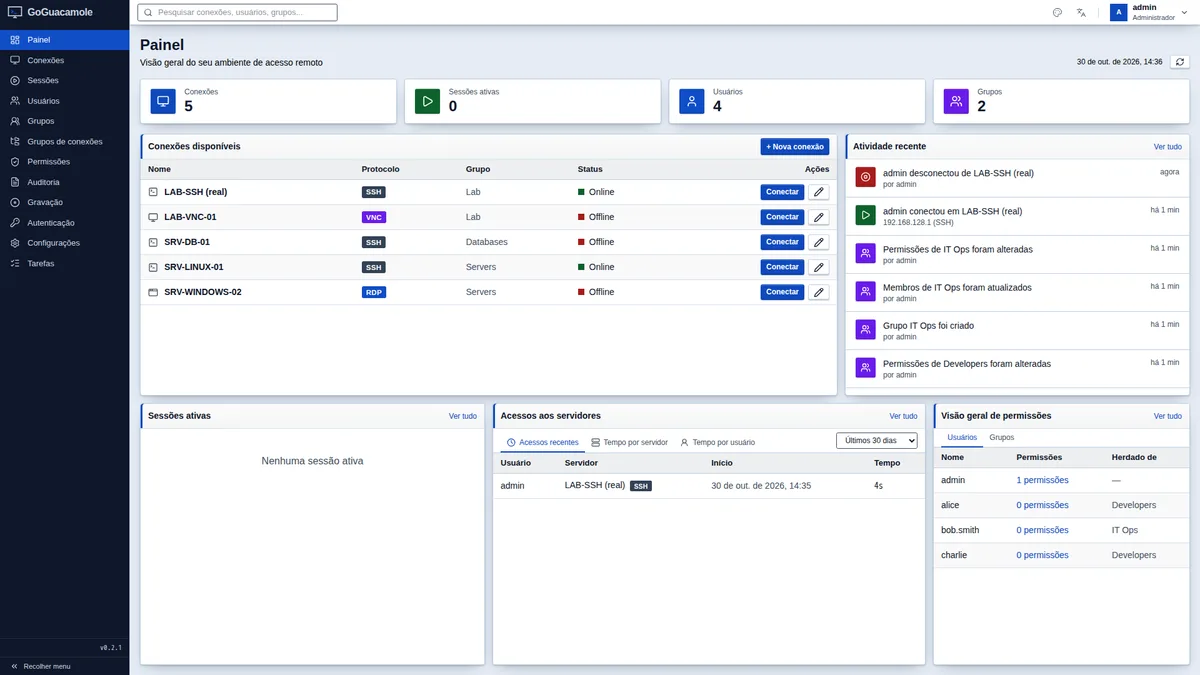
Users, groups, connection folders, inherited permissions, history, recording, auditing, external login, and MFA come ready to use, without separate extensions. The interface has 16 themes and is available in English and Brazilian Portuguese.
Architecture: Who Talks to Whom
The browser only communicates with goguacamole over HTTPS and WebSocket. goguacamole speaks the Guacamole protocol with guacd, which runs on a private network, and guacd opens the RDP, SSH, or VNC connection to the destination server. The connection's host, username, and password remain on the server, encrypted with AES-256-GCM; the browser never sees them.
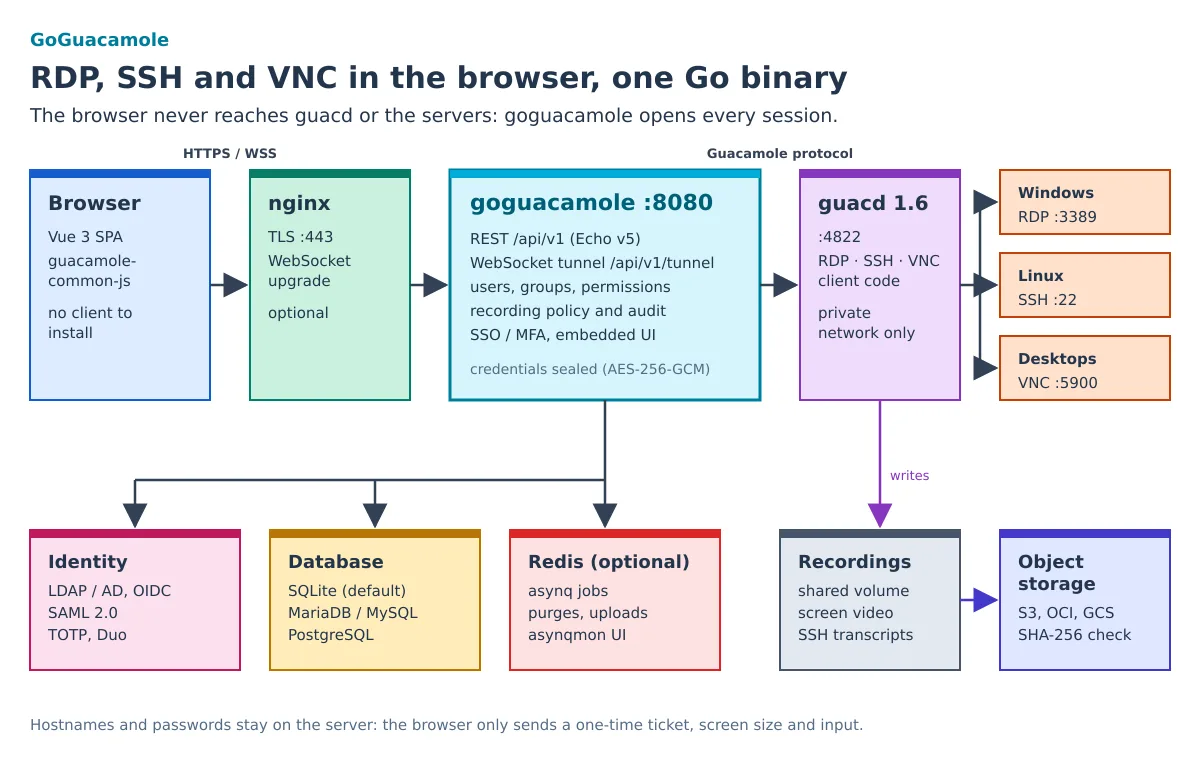
Opening a session follows this path:
- The browser requests
POST /api/v1/sessionswith the connection ID. The server checks the session, the user's restrictions (account validity, access window), and the effective read permission. - The response is a single-use ticket, valid for 30 seconds, that reserves the slot in case the connection has a session limit.
- The browser opens the WebSocket
/api/v1/tunnel?ticket=…sending only screen parameters (width, height, DPI, time zone). The server validates the origin, redeems the ticket, and authorizes again. - goguacamole performs the handshake with guacd using the stored parameters, enables history input (created as pending when the ticket was issued), and begins forwarding instructions in both directions.
If the permission is revoked midway, the tunnel is closed immediately. Changes made by another process (the CLI or the importer) are detected within 5 seconds.
Bringing It Up in One Minute: The All-in-One Image
As of version 0.6.0, each release publishes to GHCR an image that combines guacd, goguacamole, and Redis in a single container, with SQLite on the volume /data:
docker run -d --name goguacamole -p 8080:8080 \
  -v goguacamole-data:/data ghcr.io/jniltinho/go-guacamole:allinone

# a senha gerada do admin aparece uma única vez no log
docker logs goguacamole 2>&1 | grep 'bootstrap administrator'
To pin the version, use the tag 0.6.2-allinone (or 0.6-allinone). Open http://localhost:8080, enter with admin with the login password and the system prompts for a new password on first access. Readiness can be checked via the API:
curl -s http://localhost:8080/ready
# {"db":"up","guacd":"up","queue":"up"}
Inside the container, supervisord keeps the three processes running as the user guacd (uid 1000), owner of the files in /data. Therefore, CLI commands run as -u guacd:
docker exec goguacamole supervisorctl status            # guacd, redis, goguacamole
docker exec -u guacd goguacamole goguacamole user passwd admin
docker exec goguacamole goguacamole version
This HTTP mode is for local evaluation. For production, see the checklist further below.
Testing with a Lab SSH Server
To see a real session without touching any server, put GoGuacamole and a disposable OpenSSH on the same Docker network. The guacd from the all-in-one image resolves the target by container name. If the container from the previous section is still running, remove it first (docker rm -f goguacamole), because the lab uses the same name and the same port:
docker network create guac-lab
docker run -d --name goguacamole --network guac-lab -p 8080:8080 \
  -v goguacamole-data:/data ghcr.io/jniltinho/go-guacamole:allinone
docker run -d --name ssh-alvo --network guac-lab \
  -e USER_NAME=demo -e USER_PASSWORD='troque-esta-senha' -e PASSWORD_ACCESS=true \
  lscr.io/linuxserver/openssh-server:latest
In the interface, go to Connections → New connection, choose SSH, host ssh-alvo, port 2222 (the image's port), user demo and the password. Before saving, use Test connection: GoGuacamole opens a real connection through guacd using the form values and reports whether the host responded and whether the login worked. In my test, the correct password returned as success in about 200 ms, and the wrong one returned as an authentication failure, without saving anything. Then just save and click Connect: the terminal opens in a browser tab.
When finished, remove the lab:
docker rm -f goguacamole ssh-alvo
docker volume rm goguacamole-data
docker network rm guac-lab
Docker Compose with Separate Services
For a long-lasting environment, the repository provides a docker-compose.yml with goguacamole, guacd, and Redis in separate containers, and profiles for MariaDB, PostgreSQL, and test servers:
git clone https://github.com/jniltinho/go-guacamole.git
cd go-guacamole
cp .env.example .env
# no .env, defina APP_ADMIN_PASSWORD (8+ caracteres); a chave pode ser gerada assim:
printf 'APP_SECRET_KEY=%s\n' "$(openssl rand -hex 32)" >> .env
make up # app + guacd + Redis, SQLite → http://localhost:8080| Command | What it brings up |
|---|---|
make up |
app, guacd, and Redis with SQLite |
make up-mariadb |
the same, plus MariaDB 11.4 |
make up-postgres |
the same, plus PostgreSQL 17 |
make up-lab |
SSH, VNC, and RDP test targets |
make certs up-tls |
native HTTPS with https://localhost:8443 a local CA |
make down |
takes everything down |
A APP_SECRET_KEY derives the key that encrypts the connection passwords. Keep it together with the database backup: without it, the stored credentials cannot be recovered. If you do not set the key, GoGuacamole generates a secret.key on the first start, and that file becomes equally critical.
You can also run just the binary (Linux/amd64, on releases) pointing to a guacd:
docker run -d -p 127.0.0.1:4822:4822 guacamole/guacd:1.6.0
APP_ADMIN_PASSWORD='troque-agora' GUACD_ADDR=127.0.0.1:4822 ./goguacamole serve
Behind nginx with HTTPS
The session tunnel is a WebSocket that may remain open for hours, so the proxy needs HTTP/1.1, upgrade headers, and long timeouts. The repository provides a complete example in docker/nginx/goguacamole.conf; the essential part is this:
map $http_upgrade $connection_upgrade {
    default upgrade;
    ''      '';
}

server {
    listen 443 ssl;
    http2 on;
    server_name guac.example.com;
    # ssl_certificate / ssl_certificate_key ...

    location / {
        proxy_pass http://127.0.0.1:8080;
        proxy_http_version 1.1;
        proxy_set_header Host              $host;
        proxy_set_header X-Real-IP         $remote_addr;
        proxy_set_header X-Forwarded-For   $proxy_add_x_forwarded_for;
        proxy_set_header X-Forwarded-Proto $scheme;
        proxy_set_header Upgrade           $http_upgrade;
        proxy_set_header Connection        $connection_upgrade;
    }

    # o túnel transmite a tela: sem buffer e com timeouts longos
    location = /api/v1/tunnel {
        proxy_pass http://127.0.0.1:8080;
        proxy_http_version 1.1;
        proxy_set_header Host              $host;
        proxy_set_header X-Forwarded-For   $proxy_add_x_forwarded_for;
        proxy_set_header X-Forwarded-Proto $scheme;
        proxy_set_header Upgrade           $http_upgrade;
        proxy_set_header Connection        $connection_upgrade;
        proxy_buffering    off;
        proxy_read_timeout 12h;
        proxy_send_timeout 12h;
    }
}
On the GoGuacamole side, three variables complete the pair:
APP_BASE_URL=https://guac.example.com   # o host aceito como Origin do WebSocket
APP_COOKIE_SECURE=true                  # TLS termina no proxy
APP_TRUSTED_PROXIES=127.0.0.1           # só esse IP pode informar X-Forwarded-For
With APP_TRUSTED_PROXIES sure, the log, the audit, and the history record the client IP, not nginx's, and a X-Forwarded-For forged one coming from elsewhere is ignored. If you prefer the Caddy, the reverse_proxy it already handles WebSocket with no extra configuration.
Session Recording and Auditing
Here is much of the reason for the project. guacd stores the session in a shared volume and GoGuacamole handles the rest:
- Screen video from RDP, SSH, and VNC, played right in the browser.
- SSH transcription in text, with every command and its output, ready to read or search.
- Typed keys, optional and disabled by default.
- Per-connection policy: video, transcript, and keystrokes can inherit the default, be forced, or disabled; video and transcript have separate retention periods (keystrokes are part of the video).
- Fail-closed: if the required recording is unavailable, the session does not open (there are temporary, audited exceptions).
- Retention and legal hold: cleanup follows the retention history, and a recording under legal hold is not deleted.
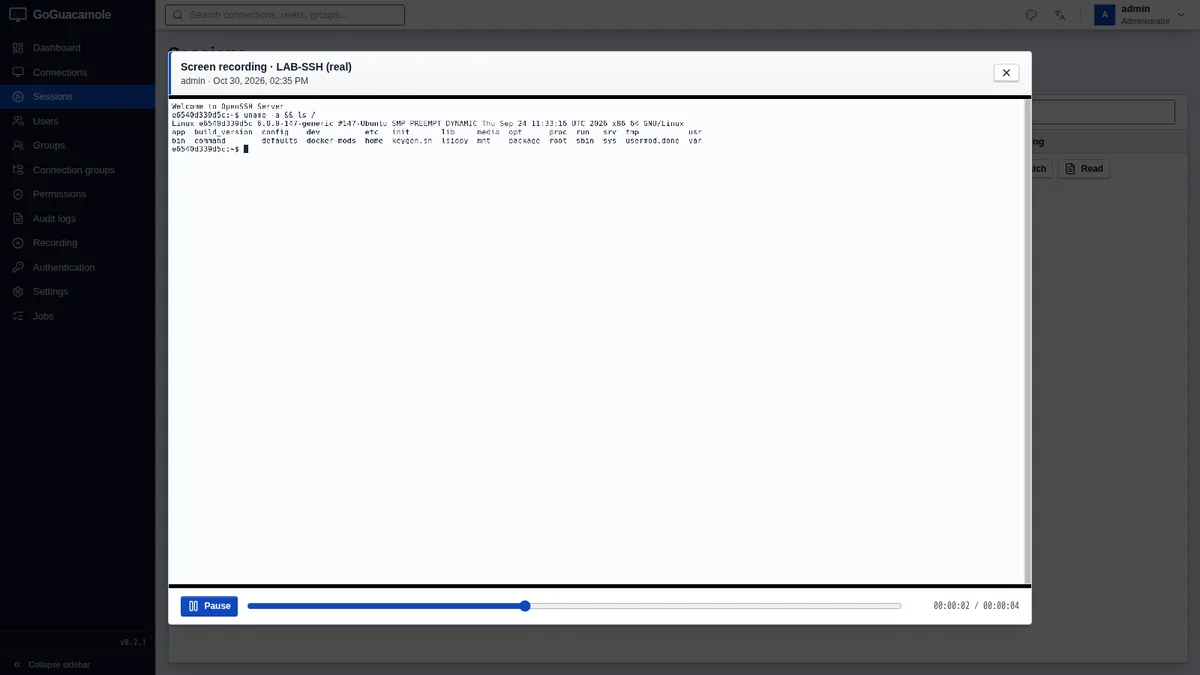
The initial defaults come from environment variables (after an administrator saves under Administration → Recording, what is in the database takes precedence):
RECORDING_ENABLED=true          # padrão false; true no compose
RECORDING_SCREEN=true           # vídeo de todos os protocolos
RECORDING_TYPESCRIPT=true       # transcrição de SSH
RECORDING_INCLUDE_KEYS=false    # teclas no vídeo
RECORDING_RETENTION_DAYS=90
Recordings can also be sent to object storage: AWS S3, S3-compatible solutions (MinIO, Ceph, R2, Wasabi), Oracle Cloud, and Google Cloud Storage via rclone. Each upload is verified by SHA-256 by reading the object back; the local copy can be removed, and the player streams directly from the bucket. The button Test access writes, reads, and deletes a test object and reports whether the bucket has versioning and object lock. These tasks run in a queue in Redis with asynq, and the asynqmon panel is available at /asynqmon, only to administrators.
For security, the connection to the object storage goes through an internal proxy that rejects private addresses, loopback, link-local, and cloud metadata addresses. A lab MinIO instance on the local network must be explicitly allowed:
OBJSTORE_ALLOWED_ENDPOINTS=minio
OBJSTORE_ALLOW_HTTP=true
The audit log records logins, sessions, and administrative changes made through the interface and the API. The panel also has a server access report: who accessed which server, when, and for how long.
Login: LDAP, OIDC, SAML, and MFA
In the Java client, each login method is an extension with its own file. In GoGuacamole, everything is under Administration → Authentication, with secrets stored encrypted in the database and a test button for each method:
- LDAP / Active Directory, with directory groups mapped to local groups by name. If you manage AD or Samba 4, the AD Manager pairs with it.
- OpenID Connect (authorization code with PKCE) and SAML 2.0.
- HTTP header coming from trusted proxies and encrypted JSON compatible with the
guacamole-auth-json. - TOTP with QR code and protection against code reuse, and Duo Universal Prompt, as the second factor for password logins.
External users are created on first login. One important detail: Guacamole's second factor applies to password login. For SSO login, enforce MFA in your identity provider.
Migrating from Apache Guacamole
The importer reads the Guacamole database (MySQL or PostgreSQL) in a read-only transaction, using only SELECT. Always start with --dry-run:
# não grava nada importado; a origem nunca é alterada
goguacamole import guacamole --source-driver mysql \
  --dsn 'guacamole_user:senha@tcp(db-antigo:3306)/guacamole_db' --dry-run

# importação de verdade (reexecutar é idempotente; conflitos são ignorados por padrão)
goguacamole import guacamole --source-driver mysql \
  --dsn 'guacamole_user:senha@tcp(db-antigo:3306)/guacamole_db'
One detail: even when --dry-run, the command opens GoGuacamole’s target database and applies any pending schema migrations, as does the serve. The imported data is not written, however.
Users come over (with the hash and salt, so the passwords continue to work and are migrated to bcrypt on the next login), validity and access window, groups and members, folders, connections with parameters (re-encrypted secrets), limits, the system permissions that have an equivalent (ADMINISTER, CREATE_CONNECTION, CREATE_USER and AUDIT) and the connection read permissions. Nested groups are flattened. The following are left out and appear in the report: sharing profiles and permissions other than read permissions. Load-balancing groups become regular folders.
At the end, the importer compares, user by user, the connections and privileges each user had in the source and has in the destination, and prints lines ACCESS DIFF. These differences are reported, not blocked: for example, if an account with the same name and with ADMINISTER, the report shows the privilege gain. The flag --accept-expansion only determines whether load-balancing group reads become reads on each child connection. The sensible approach is to run the dry run on a copy of the production database, review each ACCESS DIFF and pilot it with a few users side by side with the Java client, on another port, before switching the proxy.
The CLI
goguacamole serve                       # servidor HTTP(S)
goguacamole migrate up|down|status      # migrações do banco
goguacamole user create|passwd|list|disable
goguacamole import guacamole            # importação do Apache Guacamole
goguacamole config print                # configuração efetiva, segredos ocultos
goguacamole healthcheck                 # usado pelo HEALTHCHECK do Docker
goguacamole version
The configuration comes from config.toml (there is a config.toml.example in the repository) and environment variables with prefixes such as APP_, DB_, GUACD_, RECORDING_, REDIS_ and OBJSTORE_.
Java client vs. GoGuacamole
| Apache Guacamole client | GoGuacamole | |
|---|---|---|
| Execution | Java, Tomcat and extensions | a Go binary with the embedded interface |
| Database | MySQL, PostgreSQL or SQL Server via JDBC extension | embedded SQLite, MariaDB/MySQL or PostgreSQL |
| SSO and MFA | separate extensions, configured in files | embedded, configured, and tested through the interface |
| Recording | recording to disk; player via extension | embedded player, SSH transcripts, retention, legal hold, object storage |
| Update | redeploy the WAR and extensions | replace the binary or image; migrations run at startup |
| guacd | guacamole/guacd |
the same guacamole/guacd (1.6) |
Production checklist
APP_ENV=production: the service only starts withTLS_ENABLED=trueorAPP_COOKIE_SECURE=true, with a defined key (APP_SECRET_KEYorAPP_SECRET_KEY_FILE), and refusesTLS_SELF_SIGNED=trueandGUACD_TLS_INSECURE=true. It does not verify whether the proxy actually has TLS: that is up to you.APP_SECRET_KEYin a secrets vault, with a backup alongside the database. Test the restore on a clean host.- HTTPS:
TLS_ENABLED=truein the binary itself, or with TLS terminated on the proxy,APP_COOKIE_SECURE=trueandAPP_TRUSTED_PROXIES, keeping the proxy → goguacamole section in127.0.0.1or on a private network. APP_BASE_URLwith the public URL.- guacd on an isolated network, never exposed; consider
GUACD_TLS=true. - MFA (TOTP or Duo) for password logins; for SSO, MFA at the provider.
- Redis on a private network (or with
REDIS_PASSWORDandREDIS_TLS), one database per installation. - Object storage with a bucket or dedicated prefix and credentials limited to put/get/list/delete on it.
Current limitations
The project is new, is in the 0.x series, and it is worth knowing what it does not yet have:
- A replica for the tunnels: the tunnel registry, limits, and session closures are kept in the process's memory. Scale vertically. Background tasks and uploads are already safe with multiple instances.
- No session sharing (joining an active session of another user) and no load-balancing groups.
- Flat user groups: nested groups do not exist yet.
- Binaries and image for Linux/amd64; other architectures require compiling.
- Telnet and Kubernetes, which guacd supports, are not yet in the forms.
The ROADMAP list those items and others, such as Prometheus metrics, .deb/.rpm packages, and Helm charts.
Conclusion
guacd remains the right piece for handling RDP, SSH, and VNC. What GoGuacamole changes is everything else: a binary, a container to get started, external login and MFA without extensions, recording with a player and transcription, and an importer that brings over the Guacamole database and reports every access difference. If you already use Guacamole, run the importer with --dry-run on a copy of the database and compare. If you are just starting, the docker run from the all-in-one image is enough to test.
Issues and pull requests are welcome on the GoGuacamole repository. Other Go projects here on the blog follow the same single-binary idea: go-postfixadmin, go-imapsync and mcp-wp-go. And, for direct SSH access without a gateway, see SSH authentication keys.