

When a service starts failing, the signs are usually scattered: metrics in Prometheus, logs in another backend, traces in a third tool, and alerts without context. The OpenObserve tries to gather this work in an open source platform for logs, metrics, traces, RUM, dashboards, alerts and incidents. Written in Rust, it queries logs and traces with SQL, metrics with SQL or PromQL, and uses Parquet with object-oriented storage to reduce retention costs.
Video summary: the official two-minute demo shows installation and first steps of OpenObserve. URL: OpenObserve 2-Minute Demo: Quick Install and Setup.
Technical review: 7 October 2026. This article introduces the platform and a log lab. To install without Docker and operate with TLS and a bucket, follow the OpenObserve on Ubuntu guide.
What is OpenObserve
OpenObserve, also called O2, is a unified observability platform. The idea is not to replace every agent that collects telemetry, but to provide a common destination and interface for the signals: logs, metrics, and distributed traces. The platform also includes dashboards, alerts, ingestion pipelines, incident management, real user monitoring (RUM), and observability features for AI applications.
The project is open source under AGPL-3.0. There is also an Enterprise edition and the OpenObserve Cloud service. This matters in the choice: the OSS edition is useful for those who want control over infrastructure and data residency; specific enterprise features like SSO, granular RBAC, federated search, and load management belong to the Enterprise offering.
Why gather logs, metrics and traces
The three signals answer different questions:
- Metrics show trend and aggregated state: CPU usage, error rate, latency, and request volume.
- Logs preserve the event and context: application messages, errors, structured fields, and auditing.
- Traces follow a request through services, queues, and databases, making visible where time was spent.
The value of a unified platform appears in investigation. An error spike in the graph can lead to traces of that service and, from them, to logs from the same period. This does not eliminate the need to instrument the application well nor fix excessive cardinality; it only reduces context switching between tools.
If you already monitor Linux machines, start with our guide of Prometheus and Node Exporter. OpenObserve can complement this flow by centralizing other signals, but there's no reason to urgently migrate a stable stack just because one platform gathers more functions.
From application to investigation: the telemetry flow
The application produces signals; agents or an OpenTelemetry Collector receive, process, and forward that data; OpenObserve stores it and makes it queryable. The Collector is optional, but it can centralize sending and reduce repetitive configuration across services. It is not the database or the dashboard. The diagram below is conceptual, not a ready-made configuration of every protocol.
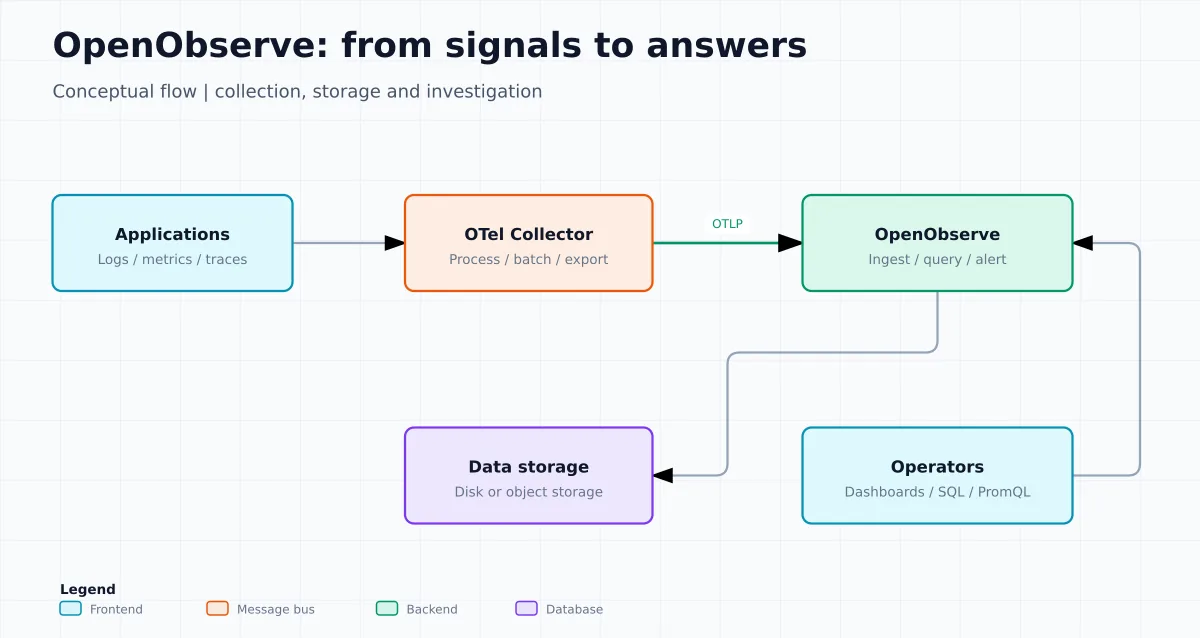
Keep service and environment identifiers consistent. To correlate logs and traces, propagate the context and include the trace and span identifiers in the relevant events. Do not turn user or request IDs into metric labels without evaluating cardinality. Reference: OpenTelemetry signals.
How the architecture reduces the number of pieces
In single-node mode, OpenObserve uses SQLite for metadata and can write locally or to object storage. It's the path for lab, development, and workloads that don't require high availability. The documentation also covers single node with S3, GCS, MinIO, or Azure Blob: continues simple to operate, but Parquet files go to more durable storage.
In high availability, the topology changes: the project separates the roles of Router, Ingester, Compactor, Querier, and Scheduler. Kubernetes orchestrates the nodes; PostgreSQL stores metadata; NATS coordinates the cluster; and object storage maintains the Parquet files. This scales better, but it's not “a binary without operation”: it's a production architecture that requires capacity, backups, planned updates, networking, and observability of the backend itself.
Parquet organizes data in columns and enables compression suited to analytical queries. That alone does not determine cost-effectiveness: compare ingestion, retention, concurrency, query time, caching, bucket requests, and traffic. Prefer measuring your own workload over carrying a benchmark multiplier into your budget.
Main features
| Area | What OpenObserve offers | Attention point |
|---|---|---|
| Logs | Text search, filters, SQL and visual query building. | Define schema, retention and useful fields before sending everything indiscriminately. |
| Metrics | Query via SQL or PromQL, graphs and alerts. | Query compatibility does not replace reviewing existing rules. |
| Traces | Exploring OpenTelemetry traces, waterfall, flame graph and service graph. | The result depends on correct context propagation between services. |
| Dashboards and alerts | Panels, variables, visualizations, alerts and incidents. | Alerts must have an owner, severity, route and response procedure. |
| Pipelines | Ingestion transformations, normalization and conversion of logs into metrics. | Test transformations on a sample; an incorrect parser can destroy context. |
| RUM and AI | Core Web Vitals, errors, session replay, and signals for GenAI/LLM applications. | RUM and AI data require extra attention to PII, consent, and retention. |
Quick Docker installation for lab
The lab requires Bash, curl, OpenSSL, and an up-to-date Docker Engine, with permission to run containers. Use Docker 28 or later to avoid the historical limitation of publishing on a loopback address accessible on the same network segment; see the port publishing documentation.
The procedure below uses the OSS image indicated by the project repository. It is for local testing or a proof of concept; do not expose port 5080 directly to the internet and do not use an example password on an accessible server.
umask 077
LAB=$(mktemp -d "$HOME/openobserve-lab.XXXXXX")
cd "$LAB"
mkdir data

export ZO_ROOT_USER_EMAIL="admin@example.com"
export ZO_ROOT_USER_PASSWORD="$(openssl rand -base64 32)"

printf '%s\n' "$ZO_ROOT_USER_PASSWORD" > senha-inicial.txt
chmod 600 senha-inicial.txt

docker run -d \
  --name linuxpro-openobserve-lab \
  --restart no \
  -v "$PWD/data:/data" \
  -p 127.0.0.1:5080:5080 \
  -e ZO_DATA_DIR="/data" \
  -e ZO_ROOT_USER_EMAIL \
  -e ZO_ROOT_USER_PASSWORD \
  public.ecr.aws/zinclabs/openobserve:latest
Open http://127.0.0.1:5080 on the host itself or make an SSH tunnel. For a team, publish the interface behind a reverse proxy with TLS and appropriate authentication. In production, prefer a tested image tag instead of latest and follow the releases.
The root user is defined on first startup. Store the credential outside shell history and shared files, for example in a secrets manager. Before cleaning up the test, stop the container and intentionally remove the data directory: that is where the local telemetry was persisted.
Send an event and close the end-to-end test
Check the process before sending data:
docker logs --tail=50 linuxpro-openobserve-lab
curl --fail --silent --show-error --retry 20 --retry-connrefused --retry-delay 2 http://127.0.0.1:5080/healthz
Send the event below from the host terminal. curl will prompt for the password saved in senha-inicial.txt, without placing it in history. The organization is default and the stream is linuxpro_lab. Without an explicit timestamp, the server assigns the ingestion time.
curl --fail-with-body --silent --show-error \
  --user admin@example.com \
  --header 'Content-Type: application/json' \
  --data '[{"service":"linuxpro-demo","level":"info","message":"primeiro evento","duration_ms":12}]' \
  http://127.0.0.1:5080/api/default/linuxpro_lab/_json
Check the response body: HTTP 200 alone is not enough if there are rejected records. Go to the interface, select Logs and the stream linuxpro_lab, choose the last few minutes and run in SQL mode:
SELECT _timestamp, service, level, message, duration_ms
FROM "linuxpro_lab"
ORDER BY _timestamp DESC
LIMIT 20
Finding primeiro evento proves ingestion and querying, not just an active process. If it does not appear, check organization, stream, time window, and POST response. The example tests JSON logs; metrics and traces need their own exporters and endpoints. Official API reference.
Record the effective image to repeat the lab. The tag latest changes; in production, pin a homologated release or the digest and plan updates.
docker image inspect public.ecr.aws/zinclabs/openobserve:latest --format '{{index .RepoDigests 0}}'
unset ZO_ROOT_USER_PASSWORD
Docker administrators can inspect the container variables. The password file and directory must remain protected. To stop without deleting persistence:
docker stop linuxpro-openobserve-lab
docker rm linuxpro-openobserve-lab
The generated data remains. Remove it only when you decide that this data is disposable. Do not perform a global cleanup of volumes or containers.
From lab to production
A production installation starts with data decisions, not the Docker command:
- Choose retention by signal type. Debug logs and session replay do not need the same window as capacity metrics.
- Plan storage. For durability and scale, use a bucket compatible with the design recommended by the project; for HA, local storage is not supported.
- Use OpenTelemetry when possible. Standardizing instrumentation and context reduces dependency on specific agents.
- Separate organizations, streams, and credentials. Do not mix production, staging, and sensitive data without a clear policy.
- Treat access as part of the architecture. The official comparison states that OSS does not provide granular RBAC; validate SSO, audit, and permission requirements before opening the platform to multiple teams.
- Test restoration. Untested backup is just hope. Verify data, metadata, and the configurations needed to recover the environment.
The official guide makes clear that HA mode requires Kubernetes, PostgreSQL, NATS, and object storage. If the team lacks maturity to operate these components, the Cloud edition or a well-bounded single node may be a safer decision than an undersized HA deployment.
Queries, dashboards and alerts
Logs and traces can be explored with SQL; metrics can use SQL or PromQL. The practical advantage is preserving languages that many teams already know instead of forcing a proprietary DSL. Still, dashboard and alert migration requires review: metric names, labels, time windows, aggregations, and function semantics need to be validated against the previous result.
Start with a small, actionable dashboard: availability, error rate, percentile latency, and saturation signals. For each alert, document which dashboard to open, which fields to filter, who responds, and what action can be taken. Alerting on everything is the shortest path to ignoring alerts.
Official video: this tutorial from the OpenObserve channel walks through building dashboards. URL: Building Dashboards with OpenObserve: A Comprehensive Tutorial.
Open source, Enterprise and Cloud
The OSS edition is AGPL-3.0 and free, with logs, metrics, traces, RUM, dashboards, and alerts. According to the official download table, it has basic user support but without granular RBAC: users have full access. The Enterprise edition adds, among other items, SSO, custom roles, groups, audit, federated search, workload control, and advanced pipeline and security features.
Separate license from operational cost: infrastructure, retention, requests, traffic, and staff work still exist in self-hosted. Franchises and commercial conditions change; check the pricing page and the edition comparison before deciding.
When it makes sense — and when it doesn't
OpenObserve is a good option for those wanting to consolidate telemetry around OpenTelemetry, SQL, PromQL, and object storage; for teams already paying dearly for log retention; or for those preferring to operate an integrated platform instead of piecing together multiple components.
It may not be the right choice if the team only needs metrics from a few hosts, if there's already a platform with mature SLOs and integrations that serves well, or if there's no capacity to operate data, backups, and upgrades. “A single binary” simplifies initial testing; it doesn't eliminate operational responsibility, access governance, nor storage cost.
Another video: comparison with Splunk
For a product positioning view, this WPoers TV video features a conversation with OpenObserve comparing to Splunk. It's a complementary source, it doesn't replace load testing and cost calculation in your environment.
To learn about an object storage option with S3 API, see RustFS on Linux: install via binary and Docker. RustFS stores objects; OpenObserve ingests, queries, and presents the telemetry. Validate compatibility between versions before combining them.
Official sources and next steps
- OpenObserve repository on GitHub
- Official documentation
- Platform Features
- Architecture and Deployment Modes
- Quickstart: Cloud and self-hosted
- OpenObserve Blog
- Pricing and Downloads
The best next step is small: run the lab, send a log source and a metric you already know, create a single alert and calculate real ingestion and retention. Only then decide if it's worth scaling the platform.